
DocuScan — iOS Document Scanner & PDF Manager with OCR | SwiftUI App
Description
DocuScan AI — iOS Document Scanner & PDF Manager | SwiftUI App Template
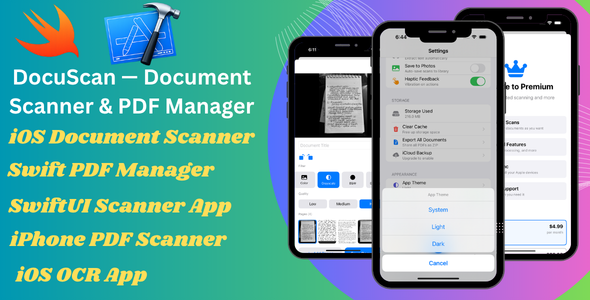
DocuScan AI is a powerful and production-ready iOS document scanner and PDF manager built entirely with native Swift and SwiftUI. It allows users to scan documents, apply filters, extract text using on-device OCR, organize files, and manage PDFs — all without any third-party libraries or backend services.
This template is designed for developers, agencies, and entrepreneurs who want to quickly launch a modern document scanner app on the App Store with clean code, smooth performance, and easy customization.
Core Features
- Multi-page document scanning with automatic edge detection
- 4 scan filters: Color, Grayscale, Black & White, Enhanced
- Import images from photo library
- Rotate, delete, and manage pages before saving
- High-quality PDF generation (up to 300 DPI)
PDF Viewer & Management
- Built-in PDF viewer with smooth navigation
- Highlight, draw, and text annotations
- Save annotations directly into PDF
- Share, export, and print documents
- Organize documents into folders and tags
OCR Text Recognition
- On-device OCR using Apple Vision framework
- No API key or internet required
- Supports 60+ languages
- Instant full-text search across documents
- Copy and share extracted text easily
Document Organization
- Create custom folders and tags
- Smart filters: All, Favorites, Recent
- Sort by date, name, size, or pages
- Batch selection and delete options
- Quick actions with swipe gestures
Authentication
- Sign in with Apple integration
- Guest mode supported
- User profile management
- Secure authentication using Apple frameworks
Premium Features
- Subscription system with StoreKit 2
- Free tier limitations with upgrade option
- Restore purchases functionality
- Easy product ID configuration
User Experience
- Modern SwiftUI design with smooth animations
- Light and Dark mode support
- iPhone and iPad compatibility
- Accessibility support (Dynamic Type, VoiceOver)
- Clean and responsive UI
Technology Stack
- Swift 5.10
- SwiftUI (iOS 17+)
- SwiftData for local storage
- VisionKit (document scanning)
- Vision Framework (OCR)
- PDFKit (PDF handling)
- Core Image (filters)
- StoreKit 2 (subscriptions)
- No third-party dependencies
Requirements
- Xcode 16 or higher
- iOS 17.0+
- Apple Developer Account (for publishing)
What’s Included
- Complete SwiftUI source code
- Organized project structure
- Ready-to-use UI components
- Rebranding guide
- Documentation for setup and customization
Easy Customization
- Change app name and colors from one file
- Update app icon and bundle ID
- Modify features and UI easily
- Add your subscription product IDs
Support
Need help with setup or customization? We are here to assist you.
WhatsApp: +92 316 9735216
Email: mubeenafridi691@gmail.com
Launch your own document scanner app quickly with this clean, modern, and scalable iOS template.
| Type | iOS App |
|---|---|
| Author | AIHub |
| Price | $29 |
| Sales | 2 |
| Rating | 0 (0) |
| Published | Mar 24, 2026 |
| Last Update | Mar 24, 2026 |
| Compatible Software | iOS 15, iOS 14, iOS 13, iOS 12 |
| Compatible With | Swift, Bootstrap 5.x, Bootstrap 4.x, Foundation 6, Foundation 5, TypeScript |
| Mobile Files Included | .h, .m, .pch, .xib/.nib, Layered PSD, Layered PNG, JavaScript JS, CSS, LESS, Sass, Stylus, PHP, HTML |
Categories
Tags
External listing. code.market does not sell this product and does not process payment for it. Pricing, payment, delivery, licensing, refunds, and support are handled by the third-party merchant on its own website. We may earn an affiliate commission from a referral. Details.
Products of the Week.
Submit🥇

STOP GUESSING WHAT TO POST
AI that learns your brand voice and builds a month of consistent, on-brand social content: carousels, posts and hooks that sound like you, not like everyone else's AI.
SaaS · 7,390 views · 67 clicksSaaS · Week 46 · 7,390 views · 67 clicks
🥈

Conversational Backlinks for Busy Founders
Place Backlink Relevant Conversation for your domain across Forums and Conversations
Website · 46,678 views · 232 clicksWebsite · Week 46 · 46,678 views · 232 clicks
🥉

upvote.club
Free Social Media Engagement that Helps Boost Your Content. Upvote Club supports 19 social networks with 100+ engagement actions in one dashboard. Add links to your posts and get free engagement from real users.
SaaS · 44,617 views · 127 clicksSaaS · Week 46 · 44,617 views · 127 clicks
#4

Substack Posting API
Onboard your Agent to Substack. Write Publish on Substack via API
SaaS · 63,503 views · 206 clicksSaaS · Week 46 · 63,503 views · 206 clicks
#5

Seenshot App
Free, Fast, MacOS Screenshot app. Make Screenshot cmd+shift+2 and send it via link
Desktop App · 32,753 views · 127 clicksDesktop App · Week 46 · 32,753 views · 127 clicks
#6

Hand-Placed Backlinks $9.99 per link. Flat rate.
Buy hand-placed forum, Q-A and directory backlinks. Flat $9.99 per link, no subscriptions — you only pay for approved listings.
Website · 8,370 views · 19 clicksWebsite · Week 46 · 8,370 views · 19 clicks
#7

Free Invoice Generator - PDF Invoices in Your Browser, No Sign-Up
A free invoice maker for freelancers and small businesses: fill in the invoice, check the live preview, and download a PDF that looks exactly like it. Any currency, tax per item, three templates, no sign-up, and nothing leaves your device.
7,000 views · 29 clicksWeek 46 · 7,000 views · 29 clicks
#8

Merge PDF Files Free - Combine PDFs in Your Browser, No Upload
A free PDF merger for office workers, students, and freelancers: combine PDFs and images into one file in the browser, reorder files and pages, pick page ranges, keep bookmarks, and open password-protected PDFs. Nothing is uploaded, no sign-up, no watermark.
6,475 views · 18 clicksWeek 46 · 6,475 views · 18 clicks