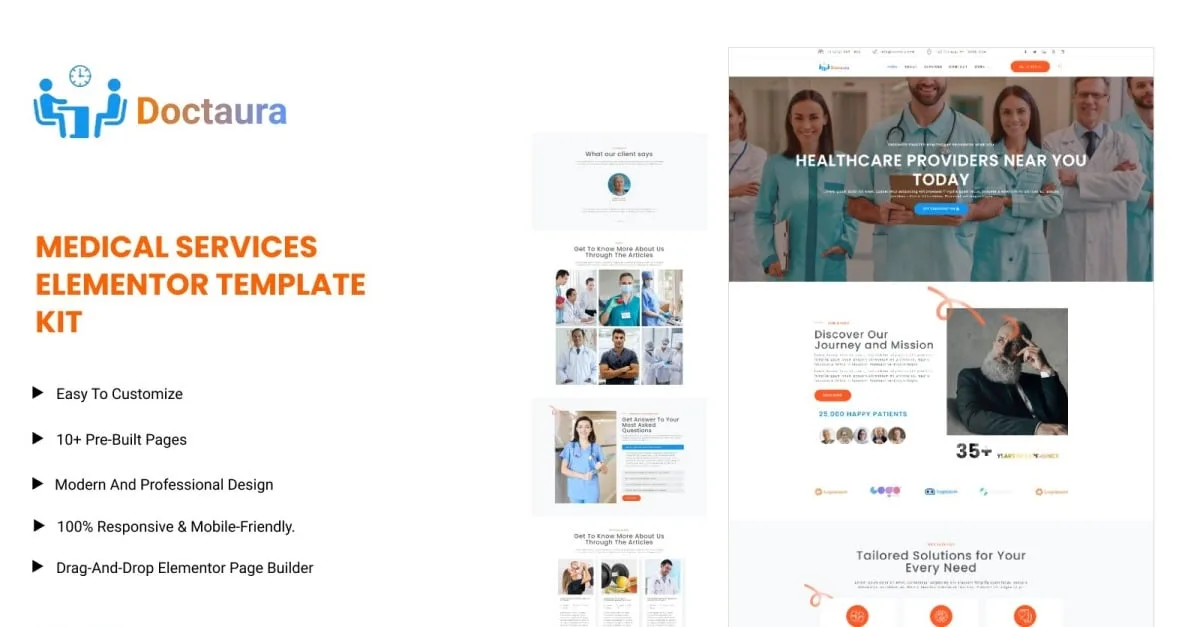
Doctaura - Medical & Healthcare Services Elementor Template Kit
Description

Introduction:
Introducing Doctaura – a sophisticated and tailored solution designed specifically for medical services. With the Doctaura Medical Template Kit, crafting a professional and engaging online presence has never been easier. Powered by the intuitive Elementor Page Builder, customization is seamless – simply drag and drop elements without the need for coding expertise. Boasting a collection of meticulously crafted pages, each exudes a modern and fresh style, ensuring a visually stunning and well-organized layout throughout your website. Doctaura is engineered to adapt flawlessly to various device ratios, guaranteeing optimal responsiveness across desktops, tablets, and mobile phones. Elevate your medical practice's online presence effortlessly with Doctaura, the ultimate choice for creating a captivating and user-friendly platform for your patients.
Features
- Using Free Plugins (Elementor Pro is not required).
- Drag-and-drop visual builder for true no-code customization.
- Retina Ready 10+ Templates.
- Fast-loading.
- Global Theme Style.
- Fully Responsive Layout.
- Cross Browser Compatibility: Chrome, Firefox, Safari, Opera.
- Fully Customizable.
Pages Templates Include:
- Home
- About us
- Services
- Contact us
- Team
- Blog
- Pricing plan
- Testimonials
- Faqs
- 404 error
- Coming soon
Sections and Blocks:
- Header section
- Footer section
- Newsletter Section
- Contact Form Section
Required Plugins Pre-Installed With the Kit
- Elementor
- ElementsKit
- Metform
Importing Metforms: What You Need to Know
- The metform block templates should be imported.
- Import the page template with the form on it and enable the Navigator by right-clicking.
- Click Edit Form after locating and selecting the Metform widget. Then select New and Edit Form from the drop-down menu. The function Object() { } will show up.
- Select the grey folder icon that says 'Add Template'.
- Select the 'My Templates' option from the drop-down menu.
- Then click 'Insert' after selecting your imported metform template (click No for page settings).
- After you've finished customizing the template, click 'Update & Close.' In the template, the form will appear.
- Update the information by clicking the button.
In Elementskit, Configure The Global Header and Footer
- Import the template for the header and footer.
- Navigate to ElementsKit Header Footer and select Add New (if prompted with a wizard, you may click Next through it without taking any action).
- Toggle Activation to On, title the header, and leave Entire Site selected.
- To open the builder, click the grey Edit Content button.
- Select the header template to import by clicking the grey folder icon, then select your menu in the nav element and click Update.
- Repeat for the footer.
Demo pictures are used in this Template Kit. To use these photos on your website, you'll need to purchase a license or you can use your own.
Categories
Tags
External listing. code.market does not sell this product and does not process payment for it. Pricing, payment, delivery, licensing, refunds, and support are handled by the third-party merchant on its own website. We may earn an affiliate commission from a referral. Details.
Products of the Week.
Submit🥇

STOP GUESSING WHAT TO POST
AI that learns your brand voice and builds a month of consistent, on-brand social content: carousels, posts and hooks that sound like you, not like everyone else's AI.
SaaS · 5,038 views · 47 clicksSaaS · Week 45 · 5,038 views · 47 clicks
🥈

Conversational Backlinks for Busy Founders
Place Backlink Relevant Conversation for your domain across Forums and Conversations
Website · 43,050 views · 226 clicksWebsite · Week 45 · 43,050 views · 226 clicks
🥉

upvote.club
Free Social Media Engagement that Helps Boost Your Content. Upvote Club supports 19 social networks with 100+ engagement actions in one dashboard. Add links to your posts and get free engagement from real users.
SaaS · 41,077 views · 122 clicksSaaS · Week 45 · 41,077 views · 122 clicks
#4

Substack Posting API
Onboard your Agent to Substack. Write Publish on Substack via API
SaaS · 60,028 views · 202 clicksSaaS · Week 45 · 60,028 views · 202 clicks
#5

Seenshot App
Free, Fast, MacOS Screenshot app. Make Screenshot cmd+shift+2 and send it via link
Desktop App · 29,393 views · 124 clicksDesktop App · Week 45 · 29,393 views · 124 clicks
#6

Hand-Placed Backlinks $9.99 per link. Flat rate.
Buy hand-placed forum, Q-A and directory backlinks. Flat $9.99 per link, no subscriptions — you only pay for approved listings.
Website · 5,178 views · 19 clicksWebsite · Week 45 · 5,178 views · 19 clicks
#7

Free Invoice Generator - PDF Invoices in Your Browser, No Sign-Up
A free invoice maker for freelancers and small businesses: fill in the invoice, check the live preview, and download a PDF that looks exactly like it. Any currency, tax per item, three templates, no sign-up, and nothing leaves your device.
3,821 views · 17 clicksWeek 45 · 3,821 views · 17 clicks
#8

Merge PDF Files Free - Combine PDFs in Your Browser, No Upload
A free PDF merger for office workers, students, and freelancers: combine PDFs and images into one file in the browser, reorder files and pages, pick page ranges, keep bookmarks, and open password-protected PDFs. Nothing is uploaded, no sign-up, no watermark.
3,530 views · 14 clicksWeek 45 · 3,530 views · 14 clicks