
DocScan | AI Document Scanner App With OCR Text Extraction, PDF Tools and Subscriptions - SwiftUI
Description
DocScan – Full iOS Document Scanner Template in SwiftUI
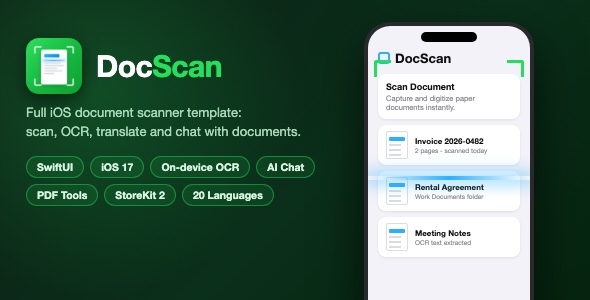
DocScan is a complete, production-ready iOS document scanner app template built with SwiftUI. It turns any iPhone into a pocket scanner: capture paper documents, clean them up automatically, extract text with OCR, organize everything in folders, convert and edit PDFs, translate documents, and even chat with your documents using AI.
Demo Instructions
No login and no demo credentials are required – the app runs fully on first launch and all core features work offline:
- Launch the project in Xcode and run it on a simulator or a real device. No account, no API key and no configuration are needed to scan documents, extract text on-device, manage folders, and use the PDF tools.
- OCR text recognition runs 100% on-device using Apple’s Vision framework, so scanning and text extraction work out of the box.
- Optional cloud features (AI Document Chat, cloud OCR fallback, and text translation) talk to a configurable backend endpoint and a translation API key. The template ships with clearly marked placeholder values in
APIClient.swiftandConfigService.swift. See the Configuration section indocumentation.htmlfor the exact steps to plug in your own endpoint and key. The app builds and runs correctly with the placeholders in place. - In-app purchases use StoreKit 2 product identifiers that you rename to match your own App Store Connect products.
Everything the App Does
- Dashboard with quick-action tool cards, search, and a recently scanned list
- Custom in-app camera with multiple capture modes: Scan, Extract Text, Translate, Photo Translation, ID Cards, ID Photo Maker, Formula, Book, PPT, Whiteboard, Timestamp and Sign
- Automatic document edge detection, perspective correction and image enhancement pipeline
- OCR text extraction with on-device Apple Vision recognition and smart document titling
- Text result screen with text-to-speech (Listen, Pause, Resume), Copy, Print, Translate and Share
- Document translation powered by a translation API key you configure in one place
- AI Document Chat: ask questions about any scanned document and get streaming answers
- Files manager with folders, create/rename/move, multi-selection, search and document previews
- Document detail screen with page thumbnails, full-screen page viewer, share as PDF or images
- PDF tools: Merge PDFs, Compress, Lock and Unlock with password, Add Watermark, Extract Pages, Reorder Pages and Sign
- PDF conversions: PDF to Images, PDF to Long Image, Images to PDF
- Import documents from the photo library and the Files app
- QR code scanner built in
- AR Measure tool with ARKit and Room Scanner with RoomPlan
- Scrollshot: capture and stitch long scrolling screenshots
- AirPrint printing for documents, pages and extracted text
- Export as PDF, TXT and JPEG, with the native iOS share sheet
- Premium paywall with StoreKit 2: consumable credit packs (400, 1,000, 2,500) and weekly, monthly and yearly unlimited subscriptions, plus Restore Purchases
- Me tab with premium upsell card, sync entry, scan shortcut and support
- Contact support form and about screen
- In-app language switcher with 22 bundled localizations
- Light and dark mode support, haptic feedback, polished empty states and smooth animations
Technology
- SwiftUI – modern declarative UI, iOS 17.0+ deployment target
- Vision framework – fully on-device OCR text recognition
- VisionKit, AVFoundation, UIKit – camera, scanning and speech synthesis
- PDFKit – PDF rendering, generation, merge, lock, watermark and page tools
- ARKit and RoomPlan – AR Measure and Room Scanner
- StoreKit 2 – credits and subscriptions with a complete paywall
- Foundation JSON storage – no server required for document library
- One lightweight open-source SPM package (EventSource) for server-sent events streaming
- 20 localizations bundled: English, German, French, Spanish, Portuguese (Brazil), Dutch, Swedish, Norwegian, Danish, Finnish, Polish, Czech, Arabic, Japanese, Korean, Thai, Vietnamese, Indonesian, Malay and more
What the Buyer Gets
- Full Xcode source code of the DocScan app (SwiftUI, Swift files, asset catalog, app icon, localizations)
- Complete documentation.html setup guide with screenshots: open and run, change the bundle ID, rename the app, replace the icon, re-skin the theme, configure the optional backend and translation key, and submit to the App Store
- All preview screenshots and the item description assets
- Clean project structure with no leftover files, no hardcoded secrets and a professional bundle identifier setup
Development Disclosure
Portions of this template’s source code were developed with AI-assisted tools. All code has been reviewed, tested and documented, and is provided as a fully working Xcode project.
Please note: this is a source code template. Xcode and basic iOS development knowledge are required to build, customize and publish the app. The optional cloud features require you to configure your own backend endpoint; all other features work out of the box.
| Type | iOS App |
|---|---|
| Author | mefjudevllc |
| Price | $14 |
| Sales | 0 |
| Rating | 0 (0) |
| Published | Sep 7, 2026 |
| Last Update | Sep 7, 2026 |
| Compatible Software | Other |
| Compatible With | Swift |
| Mobile Files Included | .h |
Categories
Tags
External listing. code.market does not sell this product and does not process payment for it. Pricing, payment, delivery, licensing, refunds, and support are handled by the third-party merchant on its own website. We may earn an affiliate commission from a referral. Details.