
[VS] DocScan - A mini and Powerful mobile scanner for iOS (Admob, IAP, Push Notifications)
Description


– Version: 1.0.9
– Last update: 02/02/2025
– Updated the dependency manager
– Small fixes and improvements
– Version: 1.0.8
– Last update: 30/01/2024
– Small fixes and improvements
– Version: 1.0.7
– Last update: 11/07/2022
– Updated to the Xcode 13
– Updated the Google Admob tracker request for iOS 14+
– Fixed the alert crash o iPad
– Small fixes and improvements
– Previous ersion: 1.0.5
– Last update: 02/03/2021
– New Feature: Expand the screen with the recognized text, apply any changes and save by pressing done. See screenshot.
– Updated the documentation
– Small fixes and improvements
Get Android version from here:


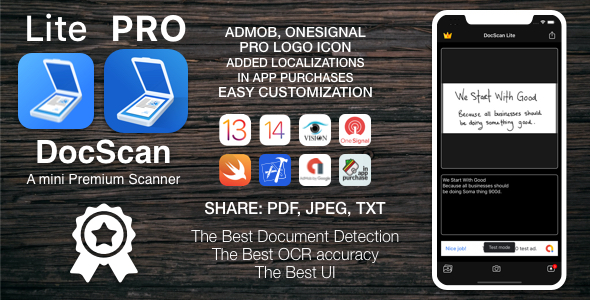
DocScan is currently the fastest and most powerful tool for scanning documents. DocScan will turn your iPhone or iPad into a powerful mobile scanner.
You can create and manage a virtual copy of credit cards, books, checks, recipes, timetables and any paper documents by using DocScan. Quickly scan, edit, save, and share any document in PDF JPEG or TXT format.
The application supports optical character recognition (OCR) technology and allows you to extract the text from the image. It doesn’t require an Internet connection, as all scans are stored locally on your device.
DocScan can process the captured from the camera images and already existing photos in the gallery. The application allows you to adjust and apply the filters for images with the built-in editor. Experiment with your documents and edit them, you can always revert to the original image. You can save your finished pictures to gallery, send by mail, message in JPEG, TXT and PDF formats.
Say goodbye to old office scanners and get this PDF scanner for your daily business needs!
High speed and quality of image processing without tedious manual corrections will make DocScan your ideal companion for business and education.
FEATURE HIGHLIGHTS:
— Scan premium quality PDFs or JPGs;
— An automatic or manual image capturing modes;
— Enhance your scans: edge detection, optimization and color corrections;
— Flash settings;
— Ability to turn on a grid;
— Fastest recognition using Vision API;
— Cloud integrations: iCloud, Dropbox, Evernote, Yandex Disk, Box, OneDrive, Google Drive, and other cloud services;
— Creating and saving the documents in colored, grayscale, black and white formats;
— High performance and stability of the application
— User friendly navigation
Scan HIGH-QUALITY:
DocScan captures the best possible image in the perfect moment.
The edges of the document are automatically identified so that only the document itself is scanned.
Scan QUICKLY:
DocScan is very quickly. Make scans with just a tap.
Scan ANYTHING:
DocScan works on all occasions with all kind of documents.
Scan to SHARE:
Scanned documents can be shared anywhere.
Share and upload scanned documents to cloud services like iCloud, Dropbox, Evernote, Yandex Disk, Box, OneDrive, or Google Drive.
UNLIMITED ACCESS MEMBERSHIP SUBSCRIPTION
- - You can subscribe for premium account with unlimited scans, premium features and no ads or any other premium features you can define by yourself
- – Subscriptions are billed one time only on the subscription plan, but it can be changed with any other from iTunes app subscription.
- – Payment will be charged to iTunes Account at confirmation of purchase
- – Subscriptions may be canceled by the user and auto-renewal may be turned off by going to the user’s Account Settings after purchase

© MisterGrizzly
View Changelog | Contact | Federal Law and Regulations | FAQ
| Type | iOS App |
|---|---|
| Author | MisterGrizzly |
| Price | $39 |
| Sales | 38 |
| Rating | 0 (0) |
| Published | Aug 31, 2020 |
| Last Update | Feb 4, 2025 |
| Compatible Software | iOS 15, iOS 14, iOS 13 |
| Compatible With | Swift |
| Mobile Files Included | .xib/.nib, Layered PNG, JavaScript JS, CSS, HTML |
Categories
Tags
External listing. code.market does not sell this product and does not process payment for it. Pricing, payment, delivery, licensing, refunds, and support are handled by the third-party merchant on its own website. We may earn an affiliate commission from a referral. Details.
Products of the Week.
Submit🥇

STOP GUESSING WHAT TO POST
AI that learns your brand voice and builds a month of consistent, on-brand social content: carousels, posts and hooks that sound like you, not like everyone else's AI.
SaaS · 7,330 views · 67 clicksSaaS · Week 46 · 7,330 views · 67 clicks
🥈

Conversational Backlinks for Busy Founders
Place Backlink Relevant Conversation for your domain across Forums and Conversations
Website · 46,598 views · 232 clicksWebsite · Week 46 · 46,598 views · 232 clicks
🥉

upvote.club
Free Social Media Engagement that Helps Boost Your Content. Upvote Club supports 19 social networks with 100+ engagement actions in one dashboard. Add links to your posts and get free engagement from real users.
SaaS · 44,540 views · 127 clicksSaaS · Week 46 · 44,540 views · 127 clicks
#4

Substack Posting API
Onboard your Agent to Substack. Write Publish on Substack via API
SaaS · 63,426 views · 206 clicksSaaS · Week 46 · 63,426 views · 206 clicks
#5

Seenshot App
Free, Fast, MacOS Screenshot app. Make Screenshot cmd+shift+2 and send it via link
Desktop App · 32,674 views · 127 clicksDesktop App · Week 46 · 32,674 views · 127 clicks
#6

Hand-Placed Backlinks $9.99 per link. Flat rate.
Buy hand-placed forum, Q-A and directory backlinks. Flat $9.99 per link, no subscriptions — you only pay for approved listings.
Website · 8,299 views · 19 clicksWebsite · Week 46 · 8,299 views · 19 clicks
#7

Free Invoice Generator - PDF Invoices in Your Browser, No Sign-Up
A free invoice maker for freelancers and small businesses: fill in the invoice, check the live preview, and download a PDF that looks exactly like it. Any currency, tax per item, three templates, no sign-up, and nothing leaves your device.
6,926 views · 29 clicksWeek 46 · 6,926 views · 29 clicks
#8

Merge PDF Files Free - Combine PDFs in Your Browser, No Upload
A free PDF merger for office workers, students, and freelancers: combine PDFs and images into one file in the browser, reorder files and pages, pick page ranges, keep bookmarks, and open password-protected PDFs. Nothing is uploaded, no sign-up, no watermark.
6,409 views · 18 clicksWeek 46 · 6,409 views · 18 clicks