
Distance Between Cities Calculator PHP Script
Description
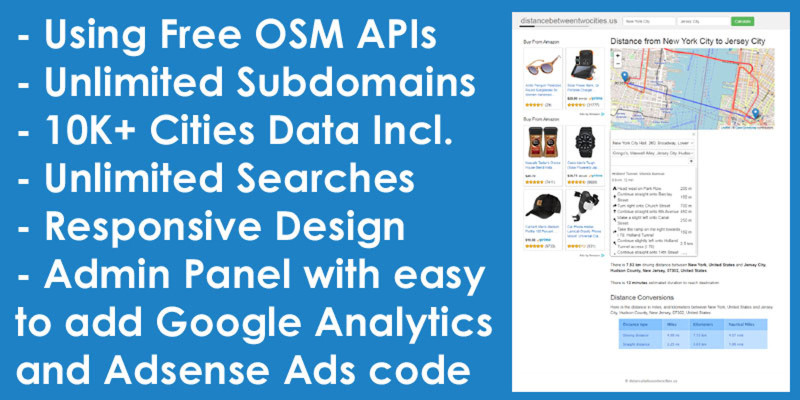
Distance Calculator is one of the most important travel tool used by travelers to calculate the distance between cities. This distance calculator will give you the estimated travel distance between the two cities or places along with location map. It is PHP/Javascript/MySQL based script integrated with free Open Street Map (OSM) API using Leaflet JS library and bootstrap CSS framework. OpenStreetMap is a good alternative to Google Maps and allows unlimited free searches.
This script allows to create unlimited city subdomains and it can automatically redirect US visitors to city specific sub-domain pages. More than 10 thousand USA cities data included in it.
Admin Panel Demo Link: https://distancebetweentwociti...
Username: admin
Password: 123
Features
- Using Free OpenStreetMap APIs
- Unlimited City Subdomains
- More Than 10 Thousand Cities Data Included
- Unlimited Searches
- Responsive Design
- Admin Panel with easy to add Google Analytics and Adsense Ads Code
Requirements
- Have a web hosting to upload script files and MySQL Database to run this script
- Shared hosting with Cpanel
Instructions
- Login to your cpanel hosting
- Navigate to Subdomains under the Domains section
- Create a wildcard subdomain * pointing it to the "cities" folder (Subdomain: * & Domain: yourdomain.com & Document Root: public_html/cities)
- Open MySQL Databases, create database and give database name like you want
- Create user for your database
- Add user to your database and check ALL PRIVILEGES
- Open phpMyAdmin and select your database
- Import database file “cities.sql.zip” from download package inside ‘Script‘ folder
- Open File Manager via cpanel or ftp server
- Upload all files inside “Script_Files” folder to your folder destination on your hosting
- you must edit both “db.php” and "admin/db.php" files and replace with your own database configuration data
- Open admin panel page by opening your website link e.g. https://yourwebsite.com/admin/
- Default admin panel login details are "username:admin" and "password:123"
- Login to your admin panel and go to "Settings" menu and change the details according to your website
| Author | alreadycoded |
|---|---|
| Category | Scripts & Code / PHP Scripts / Miscellaneous |
| Price | $35 |
| Extended License | $105 |
| Rating | 4.70 from 3 ratings |
| Reviews | 3 |
| Likes | 13 |
| First Release | Apr 14, 2022 |
| Last Update | Sep 19, 2022 |
| Files included | .php, .css, .html, .sql, JavaScript .js |
| Software version | PHP 7.0, PHP 7.1, PHP 7.2, PHP 7.3, PHP 7.4, PHP 8.0, PHP 5.5, PHP 5.6 |
Categories
Tags
External listing. code.market does not sell this product and does not process payment for it. Pricing, payment, delivery, licensing, refunds, and support are handled by the third-party merchant on its own website. We may earn an affiliate commission from a referral. Details.
Products of the Week.
Submit🥇

Perceptle
Perceptle is a daily browser-based game that challenges you to test your sensory intuition through five quick estimation and rhythm-based rounds.
Other · 3,957 views · 16 clicksOther · Week 47 · 3,957 views · 16 clicks
🥈

Free LinkedIn Likes From Real
Get free LinkedIn likes on your posts from real members who react by hand. No
SaaS · 4,075 views · 18 clicksSaaS · Week 47 · 4,075 views · 18 clicks
🥉

STOP GUESSING WHAT TO POST
AI that learns your brand voice and builds a month of consistent, on-brand social content: carousels, posts and hooks that sound like you, not like everyone else's AI.
SaaS · 11,557 views · 80 clicksSaaS · Week 47 · 11,557 views · 80 clicks
#4

aaas.market
407 reliable micro tools for solo founders, marketers and creators. They work in your browser
SaaS · 3,936 views · 7 clicksSaaS · Week 47 · 3,936 views · 7 clicks