
Digi Buttons Bar For WordPress
Description
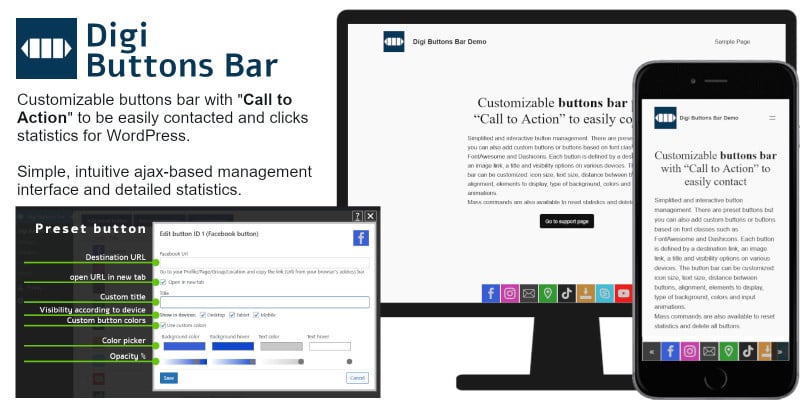
Customizable buttons bar with “Call to Action” to easily contact and clicks statistics.
Try it before you buy it:
digibuttonsbar.digireturn.it username: demo password: demo1234
To contact us you can write to igibuttonsbar@digireturn.it">digibuttonsbar@digireturn.it or follow us on https://www.facebook.com/digibuttonsbar
A very elegant and customizable actions bar. To allow visitors a quick and easy way for contact you by "Call to Action" buttons bar. The plugin displays (also with animation) a highly customizable bar at the bottom of all pages on your site. You can add, modify or delete as many buttons as you want. You can add buttons to contact you immediately and easily (with a simple click) or buttons with URLs to the most famous social media or any URL.
Optimized for desktop, tablet and mobile devices. The buttons are easily customizable for different site themes and they open a link in a new window. Compatibility with Firefox, Chrome, Safari, Opera and Edge. The plugin is available in English, Spanish (Español), Italian (Italiano), German (Deutsch) and French (Français).
Button management is simple and the interface is intuitive and interactive thanks to ajax technology for Real-Time System.
Preset buttons available:
- Phone Call
- Skype
- Youtube
- Map
- Tik Tok
- Download
- X
- Telegram
- Website
Settings available:
- Spacing
- Size
- Text size
- Alignment
- View
- Background
- Shape
- Colors
- Animation
Statistics:
- Separate statistics of the day for each button
- Statistics of the last 30 days
- Total and separate daily statistics for each button
- Total and separate monthly statistics for each button
- Total and separate annual statistics for each button
Requirements
WordPress v. 5.0 or later and PHP v 5.6 or later
Instructions
After downloading the plugin in zip format you can install it. Go to the backend of your WordPress site and click on Plugins -> Add new -> Upload plugin and activate it.
Now that you've installed and activated the plugin, you'll see a new menu item created inside WordPress called 'Digi Buttons Bar'. First thing first, let's head over to Settings and take a look at what options are available.
Add the buttons you want and enjoy
| Author | digireturn |
|---|---|
| Category | Plugins / WordPress / Interface Elements |
| Price | $19 |
| Extended License | $57 |
| Likes | 3 |
| First Release | Jan 12, 2024 |
| Last Update | Jan 12, 2024 |
| Supported cms | WordPress 5.0, WordPress 5.8, WordPress 5.9, WordPress 6.0, WordPress 6.1, WordPress 6.2, WordPress 6.3 |
| Files included | .php, .css, JavaScript .js |
Categories
Tags
External listing. code.market does not sell this product and does not process payment for it. Pricing, payment, delivery, licensing, refunds, and support are handled by the third-party merchant on its own website. We may earn an affiliate commission from a referral. Details.
Products of the Week.
Submit🥇

STOP GUESSING WHAT TO POST
AI that learns your brand voice and builds a month of consistent, on-brand social content: carousels, posts and hooks that sound like you, not like everyone else's AI.
SaaS · 6,524 views · 59 clicksSaaS · Week 46 · 6,524 views · 59 clicks
🥈

Conversational Backlinks for Busy Founders
Place Backlink Relevant Conversation for your domain across Forums and Conversations
Website · 45,433 views · 229 clicksWebsite · Week 46 · 45,433 views · 229 clicks
🥉

upvote.club
Free Social Media Engagement that Helps Boost Your Content. Upvote Club supports 19 social networks with 100+ engagement actions in one dashboard. Add links to your posts and get free engagement from real users.
SaaS · 43,424 views · 124 clicksSaaS · Week 46 · 43,424 views · 124 clicks
#4

Substack Posting API
Onboard your Agent to Substack. Write Publish on Substack via API
SaaS · 62,359 views · 204 clicksSaaS · Week 46 · 62,359 views · 204 clicks
#5

Seenshot App
Free, Fast, MacOS Screenshot app. Make Screenshot cmd+shift+2 and send it via link
Desktop App · 31,613 views · 125 clicksDesktop App · Week 46 · 31,613 views · 125 clicks
#6

Hand-Placed Backlinks $9.99 per link. Flat rate.
Buy hand-placed forum, Q-A and directory backlinks. Flat $9.99 per link, no subscriptions — you only pay for approved listings.
Website · 7,317 views · 19 clicksWebsite · Week 46 · 7,317 views · 19 clicks
#7

Free Invoice Generator - PDF Invoices in Your Browser, No Sign-Up
A free invoice maker for freelancers and small businesses: fill in the invoice, check the live preview, and download a PDF that looks exactly like it. Any currency, tax per item, three templates, no sign-up, and nothing leaves your device.
5,937 views · 20 clicksWeek 46 · 5,937 views · 20 clicks
#8

Merge PDF Files Free - Combine PDFs in Your Browser, No Upload
A free PDF merger for office workers, students, and freelancers: combine PDFs and images into one file in the browser, reorder files and pages, pick page ranges, keep bookmarks, and open password-protected PDFs. Nothing is uploaded, no sign-up, no watermark.
5,488 views · 16 clicksWeek 46 · 5,488 views · 16 clicks