
Diastora | AI Blood Pressure Log App With Laravel Key Proxy
Description
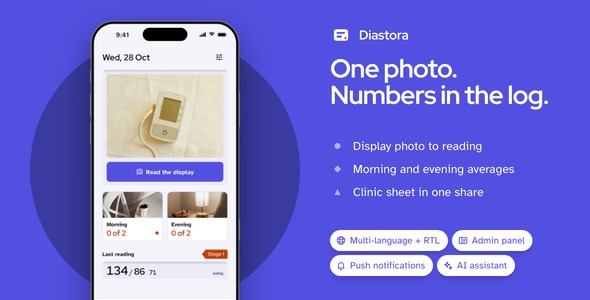
Photograph the display of a blood pressure monitor, check the three numbers, and keep a morning and evening log your doctor can read. Diastora reads only what the display shows; the stage, the averages and the seven day series are worked out on the phone, every time, the same way.

Demo Instructions
There is no account and nothing to sign in to. The Live Preview opens straight into the app with Demo mode on: the Read tab offers six drawn sample displays, each with a fixed reading already worked out, so a tap shows the full read-and-confirm flow with no key, no server and no network. Everything on this page is one click away in the Live Preview, not just the app; see every part before you buy below.
- App: no sign-in, the Read tab opens straight into Demo mode with six sample displays.
- Admin panel of the included back end, once you install it. Email: admin@diastora.test · Password: password (the seeded account forces a password change on first login).
Costs not included in the price
Reading a display calls OpenAI, Anthropic or Google Gemini, and each of them bills every request, an ongoing cost for as long as the app is in use, whether the request goes out with a key the person pastes in or through the included key proxy on your own server. Running that server is a separate hosting cost. Push notifications and analytics only work with your own Firebase project and bill under Firebase’s own pricing once a build is live. Publishing needs your own Apple and Google developer accounts. Every one of them bills you directly, and none of it is included in the purchase price.
AI disclosure
AI-assisted tools were used to help write and review the source code and the documentation of this item. The author reviewed, tested and finalized every part before release. The photographs are licensed Pexels stock images, each listed with its photographer in assets/images/clinic/LICENSES.txt; the illustrations, including the six sample display graphics, are SVG drawings written as code for this item; no image-generation model was used.
In addition, Diastora’s display reading is AI-powered: a photo of a monitor’s display or a cuff label is sent to a vision model, which copies only the digits and symbols printed on it. The model never estimates a missing number, never sorts a reading into a stage and never gives advice; every stage, average and target line is calculated afterward by a small Dart engine on the phone, from the numbers the person confirmed. A low-confidence digit must be checked or corrected before a reading can be saved. Without a key or the included proxy, the Read tab runs Demo mode on bundled sample displays.
Why Diastora, in three lines
- Read and confirm, never read and trust: a photo of the display becomes three numbers in a display well; any digit the model was not sure of is underlined and waits for a tap before the reading can be saved.
- The clinical pieces are already built: stages from a published guideline (ACC/AHA 2017 or the ESC 2024 home thresholds), morning and evening averages, a seven day home protocol tracker, and a one page sheet for the clinic shared as an image or a CSV file.
- A server and a landing page come with it:
backend/is a Laravel key proxy with a Filament admin panel that holds your AI provider keys, meters every phone and keeps the photos people chose to keep;landing/is a one-page product site already in the app’s colors.
Eight things you will not have to build
- AI assistant: the display and cuff-label reading jobs run on your own key (OpenAI, Anthropic or Gemini) or through the included Laravel key proxy, which keeps the key on your server instead; Demo mode answers on the device with no key at all.
- Push notifications: send from your admin panel to every install, and a screen to open on tap if you pick one; permission asked from Settings, foreground display included.
- Multi-language + RTL: three languages (English, Spanish and Arabic, laid out right to left); a new one starts as a copy of one file, and the server answers in the language the phone uses.
- Face ID / Touch ID / fingerprint lock: a switch in Settings asks for the face or finger before the log opens; it stays hidden on a phone with neither set up.
- Analytics and crash reports: screen views and uncaught errors go to your Firebase project only after the person agrees in Settings.
- Update prompts: a gentle or a required update, driven by four lines in your server’s
.env. - Share sheet: the clinic sheet and the CSV go out through the system sheet, iPad anchored.
- Remote images with fallback: the twelve bundled photographs and every monitor picture load with placeholders and fallbacks.
Open every part of Diastora before you buy
Everything on this page is one click away in the Live Preview, not just the app. The preview starts on one page with four entries; the All demos button on each brings you back to it:

- Mobile app: the Flutter app running in your browser inside a phone frame, with the sample data already loaded.
- Documentation: the HTML manual exactly as it sits in the zip, every chapter and figure.
- Admin panel: pages captured from a running copy of the key proxy, from the sign-in screen to usage, devices and the AI settings, clickable but read-only.
- Landing page: the one-page site from the
landing/folder, in indigo and Red Hat Display like the app.
The full source code is included with every license type, Regular and Extended alike.
Three numbers in a display well
A photo of the display becomes three large numbers in a DisplayWell: upper, lower and pulse, copied off the screen in front of you, not estimated.

Every number checked before it is saved
A digit the model was not sure of gets a dashed underline; one tap opens a big number pad, and the reading cannot be saved until every number has been checked.

Every reading, by day
The log groups readings by day with a stage tag on every row, the morning, evening, arm and position noted, and the display photo kept alongside the numbers it came from.

Morning and evening averages, side by side
Two traces, one for each number, run alongside a dashed target line; splitting morning from evening is one switch, and 7, 30 and 90 day windows are a tap away.

A one page sheet for the clinic
The seven day protocol fills in as readings come in; once it is complete, one tap composes a page with the morning, evening and overall averages and every reading in a table, shared as an image or a CSV file.

The monitor, the cuff and the seven days
Each monitor keeps its own arm range on a cuff card; an arm-size tool matches the number you enter to a cuff size, a four step checklist and a five-minute rest timer come before the reading, and a 28-cell bar tracks the seven day protocol.

Light by day, dark at the bedside
Every screen, including the display well, the traces and the clinic sheet, is tuned for both themes; the app opens in light by default and switches with the system or a setting.

Plus the screens a real app needs: capture, monitor and cuff setup, reminders, settings and the legal pages.
Landing page included
landing/ is a one-page site for the people who will download the app: the camera-to-log promise up top beside two phones, the display well, the twin trace and the clinic sheet as three features, six screens, three questions people ask about a health app, and store buttons waiting for your links. It is static HTML and CSS in the app’s indigo.

Laravel back end included
backend/ is a Laravel key proxy with a Filament admin panel: it holds your OpenAI, Anthropic and Gemini keys server-side, meters every phone’s display and cuff-label reads against a daily limit, and keeps the photos a phone chose to upload. Point the app at it with one --dart-define=API_BASE_URL and the same reading jobs talk to it instead of a key typed into the phone. It runs on PHP 8.4+ or the included Docker compose file; the proxy’s own AI provider usage is billed on your account.

For the developer who takes it to the stores
- Reading and judging are two layers: the reader returns three numbers as closed JSON; stages, averages, the seven day series and the clinic sheet are plain Dart engines with their own unit tests, so a new guideline is one table in
stage_tables.dartand no request. - Every integration behind one switch:
feature_config.dartholds the ids and switches, andfeature_packs.dartis the single place each pack picks its implementation. - Prompts live on your server: the two jobs and their prompts sit in
backend/config/ai_tasks.php; the app sends only the job name and the photo, and a test keeps the app’s copy and the server’s copy word for word the same. - Model names are a setting: when a provider retires a model, the new name goes into the settings screen or the server’s admin page, not into a new build.
- One color file: the indigo, the stage colors and both themes come from
app_colors.dart; the icon and the landing page follow the same values.

What you get: full Flutter source code with the display reading, trends and clinic sheet engines, the Laravel key proxy with admin panel, the landing page, README with re-theming and integration guide, offline HTML documentation, mock data layer, light and dark themes.
Notes
Diastora is not a medical device and does not diagnose, treat, cure, or prevent any medical condition. It reads the numbers shown on the display of a blood pressure monitor you already own; it does not take a reading itself. The camera is used only to photograph the display of a blood pressure monitor; the app does not use the camera or any other sensor to take a measurement.
Reading a display from a photo needs a network connection and an AI key or the included proxy; without a server the app runs in Demo mode on the bundled sample data. Diastora has no accounts: each phone gets its own device token from the server.
In-app purchase hooks are not part of this item; Diastora has no paywall and does not lock history or reports behind a plan. The full source code is included with every license type, Regular and Extended alike.
| Author | coderqh |
|---|---|
| Price | $69 |
| Sales | 0 |
| Rating | 0 (0) |
| Published | Nov 9, 2026 |
| Last Update | Nov 9, 2026 |
| Compatible Software | Flutter 3.x |
| Mobile Files Included | Dart, YAML, JavaScript JSON, .kotlin, .swift, JavaScript JS, CSS, PHP, HTML |
Categories
Tags
External listing. code.market does not sell this product and does not process payment for it. Pricing, payment, delivery, licensing, refunds, and support are handled by the third-party merchant on its own website. We may earn an affiliate commission from a referral. Details.
Products of the Week.
Submit🥇

Perceptle
Perceptle is a daily browser-based game that challenges you to test your sensory intuition through five quick estimation and rhythm-based rounds.
Other · 1 views · 0 clicksOther · Week 47 · 1 views · 0 clicks
🥈

Free LinkedIn Likes From Real
Get free LinkedIn likes on your posts from real members who react by hand. No
SaaS · 124 views · 2 clicksSaaS · Week 47 · 124 views · 2 clicks
🥉

STOP GUESSING WHAT TO POST
AI that learns your brand voice and builds a month of consistent, on-brand social content: carousels, posts and hooks that sound like you, not like everyone else's AI.
SaaS · 7,686 views · 71 clicksSaaS · Week 47 · 7,686 views · 71 clicks
#4

aaas.market
407 reliable micro tools for solo founders, marketers and creators. They work in your browser
SaaS · 122 views · 0 clicksSaaS · Week 47 · 122 views · 0 clicks