
Desktop Notes | Windows Notes App With Animated Companion
Description
Desktop Notes — Your Ideas, Always Close
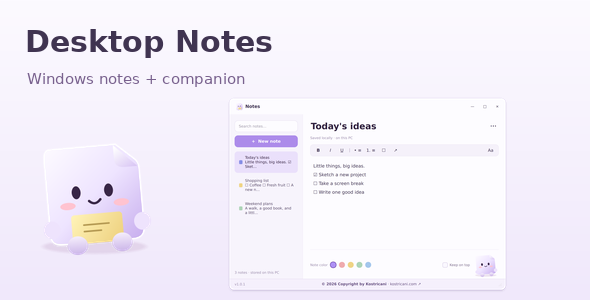
Desktop Notes is a Windows notes application with a playful animated desktop companion. Capture ideas, organize checklists, and keep your notes within easy reach.
Write and Organize
Create notes, search titles and content, and organize your writing with five note colors. Format text with bold, italic, underline, bullet lists, numbered lists, checklists, and adjustable text sizes.
Changes save automatically after a short pause. Switching notes, minimizing, or quitting also saves pending edits. Enable Keep on Top to keep the editor visible above other windows.
An Animated Desktop Companion
Minimize the editor to reveal a draggable paper companion. Click it to bounce, double-click to reopen your notes, or hover to access New Note and Open controls.
Quiet mode disables animations and cursor-following eyes. A system-tray menu provides quick access to notes and application controls.
Local Storage and Backups
Your notes are stored locally in a SQLite database. No account, server, subscription, or API key is required to use the installed application.
Restore deleted notes from Trash, export individual notes as HTML or plain text, and export or import JSON backups. The first launch of each day creates a backup snapshot, retaining the latest seven snapshot days.
What Is Included?
The download includes editable Python application source, a portable Windows application, a Windows setup installer, build scripts, automated tests, illustrated English HTML documentation, and third-party license notices.
The installer and portable application include their runtime dependencies. End users do not need Python installed.
Technology and Requirements
Built with Python, PySide6 Essentials, and SQLite. Packaging uses PyInstaller and Inno Setup. Designed for 64-bit Windows 10 version 1809 or later and Windows 11.
Running or building the source requires supported 64-bit Python. Creating the setup installer also requires Inno Setup. Initial source setup requires internet access to download dependencies.
Important Details
Closing the editor keeps the companion running. Choose Quit Desktop Notes from the application or tray menu to exit completely.
Portable program files still store notes in the Windows user’s local data folder. This version does not include cloud synchronization, encryption, password protection, reminders, attachments, or a built-in updater. The default build scripts produce unsigned executables.
Application previews show the implemented interface rendered with Qt on Linux. Windows fonts and system integration may vary. Decorative website illustrations are not included in the download. Third-party components retain their respective licenses.
| Author | Kostricanitechnology |
|---|---|
| Price | $27 |
| Sales | 0 |
| Rating | 0 (0) |
| Published | Oct 29, 2026 |
| Last Update | Oct 29, 2026 |
| Application Runtime | Native |
| High Resolution | No |
| Operating System Versions | Windows 11, Windows 10 |
Categories
Tags
External listing. code.market does not sell this product and does not process payment for it. Pricing, payment, delivery, licensing, refunds, and support are handled by the third-party merchant on its own website. We may earn an affiliate commission from a referral. Details.
Products of the Week.
Submit🥇

STOP GUESSING WHAT TO POST
AI that learns your brand voice and builds a month of consistent, on-brand social content: carousels, posts and hooks that sound like you, not like everyone else's AI.
SaaS · 7,369 views · 67 clicksSaaS · Week 46 · 7,369 views · 67 clicks
🥈

Conversational Backlinks for Busy Founders
Place Backlink Relevant Conversation for your domain across Forums and Conversations
Website · 46,653 views · 232 clicksWebsite · Week 46 · 46,653 views · 232 clicks
🥉

upvote.club
Free Social Media Engagement that Helps Boost Your Content. Upvote Club supports 19 social networks with 100+ engagement actions in one dashboard. Add links to your posts and get free engagement from real users.
SaaS · 44,593 views · 127 clicksSaaS · Week 46 · 44,593 views · 127 clicks
#4

Substack Posting API
Onboard your Agent to Substack. Write Publish on Substack via API
SaaS · 63,480 views · 206 clicksSaaS · Week 46 · 63,480 views · 206 clicks
#5

Seenshot App
Free, Fast, MacOS Screenshot app. Make Screenshot cmd+shift+2 and send it via link
Desktop App · 32,730 views · 127 clicksDesktop App · Week 46 · 32,730 views · 127 clicks
#6

Hand-Placed Backlinks $9.99 per link. Flat rate.
Buy hand-placed forum, Q-A and directory backlinks. Flat $9.99 per link, no subscriptions — you only pay for approved listings.
Website · 8,349 views · 19 clicksWebsite · Week 46 · 8,349 views · 19 clicks
#7

Free Invoice Generator - PDF Invoices in Your Browser, No Sign-Up
A free invoice maker for freelancers and small businesses: fill in the invoice, check the live preview, and download a PDF that looks exactly like it. Any currency, tax per item, three templates, no sign-up, and nothing leaves your device.
6,977 views · 29 clicksWeek 46 · 6,977 views · 29 clicks
#8

Merge PDF Files Free - Combine PDFs in Your Browser, No Upload
A free PDF merger for office workers, students, and freelancers: combine PDFs and images into one file in the browser, reorder files and pages, pick page ranges, keep bookmarks, and open password-protected PDFs. Nothing is uploaded, no sign-up, no watermark.
6,458 views · 18 clicksWeek 46 · 6,458 views · 18 clicks