
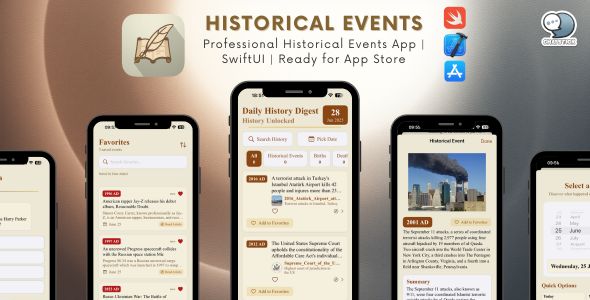
Daily History Digest - Professional Historical Events App | SwiftUI | Ready for App Store
Description
Daily History Digest – Complete iOS App Template
Professional Historical Events App • SwiftUI • Ready for App Store
Transform history education into an engaging daily experience! Daily History Digest is a production-ready iOS template showcasing historical events, notable births, deaths, and holidays with a classic look inspired by historical manuscripts. Perfect for enthusiasts, educators, students, and the simply curious.
⭐ What Makes This App Special
Beautiful, Unique Design
- Classic Historical Theme — parchment textures & elegant typography
- Carefully Crafted UI — every screen designed with polish
- Smooth Animations — refined transitions & interactions
- Dark Mode support · iPad optimized
Production-Ready Code
- 100% SwiftUI (modern, declarative)
- MVVM architecture for clean scalability
- Comprehensive comments across views & logic
- No third-party dependencies — native frameworks only
- Performance optimized — caching & efficient loading
Rich Features Out of the Box
- Real-Time Data — Wikipedia REST API (no key required)
- Event Categories — Events, Births, Deaths, Holidays
- Interactive Calendar — browse any date in history
- Favorites with Core Data · Trivia Game
- Search · Daily Notifications · Share · Accessibility
What’s Included
✅ Complete Source Code
- SwiftUI views & components
- View models & business logic (MVVM)
- Services for API integration (Wikipedia)
- Core Data favorites module
- Custom theme system · Notification manager · Combine network layer
✅ Easy Customization System
AppConfig.swift — edit colors, fonts, text, toggles & features in one place. No hunting through files.
✅ Professional Documentation
- Reskin Guide — step-by-step customization
- Technical Docs — architecture & code walkthrough
- App Store Submission Guide — everything to publish
- Troubleshooting — common issues & solutions
✅ Ready-to-Use Assets
- App icon template (all sizes)
- Sample screenshots & launch screen
- Curated SF Symbols usage
Key Features
1️⃣ Home — Today in History
- Auto-loads today’s events with category filters
- Pull-to-refresh · Rich cards with images & summaries
- Tap through to Wikipedia articles
2️⃣ Calendar — Explore Any Date
- Interactive date picker & timeline browsing
- Quick jump to any day · Smart cached loading
3️⃣ Favorites — Save & Organize
- Persistent storage via Core Data
- Offline access · Search within favorites · Easy share/export
4️⃣ Trivia Game — Test Your Knowledge
- 5-question rounds · multiple choice · difficulty scaling
- Score tracking, explanations, accuracy & streak stats
5️⃣ Settings — Full Control
- Daily notifications with preferred time
- Category visibility · font size · theme options
- About & Support section
6️⃣ Search — Find Anything
- Instant results with Wikipedia integration
- Filter by category, date, keyword · search history
Technical Specifications
Requirements
- iOS 16.0+ · Swift 5.9+ · Xcode 15.0+
- 100% SwiftUI implementation
Frameworks & Technologies
- SwiftUI · Combine · Core Data · UserNotifications
- Foundation · Network (reachability/monitoring)
Architecture
- MVVM pattern · Service layer · Repository
- Singleton utilities · Protocol-oriented abstractions
Data Source
- Wikipedia REST API — no key, multi-language, always updated
Customization Made Easy
Edit everything in AppConfig.swift — no extra coding required.
// Colors
static let primaryColor   = Color(red: 0.54, green: 0.27, blue: 0.07)
static let secondaryColor = Color(red: 0.85, green: 0.65, blue: 0.13)

// Text & Branding
static let appName       = "Your App Name"
static let appTagline    = "Your Tagline"
static let developerName = "Your Company"

// Typography
static let fontFamily = "Your-Font-Name"

// Feature Toggles
static let enableTrivia    = true
static let enableCalendar  = true
static let enableFavorites = true

// Language
static let wikipediaLanguage = "en" // en, es, fr, de, ...
Reskin Guide covers: color & font changes, icon replacement, naming, feature toggles, notifications, layouts & advanced edits.
Monetization Opportunities
In-App Purchases (Ready)
- Premium themes
- Advanced trivia modes
- Ad-free experience
- Exclusive content & filters
Advertising (Pluggable)
- Banner/interstitial/native ads
- Rewarded video for hints
Subscription / One-Time
- Monthly/yearly access
- Or sell as premium app
White-Label
- Schools, museums, societies
- Tourism & education partners
Perfect For
- Developers — modern SwiftUI & MVVM patterns
- Entrepreneurs — quick time-to-market & multiple revenue paths
- Students & Educators — build real educational tools
- Agencies — white-label, rapid client delivery
Quick Start (10 Minutes)
- Open
On This Day.xcodeprojin Xcode - Edit
AppConfig.swift(name, colors, text) - Replace app icon in Assets
- Run on simulator (⌘R)
- Follow RESKIN_GUIDE.md for deeper changes
- Prepare App Store listing & submit
Feature Comparison
| Feature | Included | Customizable | Docs |
|---|---|---|---|
| Historical Events | ✅ | ✅ | ✅ |
| Calendar View | ✅ | ✅ | ✅ |
| Favorites System | ✅ | ✅ | ✅ |
| Trivia Game | ✅ | ✅ | ✅ |
| Search & Filters | ✅ | ✅ | ✅ |
| Notifications | ✅ | ✅ | ✅ |
| Dark Mode & iPad | ✅ | ✅ | ✅ |
| Accessibility | ✅ | ✅ | ✅ |
| Offline Favorites | ✅ | ✅ | ✅ |
| AppConfig System | ✅ | ✅ | ✅ |
Bonus Materials
- Docs: code & API guides, architecture notes, troubleshooting
- Design: color palette, typography, icon guidelines, screenshot templates
- Code Quality: no warnings, no leaks, optimized performance
- Updates: bug fixes, features, and iOS compatibility
❓ Frequently Asked Questions
- Programming experience? Helpful but not required — the guide walks you through everything.
- API key? Not needed — Wikipedia REST is free.
- App Store-ready? Yes — customize, test, and submit.
- Language change? One line in
AppConfig.swift(100+ languages). - Add features? Clean, modular architecture makes it simple.
- Support? Email support is included.
️ Professional Services
- Design — logo, themes, icons, screenshots, marketing
- Development — custom features, backend, payments, analytics, APIs
- App Store — ASO, submission, copy, media, preview videos
- Launch — strategy, socials, press, UA, monetization
Contact: choochai.t@chatstickmarket.com · www.chatstickmarket.com · Response within 24h
Customer Reviews
- “Saved me months. Excellent code & docs.” — John D., iOS Dev ⭐⭐⭐⭐⭐
- “Launched in two weeks as a non-dev!” — Sarah M., Entrepreneur ⭐⭐⭐⭐⭐
- “Students love the trivia mode.” — Prof. Robert K. ⭐⭐⭐⭐⭐
- “Clean code, thrilled client.” — WebDev Agency ⭐⭐⭐⭐⭐
Package Contents
 Daily History Digest/
├──  On This Day/              // Main app
│   ├──  On_This_DayApp.swift  // Entry point
│   ├──  ContentView.swift     // Root view
│   ├──  Models/               // Data models
│   ├──  Views/                // UI components
│   ├──  ViewModels/           // Business logic (MVVM)
│   ├──  Services/             // API & notifications
│   ├──  Utils/                // Helpers & AppConfig
│   ├──  Widgets/              // Widget extension
│   └──  Assets.xcassets/      // Icons & images
├──  README.md                 // Getting started
├──  RESKIN_GUIDE.md           // Customization guide
├──  CODECANYON_DESCRIPTION.md // Listing copy
└──  LICENSE.txt               // License terms
License
Single Application License
- Allowed: one App Store app, customize & monetize, updates, email support
- Not allowed: resell/redistribute source, derivative templates, public sharing
Extended License for multi-app, white-label, SaaS, or client work — contact us.
App Store Success Tips
- Listing: maximize name, rich keywords, pro screenshots, preview video
- Marketing: landing page, social presence, bloggers & edu sites
- Post-launch: reply to reviews, regular updates, seasonal content
- Monetization: start free + ads, test pricing, promos, subscriptions
Why Choose This Template
| Feature | This Template | Basic Templates | Built from Scratch |
|---|---|---|---|
| Time to Market | ⏱️ Days | Weeks | Months |
| Code Quality | ⭐⭐⭐⭐⭐ | ⭐⭐⭐ | ❓ |
| Documentation | Complete | Basic | ❌ None |
| Customization | ✅ Easy | ⚠️ Medium | ✅ Full Control |
| Support | ✅ Included | ❌ Limited | ❌ None |
| Cost | $ | $ | $$$$ |
Ready to Launch Your History App?
- Instant download & documentation access
- Email support & free update notifications
- 30-day money-back guarantee
Add to Cart — Start Building Today
Contact & Support
Email: choochai.t@chatstickmarket.com
Website: www.chatstickmarket.com
Languages: English, Thai · Response within 24 hours
Tags: iOS App, SwiftUI, Historical Events, Education App, Wikipedia API, Trivia, Calendar, MVVM, Core Data, Notifications, iPad, Dark Mode, Accessibility, White Label, Reskin, iOS 16, Swift 5.9, Native iOS, No Dependencies, Monetization Ready
© 2024 ChatStickMarket. All Rights Reserved.
| Type | iOS App |
|---|---|
| Author | pooccm |
| Price | $29 |
| Sales | 4 |
| Rating | 0 (0) |
| Published | Oct 29, 2025 |
| Last Update | Oct 29, 2025 |
| Compatible Software | Other |
| Compatible With | Swift |
| Mobile Files Included | .h, .m |
| Video Preview Resolution | 1080x1920 |
Categories
Tags
External listing. code.market does not sell this product and does not process payment for it. Pricing, payment, delivery, licensing, refunds, and support are handled by the third-party merchant on its own website. We may earn an affiliate commission from a referral. Details.
Products of the Week.
Submit🥇

STOP GUESSING WHAT TO POST
AI that learns your brand voice and builds a month of consistent, on-brand social content: carousels, posts and hooks that sound like you, not like everyone else's AI.
SaaS · 7,375 views · 67 clicksSaaS · Week 46 · 7,375 views · 67 clicks
🥈

Conversational Backlinks for Busy Founders
Place Backlink Relevant Conversation for your domain across Forums and Conversations
Website · 46,660 views · 232 clicksWebsite · Week 46 · 46,660 views · 232 clicks
🥉

upvote.club
Free Social Media Engagement that Helps Boost Your Content. Upvote Club supports 19 social networks with 100+ engagement actions in one dashboard. Add links to your posts and get free engagement from real users.
SaaS · 44,600 views · 127 clicksSaaS · Week 46 · 44,600 views · 127 clicks
#4

Substack Posting API
Onboard your Agent to Substack. Write Publish on Substack via API
SaaS · 63,487 views · 206 clicksSaaS · Week 46 · 63,487 views · 206 clicks
#5

Seenshot App
Free, Fast, MacOS Screenshot app. Make Screenshot cmd+shift+2 and send it via link
Desktop App · 32,736 views · 127 clicksDesktop App · Week 46 · 32,736 views · 127 clicks
#6

Hand-Placed Backlinks $9.99 per link. Flat rate.
Buy hand-placed forum, Q-A and directory backlinks. Flat $9.99 per link, no subscriptions — you only pay for approved listings.
Website · 8,355 views · 19 clicksWebsite · Week 46 · 8,355 views · 19 clicks
#7

Free Invoice Generator - PDF Invoices in Your Browser, No Sign-Up
A free invoice maker for freelancers and small businesses: fill in the invoice, check the live preview, and download a PDF that looks exactly like it. Any currency, tax per item, three templates, no sign-up, and nothing leaves your device.
6,983 views · 29 clicksWeek 46 · 6,983 views · 29 clicks
#8

Merge PDF Files Free - Combine PDFs in Your Browser, No Upload
A free PDF merger for office workers, students, and freelancers: combine PDFs and images into one file in the browser, reorder files and pages, pick page ranges, keep bookmarks, and open password-protected PDFs. Nothing is uploaded, no sign-up, no watermark.
6,460 views · 18 clicksWeek 46 · 6,460 views · 18 clicks