
Custom Fields Element for Avada Builder

Description
Plugin Description
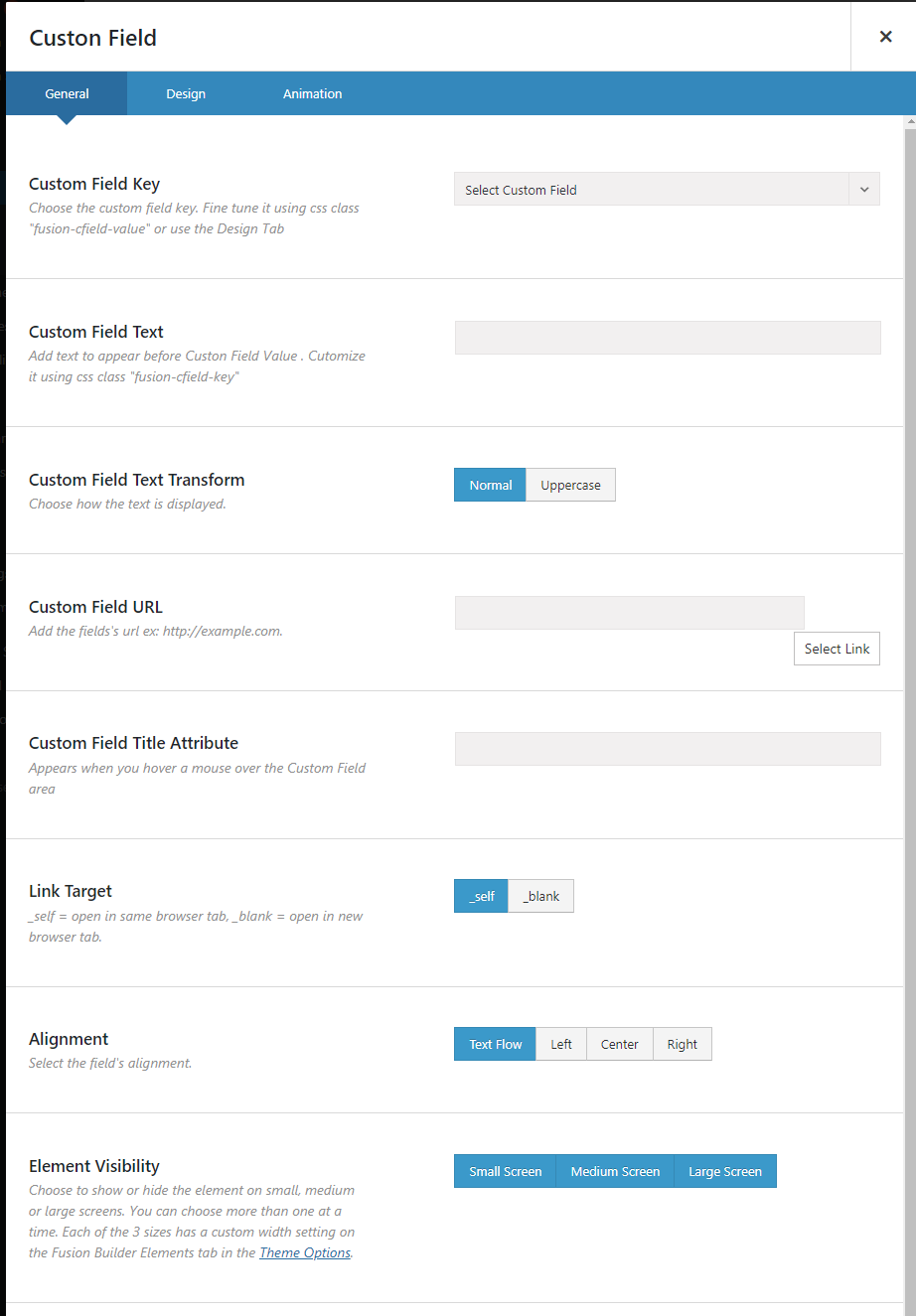
Want to display a custom field value — a price, a date, an author — anywhere in your Avada layout? This plugin makes it simple. It adds a new Custom Field element to the Avada Builder that lets you show the value of any custom field inside your Page, Post or Custom Post Type layout, with no code required. You can add as many Custom Fields per page as you need. The element also comes with a full set of design options, similar to the Avada Button element, so your field values fit neatly into your design. You can add a label before the value, or turn it into a link to an internal or external page.

Top Features
- Adds the new element to the Avada Builder – Custom Field that displays the selected custom field value at the element position
- Builds the list of all configured custom fields to choose from
- You can add text before the custom field value, which can be used as a custom field name
- A link to an internal or external page can be assigned to the custom field value
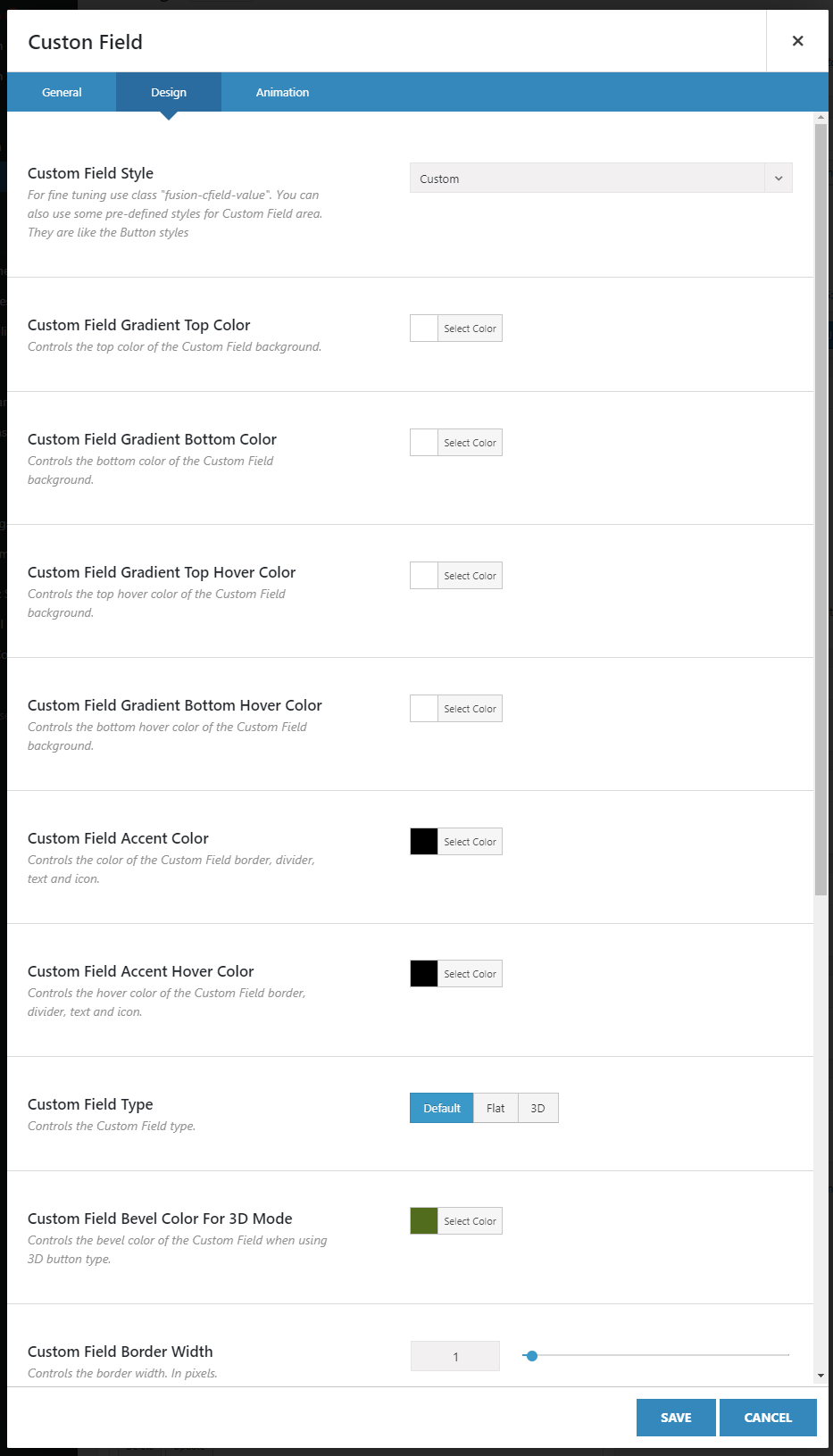
- Many design options are similar to the Button element
- ACF support. We support all basic types like text, number, date plus links, image and file types. You can also list checkboxes as a comma-separated string. Other formats may not work properly. Please contact support to see if other types can be supported
Custom Post Types, Taxonomies and Fields
Do not miss our main plugin — have a look at Custom Post Types, Taxonomies and FieldsCustom Content Pack
If you need both plugins, buy a pack and save 25%How To Use
- Install the plugin
- After activation you will be brought to the License page where you can add your Purchase Code to activate automatic updates
- Insert the new Element via Avada Builder as usual
- Choose Custom Field
- Configure the options
- Save and enjoy
Custom Field Settings
Custom Field Design Options
Demo, Documentation, Support
- Get support. We will reply within 2 business days
- Plugin works with the latest Avada version 7.x.
Install Instructions
- Download the Full version and unzip the file
- Choose the included zip file that matches your Avada major version number
- Install that zip file as usual
Refunds
Please read the Envato refund policyFeedback
If you like our plugin, please review it here| Type | WordPress Plugin |
|---|---|
| Author | AmunetBiz |
| Category | Wordpress / Add Ons |
| Price | $15 |
| Sales | 387 |
| Rating | 2.50 from 4 ratings |
| Published | Jul 13, 2018 |
| Last Update | Jul 2, 2026 |
| Compatible Browsers | IE9, IE10, IE11, Firefox, Safari, Opera, Chrome, Edge |
| Compatible Software | WordPress 6.9.x, WordPress 6.8.x, WordPress 6.7.x, WordPress 6.6.x, WordPress 6.5.x, WordPress 6.4.x, WordPress 6.3.x, WordPress 6.2.x, WordPress 6.1.x, WordPress 6.0.x, WordPress 5.9.x, WordPress 5.8.x, WordPress 5.7.x, WordPress 5.6.x, WordPress 5.5.x, WordPress 5.4.x, WordPress 5.3.x, WordPress 5.2.x, WordPress 5.1.x, WordPress 5.0.x |
| Gutenberg Optimized | No |
| Source Files Included | JavaScript JS, HTML, CSS, PHP |
Categories
Tags
External listing. code.market does not sell this product and does not process payment for it. Pricing, payment, delivery, licensing, refunds, and support are handled by the third-party merchant on its own website. We may earn an affiliate commission from a referral. Details.
