
Cuely | Flutter App AI Teleprompter With Admin Panel
Description
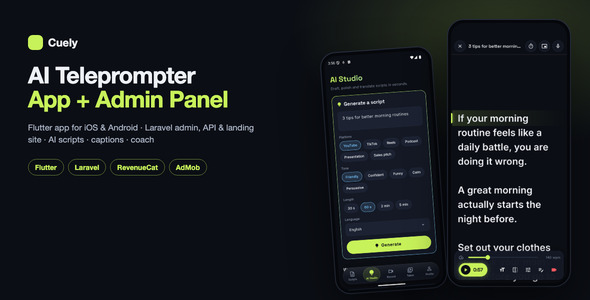
Cuely is a full-stack AI teleprompter: a cross-platform Flutter mobile app (iOS & Android) and a companion
web platform built with the Laravel PHP framework (admin panel, landing website and the mobile
REST API). It combines a dark, camera-first app with a production-ready backend: the included PHP / MySQL API
(built with Laravel), Laravel’s official laravel/ai package for script writing on the AI provider you
choose, OpenAI Whisper, fal.ai or Gemini for auto-captions, Firebase for sign-in and app configuration, OneSignal
for push notifications, and RevenueCat for the Cuely Premium subscription.
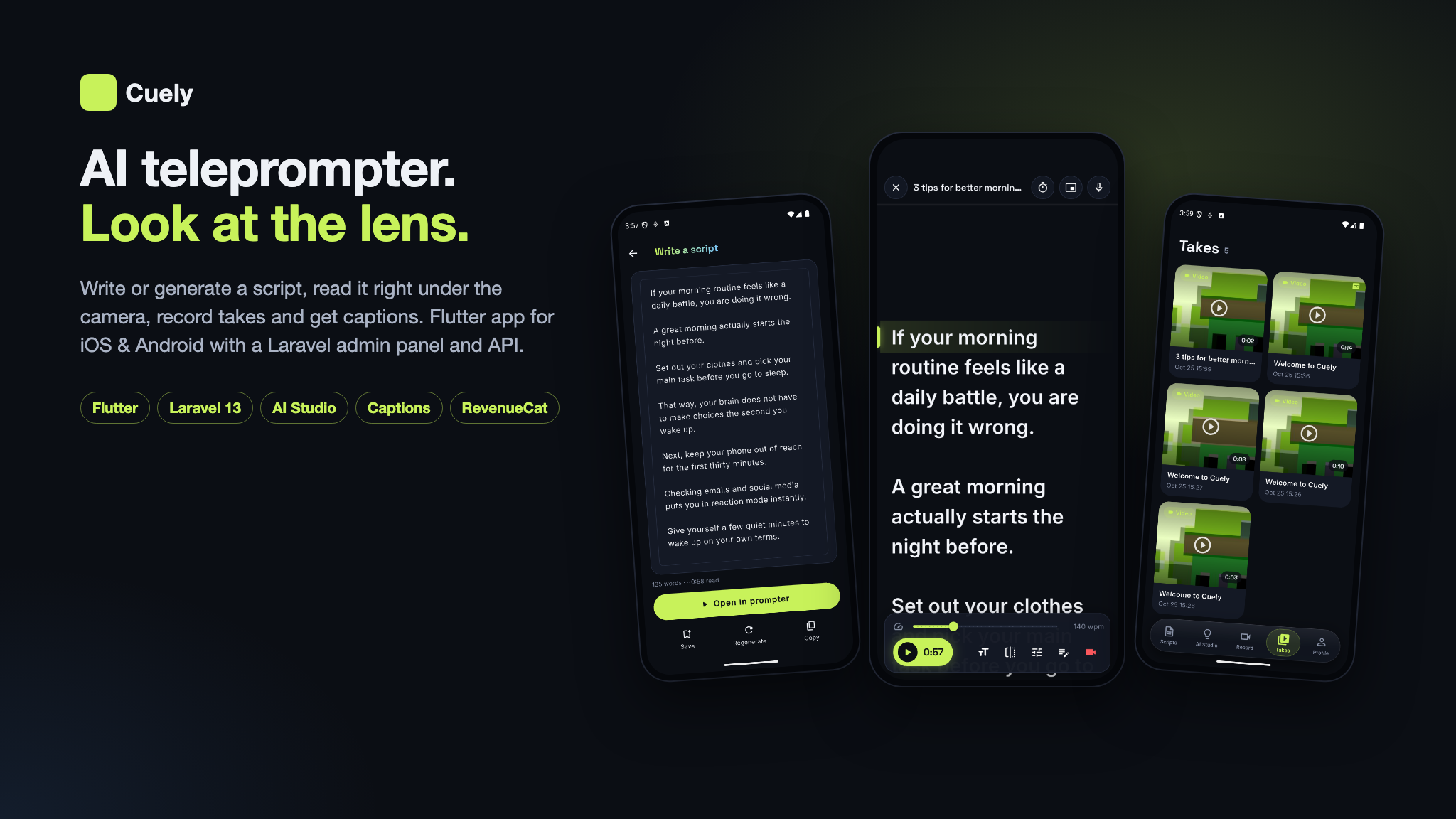
The mobile app is organized around five tabs — Scripts, AI Studio,
Record, Takes and Profile — taking a creator from an idea to a
finished, captioned take in one app. Write a script yourself, import it, start from a template or let AI write it
for a platform, a tone and a length; fit it to 30 seconds, one minute, 90 seconds or two minutes; read it on a
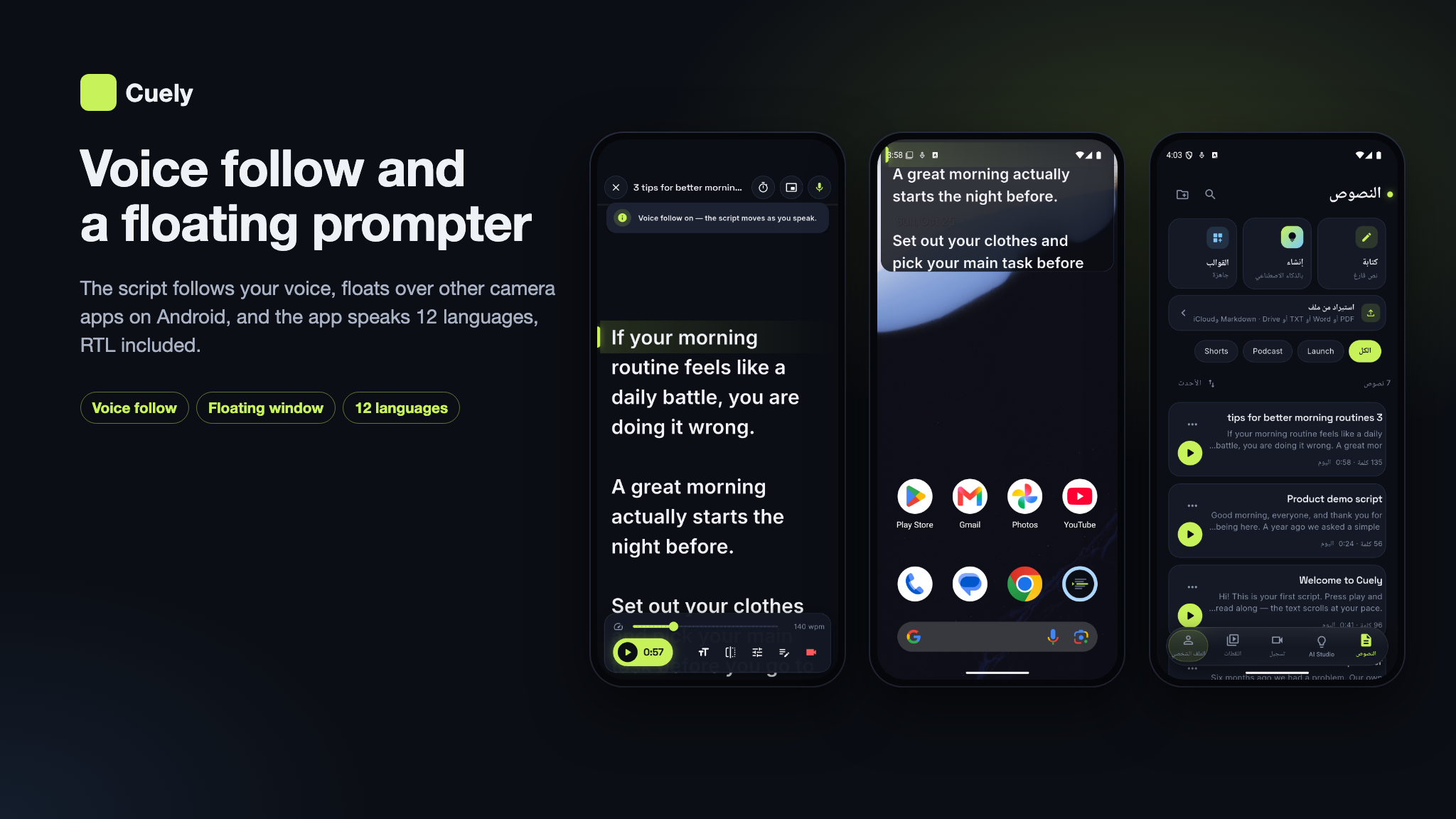
smooth scrolling prompter with the camera behind the text, or let it follow your voice; then turn the take into
editable captions and get rehearsal feedback on pace, filler words, pauses and how much of the script you covered.
Cuely Premium (weekly, monthly, yearly or lifetime, sold in the app stores through RevenueCat) and
AdMob ads on the free plan pay for it.
AI Disclosure: (1) AI tools were used to develop this item. The source code (Flutter app, Laravel admin panel, website and API) and the documentation were written with the assistance of Claude Code (Anthropic’s Claude models), then reviewed, tested and maintained by our team. The screenshots are captures of the running product. (2) The app has AI-powered features: AI script writing, Rewrite / Shorten / Expand / Translate, Hook ideas, Fit to time, Rehearsal coach tips and Auto-captions (speech-to-text). They call an external AI provider with your own API key and are optional. Details are in AI Usage Disclosure below.
Note: Cuely Premium is sold only as an in-app purchase on iOS and Android, through Apple and Google (via RevenueCat), and is subject to their store commissions. There is no web checkout and no payment gateway in this item. Apple, Google and RevenueCat are third-party services: buyers are responsible for creating their own accounts, completing any required approval processes, configuring API keys and products, and covering all applicable fees.
Important — AI, RevenueCat and AdMob: the AI features use the laravel/ai package,
which calls an external AI provider (Gemini, OpenAI, Anthropic and others); they require your own
separate API account with that provider, and usage costs apply for every AI request. Auto-captions use a
transcription provider (OpenAI, fal.ai or Gemini) on your own account, billed per use. In-app purchases use
RevenueCat: you must use your own RevenueCat account and your own API keys; no author RevenueCat
key or app identifier is included anywhere in the source or compiled assets. No author AdMob publisher, app or
ad unit id is included either; the app ships only Google’s public test app id, which you replace with your
own.
Demo Instructions
Live demo — website and admin panel
https://teleprompter.laravelbeginner.net/en
https://teleprompter.laravelbeginner.net/dashboard/login
Example admin login:
- Email:
admin@cuely.test - Password:
password123456
Example member logins (website and app) — password password for each:
- Free:
demo@example.com - Premium:
demo-pro@example.com
Try everything before you buy. The live demo is a sandboxed installation with fictional data; demo mode blocks changes to settings, keys, users and other destructive admin actions. These logins are public on purpose.
- Mobile app (Android): download the demo APK and start as a guest, or open Profile → Sign in → Email and use a member login above.
Before you buy: please read
- AI provider (script writing, fit-to-time and coach tips): the AI features need your own API key with one of the supported providers (Gemini, OpenAI, Anthropic and others, or a self-hosted Ollama). Every AI request is billed by that provider to your account. No author key is included; without a key, AI Studio stays off and the rest of the app works normally. How each provider charges is explained provider by provider in AI providers and their costs below.
- Transcription (auto-captions and the rehearsal coach): captions are transcribed by OpenAI Whisper, fal.ai (ElevenLabs Scribe or Whisper) or Google Gemini, with your own key for at least one of them. Usage is billed by that provider.
- RevenueCat: you must register your own RevenueCat account and app and use your own API keys. No author RevenueCat key or app user ID is included anywhere in the source. Premium is sold only in the app stores; there are no web payments.
- AdMob: you must use your own AdMob account and IDs. No author AdMob publisher, app or ad unit ID is included; the app ships only Google’s public test app ID, which you replace with your own.
- Firebase: a separate Firebase project of your own is required for the app to run; the package ships only example config files.
- laravel/ai: Laravel’s official package, stable v1, MIT licence (commercial redistribution permitted). The AI features need your own AI provider API key, and usage is billed by that provider.
- PDF import (Syncfusion): PDF script import uses
syncfusion_flutter_pdf, which is not open source; it is free under the Syncfusion Community License for qualifying organisations, otherwise a commercial Syncfusion licence is required. It can be removed (see Licensing below).
AI providers and their costs (please read before buying)
Cuely does not include any AI usage. AI Studio, Fit to time and the coach’s tips run on the AI provider you connect, and auto-captions run on a transcription provider you connect. Each provider is a separate company with its own account, its own terms and its own prices, and every request is billed by that provider to your account — not by us and not through the item. You need a key for at least one writing provider for the AI features, and for at least one transcription provider for captions and the coach. All keys ship blank; without them those features stay off and the rest of the app works normally.
Writing providers (connected through Laravel’s laravel/ai package; you can pick a
different provider and model for each AI tool in the admin panel):
- Google Gemini (default): pay-as-you-go per token (the text sent and the text written) on your Google AI / Google Cloud account. Google offers a limited free tier for testing; production traffic is billed per use.
- OpenAI: pay-as-you-go per token on your OpenAI API account, which is separate from a ChatGPT subscription and is paid with prepaid credits.
- Anthropic (Claude): pay-as-you-go per token on your Anthropic API account, paid with prepaid credits; separate from a Claude.ai subscription.
- xAI (Grok): pay-as-you-go per token on your xAI API account.
- Mistral: pay-as-you-go per token on your Mistral account; a limited free plan is available for experimenting.
- DeepSeek: pay-as-you-go per token on your DeepSeek account, paid with prepaid credits; among the lower-priced options.
- Groq: pay-as-you-go per token on your Groq account; a rate-limited free tier is available.
- Cohere: a free trial key with strict limits for testing; production use needs a paid key, billed per token.
- OpenRouter: one account and prepaid credits that reach many model makers; each model is billed at its own per-token price plus OpenRouter’s fee.
- Azure OpenAI: billed per token on your own Microsoft Azure subscription, after Azure approves the resource.
- Amazon Bedrock: billed per token on your own AWS account, in the AWS region you choose.
- Ollama (self-hosted): no per-request fee — the models run on a server you own or rent, so the cost is that server’s hardware, power or hosting.
- Any OpenAI-compatible API: billed by whichever service you point it at, under that service’s own terms.
Transcription providers (auto-captions and the rehearsal coach; Cuely tries the next one automatically if the first fails):
- OpenAI (Whisper): billed per minute of audio on your OpenAI API account.
- fal.ai (ElevenLabs Scribe or Whisper): billed per use on your fal.ai account, paid with prepaid credits.
- Google Gemini: the same key as the Gemini writer; audio is billed as input tokens on your Google account.
How the cost grows, and how you control it. A typical script, rewrite or fit-to-time run is a few hundred to a couple of thousand tokens, and a caption job is billed for the length of the take. What you pay depends on the model you choose and how much your members use it. The admin panel logs every AI run with its provider, model, tokens and an estimated cost, and shows the month’s total; free members get a daily AI allowance you set, and Premium members’ usage is paid by you from your subscription revenue. Installation-wide limits cap the bill whatever the number of accounts: AI runs per day by all free and guest users together (300 by default), all AI requests per day, Premium included (2,000 by default), and an optional monthly budget. New guest accounts are limited per device and per IP. Check each provider’s current price list before you choose a model; prices change and are set only by the provider.
Documentation
The package includes a full guide in HTML and PDF (cuely-docs/) with screenshots: the installation (a
one-command local setup and a browser installer), environment variables, database and seeders, installer
troubleshooting, the admin panel, AI tools, captions and the coach, auth and Premium, RevenueCat webhooks, media
storage, email templates, social login, deploying to production, the mobile API reference, a feature walkthrough
of the app, the Flutter setup and connecting it to your backend, the Remote Config reference, the project
structure, integrations, a branding guide for the app name, icon and splash screen, the Play
Store and App Store release, troubleshooting and an FAQ.
Third-party services: important notice
This item connects to services run by independent companies. Each one operates under its own terms of service, its own account approval process and its own fee structure, and using them may involve costs entirely outside this item’s purchase price. You create every account yourself and pay every fee yourself. No author accounts, API keys, Firebase projects, ad ids or measurement ids are included.
- Firebase (Google), required for the app: Authentication (anonymous guests, Google and Apple), Remote Config, Crashlytics, Analytics and Performance Monitoring. Requires your own Firebase project; the package ships only example config files. Usage beyond the free Spark plan is billed by Google (Blaze plan) and is the buyer’s responsibility.
- RevenueCat, Apple App Store, Google Play: required to sell Cuely Premium in the app. Your own RevenueCat project and store accounts; the RevenueCat keys are read from your own Firebase Remote Config and are blank by default. Store registration fees, store commissions and RevenueCat’s own pricing above its free tier are yours.
- AI providers, optional: Google Gemini (default), OpenAI, Anthropic, xAI, Mistral, DeepSeek,
Groq, Cohere, OpenRouter, Azure OpenAI, Amazon Bedrock, a self-hosted Ollama or any OpenAI-compatible API,
called through Laravel’s open-source
laravel/aipackage. Your own API key; usage is billed by the provider you choose (see AI providers and their costs above). - Transcription providers, optional (needed for auto-captions): OpenAI (Whisper), fal.ai (ElevenLabs Scribe or Whisper) or Google Gemini. Your own API key; usage is billed by the provider you choose.
- Google AdMob, optional: banner and interstitial ads for free users run on your own AdMob account, and all ad revenue goes to that account. The app ships Google’s public test AdMob app id, which you must replace with your own before release; ad unit ids are set in your admin panel and ship blank.
- OneSignal, optional: push notifications on your own OneSignal app. The app id is read from
your Remote Config and the REST key from your server’s
.env; both ship blank, which turns push off. OneSignal may incur additional costs depending on your usage volume. - Email delivery (SMTP), required for email sign-up and support replies: your own SMTP
provider, configured in the admin panel or
.env. It may incur additional costs depending on your usage volume, and sending limits are the provider’s. - Upstash QStash, optional: runs the queue on shared hosting where no worker can stay running; billed by Upstash above its free tier.
- Storage / CDN providers, optional: Amazon S3, Cloudflare R2, DigitalOcean Spaces, Backblaze B2, Wasabi, Google Cloud Storage, MinIO or Bunny Storage, and Cloudflare, Bunny, CloudFront or a custom CDN, each on your own account and pricing.
- Google Analytics 4, optional: the measurement id is not hardcoded. It is a
buyer setting (
GOOGLE_ANALYTICS_ID) that ships blank; when blank, analytics never loads. - Google and Facebook sign-in, optional, website only: uses your own OAuth apps. The mobile app contains no Facebook / Meta SDK.
- Syncfusion, PDF import: a separate licence; see Licensing below.
Licensing: PDF import (Syncfusion Community License)
Scripts → Import reads .txt, .md, .docx and .pdf. PDF text
extraction uses syncfusion_flutter_pdf,
which is not open source: you may use it free under the
Syncfusion Community License
if your organisation has less than US$1 million annual gross revenue and fewer than five developers; otherwise
you need a commercial licence from Syncfusion. The mobile README explains how to remove it in three steps; TXT,
Markdown and Word import keep working without it.
Backend (included)
The mobile app runs on the backend included in the package:
- Admin panel / Web API (built with Laravel) — the included
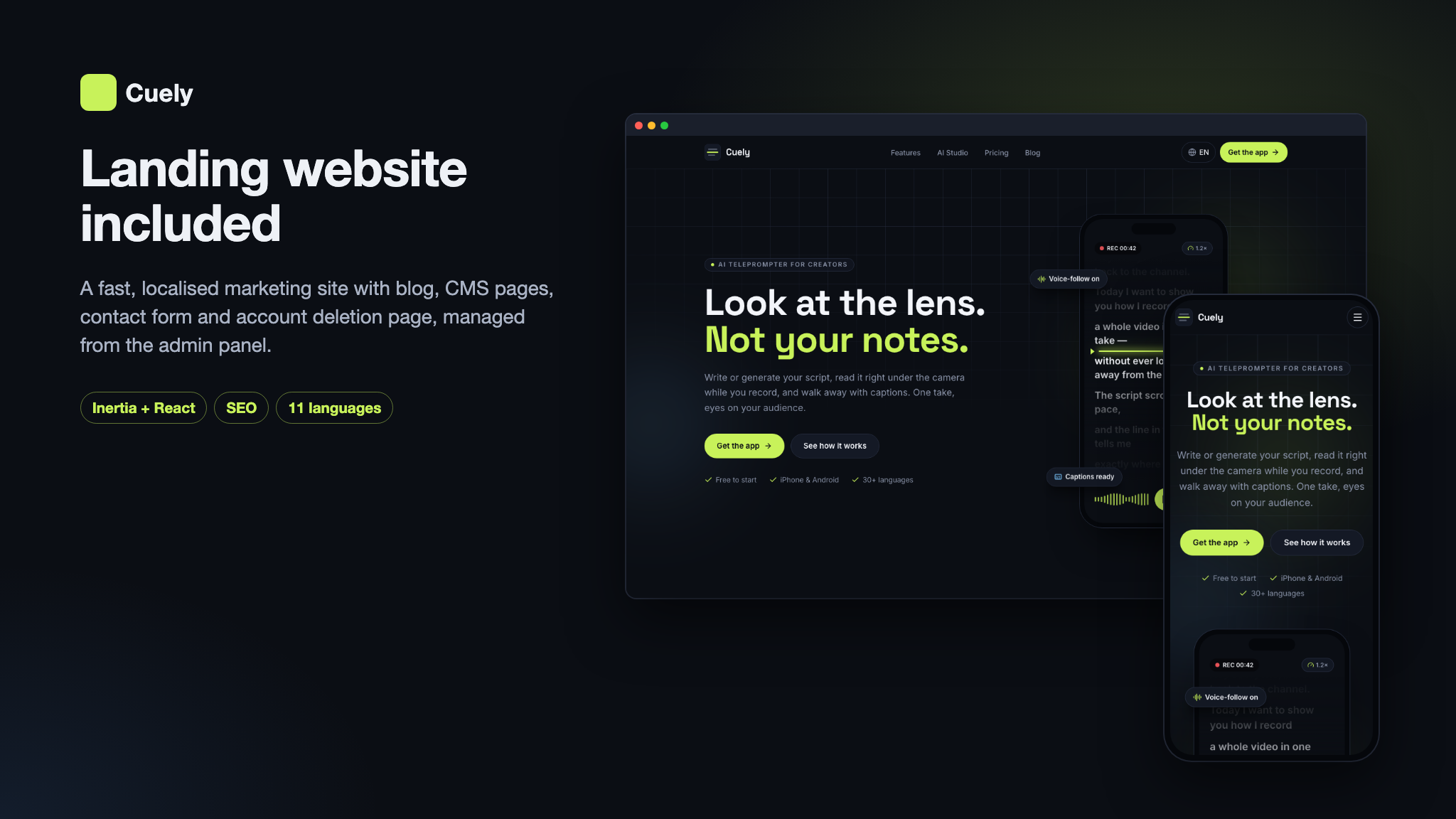
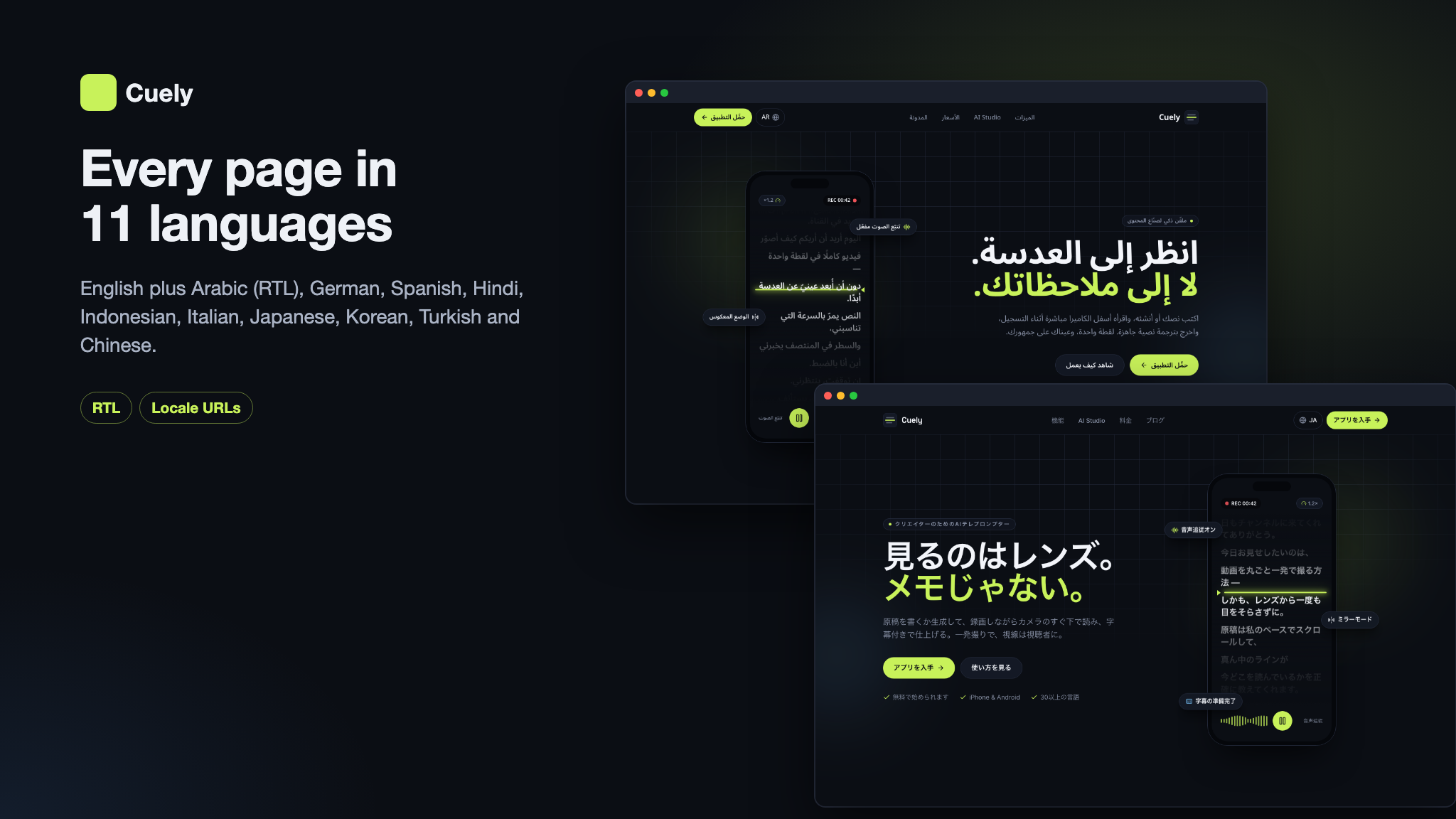
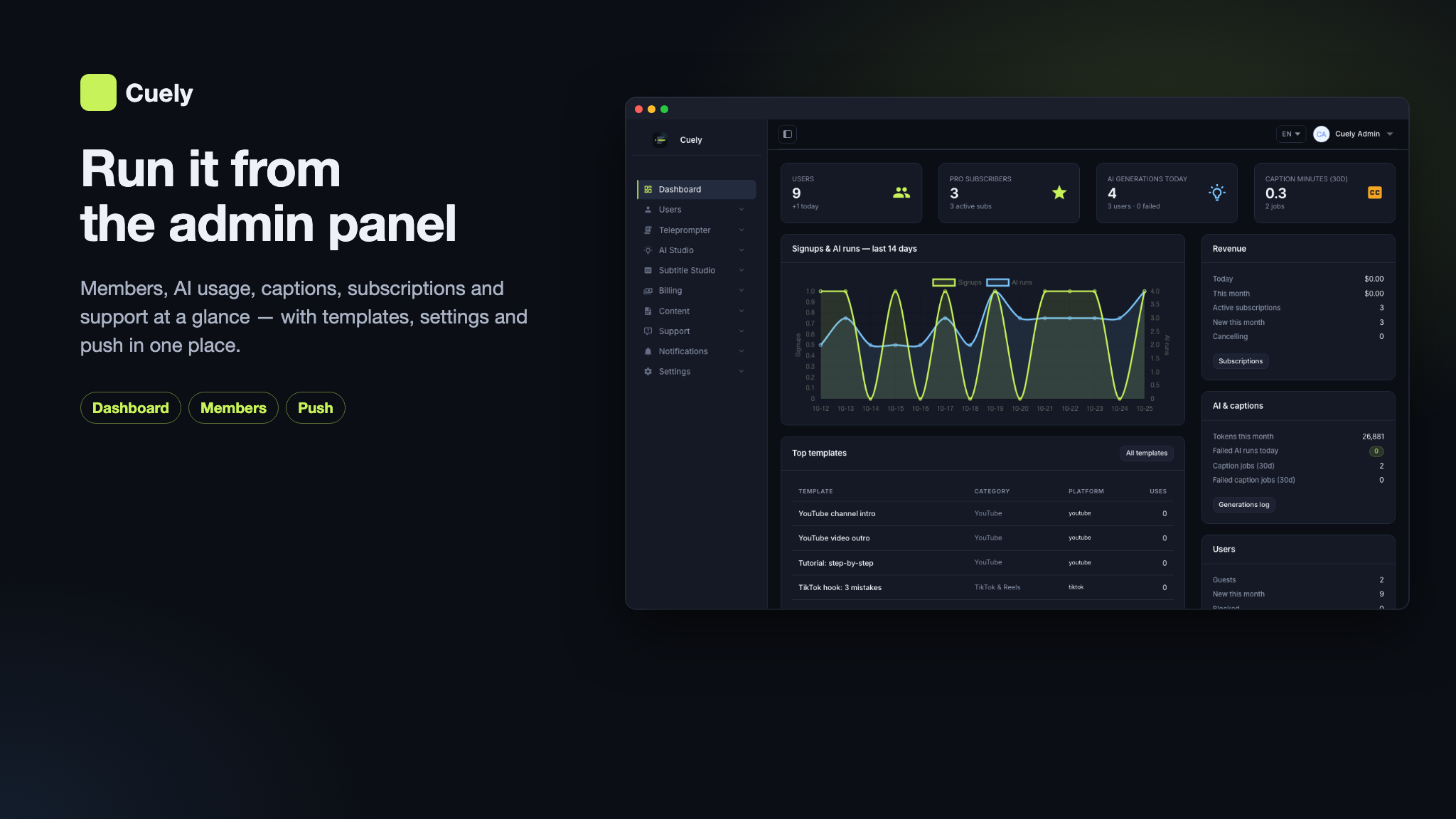
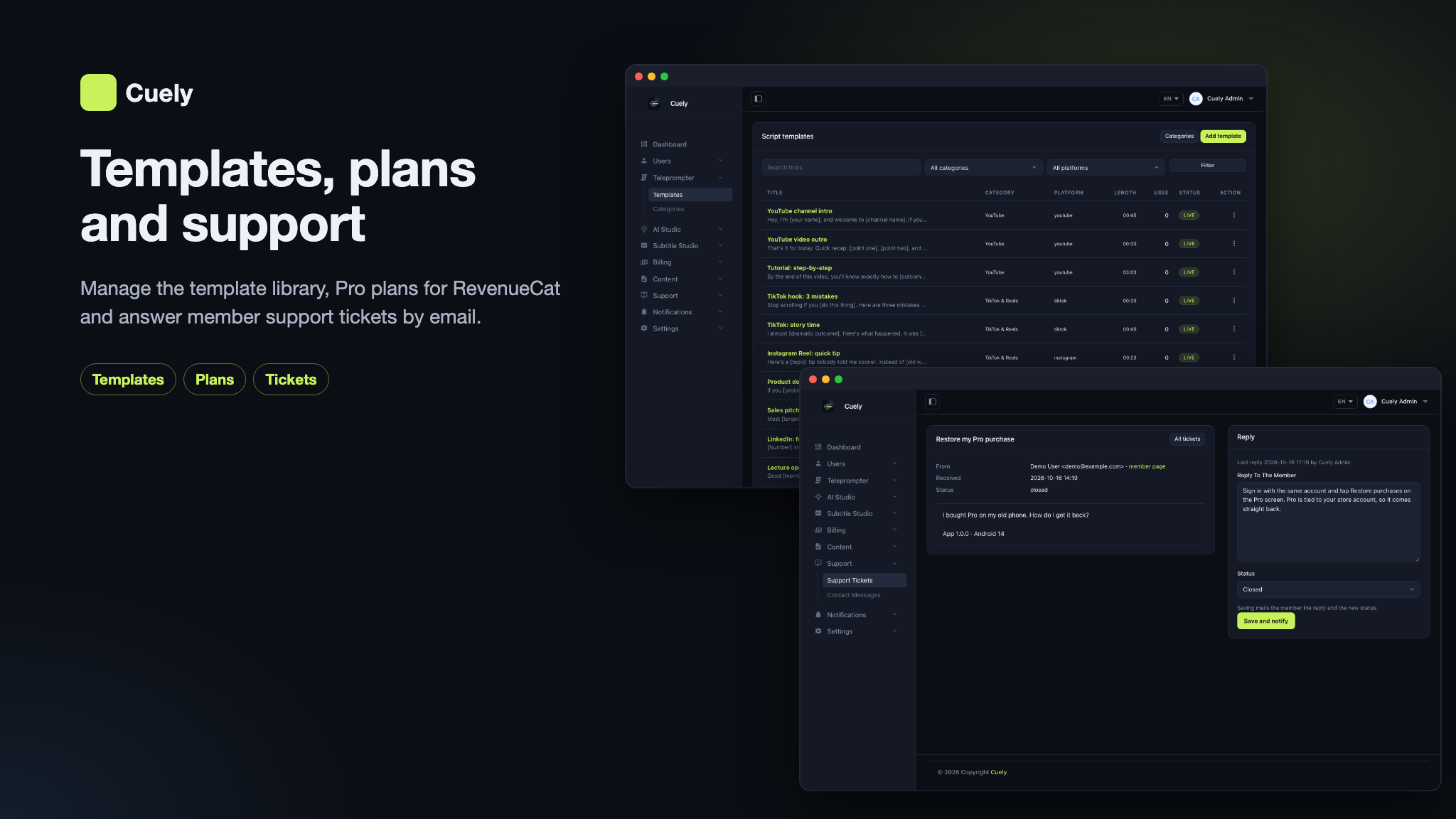
ai-teleprompter-admin-panelplatform: a PHP web app built with the Laravel framework, with an admin dashboard, database migrations + seeders, and the mobile REST API (/api/v1) the app talks to. It manages script templates and categories, AI providers and every AI tool’s prompts and model, caption jobs, members and their premium status, premium plans and RevenueCat subscriptions, push notifications, support tickets, email templates, pages, blog and FAQ, app settings and a media library with CDN support. It also ships a landing website in 11 languages (including Arabic, right to left) with a blog, a contact form, sign-in and the account deletion page the app stores ask for. Ideal if you already run on classic PHP/MySQL hosting or prefer the Laravel ecosystem.
Deploy the web project once and the app talks to that same origin: set the origin in Firebase Remote Config
(api_base_url) and the app adds /api/v1 itself. The queue runs on a VPS worker, or on
Upstash QStash on shared hosting where no process can stay running; the scheduler needs one cron entry.
Note: all of our items are built on the same base project (built with Laravel) and use the same setup system, so this installation video applies to every one of them, including this one.
Key Value Propositions
- For Creators: a script written for YouTube, TikTok, Reels, a podcast, a presentation or a sales pitch in seconds, read on a prompter while looking at the lens, recorded with the camera behind the text, and turned into captions and coaching notes — on one phone, with no second device.
- For App Owners: a complete, monetizable product — Cuely Premium with four plans you edit, a free tier with daily AI and script limits you set, AdMob ads for free users, push notifications with an in-app inbox, maintenance mode and force update — managed from one admin panel.
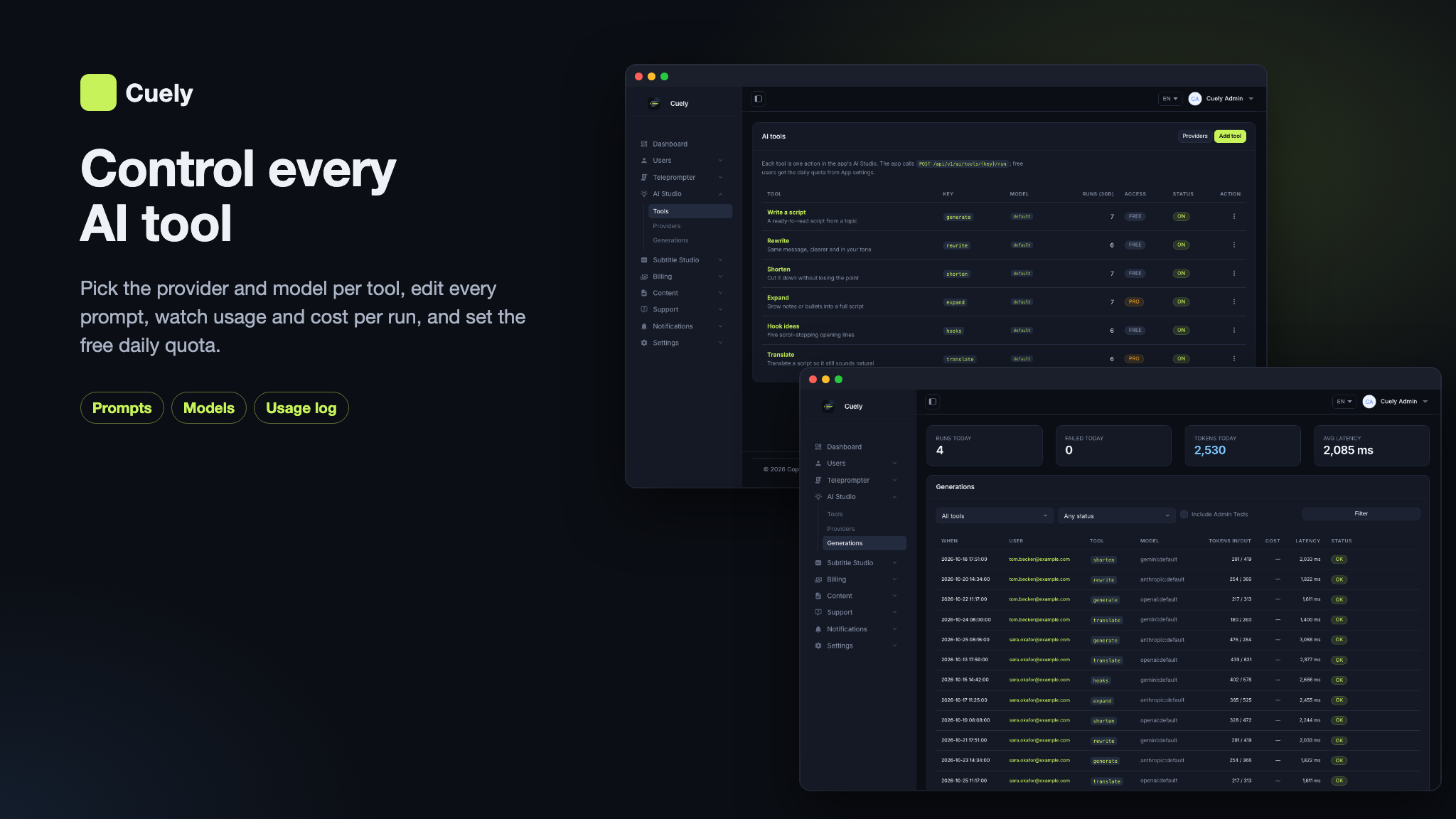
- For Operators: AI provider keys saved in the panel, every AI tool’s prompts, provider and model editable without a new app release, automatic failover to another provider, a usage log with the cost of every AI run, caption jobs you can inspect, and a template library you grow from the panel.
- For Developers: Laravel 13 + MySQL, a documented mobile API,
laravel/aiagents for the AI tools and the coach, and a Flutter app with Riverpod.
Content Disclosure
Cuely ships as a complete product with starter content so you can run it end-to-end out of the box:
- The template categories (YouTube, TikTok & Reels, Business & Sales, Teaching & Talks, Events & Speeches, News & Podcasts), the script templates, the AI tools and their prompts, the premium plans, email templates, FAQs, blog posts and the legal pages are original and editable in the admin panel.
- The optional demo seeder (
php artisan db:seed --class=DemoSeeder) adds fictional members, their scripts, AI runs, support tickets and contact messages for local and staging installs only. Every demo address is@example.com; it is not part of the default seed. - The legal pages (privacy policy, terms) are starting templates, not legal advice; have them reviewed for the countries you operate in.
Running a recording app makes you responsible for the privacy, data-protection and consumer-protection rules of the countries and app stores you publish in. Takes stay on the user’s phone; the audio of a take is uploaded to your server only when the user asks for captions or coaching, and is sent from there to your transcription provider. Cuely provides the app, the web platform and the backend; the service and its users are yours. You are also responsible for following each AI and transcription provider’s terms of use; provider accounts and their usage are up to you.
AI Usage Disclosure
AI-assisted development. This item was developed with AI assistance. The source code of the Flutter app, the admin panel and web API, the React landing website and the documentation were written with the help of Claude Code using Anthropic’s Claude models. Our team reviewed the output, tested it, and maintains and supports the item.
Graphics. The feature banners in this description and the item preview images were composed from real screenshots of the product. The screenshots in the item gallery and the documentation are captures of the running app, website and admin panel.
AI as a feature. Some features rely on a third-party generative AI service at runtime. The provider is not hard-coded — Gemini (default), OpenAI, Anthropic, xAI, Mistral, DeepSeek, Groq, Cohere, OpenRouter, Azure OpenAI, Amazon Bedrock, Ollama and any OpenAI-compatible API are supported, and you choose which provider and model answers each tool, with automatic failover to another configured provider. Every AI tool can be switched off:
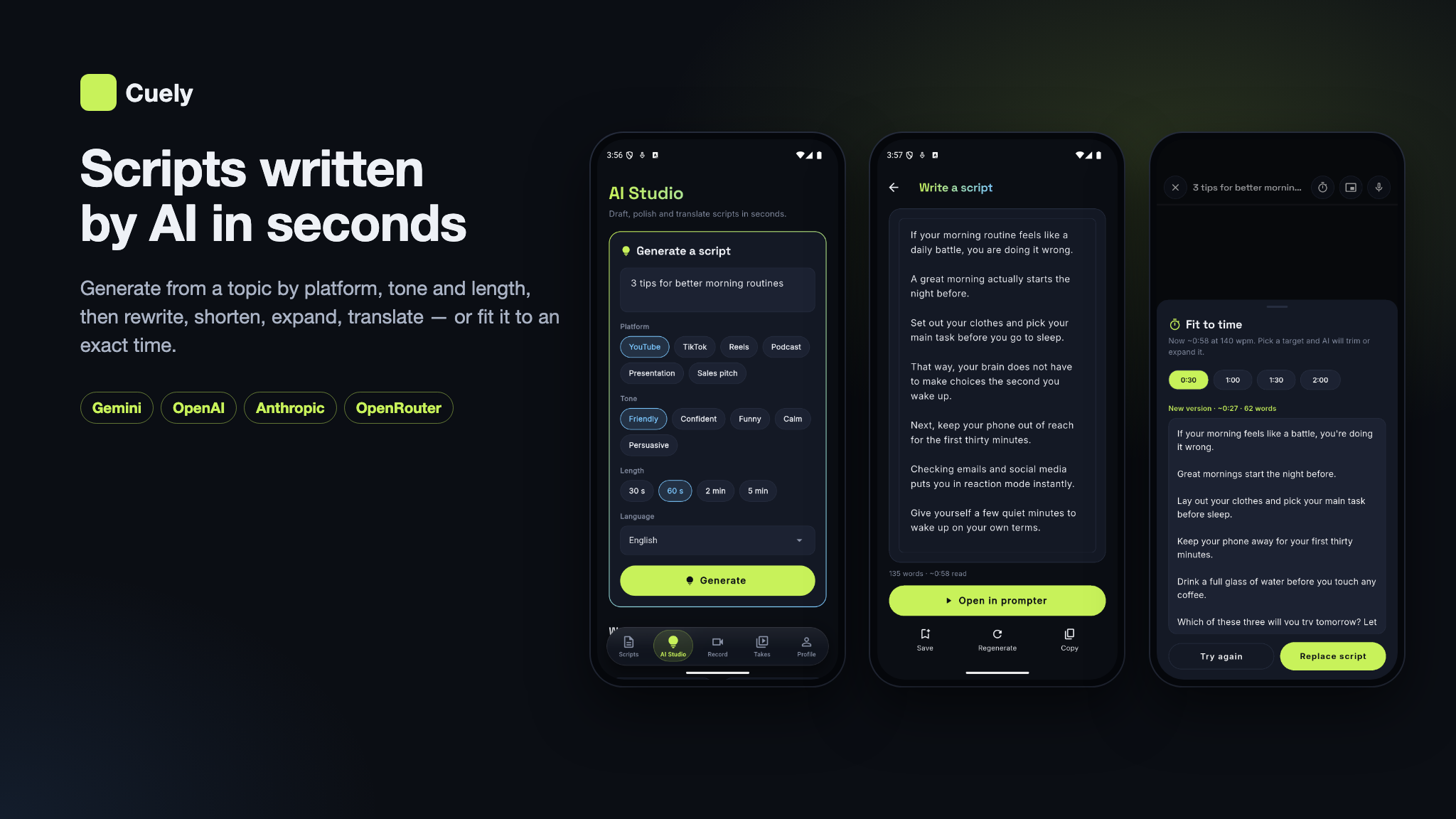
- Write a script: a script from a topic, for a platform (YouTube, TikTok, Reels, Podcast, Presentation, Sales pitch), a tone, a length and a language.
- Rewrite, Shorten, Expand and Translate: a new version of the user’s own script.
- Hook ideas: opening lines for the first seconds of a video.
- Fit to time: the script shortened or expanded to a target reading time at the user’s own speed.
- Rehearsal coach tips: three short tips from the take’s measured pace, filler words, pauses and script coverage (the measurements themselves are computed on the server, not by the AI).
- Auto-captions: speech-to-text with word timing by OpenAI Whisper, fal.ai or Gemini, trying the next configured engine when one fails.
Everything the AI writes is machine output and may be wrong: scripts are drafts the user edits before reading,
coach tips are suggestions, and captions can be corrected cue by cue in the caption editor. To use the AI
features you must create your own account with the provider you choose and supply your own API key. Keys are
stored encrypted in the admin panel (AI Studio → Providers) or in .env, are read only on the server,
and never reach the app or the browser. Free users get a daily number of AI runs that you set; Premium users have no
daily limit.
laravel/ai. The AI features run on
laravel/ai,
Laravel’s official first-party AI package (stable 1.x), released under the MIT licence. MIT
permits use and redistribution inside a commercial product; the package is installed with Composer like every
other dependency, and its licence notice stays with it in vendor/laravel/ai. It is a client library
only: it needs no Laravel Cloud, Forge or other Laravel subscription, there is no proxy in between, and requests
go directly from your server to the provider you choose. You obtain and pay for your own API keys; without a key,
the AI features stay off and the rest of the product works normally.
Required Third-Party Services and Costs (please read before buying)
Cuely depends on external services that are not included in the purchase. You create every
account yourself, under your own name, and all fees, usage charges and approval processes are your
responsibility. The package ships no author-owned accounts, API keys, ad ids, analytics ids or
other credentials: every key in .env.example is blank, the mobile app ships only example
Firebase files and Google’s public test AdMob app id, and no revenue or data is routed to the author.
- Firebase (required): a separate Firebase project is required for the app to function. You
create your own project and add its
google-services.jsonandGoogleService-Info.plist. The app uses it for sign-in (anonymous guests, Google, Apple), Remote Config, Crashlytics, Analytics and Performance Monitoring, and the server uses it (via the kreait/laravel-firebase SDK) to verify sign-ins. The free Spark plan covers testing; production use can require the pay-as-you-go Blaze plan. - RevenueCat, Apple Developer Program and Google Play Console (required to sell Premium in the app and to
publish it): your own accounts. The RevenueCat SDK keys (
revenuecat_ios_api_key,revenuecat_android_api_key) come from your own Firebase Remote Config and default to empty; the server checks the RevenueCat webhook with your own secret (REVENUECAT_WEBHOOK_SECRET), and no author project, key or entitlement is hard-coded. Apple and Google charge their membership / registration fees and store commissions; RevenueCat may charge above its free tier. - AI providers (optional): the AI features need your own API key with Gemini, OpenAI,
Anthropic, xAI, Mistral, DeepSeek, Groq, Cohere, OpenRouter, Azure OpenAI or Amazon Bedrock, billed per use by
that provider, or a self-hosted Ollama / OpenAI-compatible server.
laravel/aiis Laravel’s free open-source (MIT) package and needs no Laravel Cloud or other Laravel subscription. Without a key, the AI features stay off and the rest of the product works normally. - Transcription providers (optional, needed for auto-captions): OpenAI
(
OPENAI_API_KEY, Whisper, files up to 25 MB), fal.ai (FAL_KEY) or Gemini (GEMINI_API_KEY), billed per use by that provider. - Google AdMob (optional): ads run on your own AdMob account and the revenue is yours. The app
ships Google’s public test app id (
ca-app-pub-3940256099942544~…) inios/Runner/Info.plist(GADApplicationIdentifier) andandroid/app/src/main/res/values/strings.xml(admob_app_id) — you must replace both with your own AdMob app id before release. Banner and interstitial unit ids for Android and iOS are set in Admin → Settings → App and ship blank, with ads switched off. You are responsible for AdMob’s policies, user consent (Google UMP / GDPR) and store review. - OneSignal (optional): push notifications with your own OneSignal app
(
onesignal_app_idin Remote Config,ONESIGNAL_APP_IDandONESIGNAL_REST_API_KEYon the server), all blank by default. OneSignal may incur additional costs depending on your usage volume (subscribers, messages, paid features) beyond its free plan. - SMTP / email provider (required for email sign-up and support replies): your own provider (Amazon SES, Mailgun, SendGrid, Postmark, Brevo or your host’s mail server). It may incur additional costs depending on your usage volume, usually per email beyond a free allowance, and may cap daily sending.
- Google Analytics 4 (optional): reports to your own GA4 property. No
measurement id is included; leave
GOOGLE_ANALYTICS_IDblank and no analytics loads. - Syncfusion (PDF import): free under the Syncfusion Community License for qualifying organisations, otherwise a paid Syncfusion licence; removable.
- Other optional services: Upstash QStash (queue on shared hosting), Cloudflare Turnstile or Google reCAPTCHA, Google and Facebook sign-in on the website (your own OAuth apps), Mailchimp (newsletter), and storage / CDN providers (Cloudflare R2, Amazon S3 and others). Each has its own terms and pricing.
- Hosting: PHP/MySQL hosting, a queue worker or QStash, email delivery (SMTP), bandwidth and storage costs are yours.
Requirements
- Server: PHP 8.3 or newer with the usual Laravel extensions (openssl, pdo_mysql, mbstring, xml, curl, fileinfo, bcmath and others; gd or imagick recommended), MySQL 8 or MariaDB 10.3+, HTTPS in production (Android release builds refuse plain HTTP, and RevenueCat and QStash call your server) and one cron entry for the scheduler.
- Build tools: Composer 2 and Node.js 18+ with npm, on your computer at least.
- Mobile: Flutter 3.35.1 or newer, stable channel (Dart 3.9+, as pinned by pubspec.lock); Android Studio with Android SDK API 36 and JDK 17 (the app runs on Android 7.0 and newer); Xcode and CocoaPods on a Mac for iOS 15.0 and newer.
- Accounts: Firebase (required), RevenueCat with an Apple Developer and a Google Play account (to sell Premium), an AI and a transcription provider key (for the AI features), AdMob and OneSignal (optional).
Privacy & Data
No telemetry. The package sends no data to the author and has no license phone-home. Every third-party identifier — Firebase, RevenueCat, AdMob, OneSignal, Google Analytics and the AI and transcription keys — is blank or a placeholder and supplied by you, so the data each service collects goes to your own accounts. The AdMob app id that ships is Google’s public test id and must be replaced with yours. The mobile app contains no Facebook / Meta SDK; Facebook sign-in exists only on the website, with your own Facebook app. No ready-built IPA is distributed; the demo APK is for evaluation only.
App Tracking Transparency. On iOS, the tracking prompt is used only for personalised AdMob ads on the free plan, and can be removed if you do not show ads. You are solely responsible for your own ATT compliance, privacy policy, ad consent, privacy labels and App Store / Google Play review outcomes.
Disclaimer
This product is built to work with the included web API / admin panel (built with Laravel,
MySQL) — plus third-party services: Firebase (Auth, Remote Config, Analytics, Crashlytics, Performance
Monitoring), RevenueCat (Cuely Premium in the App Store and Google Play), an AI provider such as Google Gemini (your
own API key, through laravel/ai), a transcription provider (OpenAI, fal.ai or Gemini, your own API
key), optional AdMob ads (banner and interstitial), optional OneSignal push, email delivery (SMTP) and a queue
service for shared hosting (Upstash QStash). Hosting, AI usage, transcription usage, push, queue usage and
storage/CDN costs are not included in the purchase — you will need to create your own accounts, configure API
keys, and manage usage yourself. Every AI and transcription request is billed by the provider that answers it, to
your account. RevenueCat may also incur additional costs depending on your subscription volume and plan, beyond
any available free-tier limits. Mailchimp integration requires your own Mailchimp account and API key, and any
applicable Mailchimp subscription fees are your responsibility. PDF import uses Syncfusion’s
syncfusion_flutter_pdf under the Syncfusion Community License or a commercial Syncfusion licence. A
separate Firebase project is required for the app to function; the package contains no Firebase configuration
files (google-services.json, GoogleService-Info.plist) other than example templates, and
no service-account key, so you must create and configure your own Firebase project and provide your own
credentials. Additional charges may apply depending on usage and the Firebase services you use. The floating
prompter is available on Android only, where it needs the “display over other apps” permission. Basic familiarity
with Flutter, Xcode, Android Studio, Firebase, PHP/MySQL hosting, App Store Connect and Play Console setup is
recommended before launching.
Laravel, Flutter and all other product names, logos and trademarks mentioned here belong to their respective owners. Cuely is an independent product built with these frameworks and is not affiliated with or endorsed by any of them.
What’s Included
- Full Flutter application source code (
ai-teleprompter-mobile) - Landing website + admin dashboard + mobile Web API, built with Laravel (
ai-teleprompter-admin-panel) — the backend for the app, with migrations and idempotent seeders - Seeded template categories and script templates, six AI tools with their prompts, four Cuely premium plans (weekly, monthly, yearly, lifetime) with their store product ids and the premium feature list, email templates, FAQs, blog posts and legal pages; plus an optional demo seeder with a Free and a Premium member
- AI script writing, fit-to-time and coach tips through
laravel/aiand your own provider keys, with 13 supported providers - Auto-captions through OpenAI Whisper, fal.ai or Gemini, with a caption editor and SRT export
- RevenueCat in-app purchases with a signature-checked webhook, and AdMob banner and interstitial ads for free users
- A notification system on OneSignal with an in-app inbox, plus email
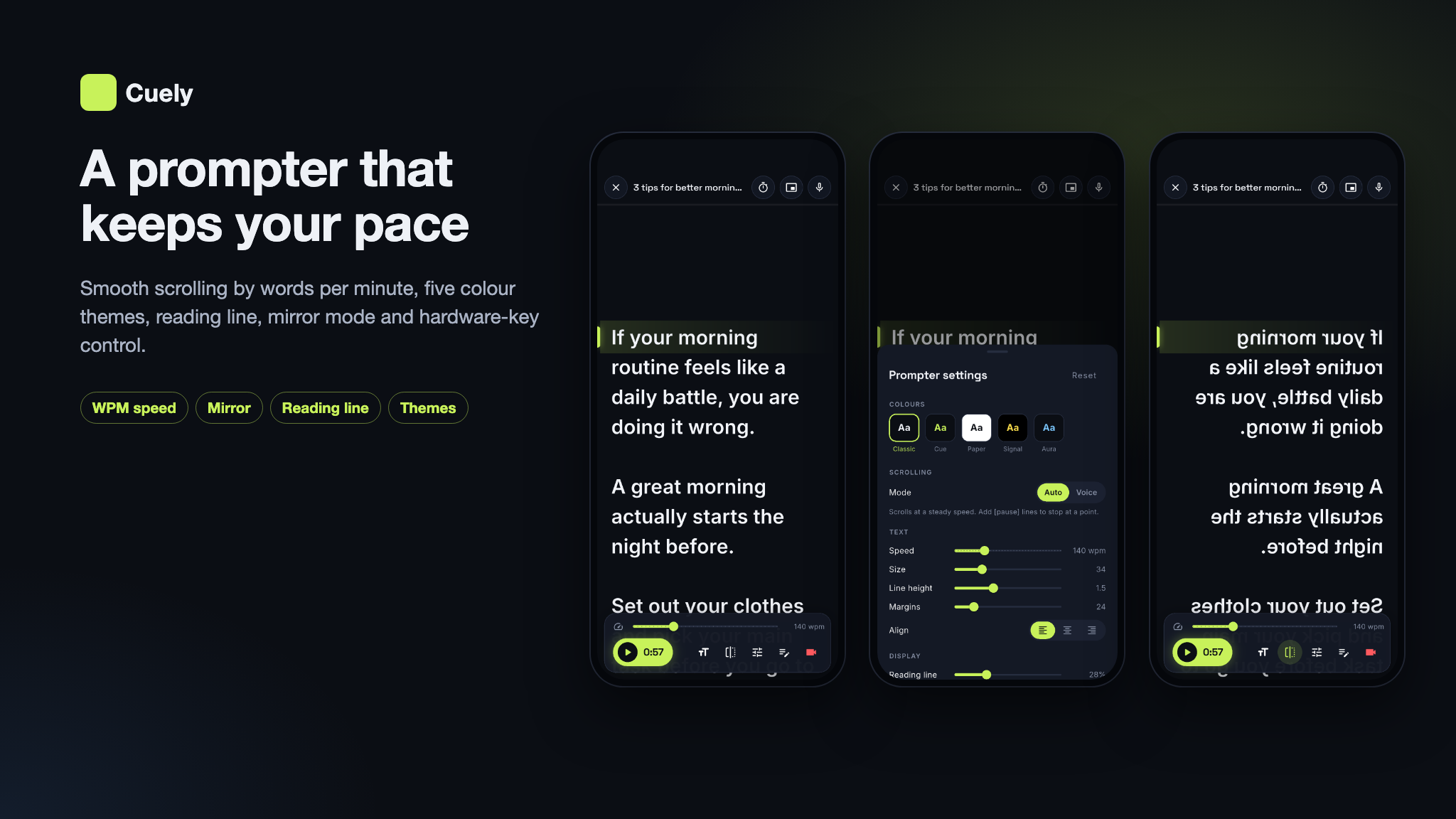
- One app design, dark, with five prompter colour presets (Classic, Cue, Paper, Signal, Aura)
- 12-language app (ar, de, en, es, fr, it, ja, ko, pt, ru, tr, zh), with a right-to-left layout for Arabic
- 11-language website (en, ar, de, es, it, tr, ja, ko, zh, hi, id), with a right-to-left layout for Arabic
- Five onboarding layouts in the app, chosen with one constant, and a custom RevenueCat paywall
- A browser installer (
/setup) and a one-command local setup script (scripts/run-local.sh) - Complete documentation in HTML and PDF (Cuely-Documentation.pdf) with screenshots — installation, the admin panel, AI, captions, RevenueCat, media storage, deployment, the mobile API, the app walkthrough, Remote Config, branding (app name, icon, splash) and store release
Key Features
- Scripts: write and edit scripts, organise them in folders, import a
.pdf,.docx,.txtor.mdfile, and see the reading time at your own speed. Mark a[pause]on its own line to stop the scroll there, and==highlight==a phrase to make it stand out on the prompter. - Template library: ready scripts by category and platform, managed in the admin panel, with Premium-only templates locked for free users.
- Cloud backup: signed-in users’ scripts are backed up to your server and synced across their devices.
- AI Studio: write a script from a topic for a platform, a tone (friendly, confident, funny, calm, persuasive), a length (30 seconds to 5 minutes) and a language; rewrite, shorten, expand or translate your own script; get hook ideas — with a free daily quota you set in the admin panel.
- Fit to time: pick 0:30, 1:00, 1:30 or 2:00 and the AI shortens or expands the script to that reading time at your words-per-minute setting.
- Scrolling prompter: smooth scrolling by words per minute, font size, line height, side margins, text alignment, colour presets, a reading line, a countdown, horizontal and vertical mirroring for beam-splitter rigs, and the camera preview behind the text with adjustable opacity.
- Remote and keyboard control: play / pause, jump lines and change speed with a Bluetooth keyboard or remote, media keys or the phone’s volume buttons.
- Voice follow (Premium): the prompter scrolls as you speak, using the phone’s built-in speech recognition — no AI key needed. Switched on or off for everyone from the admin panel.
- Floating prompter (Android, Premium): the script scrolls in a window over other apps, such as the camera, Instagram or Zoom. Switched on or off from the admin panel.
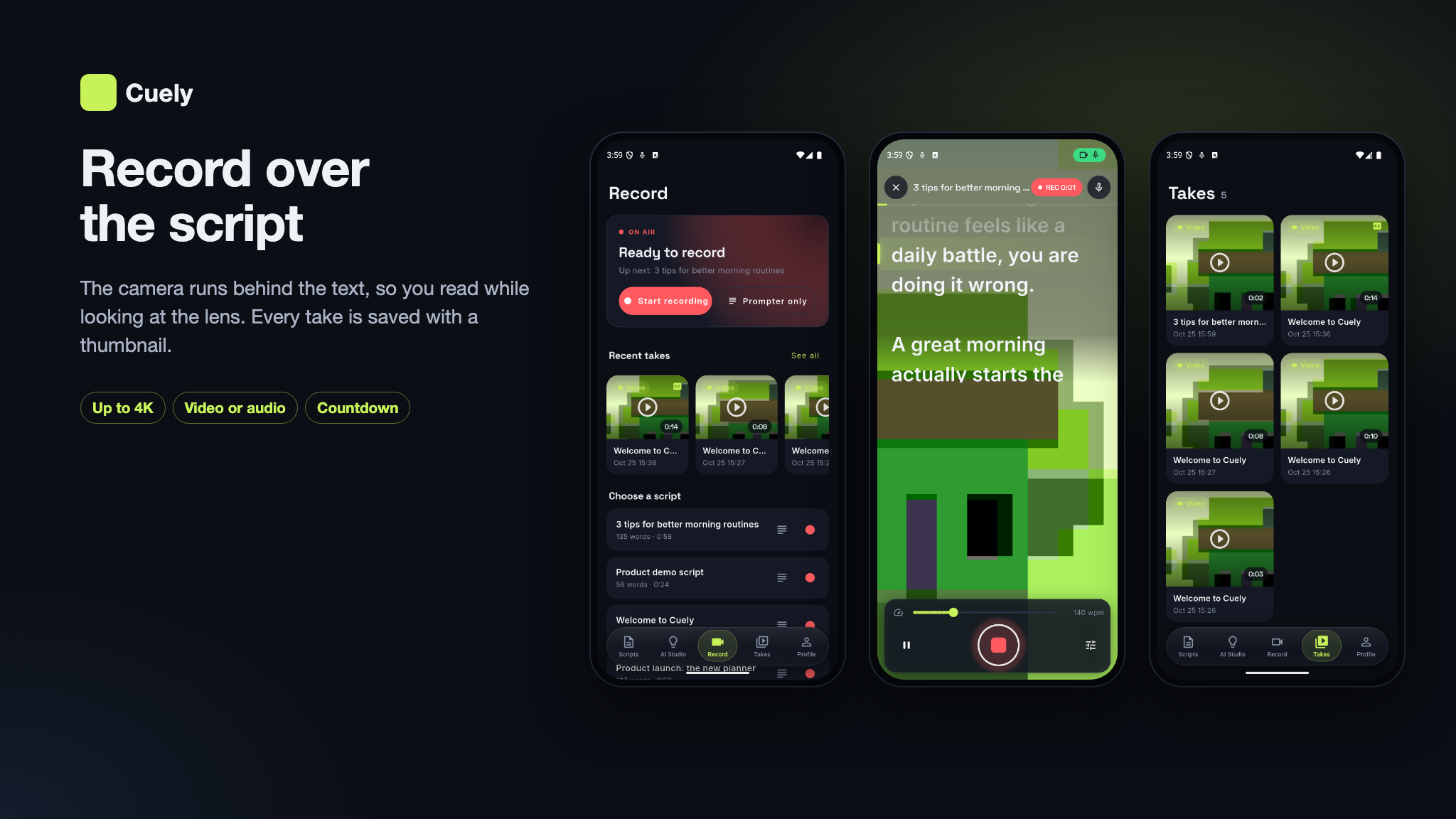
- Record: front or back camera behind the script, 720p, 1080p or 4K (Premium), 24, 30 or 60 fps, a framing grid, landscape, or an audio-only take.
- Takes: every take kept with a thumbnail or waveform, a player, share, and save to the gallery (Movies / Music on Android, the share sheet on iOS).
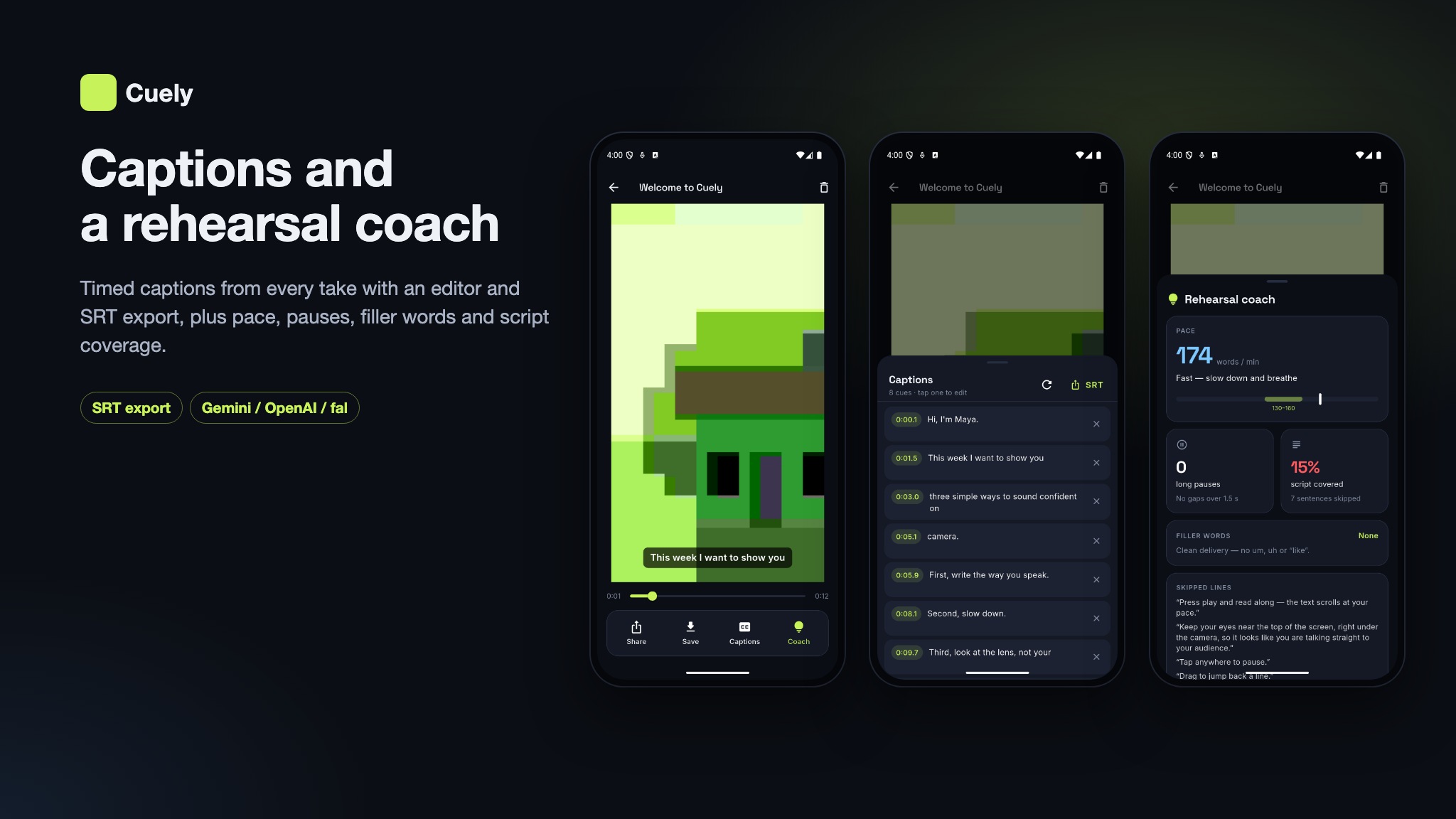
- Auto-captions (Premium): timed captions from the take’s audio by OpenAI Whisper, fal.ai or
Gemini, shown over the video, editable cue by cue, re-transcribed on request and exported as an
.srtfile. - Rehearsal coach (Premium): pace in words per minute, filler words, long pauses, script coverage with the lines you skipped, and three AI tips for the next take.
- Cuely Premium: weekly, monthly, yearly (with an optional trial) and lifetime plans through
RevenueCat, served to the paywall by the public
/plansendpoint; the plans, their store product ids and the premium feature list are edited in the admin panel. Restore purchases and an optional discounted offer are included. - Ads for free users only: an AdMob banner and an interstitial after recording, with the interval and the unit ids per platform set in the admin panel. Premium users never see ads.
- Notifications: push through OneSignal to everyone or a group of members, with a copy in each member’s in-app inbox and an unread count.
- Accounts: an instant guest start with no sign-up, email sign-up and sign-in on your backend (with password reset), and Google or Apple sign-in through Firebase. A guest’s scripts and Premium purchase move to the account when they sign in.
- In-app support: users send a support request from the app and read your replies; a reply or status change also emails them.
- Remote configuration: free script limit, daily AI quota, feature flags, ads, maintenance mode
with a message, force update with minimum and latest versions per platform, store URLs and the terms,
privacy and support links — all from the admin panel, served by
GET /api/v1/config. - AI Providers per Tool: Gemini, OpenAI, Anthropic, xAI, Mistral, DeepSeek, Groq, Cohere, OpenRouter, Azure OpenAI, Amazon Bedrock, Ollama or any OpenAI-compatible API — keys saved encrypted in the panel with a key check, a provider and model per tool, automatic failover when one fails, and the cost of every run in the usage log.
- Admin panel: a dashboard, members (search, premium status, sessions, account deletion requests), templates and categories, AI Studio (providers, every tool’s prompts, model, token limit and Premium flag, a test run, and the usage log), caption jobs, premium plans, subscriptions and RevenueCat transactions, push notifications, support tickets with replies, contact messages, newsletter subscribers, email templates with a preview, pages, blog and FAQ, languages, and settings for the app, the website, SMTP, social login and captcha. Two-factor sign-in for staff, and moderator accounts that cannot change plans, AI tools or app settings, and cannot edit, suspend or delete administrators or other moderators.
- Media Library with 9 Storage Back Ends & CDN: keep files on this server, Amazon S3, Cloudflare R2, DigitalOcean Spaces, Backblaze B2, Wasabi, Google Cloud Storage, MinIO or Bunny Storage, with Cloudflare, Bunny, CloudFront or any custom CDN in front.
- 11 Website Languages: a landing page, CMS pages, a blog, a contact form, sign-in and registration with an emailed code, Google and Facebook sign-in, and the account deletion page — in English, Arabic (right to left), German, Spanish, Italian, Turkish, Japanese, Korean, Simplified Chinese, Hindi and Indonesian.
- Runs on shared hosting: a browser installer at
/setupthat checks the database and your Firebase file, a one-command local setup (scripts/run-local.sh), Upstash QStash instead of a queue worker, and a demo mode that blocks destructive admin actions on a public demo.
Important Notice to Our Valued Customers
We are committed to building a reliable and continuous business system, with your satisfaction and the success of
this product as our top priorities. Your feedback is crucial, and we encourage you to share any bugs, suggestions,
or new feature ideas. Your input directly supports our ongoing improvement and innovation.
We’re here to help — send us a message anytime through the CodeCanyon messaging system.
Thank you for being part of our journey.
Warm regards,
The Morningstarcode Team
| Author | morningstarcode |
|---|---|
| Price | $19 |
| Sales | 0 |
| Rating | 0 (0) |
| Published | Nov 4, 2026 |
| Last Update | Nov 4, 2026 |
| Compatible Software | Flutter 3.x |
| Demo Url | https://teleprompter.laravelbeginner.net/en |
| Mobile Files Included | Dart, YAML, .java, Layered PNG, JavaScript JS, CSS, PHP, HTML |
Categories
Tags
External listing. code.market does not sell this product and does not process payment for it. Pricing, payment, delivery, licensing, refunds, and support are handled by the third-party merchant on its own website. We may earn an affiliate commission from a referral. Details.
Products of the Week.
Submit🥇

Perceptle
Perceptle is a daily browser-based game that challenges you to test your sensory intuition through five quick estimation and rhythm-based rounds.
Other · 1 views · 0 clicksOther · Week 47 · 1 views · 0 clicks
🥈

Free LinkedIn Likes From Real
Get free LinkedIn likes on your posts from real members who react by hand. No
SaaS · 124 views · 2 clicksSaaS · Week 47 · 124 views · 2 clicks
🥉

STOP GUESSING WHAT TO POST
AI that learns your brand voice and builds a month of consistent, on-brand social content: carousels, posts and hooks that sound like you, not like everyone else's AI.
SaaS · 7,686 views · 71 clicksSaaS · Week 47 · 7,686 views · 71 clicks
#4

aaas.market
407 reliable micro tools for solo founders, marketers and creators. They work in your browser
SaaS · 122 views · 0 clicksSaaS · Week 47 · 122 views · 0 clicks