
CSV File Reader & CSV Viewer- Csv to Pdf Converte - PDF Reader - File Editor - Pdf Converter

Description


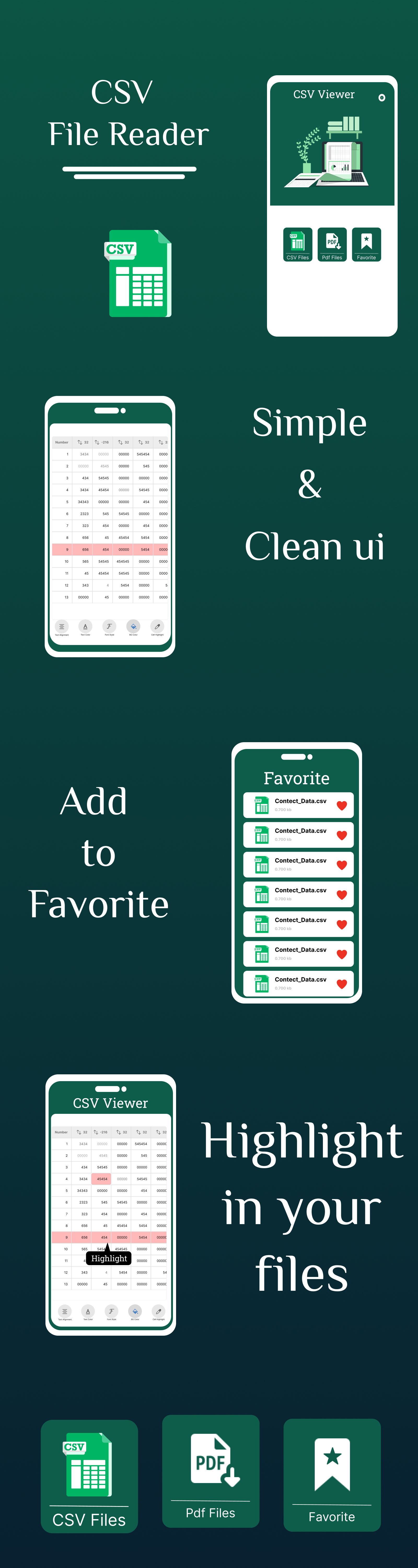
The ultimate companion for managing, reading, and editing CSV files with unmatched convenience and efficiency. Gone are the days of scattered data and cumbersome file management. With Edit CSV File Reader, everything you need is seamlessly consolidated into one powerful application, right on your device.
Centralized File Management
- Access all your CSV files from across your device in one centralized location.
- Say goodbye to endless folder searching – your data is always just a tap away.
✏️ Effortless Editing
- Edit any cell value with ease and precision.
- Copy cells, rows, or columns to streamline your workflow.
- Enable/disable line numbers for a personalized viewing experience.
- Sort columns in ascending or descending order with a single tap.
- Jump to specific rows or scroll to top/bottom with ease.
Customization Options
- Adjust text size, font type, and text color to your liking.
- Add background colors or highlight specific cells for better visibility.
⚙️ Enhanced Functionality
- Mark favorite files for quick access.
- Convert CSV files to PDF format for easy sharing.
- View PDFs directly within the app – no need for external viewers.
- Seamlessly share your CSV or converted PDF files.
Comprehensive CSV File Toolkit
- View and Read: Simple, intuitive interface to open any CSV file.
- Edit with Ease: Modify cell data, copy, sort, and jump through rows quickly.
- Customization: Fully personalize how your CSV content is displayed.
- Favorites: Quickly access frequently used CSV files.
- Convert to PDF: Instant CSV to PDF conversion and viewing within the app.
- File Sharing: Share PDFs or original CSV files directly.
Bonus Features
- ️️ Intuitive, fast-loading interface built for productivity.
- Add to Favorites for instant access to key files.
- Share directly to email, messaging apps, or cloud drives.
More Items by CodeMaxInfotech
- Smart Clock – Timer & World Clock – Easy Alarm Management
- Expenses Money Manager – Daily Spending Tracker
- Voice Changer Effects – Female Voice & Audio Editor
- ⌨️ Font Keyboard – Themes & Emoji Keyboard
- Birthday Status & Video Maker – Greeting Cards & Reminders
- Todo List – Daily Routine Planner & Task Reminder
- Always On Display – AMOLED Clock with Edge Lighting
Technical Highlights
- Language: 100% Java (No Kotlin)
- Clean Architecture (Separation of Concerns – Activity, Adapter, Utility Classes, etc.)
- Easy to Integrate AdMob or Other SDKs
- Well-Documented Code – Ideal for beginners and professionals
- Supports Android SDK 21 – 34+ (Lollipop to Android 14)
- No third-party dependencies required – Lightweight & fast performance
- Android Studio Project (Latest Gradle)
- MVVM-inspired structure (for future scalability)
Use Cases
- Integrate advanced features in your existing app
- Offer productivity apps to clients or on freelancing platforms
- Educational tool for developers learning Java-based Android
Why Buy This App?
- ✅ Full-featured & production-ready
- ✅ 100% written in Java – no Kotlin required
- ✅ Clean, readable code – easy to modify and maintain
- ✅ Professionally designed UI & UX
- ✅ Works offline – no login or API required
- ✅ Fast loading & battery optimized
Target Audience
- Android developers
- App resellers
- Entrepreneurs in productivity & tools niche
- Students or educators using Android Java apps as learning tools

| Type | Android App |
|---|---|
| Author | CodeMaxInfotech |
| Category | Mobile / Android / Full Applications |
| Price | $26 |
| Sales | 1 |
| Published | Nov 6, 2023 |
| Last Update | Nov 6, 2023 |
| Compatible Software | Android 12.0, Android 11.0, Android 10.0, Android 9.0 |
| Mobile Files Included | .apk, .dex, .db, .java, .xml, Layered PSD, Layered PNG |
Categories
Tags
External listing. code.market does not sell this product and does not process payment for it. Pricing, payment, delivery, licensing, refunds, and support are handled by the third-party merchant on its own website. We may earn an affiliate commission from a referral. Details.
Products of the Week.
Submit🥇

STOP GUESSING WHAT TO POST
AI that learns your brand voice and builds a month of consistent, on-brand social content: carousels, posts and hooks that sound like you, not like everyone else's AI.
SaaS · 4,291 views · 38 clicksSaaS · Week 45 · 4,291 views · 38 clicks
🥈

Conversational Backlinks for Busy Founders
Place Backlink Relevant Conversation for your domain across Forums and Conversations
Website · 42,004 views · 223 clicksWebsite · Week 45 · 42,004 views · 223 clicks
🥉

upvote.club
Free Social Media Engagement that Helps Boost Your Content. Upvote Club supports 19 social networks with 100+ engagement actions in one dashboard. Add links to your posts and get free engagement from real users.
SaaS · 40,046 views · 117 clicksSaaS · Week 45 · 40,046 views · 117 clicks
#4

Substack Posting API
Onboard your Agent to Substack. Write Publish on Substack via API
SaaS · 59,055 views · 198 clicksSaaS · Week 45 · 59,055 views · 198 clicks
#5

Seenshot App
Free, Fast, MacOS Screenshot app. Make Screenshot cmd+shift+2 and send it via link
Desktop App · 28,432 views · 122 clicksDesktop App · Week 45 · 28,432 views · 122 clicks
#6

Hand-Placed Backlinks $9.99 per link. Flat rate.
Buy hand-placed forum, Q-A and directory backlinks. Flat $9.99 per link, no subscriptions — you only pay for approved listings.
Website · 4,265 views · 19 clicksWebsite · Week 45 · 4,265 views · 19 clicks
#7

Free Invoice Generator - PDF Invoices in Your Browser, No Sign-Up
A free invoice maker for freelancers and small businesses: fill in the invoice, check the live preview, and download a PDF that looks exactly like it. Any currency, tax per item, three templates, no sign-up, and nothing leaves your device.
2,940 views · 17 clicksWeek 45 · 2,940 views · 17 clicks
#8

Merge PDF Files Free - Combine PDFs in Your Browser, No Upload
A free PDF merger for office workers, students, and freelancers: combine PDFs and images into one file in the browser, reorder files and pages, pick page ranges, keep bookmarks, and open password-protected PDFs. Nothing is uploaded, no sign-up, no watermark.
2,717 views · 13 clicksWeek 45 · 2,717 views · 13 clicks