
Crono Desktop - Terminal-Style File Archive & Organizer - Electron, Node.js, SQLite, Encrypted
Description
Crono Desktop – Terminal-Style File Archive System
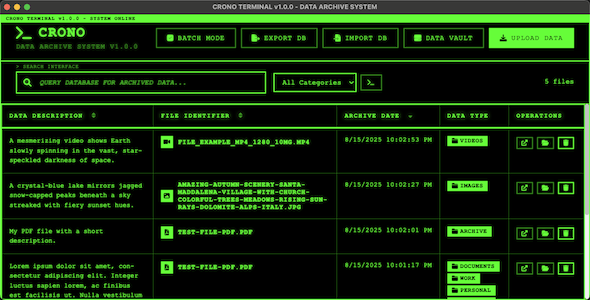
Crono Desktop is a powerful local file archiving and organization system with a unique cyberpunk terminal aesthetic. It features advanced categorization, real-time search, and encrypted backup capabilities. Built with Electron for cross-platform compatibility, it provides secure local file storage with no cloud dependencies.The application features a distinctive terminal-style interface with a green-on-black theme and an authentic “80s hacker aesthetic” — a retro, cyberpunk look that pairs nostalgic visuals with modern usability and secure local file management.
This is the complete source code version of Crono Desktop. You receive the full source code for customization, rebranding, and building your own file management application. No pre-built executables are included – you build everything from source.
Live Preview
The application features a distinctive terminal-style interface with green-on-black color scheme, reminiscent of classic command-line interfaces but with modern usability. All file operations are visual and user-friendly despite the retro aesthetic.News
Crono Desktop is built with modern web technologies including Electron, SQLite, and Node.js. The codebase is well-documented and follows best practices for maintainability and customization.Requirements
Crono Desktop requires Node.js 18.0.0+ for development and building. It supports Windows 10+, macOS 10.14+, and Ubuntu 18.04+.We provide comprehensive documentation including a complete Developer Guide with rebranding instructions, build processes, and customization examples that will save you significant development time!
Documentation & Support
Crono Desktop comes with extensive documentation covering both end-user functionality and developer customization. The documentation maintains the same terminal aesthetic as the application for a cohesive experience.Complete documentation includes:
- User Documentation: Complete guides for end users (mobile-responsive)
- Developer Guide: Source code customization and building
- Rebranding Instructions: Step-by-step customization guide
- Build Process: Multi-platform deployment instructions
- Mobile Testing: Comprehensive mobile responsiveness validation
Features
Crono Desktop is a comprehensive file archiving solution with professional-grade features:- Terminal-Style Interface: Unique cyberpunk aesthetic with green-on-black theme
- Local File Archiving: Automatic file copying with organized storage
- Advanced Search: Real-time search across filenames, descriptions, and categories
- Category System: Hierarchical categories with custom icons
- Batch Operations: Select and process multiple files simultaneously
- Encrypted Exports: Password-protected database backups
- Drag & Drop: Intuitive file upload interface
- Cross-Platform: Windows, macOS, and Linux support
- No Cloud Dependencies: Complete offline functionality
- Smart Sorting: Sort by description, filename, or date
- File Integrity: Original files remain untouched
- Keyboard Shortcuts: Power user productivity features
- Mobile-Responsive Documentation: Fully responsive documentation with collapsible mobile menu
- Database Import/Export: Migration and backup capabilities
- Missing File Detection: Visual indicators for moved/deleted files
Framework and Libraries
Crono Desktop is built with Electron for cross-platform desktop applications, using SQLite for local database storage and better-sqlite3 for high-performance database operations. The frontend uses vanilla JavaScript with a custom terminal-themed CSS framework. File compression uses archiver and yauzl for reliable archive operations.Source Code Package
You receive the complete source code including:- Main Application: Complete Electron application source
- Database Layer: SQLite integration and schema
- UI Components: Terminal-themed interface with animations
- Build Scripts: Multi-platform build and packaging
- Documentation: Comprehensive mobile-responsive user and developer guides
- Icon Generation: Scripts for creating custom app icons
- Utility Scripts: Database management and maintenance tools
Developer Benefits
- Easy Rebranding: Complete guide for customizing app name, colors, and branding
- Modular Architecture: Clean separation of concerns for easy modification
- Build Automation: Scripts for building on all platforms
- Customizable Categories: Easy to modify default categories and icons
- Extensible Database: Migration system for adding new features
- Theme Customization: Easy color scheme modifications
- Icon Customization: Tools for generating custom application icons
Technical Specifications
- Framework: Electron (cross-platform desktop)
- Database: SQLite with better-sqlite3
- Frontend: Vanilla JavaScript, HTML5, CSS3
- Backend: Node.js
- Build System: electron-packager with custom scripts
- Compression: archiver and yauzl libraries
- File System: Native Node.js fs operations
Release Summary
1.0.1 - Mobile Documentation Update

This release improves the documentation system with full mobile responsiveness and enhanced user experience across all devices.

New in 1.0.1:
- Mobile-responsive documentation with collapsible hamburger menu
- Touch-friendly navigation with proper mobile spacing
- Optimized content layout for smartphones and tablets
- Improved mobile typography and readability
- Auto-closing mobile menu with smooth animations
- Cross-device compatibility testing and optimization

1.0.0 - Initial Release (source code package)

This release is the complete source code package for Crono Desktop. The repository and included artifacts provide a ready foundation for building, customizing, and distributing the application. Key capabilities and included components in this package are summarized below.

Feature summary:
- Full source code for the main Electron application and UI
- Developer documentation and rebranding guide (now mobile-responsive)
- Cross-platform build scripts and packaging tools
- Terminal-themed UI with animations and responsive layout
- Local file archiving system with organized storage
- Real-time and advanced search across filenames, descriptions, and categories
- Hierarchical category system with customizable icons
- Batch operations for selecting and processing multiple files
- Encrypted export/import functionality (password-protected backups)
- Drag & drop upload interface and intuitive file operations
- Smart sorting by description, filename, and date
- Missing file detection with visual indicators for moved/deleted items
- Database import/export and migration utilities
- Icon generation scripts and customization tools
- Keyboard shortcuts and productivity-focused interactions
- Comprehensive mobile-friendly troubleshooting, FAQ, and user guides
- Offline-first design with no cloud dependencies
- Compatibility with Windows, macOS, and Linux
| Author | Honeyside |
|---|---|
| Price | $49 |
| Sales | 2 |
| Rating | 0 (0) |
| Published | Aug 25, 2025 |
| Last Update | Sep 1, 2025 |
| Application Runtime | Native |
| Demo Url | https://crono.honeyside.it/ |
| High Resolution | Yes |
| Operating System Versions | Windows 11, Windows 10, Windows 8 Metro, Windows 8 Desktop, Windows 7, macOS 15, macOS 14, macOS 13, macOS 12, macOS 11, macOS 10.15, macOS 10.14, macOS 10.13, macOS 10.12, OS X 10.11, OS X 10.10, OS X 10.9 |
| Video Preview Resolution | 1196x796 |
Categories
Tags
External listing. code.market does not sell this product and does not process payment for it. Pricing, payment, delivery, licensing, refunds, and support are handled by the third-party merchant on its own website. We may earn an affiliate commission from a referral. Details.
Products of the Week.
Submit🥇

STOP GUESSING WHAT TO POST
AI that learns your brand voice and builds a month of consistent, on-brand social content: carousels, posts and hooks that sound like you, not like everyone else's AI.
SaaS · 7,360 views · 67 clicksSaaS · Week 46 · 7,360 views · 67 clicks
🥈

Conversational Backlinks for Busy Founders
Place Backlink Relevant Conversation for your domain across Forums and Conversations
Website · 46,643 views · 232 clicksWebsite · Week 46 · 46,643 views · 232 clicks
🥉

upvote.club
Free Social Media Engagement that Helps Boost Your Content. Upvote Club supports 19 social networks with 100+ engagement actions in one dashboard. Add links to your posts and get free engagement from real users.
SaaS · 44,583 views · 127 clicksSaaS · Week 46 · 44,583 views · 127 clicks
#4

Substack Posting API
Onboard your Agent to Substack. Write Publish on Substack via API
SaaS · 63,471 views · 206 clicksSaaS · Week 46 · 63,471 views · 206 clicks
#5

Seenshot App
Free, Fast, MacOS Screenshot app. Make Screenshot cmd+shift+2 and send it via link
Desktop App · 32,720 views · 127 clicksDesktop App · Week 46 · 32,720 views · 127 clicks
#6

Hand-Placed Backlinks $9.99 per link. Flat rate.
Buy hand-placed forum, Q-A and directory backlinks. Flat $9.99 per link, no subscriptions — you only pay for approved listings.
Website · 8,340 views · 19 clicksWebsite · Week 46 · 8,340 views · 19 clicks
#7

Free Invoice Generator - PDF Invoices in Your Browser, No Sign-Up
A free invoice maker for freelancers and small businesses: fill in the invoice, check the live preview, and download a PDF that looks exactly like it. Any currency, tax per item, three templates, no sign-up, and nothing leaves your device.
6,966 views · 29 clicksWeek 46 · 6,966 views · 29 clicks
#8

Merge PDF Files Free - Combine PDFs in Your Browser, No Upload
A free PDF merger for office workers, students, and freelancers: combine PDFs and images into one file in the browser, reorder files and pages, pick page ranges, keep bookmarks, and open password-protected PDFs. Nothing is uploaded, no sign-up, no watermark.
6,446 views · 18 clicksWeek 46 · 6,446 views · 18 clicks