
CourtClips | Instant Replay Camera With Rolling Buffer, Slow Motion and Frame Scrubbing - SwiftUI
Description
CourtClips – Instant Replay Camera for Sports
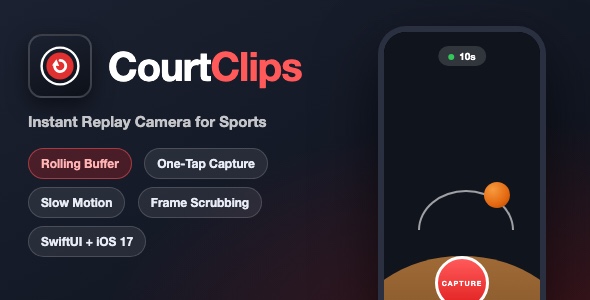
CourtClips is a native iOS instant-replay camera app. It continuously buffers the last seconds of live camera footage in the background, so a single tap on the big red CAPTURE button saves the action you JUST saw – the goal, the dunk, the match point – without pressing record at the right moment. It is built for coaches, parents at weekend games, and anyone who ever said “did you get that on camera?”
Demo Instructions
- No login and no demo credentials are required. The app is 100% offline – there is no account system, no server and no API keys.
- On first launch the app asks for camera and microphone permission (required by iOS for any camera app). Grant access and the live view starts buffering immediately.
- Let the buffer fill for about 10 seconds (the pill at the top turns green), then tap CAPTURE to export a replay clip.
- Open the clips library from the stack icon in the top right corner to review, slow down, scrub, save, share or delete clips.
Everything the App Does
- Rolling video buffer – continuously records the last 10, 20, 30 or 60 seconds of footage (user selectable from the buffer pill)
- One-tap instant replay export – CAPTURE saves the buffered action as a single MP4 video, with audio
- Memory-safe segment engine – footage is written to short 2-second H.264 segment files on disk and joined with AVFoundation composition, so long sessions stay stable
- Live camera preview with aspect-fill video layer
- Pinch-to-zoom on the live preview
- Front / back camera flip button
- Hardware lens picker (.5x, 1x, 2x) that reads the real virtual-device switch-over factors of the iPhone camera
- Buffer status indicator – orange dot while filling, green when the buffer is full, with a live seconds counter
- Playback library – saved clips listed with video thumbnails, date, time and duration, newest first
- Swipe-to-delete in the clips list
- Video player with automatic looping playback
- Slow motion – 0.25x, 0.5x and 1x playback rate buttons
- Frame scrubbing – a slider that seeks with zero tolerance for frame-accurate inspection
- Save clip to the photo library (add-only photo permission)
- Share clip via the system share sheet (ShareLink)
- Delete clip with a confirmation alert
- Capture pulse animation, capture / flip / success haptic feedback and a “Clip captured!” toast
- Friendly permission request screen and a “denied” fallback screen that deep-links to Settings
- In-app error banner with dismiss action
- Portrait and landscape support, dark camera-style UI throughout
Technology
- Language: Swift 5, SwiftUI
- Minimum iOS: 17.0
- Architecture: @Observable (Observation framework) – no UIKit view controllers, no storyboards
- Video engine: AVFoundation – AVCaptureSession, AVAssetWriter (H.264 1080p, AAC audio), AVMutableComposition, AVAssetExportSession
- Playback: AVKit VideoPlayer with periodic time observer
- Photos: PHPhotoLibrary (add-only)
- Dependencies: none – zero third-party packages, no CocoaPods / SPM / Carthage
- Single Xcode target, file-system-synchronized groups (Xcode 16+ project format)
What the Buyer Gets
- Complete Xcode source project (Swift files, asset catalog, app icon)
- documentation.html – step-by-step setup guide with screenshots: open and run, change the bundle ID, rename the app, replace the icon, re-skin the theme, adjust buffer options and submit to the App Store
- screenshots folder with all app screens
- Ready to build with Xcode – no extra configuration, no accounts, no API keys
Development Disclosure
Portions of this template’s source code were developed with AI-assisted tools. All code has been reviewed, tested and is delivered as a fully working Xcode project.
A Note on Templates
This item is a source-code template for developers. Xcode knowledge is required to customize, build and publish it. The app is provided as-is with the full feature list above – please read the documentation before purchasing.
| Type | iOS App |
|---|---|
| Author | mefjudevllc |
| Price | $14 |
| Sales | 0 |
| Rating | 0 (0) |
| Published | Sep 14, 2026 |
| Last Update | Sep 14, 2026 |
| Compatible Software | Other |
| Compatible With | Swift |
| Mobile Files Included | .h |
Categories
Tags
External listing. code.market does not sell this product and does not process payment for it. Pricing, payment, delivery, licensing, refunds, and support are handled by the third-party merchant on its own website. We may earn an affiliate commission from a referral. Details.