
Corona | Medical Pharmacy WooCommerce WordPress Theme

Description
Latest Version 2.2.7 – Aug 28, 2026 – view changelog Always compatible with the latest WordPress & WooCommerce versions 24+ Medical Pharmacy Demos Elementor Page Builder Elementor Builder for Header and Footer AI Product Review Summary (OpenAI with ChatGPT) RTL Ready for All Demos Mobile Version Ready 360° Product Viewer Ultra Performance Theme One-Click Demo Importer 24/7 – Reliable Support Elementor Page Builder Compatible Revolution Slider Included Dokan Multivendor Marketplace Compatible WC Vendors Compatible MultiVendorX Compatible WCFM Marketplace Compatible








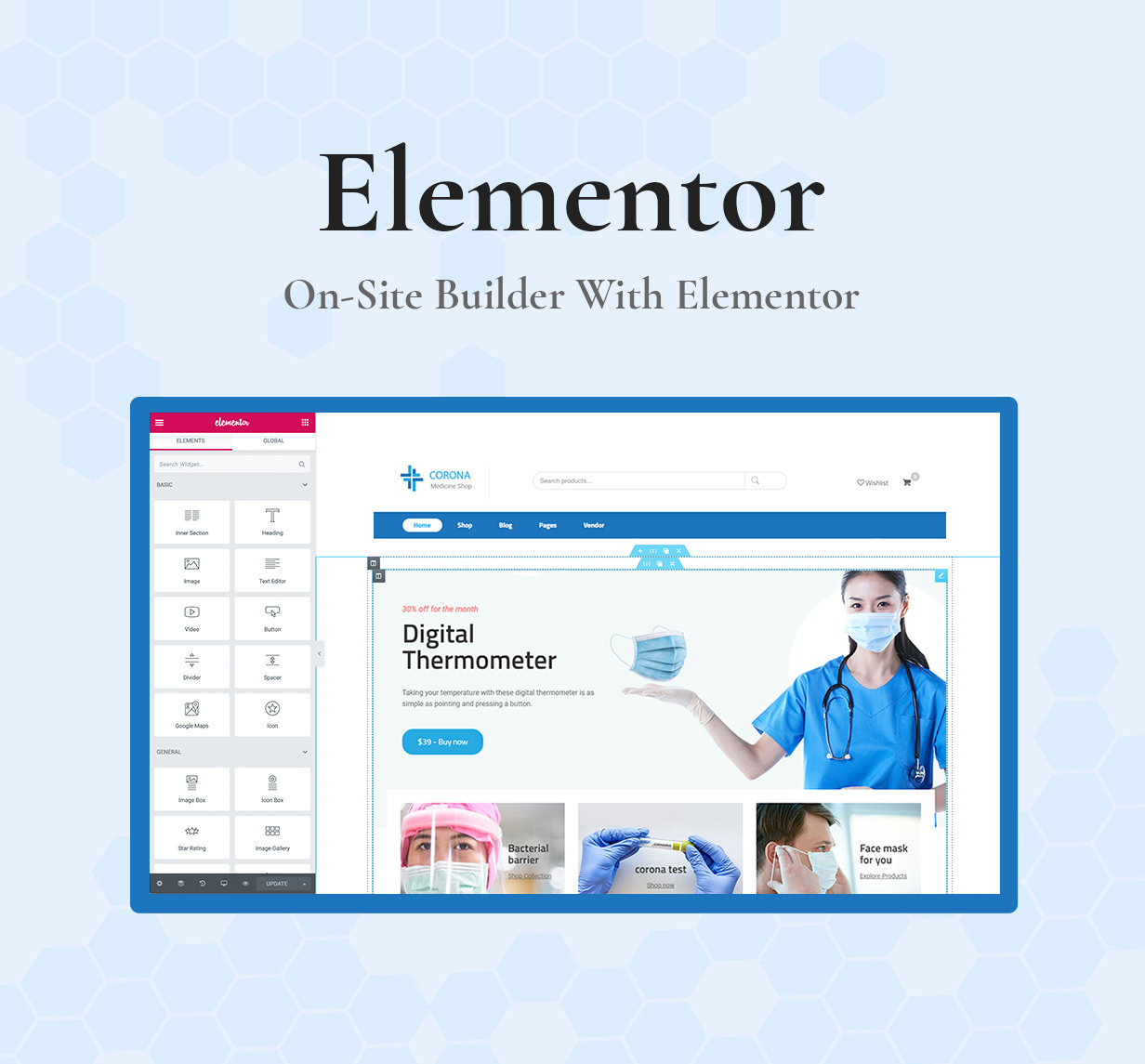
Corona Theme – Overview
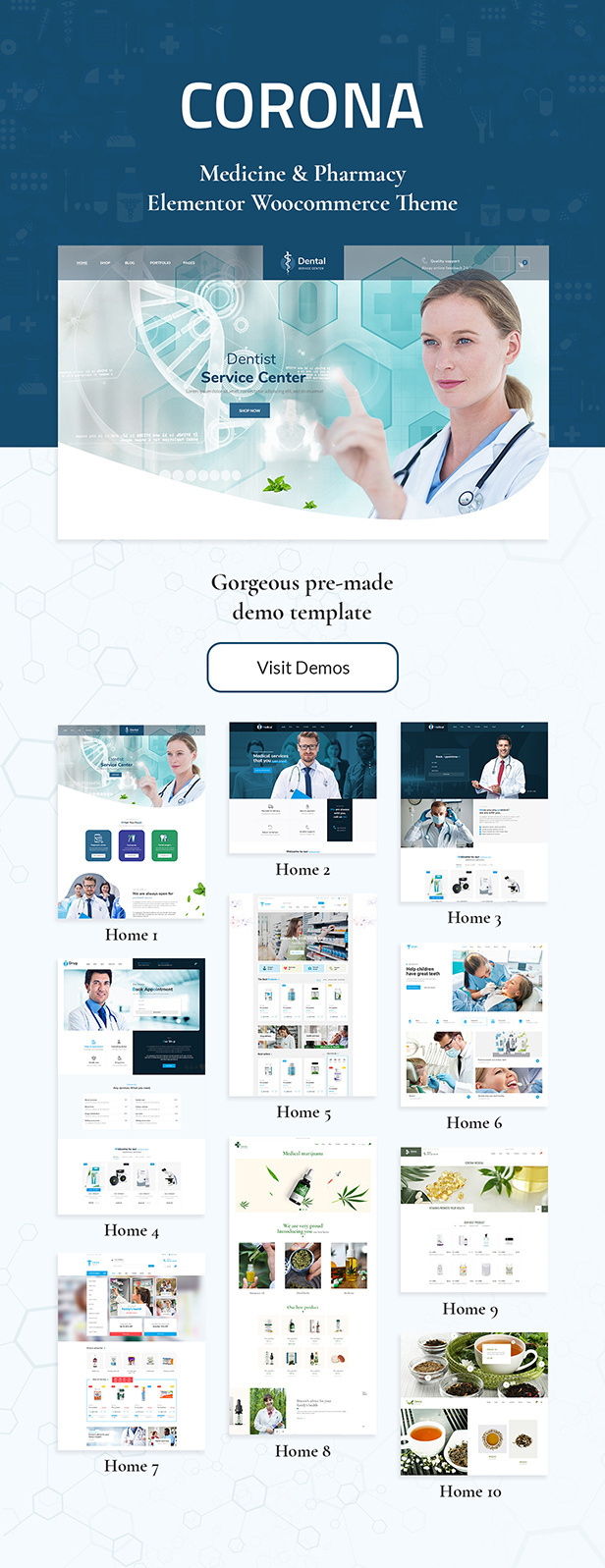
Corona is well suited for Medical Clinic and Pharmacy store.
Elementor – The World’s Leading WordPress Page Builder lets you design on the frontend with instant, real time results. No more drag, drop & wait.
This amazing theme is integrated with WooCommerce, built with Performance in mind, many Shortcodes with lots of features such as GDPR Compliant, GUTENBERG Optimized, Mobile Optimized, Multi-Vendors like Dokan, WC Vendors, MultiVendorX, WCFM Marketplace, Ajax Retail Filters, 360° Product Viewer, Off-Canvas Cart, Size and Color Variation Swatches and Advanced Widgets…
The Corona theme is optimized Ultra Performance. The One-Click Demo Importer plugin allows you import all beautiful demo layouts with just One Click. The theme is built with latest web technologies and SEO optimized to make it friendly with search engines. It is the right choice if you want to create professional and truly unique eCommerce website with ease.
Main Features
- 24+ Medical Pharmacy Demos
- Elementor Page Builder Compatible
- Revolution Slider Included
- Elementor Page Builder
- Elementor Builder for Header and Footer
- AI Product Review Summary (OpenAI with ChatGPT)
- RTL Ready for All Demos
- GDPR Compliant
- GUTENBERG Optimized
- Mobile Optimized
- Lookbook Version Ready
- One-Click Demo Importer
- One Touch Hover Products on touch devices
- Touch Friendly for touch devices
- Ultra Performance Theme
- 100% Fully Responsive & Mobile-friendly Theme
- Unlimited color and Google Fonts options
- Font Awesome icons
- Custom CSS in Theme Options
- Easy Installation and Setup
- Free lifetime updates
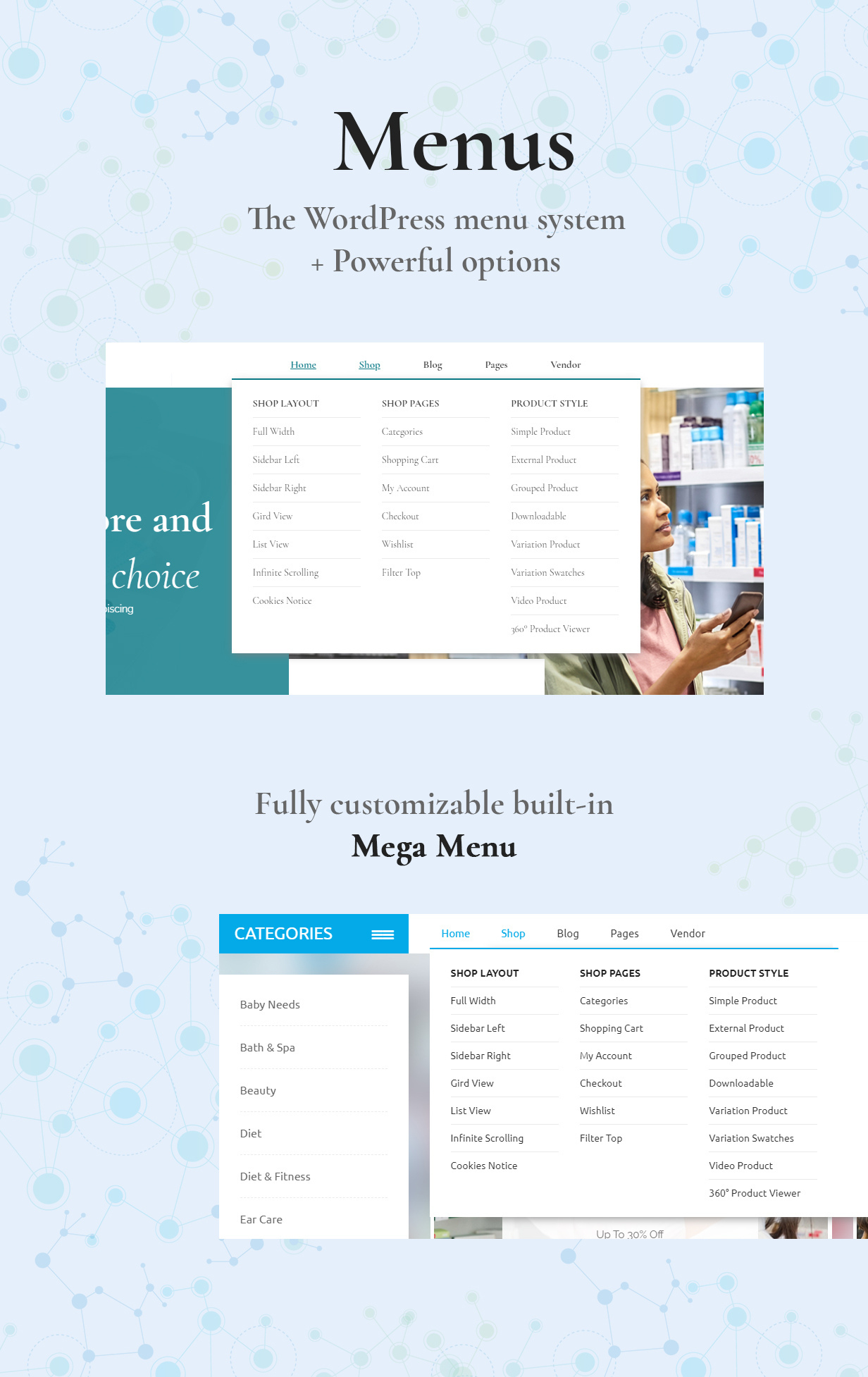
- Mega menu supported
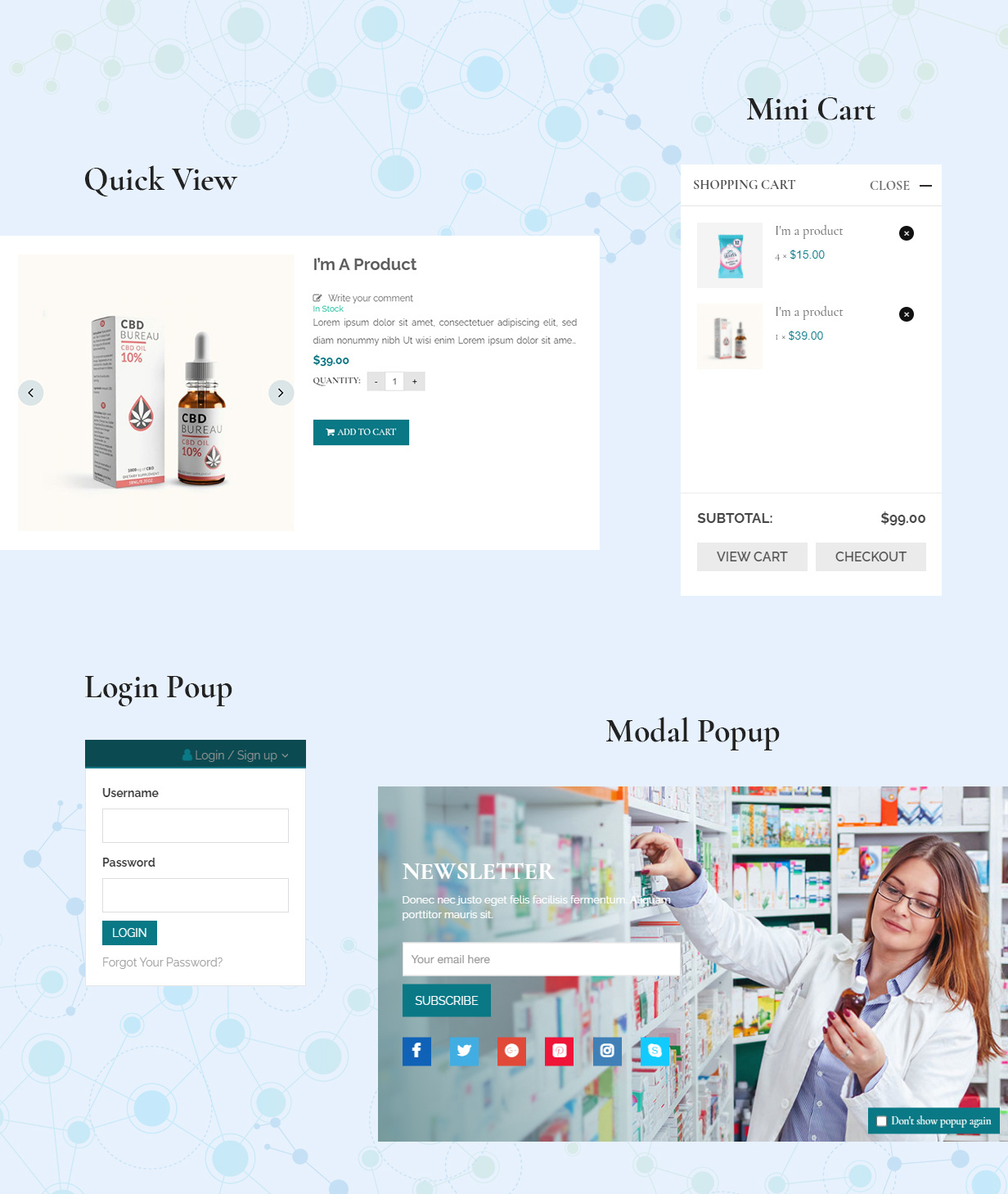
- Newsletter Popup
- Multiple Shortcodes
- Dokan Multivendor Marketplace Fully Compatible
- WC Vendors Fully Compatible
- MultiVendorX Fully Compatible
- WCFM Marketplace Fully Compatible
- YITH WooCommerce Wishlist Compatible
- YITH WooCommerce Compare Compatible
- MailChimp For WordPress Compatible
- Contact Form 7 Compatible
- WP Rocket Compatible
- W3 Total Cache Compatible
- WP Super Cache Compatible
- Yoast SEO Compatible
- Boxed Layout
- Child Theme Included
- Sticky Header supported
- Built with HTML5 and CSS3 smooth animation
- Social Share Buttons for: Posts, Pages, Projects, Shop
- Instagram Gallery
- Order Tracking
- Brands Carousel
- Cookie Law info popup
- Fully Responsive Design
- SEO Optimized
- Responsive & Retina ready
- Translations ready
- WPML Compatible
- Quality checked by Envato
- Well Documentation (Step by Step)
- 24/7 Reliable Support
- And much more…
WooCommerce Features
- Powerful Ajax Retail Filters in Shop pages
- WooCommerce Product Variation Swatches
- 360° Product Viewer
- Featured Product Video
- Simple or Variable Products
- Digital / Downloadable Products
- External / Affiliate Products
- Accordion Tabs
- Vertical Gallery
- Shop Categories
- Off-Canvas Filter
- Off-Canvas Cart
- AJAX Add to Cart and remove product form Cart
- Size and Color Variation Swatches
- Size Guide Option
- AJAX Live Search
- Layered navigation
- Product Quick View
- Product image Zoom
- Extra Custom Tabs for each product
- Countdown Timer for sale products
- Customers can Rate / Review products
- Unlimted Categories & Sub-Categories
- Catalog Mode available
- Built-in Order Tracking System
- Intricate Tax & Shipping Options
- WooCommerce Currency Switcher Compatible
- Powerful Store Management
- Unlimted Shop Layouts
Compatible with plugins
- Elementor Page Builder Compatible
- Gutenberg
- Dokan Multivendor Marketplace
- WC Vendors
- MultiVendorX
- WCFM Marketplace
- WooCommerce Multilingual
- Woocommerce Product Filter
- WOOF – WooCommerce Products Filter
- WooCommerce Variation Swatches
- Woocommerce colororimage variation select
- WooCommerce Currency Switcher
- Woocommerce Product Bundles
- Woocommerce Gift Card
- Woocommerce Points and Rewards
- YITH WooCommerce Wishlist
- YITH WooCommerce Compare
- YITH WooCommerce Ajax Search
- YITH WooCommerce Badge Management
- Yith Woocommerce Order Tracking
- Yith Woocommerce Brands Add-on
- Yith Advanced Refund System for Woocommerce
- BBPress, BuddyPress
- Yoast SEO
- WP Rocket
- WP Super Cache, W3 Total Cache
- WPML
- Polylang
- Loco Translate
- PoEdit
- Contact Form 7
- MailChimp for WordPress
- Mailpoet newsletter
- Easy WP SMTP
- Post Views Counter
- Algolia Search
- Simple WordPress Membership
- And more other plugins
CHANGELOG
Version 2.2.7 – Aug 28, 2026UPDATED: WordPress 7.1 compatibility UPDATED: WooCommerce 11.0.1 compatibility UPDATED: Elementor 4.2.3 compatibility UPDATED: Revolution Slider 6.7.58 includedVersion 2.2.6 – Apr 29, 2026
UPDATED: WordPress 6.9.4 compatibility
UPDATED: WooCommerce 10.7.0 compatibility
UPDATED: Elementor 4.0.4 compatibility
UPDATED: Revolution Slider 6.7.54 included
FIXED: AJAX Add To Cart in the Homepages, Shop pages and Product pages
FIXED: AJAX Update Cart in the Popup Sidebar Cart and Shopping Cart page
Version 2.2.5 – Mar 10, 2026
UPDATED: WordPress 6.9.1 compatibility
UPDATED: WooCommerce 10.5.3 compatibility
UPDATED: Elementor 3.35.6 compatibility
UPDATED: Revolution Slider 6.7.41 included
FIXED: The functionality and popup of Compare
FIXED: Outdated of the custom WooCommerce files in template
Version 2.2.4 – Sept 17, 2025
UPDATED: WordPress 6.8.2 compatibility
UPDATED: WooCommerce 10.1.2 compatibility
UPDATED: Elementor 3.32.1 compatibility
UPDATED: Revolution Slider 6.7.37 included
UPDATED: AJAX Add To Cart for Homepage, Shop page and Product page
UPDATED: AJAX Update Cart for Sidebar Cart popup and Shopping Cart page
FIXED: The Product Compare issues
Version 2.2.3 – Mar 28, 2025
FIXED: Swiper Slider does not work properly
FIXED: Outdated of the custom WooCommerce files in template

UPDATED: WordPress 6.7.2 compatibility
UPDATED: WooCommerce 9.7.1 compatibility
UPDATED: Elementor 3.28.1 compatibility
UPDATED: Revolution Slider 6.7.31 included
UPDATED: Mega Main Menu 2.2.4 included
Version 2.2.2 – May 31, 2024
ADDED: AI Product Review Summary (OpenAI with ChatGPT)

UPDATED: WordPress 6.5.3 compatibility
UPDATED: WooCommerce 8.9.1 compatibility
UPDATED: Elementor 3.21.8 compatibility
UPDATED: Style errors in demo content after updating Elementor ver 3.20.x, 3.21.x
UPDATED: Revolution Slider 6.7.12 included
UPDATED: Merge menu ThemeFTC in Backend

FIXED: PHP error deprecated in FTC Importer
FIXED: Duplicate Compare icon in widget Elementor Product Tab Slider
FIXED: Size image product default after importing
FIXED: Demo content after importing
FIXED: Some PHP errors in theme
FIXED: Some style errors in theme
Version 2.2.1 – Nov 13, 2023
FIXED: Not display widgets of "ThemeFTC Core" when editing page with Elementor
FIXED: FTC Instagram Feed widget doesn't show images
FIXED: TypeError in Console log: Cannot read properties of null (reading 'parentNode') in jquery.smartmenus.js
FIXED: Some errors on PHP 8

UPDATED: WordPress 6.4.1 compatibility
UPDATED: WooCommerce 8.2.2 compatibility
UPDATED: Elementor 3.17.3 compatibility
UPDATED: Revolution Slider 6.6.18 included
Version 2.2.0 – Aug 31, 2023
ADDED: ThemeFTC Core plugin version 1.0.0

REMOVED: ThemeFTC plugin
REMOVED: ThemeFTC for Elementor plugin

UPDATED: WordPress 6.3.1 compatibility
UPDATED: WooCommerce 8.0.3 compatibility
UPDATED: Elementor 3.15.3 compatibility
UPDATED: Revolution Slider 6.6.16 included
Version 2.1.3 – Apr 12, 2023
NEW: Option to use separate Mobile Menu Navigation

FIXED: Option enable/disable Header Sticky for the Elementor Header issue
FIXED: PHP 8 compatibility: Uncaught TypeError: Cannot increment array in .../widgets/ftc-gallery-instagram.php
FIXED: Warning: Trying to access array offset on value of type null in .../shortcode/custom_shortcodes.php
FIXED: Active Variation Shop in Theme Options issue
FIXED: Thumbnails Slider in the single product page issue
FIXED: Customizing main image size issue
FIXED: Customizing thumbnail image size issue
FIXED: Add-ons are not added to the Shopping Cart in variation products (WooCommerce Product Add-ons plugins compatibility)
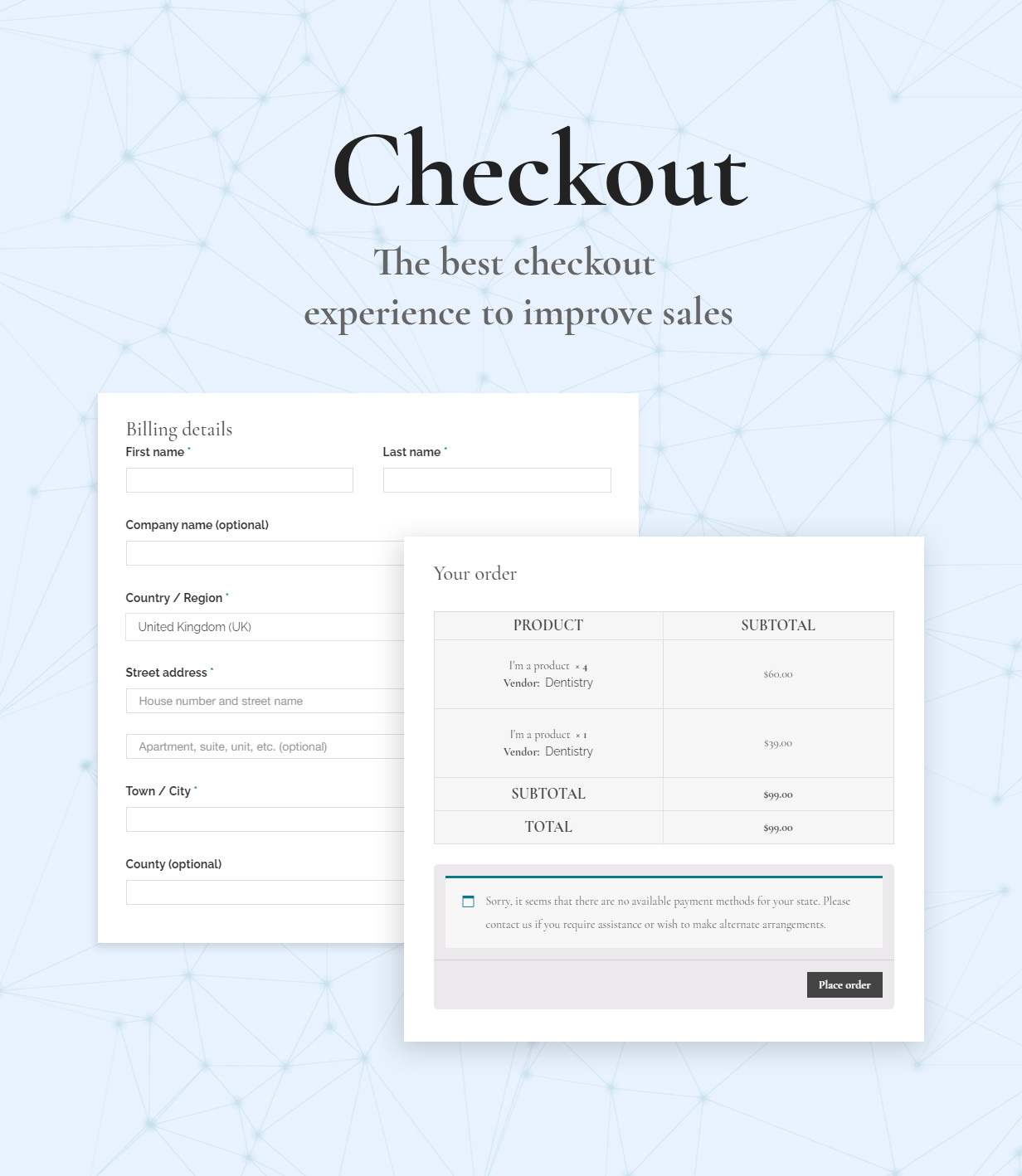
FIXED: Display product variations in the Shopping Cart and Checkout pages
FIXED: AJAX update Tini Wishlist does not work
FIXED: Duplicated Fields in variation products when using the WooCommerce Product Add-ons plugins

UPDATED: WordPress 6.2 compatibility
UPDATED: WooCommerce 7.5.x, 7.6.x compatibility
UPDATED: Elementor 3.12.1 compatibility
UPDATED: Revolution Slider 6.6.12 included
Version 2.1.2 – Oct 26, 2022
FIXED: AJAX Add To Cart, the product should not be added to the Cart if there are no options selected
FIXED: Ability choose another variant of the product and add it to the Cart without reloading the page
FIXED: Option Masonry in the FTC Portfolios Elementor Widget
FIXED: Deprecated: Function Elementor\DB::is_built_with_elementor is deprecated

UPDATED: WordPress 6.0.3 compatibility
UPDATED: WooCommerce 7.0.0 compatibility
UPDATED: Elementor 3.7.8 compatibility
UPDATED: Revolution Slider 6.6.5 included
Version 2.1.1 – July 14, 2022
FIXED: Deprecated: Elementor\Controls_Stack::_register_controls error

UPDATED: WooCommerce 6.7.x compatibility
UPDATED: Revolution Slider 6.5.25 included
UPDATED: Mega Main Menu 2.2.2 included
Version 2.1.0 – May 30, 2022
NEW: Demo 1 - Default
NEW: Demo 2 - Premium Medical
NEW: Demo 3 - Video Slider 1
NEW: Demo 4 - Video Slider 2
NEW: Demo 15 - Dental Clinic
NEW: Demo 16 - Vision Care
NEW: Demo 17 - Medical Equipment
NEW: Demo 18 - Healthy Food
NEW: Demo 19 - Bone and Joint
NEW: Demo 20 - Vitamins & Supplements
NEW: Demo 21 - Natural Pharmaceuticals
NEW: Demo 22 - Hand Sanitizer
NEW: Demo 23 - Herbal Tea 2
NEW: Demo 24 - Vision Care 2

UPDATED: WordPress 6.0.x compatibility
UPDATED: WooCommerce 6.5.x compatibility
UPDATED: Elementor 3.6.x compatibility
UPDATED: Revolution Slider 6.5.24 included
Version 2.0.2 – Jan 14, 2022
FIXED: Swiper Slider Elementor from Version 3.5.x

UPDATED: WordPress 5.9.x compatibility
UPDATED: WooCommerce 6.1.x compatibility
UPDATED: Elementor 3.5.x compatibility
UPDATED: Revolution Slider 6.5.15 included
Version 2.0.1 – Aug 10, 2021
NEW: Option On/Off live editor widget in Theme Options on WordPress 5.8

FIXED: Display Add Sidebar in Appearance -> widget on WordPress 5.8
FIXED: Minor PHP issue in Theme Options

UPDATED: WordPress 5.8 compatibility
UPDATED: WooCommerce 5.5.2 compatibility
UPDATED: Elementor 3.3.1 compatibility
UPDATED: Revolution Slider 6.5.6 included
Version 2.0 – May 21, 2021
NEW: Demo 1 - Medicine Shop
NEW: Demo 2 - Protective Equipment
NEW: Demo 3 - Herbal Essences
NEW: Demo 4 - Herbal Care
NEW: Demo 5 - Drug Store
NEW: Demo 6 - Dentistry
NEW: Demo 7 - Medicine & Health
NEW: Demo 8 - Medical Marijuana
NEW: Demo 9 - Medical & Pharmacy
NEW: Demo 10 - Herbal Tea
NEW: Demo RTL - Medicine Shop
NEW: RTL Ready for All Demos
NEW: Elementor Page Builder compatibility
NEW: Elementor Builder for Header and Footer

UPDATED: WordPress 5.7.2 compatibility
UPDATED: WooCommerce 5.3.0 compatibility
UPDATED: Elementor 3.2.3 compatibility
UPDATED: Elementor Pro compatibility
UPDATED: Revolution Slider 6.4.11 included
Version 1.2.4 – Feb 24, 2021
UPDATED: WordPress 5.6.2 compatibility
UPDATED: WooCommerce 5.0.0 compatibility
UPDATED: WPBakery Page Builder 6.6.0 included
UPDATED: Revolution Slider 6.4.1 included

FIXED: Display product image in the product detail page
Version 1.2.3 – Dec 16, 2020
UPDATED: WordPress 5.6 compatibility
UPDATED: WooCommerce 4.8.0 compatibility
UPDATED: Revolution Slider 6.3.3 included
FIXED: The problem with swipebox overlay: Replaced the swipebox by a new lightbox
FIXED: Zoom in the product details page
Version 1.2.2 – Dec 5, 2020
UPDATED: WordPress 5.5.3 compatibility
UPDATED: WooCommerce 4.7.1 compatibility
UPDATED: WPBakery Page Builder 6.4.2 included
UPDATED: Revolution Slider 6.3.2 included

FIXED: The vulnerability: Sanitized the meta boxes, use sanitization for all field types for example: sanitize_text_field(), sanitize_textarea(), sanitize_email() etc
Version 1.2.1 – Nov 3, 2020
UPDATED: WordPress 5.5.3 compatibility
UPDATED: WooCommerce 4.6.1 compatibility
UPDATED: WPBakery Page Builder 6.4.1 included
UPDATED: Revolution Slider 6.2.23 included
UPDATED: Mega Main Menu 2.2.1 included

FIXED: Options in ThemeOptions -> Product Category
+ Product SKU
+ Product Categories
FIXED: Options in ThemeOptions -> Product Details
+ Product Title
+ Product SKU
+ Product Categories
+ Product Tags
FIXED: Options in ThemeOptions -> Blog
+ Blog Excerpt
+ BLog Count Comment
FIXED: Options in ThemeOptions -> Blog Details
+ Blog Thumbnail
+ Blog Title
+ Blog Categories
+ Blog Date
+ Blog Author Box
+ Blog Count Comment
+ Blog Content
+ Blog Comment Form
FIXED: Cart layout - Cart Dropdown, quick Add To Cart shows a black screen
Version 1.2.0 – Aug 15, 2020
UPDATED: WordPress 5.5 compatibility
UPDATED: WooCommerce 4.4 and 4.3.2 compatibility
UPDATED: WPBakery Page Builder 6.2 included
UPDATED: Revolution Slider 6.2.19 included
FIXED: The WPBakery and Importer plugins don't work on WordPress 5.5
FIXED: The Theme Options plugin doesn't work on new version of the Redux Framework
Version 1.1.9 – Mar 24, 2020
UPDATED: WooCommerce 4.0 compatibility
UPDATED: Revolution Slider 6.2.2 included
Version 1.1.8 – Jan 31, 2020
UPDATED: WordPress 5.3.2 compatibility.
UPDATED: WooCommerce 3.9.1 compatibility.
UPDATED: WPBakery Page Builder 6.1 included.
UPDATED: Revolution Slider 6.1.8 included.
Version 1.1.7 – Oct 12, 2019
UPDATED: Some code according to Envato WordPress Theme RequirementsVersion 1.1.6 – Jul 17, 2019
UPDATED: FTC Importer to compatible with Revolution Slider 6.0.x, 6.0.5+
UPDATED: Outdated copies of some WooCommerce template files
UPDATED: All other plugins to latest version
Version 1.1.5 – Jun 13, 2019
NEW: Gutenberg Optimized
NEW: Improved Design with the spacing and typography
NEW: Powerful Ajax Retail Filters in Shop pages
NEW: WooCommerce Product Variation Swatches
NEW: Infinite scrolling for the shop page
NEW: Added Lightbox in product details page
NEW: Added blog posts Video, Audio, Gallery

TWEAK: Ultra Performance Theme (Continuously Optimized)
GTmetrix: A Class - 97/100 PageSpeed Score
Pingdom: A Class - 91/100 PageSpeed Score
And very High Performance on other tools
TWEAK: Improve Mobile Layout
TWEAK: Show 2 products per 1 row on Mobile
TWEAK: Show 3 products per 1 row on Tablets
TWEAK: Improve Slideshow on Mobile
TWEAK: Improve Footer on Mobile
TWEAK: Added Wishlist and Login links to Mobile Menu
TWEAK: Off-Canvas Cart Popup
TWEAK: 360° Product Viewer
TWEAK: Cookies Notice Popup
TWEAK: Compare Products Popup
TWEAK: Changed Icons on hover products
TWEAK: Ajax Top Filter in Shop Fullwidth Pages
TWEAK: Lighter Theme Package
TWEAK: Some CSS to improve the spacing and typography
TWEAK: Some Responsive bugs

FIXED: HTTPS issues
FIXED: Google Maps issue
FIXED: PHP Notices warning
FIXED: One-Click Demo Importer issue

UPDATED: WordPress 5.0.x, 5.1.x, 5.2.x, 5.2, 5.2.1 Ready
UPDATED: WooCommerce 3.5.x, 3.6.x, 3.6.1, 3.6.2, 3.6.3, 3.6.4 Ready
UPDATED: WPBakery Page Builder (formerly Visual Composer) 6.0.3 Ready
UPDATED: Revolution Slider 5.4.8.3 Ready
UPDATED: All other plugins to latest version
UPDATED: Documentation

More Demos are coming soon...
Version 1.1.4 – Aug 14, 2018
NEW: GDPR Ready.
NEW: 360° Product Viewer.
NEW: Product with Video.
NEW: Fully compatible with Multi-Vendors like Dokan, WC Vendors, MultiVendorX.
NEW: Off-Canvas Cart. Ajax add and remove products from Cart.
NEW: Attributes Size and Color Variation Swatches for variable products.
NEW: Top Filter on full width Category pages.

FIXED: Ajax load more posts for FTC-Blogs function.
FIXED: Show Expert Content of post on Blog page.
FIXED: Option of product details page.
FIXED: Some issues in translation.
FIXED: Some suggestions by Theme Check.

UPDATED: WordPress 4.9.8 Ready.
UPDATED: WooCommerce 3.4.4 Ready.
UPDATED: WPBakery Page Builder (formerly Visual Composer) 5.5.2 Ready.
UPDATED: Revolution Slider 5.4.8 Ready.
UPDATED: ThemeFTC plugin version 1.1.
UPDATED: Some CSS to improve the spacing and typography.

Updating...
Version 1.1.3 – May 15, 2018
- Added Mobile Layouts.
- Added Off-Canvas Menu for mobile.
- Added Newsletter Popup.
- Added Redux Framework Theme Options.
- Added Size Chart Guide in product details page.
- Updated WooCommerce latest version 3.3.5.
- Updated Revolution Slider latest version 5.4.7.3.
- Updated WPBakery Page Builder (formerly Visual Composer) latest version 5.4.7.
- And continue updating...
Version 1.1.2 – Jan 06, 2018
- Updated ThemeFTC Importer.
- Updated demo content files.
Version 1.1.1 – Dec 29, 2017
- Added One Click Demo Import plugin.
- Added Child Theme.
- Added Mailchimp Version: 4.1.12.
- Added Ajax Search function.
- Added Back To Top button.
- Updated WooCommerce template files latest version 3.2.5.
- Updated Visual Composer latest version 5.4.5.
- Updated Revolution Slider latest version 5.4.6.
- Updated Contact Form 7 latest version 4.9.2.
- Updated Yith-WooCommerce-Compare latest version 2.2.2.
- Updated documentation.
- Fixed bug can not display new product in the FTC Product Widget.
- Fixed bug search bar have been hidden when focus text box.
- Fixed problem with shopping cart table.
- Fixed problem with compare table.
- Fixed bug expert post in blog page.
- Fixed bug Page layout of Page options.
- And more...
Version 1.1 – Sept 13, 2017
- Updated WooCommerce template files to compatible with latest version of WooCommerce.
- Updated some shortcodes.
- Updated documentation.
- Added ajax remove cart function.
- And more...
Version 1.0 – Sept 09, 2017
Initial Release
| Type | WooCommerce Theme |
|---|---|
| Author | ThemeFTC |
| Category | Wordpress / Ecommerce / Woocommerce |
| Price | $59 |
| Sales | 206 |
| Rating | 4.38 from 13 ratings |
| Published | Sep 8, 2017 |
| Last Update | Aug 28, 2026 |
| Columns | 4+ |
| Compatible Browsers | IE10, IE11, Firefox, Safari, Opera, Chrome, Edge |
| Compatible Software | WordPress 7.0.x, WordPress 6.9.x, WordPress 6.8.x, WordPress 6.7.x, WordPress 6.6.x, WordPress 6.5.x, WordPress 6.4.x, WordPress 6.3.x, WordPress 6.2.x, WordPress 6.1.x, WordPress 6.0.x, WordPress 5.9.x, WordPress 5.8.x, WordPress 5.7.x, WordPress 5.6.x, WordPress 5.5.x, WordPress 5.4.x, WordPress 5.3.x, WordPress 5.2.x, WordPress 5.1.x, WordPress 5.0.x, WordPress 4.9.x |
| Compatible With | Elementor, Elementor Pro, WooCommerce 10.x.x, WooCommerce 9.x.x, WooCommerce 8.x.x, WooCommerce 7.x.x, WooCommerce 6.x.x, WooCommerce 5.x.x, WPML, Bootstrap 4.x |
| Documentation | Well Documented |
| Gutenberg Optimized | Yes |
| Layout | Responsive |
| Files Included | Layered PSD, PHP Files, CSS Files, JS Files, PSD |
| Widget Ready | Yes |
| Key Features | Medical Clinic, Pharmacy Drug Store, Elementor & Mobile Optimized Theme, Medicine & Healthcare, Regular Updates |
Categories
Tags
External listing. code.market does not sell this product and does not process payment for it. Pricing, payment, delivery, licensing, refunds, and support are handled by the third-party merchant on its own website. We may earn an affiliate commission from a referral. Details.
Products of the Week.
Submit🥇

STOP GUESSING WHAT TO POST
AI that learns your brand voice and builds a month of consistent, on-brand social content: carousels, posts and hooks that sound like you, not like everyone else's AI.
SaaS · 4,290 views · 38 clicksSaaS · Week 45 · 4,290 views · 38 clicks
🥈

Conversational Backlinks for Busy Founders
Place Backlink Relevant Conversation for your domain across Forums and Conversations
Website · 42,000 views · 223 clicksWebsite · Week 45 · 42,000 views · 223 clicks
🥉

upvote.club
Free Social Media Engagement that Helps Boost Your Content. Upvote Club supports 19 social networks with 100+ engagement actions in one dashboard. Add links to your posts and get free engagement from real users.
SaaS · 40,041 views · 117 clicksSaaS · Week 45 · 40,041 views · 117 clicks
#4

Substack Posting API
Onboard your Agent to Substack. Write Publish on Substack via API
SaaS · 59,051 views · 198 clicksSaaS · Week 45 · 59,051 views · 198 clicks
#5

Seenshot App
Free, Fast, MacOS Screenshot app. Make Screenshot cmd+shift+2 and send it via link
Desktop App · 28,425 views · 122 clicksDesktop App · Week 45 · 28,425 views · 122 clicks
#6

Hand-Placed Backlinks $9.99 per link. Flat rate.
Buy hand-placed forum, Q-A and directory backlinks. Flat $9.99 per link, no subscriptions — you only pay for approved listings.
Website · 4,260 views · 19 clicksWebsite · Week 45 · 4,260 views · 19 clicks
#7

Free Invoice Generator - PDF Invoices in Your Browser, No Sign-Up
A free invoice maker for freelancers and small businesses: fill in the invoice, check the live preview, and download a PDF that looks exactly like it. Any currency, tax per item, three templates, no sign-up, and nothing leaves your device.
2,936 views · 17 clicksWeek 45 · 2,936 views · 17 clicks
#8

Merge PDF Files Free - Combine PDFs in Your Browser, No Upload
A free PDF merger for office workers, students, and freelancers: combine PDFs and images into one file in the browser, reorder files and pages, pick page ranges, keep bookmarks, and open password-protected PDFs. Nothing is uploaded, no sign-up, no watermark.
2,712 views · 13 clicksWeek 45 · 2,712 views · 13 clicks