
Cookora | Flutter App AI Recipe Maker With Laravel Admin Panel
Description
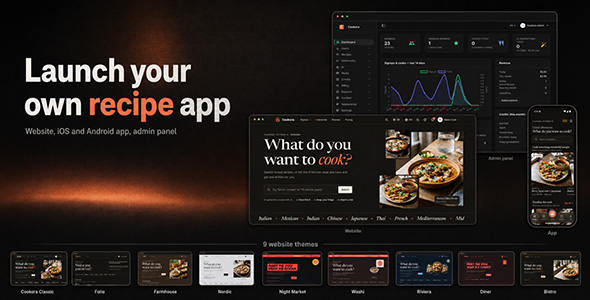
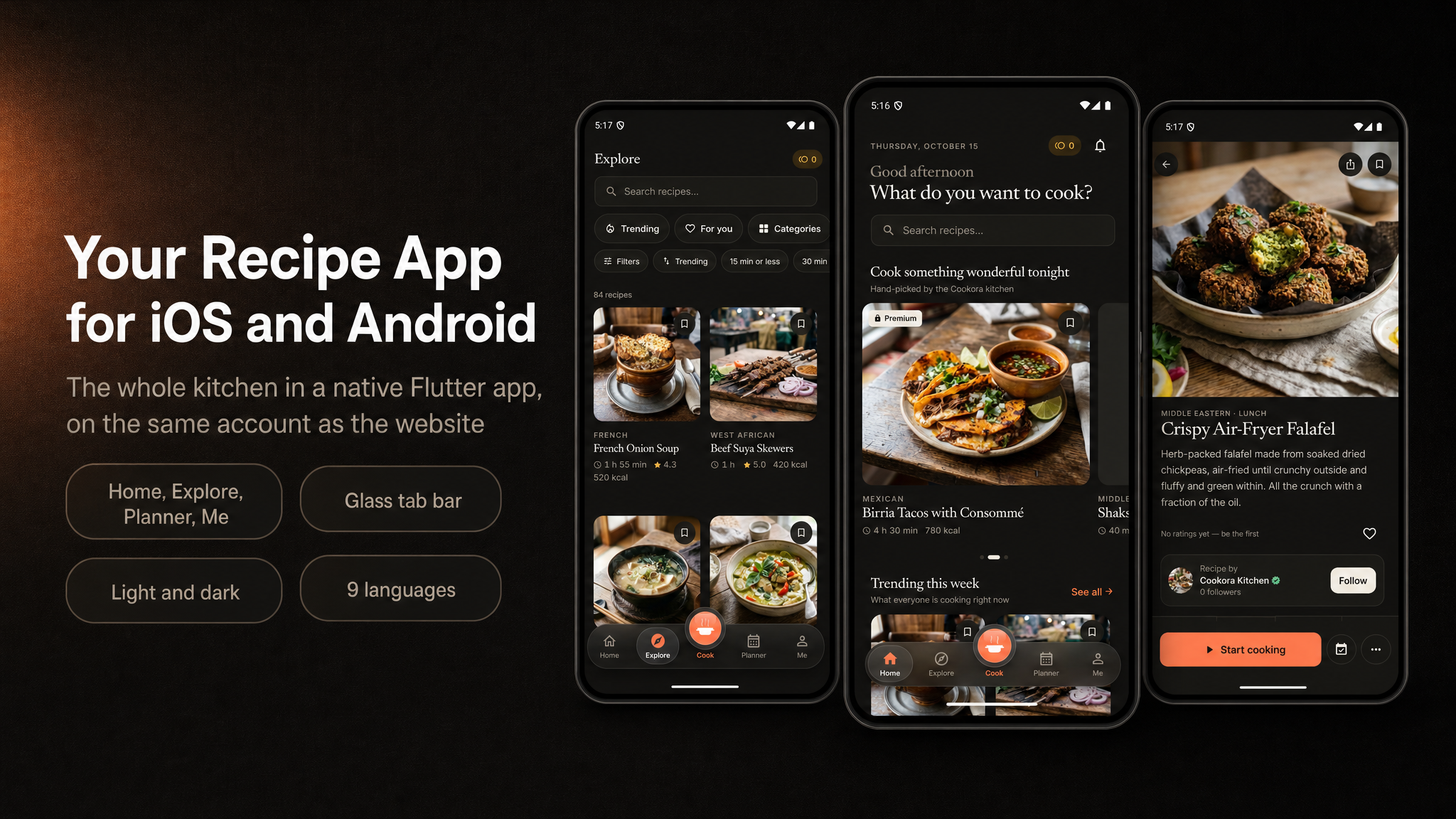
Cookora is a full-stack AI recipe maker: a cross-platform Flutter mobile app
(iOS & Android) and a companion web platform built with the Laravel PHP framework
(recipe site, admin CMS, and web checkout) for tested recipes and AI-written ones.
Built for the fast-growing home-cooking market, it combines a polished native app with
a production-ready backend: the included PHP / MySQL API (built with Laravel), Firebase Remote Config,
and RevenueCat Premium subscriptions.
About “AI” in the name
“AI” in the item title is a general descriptor for the artificial-intelligence features of this product. It does not imply any official partnership, affiliation, sponsorship or endorsement by OpenAI, ChatGPT, Google Gemini, Anthropic or any other AI company. “AI kitchen” and “AI Studio” are this item’s own feature names, not third-party products. OpenAI and ChatGPT are trademarks of OpenAI; Gemini is a trademark of Google LLC; Claude is a trademark of Anthropic. All product names are the property of their owners and are named only to describe which services the item can connect to with your own API key.
At a glance
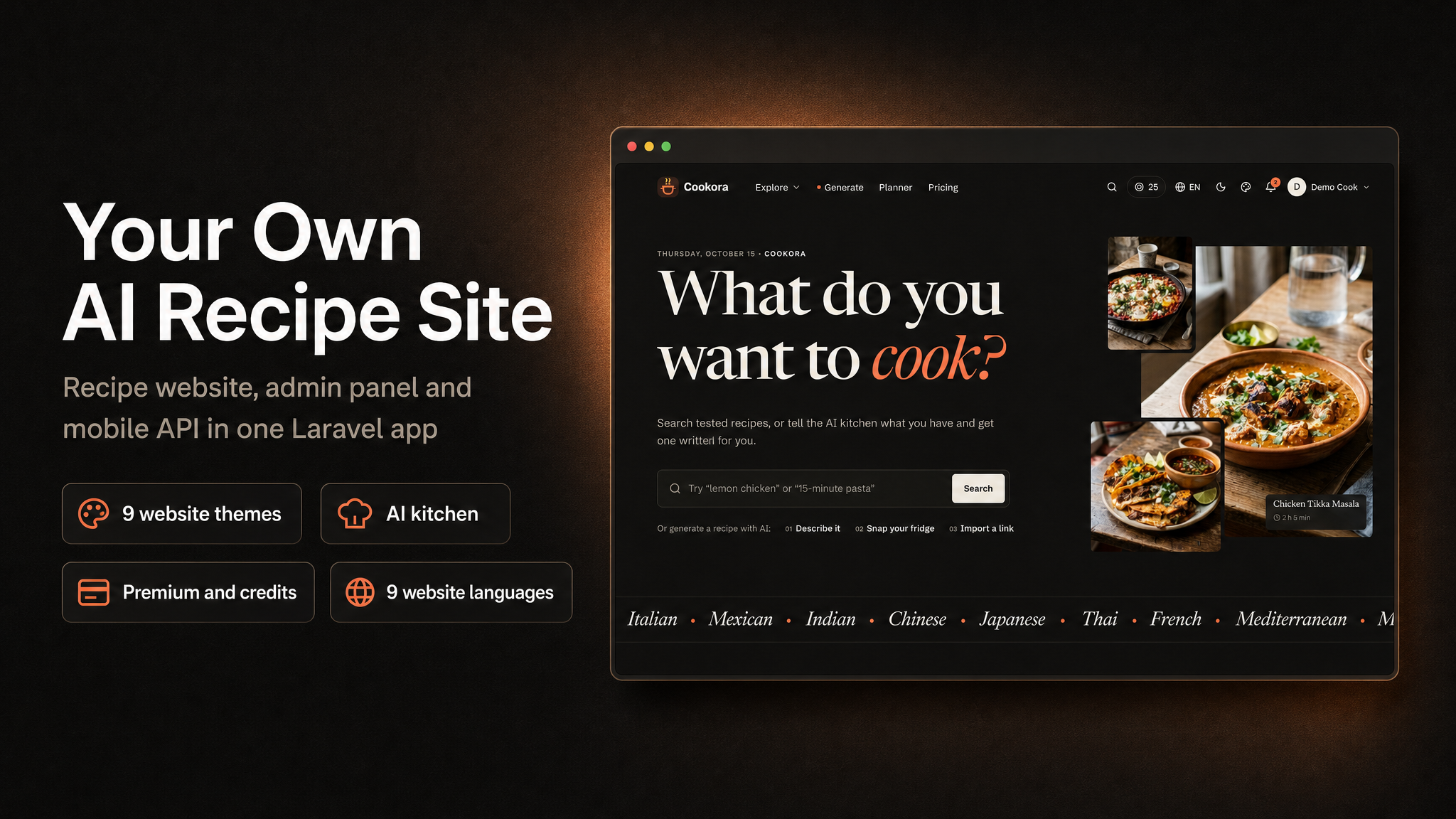
- App + web: Flutter app (iOS & Android), recipe website and admin panel.
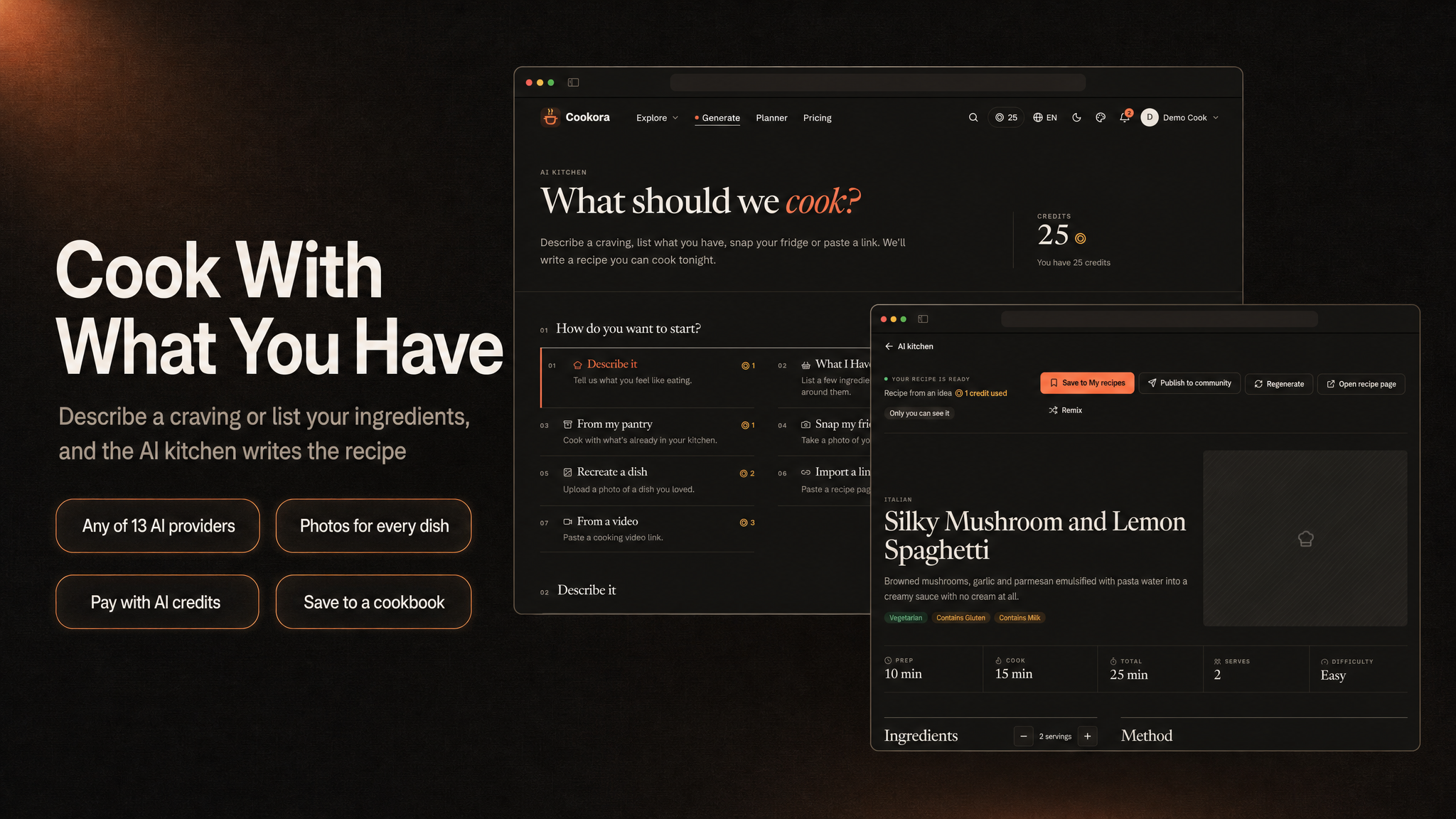
- AI kitchen: recipes from a craving, a fridge photo, the pantry, a link or a video.
- Revenue: Premium subscriptions, credit packs, premium recipes and rewarded ads.
Demo Instructions
- Website: https://airecipe.laravelbeginner.net/en
- Admin panel: https://airecipe.laravelbeginner.net/en/dashboard
- Demo email:
admin@cookora.test - Demo password:
password123456 - Test card:
4242 4242 4242 4242, any future expiry date and any CVC (all six web payment providers run in test mode). - Android app: download the demo APK from the banner below the Disclaimer.
The same email and password sign in to both the website and the admin panel.

Note: All supported payment services — the web payment gateways (Paddle, LemonSqueezy, Polar.sh, Stripe, Creem.io and Dodo Payments) — are third-party services and may charge transaction fees or other service fees depending on their pricing plans. Most require merchant account approval and verification before accepting live payments. These services are not included in the purchase price, and buyers are responsible for creating their own accounts, completing any required approval processes, configuring API keys, and covering all applicable fees. In-app purchases on iOS and Android go through Apple and Google (via RevenueCat) and are subject to their store commissions.
Third-party services: important notice
This item connects to services run by independent companies. Each one operates under its own terms of service, its own account approval process and its own fee structure, and using them may involve costs entirely outside this item’s purchase price. You create every account yourself and pay every fee yourself. No author accounts, API keys, merchant ids, Firebase projects, ad ids or analytics ids are included.
COST WARNING — Firebase (Google). The mobile app requires your own Firebase project. It uses Firebase Authentication (guest, Google and Apple sign-in), Remote Config, Analytics, Crashlytics and Performance Monitoring. The free Spark plan has usage limits and is suited to testing and small apps. If you upgrade to the pay-as-you-go Blaze plan — which some features and higher usage require — Google bills your usage, and at scale this can generate real, recurring costs. Those charges are billed by Google to your account and are paid by you, the buyer. Check Firebase’s current pricing and set budget alerts in Google Cloud before launch.
COST WARNING — RevenueCat. Premium subscriptions and credit packs in the app are sold through RevenueCat, on your own RevenueCat account. RevenueCat is free up to a monthly tracked revenue (MTR) threshold; above it, RevenueCat charges a percentage fee on your monthly tracked revenue, on top of Apple’s and Google’s store commissions. These fees grow with your sales and are paid by you, the buyer. Check RevenueCat’s current pricing before you launch.
- Firebase (Google), required for the app: Authentication, Remote Config, Analytics, Crashlytics and Performance Monitoring. Requires your own Firebase project; the package ships only example config files. Usage beyond the free Spark plan is billed by Google (Blaze plan) and is the buyer’s responsibility.
- RevenueCat, Apple App Store, Google Play: required to sell Premium and credit packs in the app. Your own RevenueCat project and store accounts; the RevenueCat keys are read from your own Firebase Remote Config and are blank by default. Store registration fees, store commissions and RevenueCat’s fees above its free tier are yours.
- OneSignal, optional: push notifications on your own OneSignal account. The OneSignal app id is set in your admin panel and ships blank; OneSignal’s paid plans and limits are yours.
- Stripe, Paddle, Lemon Squeezy, Polar.sh, Creem.io, Dodo Payments, optional: separate payment providers for Premium and credits on the website, each with its own terms, seller review and fees.
- Google AdMob, optional: rewarded ads run on your own AdMob account, and
all ad revenue goes to that account. The app ships Google’s public test AdMob app id
(
ca-app-pub-3940256099942544~…), which you must replace with your own before release; ad unit ids are set in your admin panel and ship blank, with ads switched off. - AI providers, optional: Google Gemini (default), OpenAI, Anthropic, xAI, Mistral,
DeepSeek, Groq, OpenRouter, Azure OpenAI, Amazon Bedrock, ElevenLabs, a self-hosted Ollama or any
OpenAI-compatible API, called through Laravel’s open-source
laravel/aipackage. Your own API key; every request is billed by the provider you choose, to your account. - Instacart, Pusher, Mailchimp, Turnstile / reCAPTCHA, storage / CDN, optional: on your own accounts, each with its own terms and pricing.
- Google Analytics 4, optional: the measurement id is not hardcoded. It is a
buyer setting (
GOOGLE_ANALYTICS_ID) that ships blank; when blank, analytics never loads. - Facebook sign-in, optional, website only: uses your own Facebook app id and secret. The mobile app contains no Facebook / Meta SDK.
Backend (included)
The mobile app runs on the backend included in the package:
- Admin panel / Web API (built with Laravel) — the included
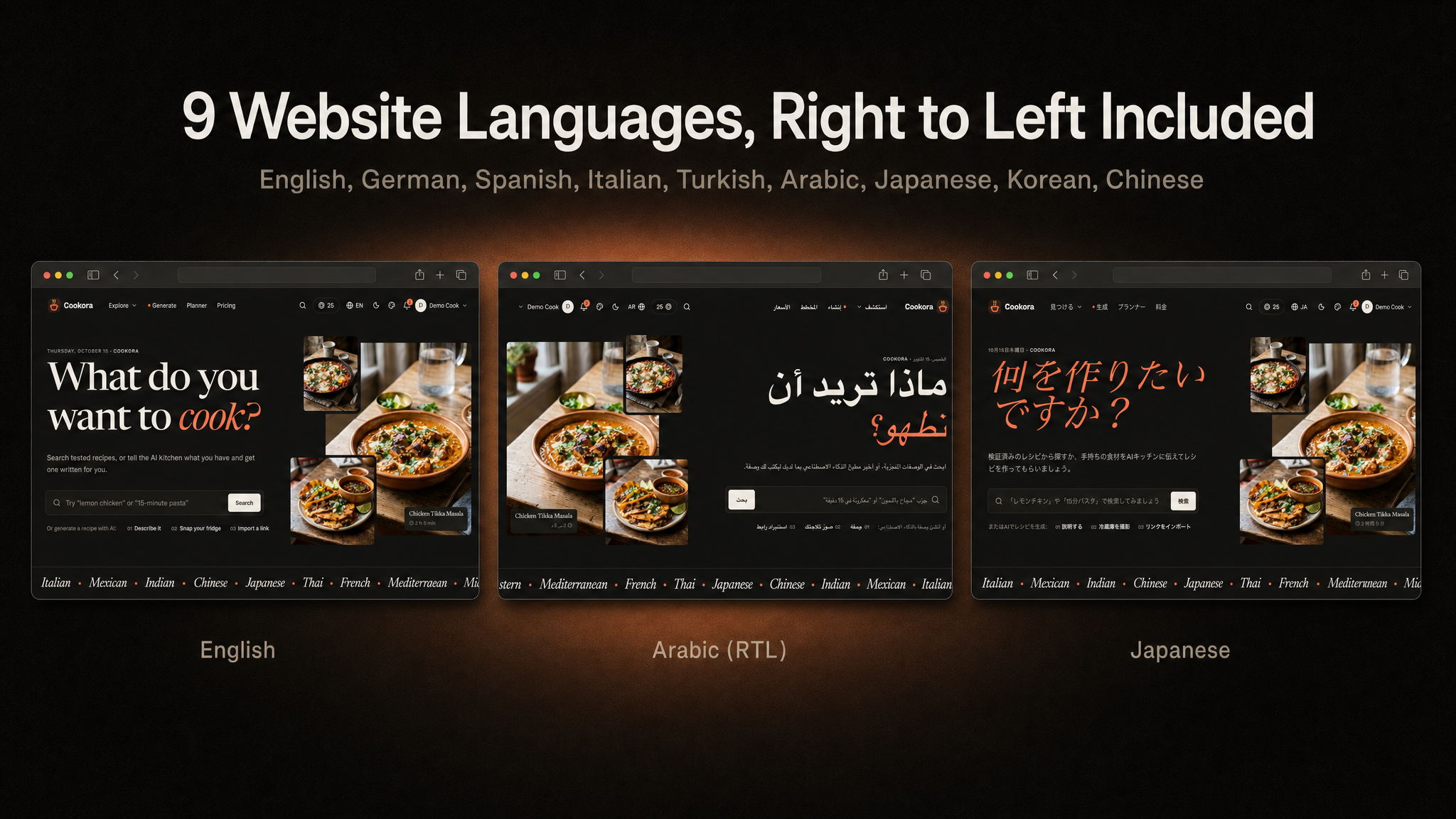
ai-recipe-maker-admin-panelplatform: a PHP web app built with the Laravel framework, with an admin dashboard, database migrations + seeders, and a mobile REST API the app can talk to. It also ships a recipe website in 9 languages (including Arabic, right to left) with nine complete website themes to choose from, each in light and dark, web checkout through six payment providers, a media library with CDN support, editable email templates and Google / Facebook sign-in. Ideal if you already run on classic PHP/MySQL hosting or prefer the Laravel ecosystem.
Deploy the web project once and the app talks to that same origin.
Note: all of our items are built on the same base project (built with Laravel) and use the same setup system, so this installation video applies to every one of them, including this one.

Key Value Propositions
- For End Users: Discover tested recipes across 12 cuisines, filter by course, diet, allergen and time, ask the AI kitchen for a recipe from what is in the fridge, unlock premium recipes with credits earned from daily check-ins and rewarded ads or with a Premium subscription, and save everything to cookbooks on web or mobile.
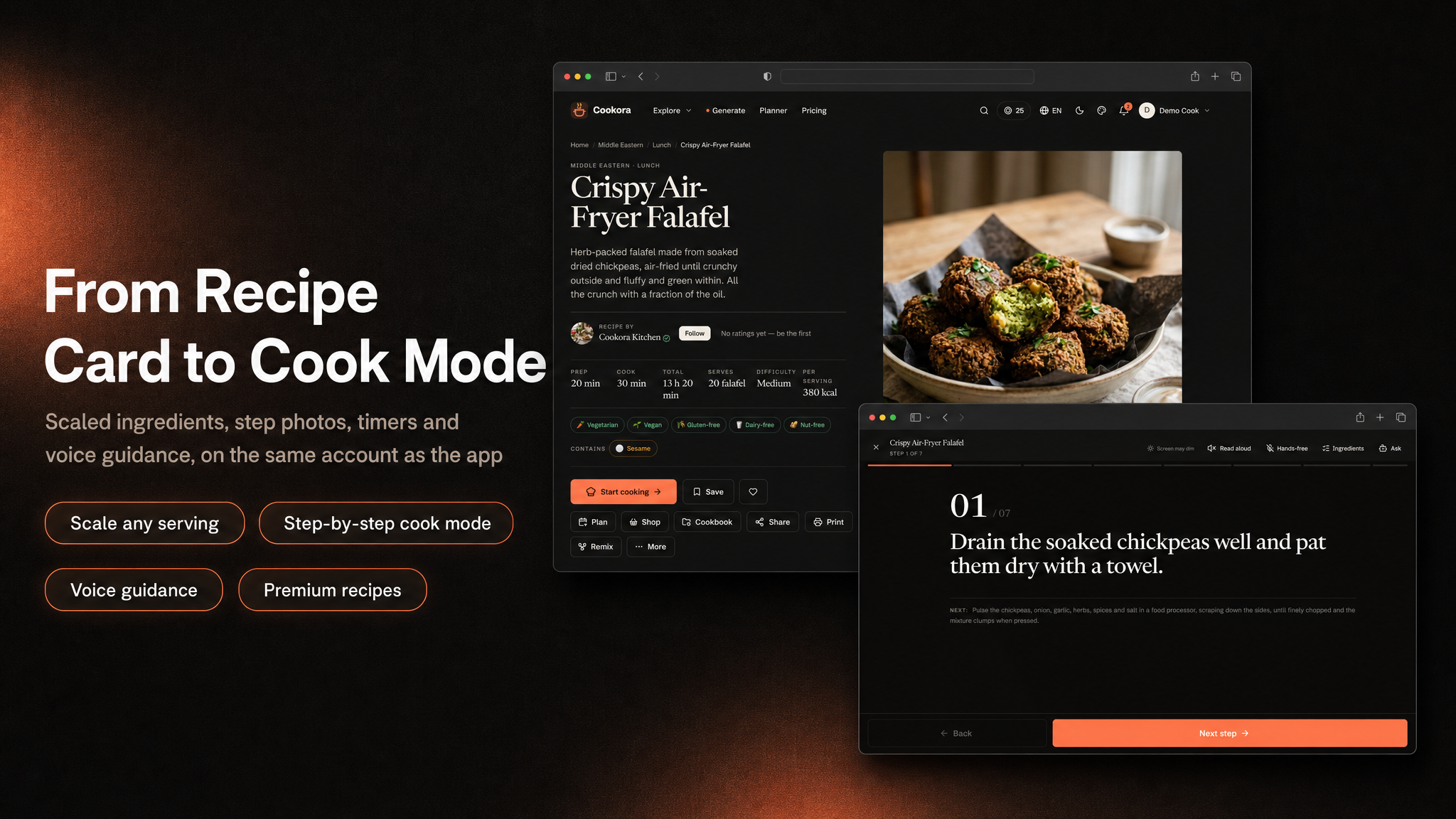
- For Home Cooks: A servings scaler and unit toggle, a grouped ingredient checklist, nutrition per serving, and a hands-free cook mode with step timers, read-aloud steps and a cook assistant.
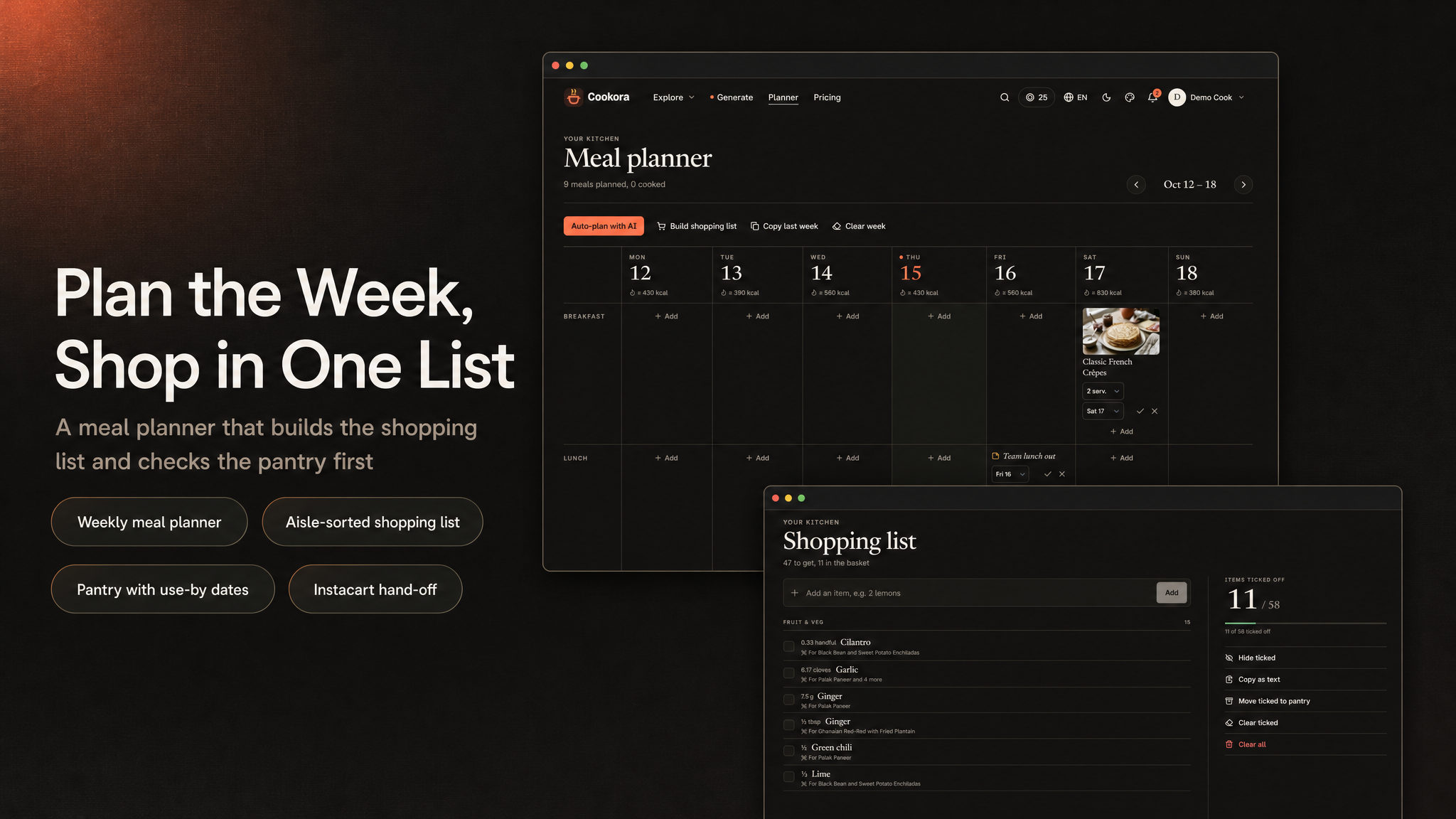
- For Planners: A weekly meal planner with AI auto-plan, a shopping list that merges ingredients by unit and groups them by aisle, and a pantry that tracks expiry dates and sends reminders.
- For Creators: A Creator Studio on the web — apply to publish, create recipes, submit them for review, then track earnings from credit unlocks and the Premium pool on an append-only statement, export it as CSV, and request a payout.
- For App Owners / Developers: A complete, monetizable recipe product with Premium subscriptions, a credit/rewards economy, rewarded ads, push notifications, analytics, and remote configuration — plus the included admin panel / web API so you can manage the catalogue, AI prices and limits, credit packs, and site content your way.
Content Disclosure
Cookora ships as a complete recipe platform with a demo catalogue so you can run it end-to-end out of the box:
- Demo recipe, collection and creator photos are AI-generated; you replace them with your own photography.
- Demo recipes (about 90 across 12 cuisines) are fictional, published under a house kitchen and six fictional creators, so browsing, cook mode and the planner work during testing.
- The full catalogue (cuisines, courses, diets, ingredients, recipes, collections, and the home feed) is managed entirely by you in the admin panel.
You are responsible for the recipes you publish. Cookora provides the app, web platform, backend, and catalogue tooling. If you open the Creator Studio to outside cooks, you are also responsible for moderating what they submit — every creator recipe goes through a submit-and-review step before it can appear in the catalogue. AI-written recipes are checked against the member’s allergens, but they are machine output and should be presented as such. You are also responsible for following each AI provider’s terms of use; AI provider accounts and their usage are up to you.
AI Usage Disclosure
AI-assisted development. This item was developed with AI assistance. The source code of the Flutter app, the admin panel and web API, the React web front end and the documentation were written with the help of Claude Code using Anthropic’s Claude Opus 5 model. Our team reviewed the output, tested it, and maintains and supports the item.
AI-made graphics. The demo recipe, collection and creator photos in the seeded catalogue are AI-generated. The feature banners in this description and the item preview image were composed with an AI image model from real screenshots of the product. The screenshots in the item gallery are captures of the running app and website.
AI as a feature. The product’s headline functionality relies on a third-party generative AI service at runtime. The provider is not hard-coded — Gemini (default), OpenAI, Anthropic and others are registered in the admin panel, and you choose which one answers each task:
- AI kitchen: writing a recipe from a craving, a list of ingredients or the pantry, and remixing an existing recipe.
- Photo reading: recognising ingredients in a fridge or pantry photo, and recreating a recipe from a photo of a finished dish.
- Import: turning a recipe web page or a cooking video into a structured recipe.
- Meal planner auto-plan: filling the week around the member’s diet, allergens and pantry.
- Cook assistant: answering questions during cook mode, by text or voice.
- Food photos and voice guidance: drawing a recipe’s hero and step photos, and reading the steps aloud.
- AI Studio (admin panel): planning, writing, photographing and voicing recipe batches — every recipe is reviewed by an admin before it is published.
Everything the AI writes, draws or says is machine output and may be wrong; AI recipes are checked against the member’s allergens but should be presented as AI-generated. To use the AI features you must create your own account with the provider you choose and supply your own API key. Keys are stored encrypted in the admin panel, are read only on the server, and never reach the app or the browser. Usage is metered in credits per member, capped per member per day, and capped for the whole platform per day and per month.
laravel/ai. The AI features run on the open-source laravel/ai AI
package (stable 1.x), released under the MIT licence. MIT explicitly permits commercial use and
redistribution inside a commercial product; the package is installed with Composer like every other dependency,
not bundled into the item’s own code, and its licence notice stays with it in vendor/laravel/ai. It
is a client library only: it needs no Laravel Cloud, Forge or other Laravel subscription, there is no proxy in
between, and requests go directly from your server to the provider you choose. You obtain and pay for your own
API keys; without a key, the AI features stay off and the rest of the product works normally.
Code Origin
All of Cookora’s source code is original to this item, developed by the author with AI assistance (see the AI Usage Disclosure). Some modules — the media library, billing and checkout,
the admin list screens and the setup wizard — were reused from the author’s own earlier projects and adapted for
Cookora; the author holds full rights to that code. Third-party libraries keep their own licences and are listed
in THIRD-PARTY-LICENSES.md in the web project; PHP, JavaScript and Dart packages are installed by
you with Composer, npm and Flutter.
Required Third-Party Services and Costs (please read before buying)
Cookora depends on external services that are not included in the purchase. You create every
account yourself, under your own name, and all fees, usage charges and approval processes are your
responsibility. The package ships no author-owned accounts, API keys, merchant ids, ad ids,
analytics ids or other credentials: every key in .env.example is blank, the mobile app ships
only example Firebase files and Google’s public test AdMob app id, and no revenue or data is routed to the
author.
- Firebase (required): a separate Firebase project is required for the app to function. You
create your own project and add its
google-services.jsonandGoogleService-Info.plistin place of the shippedgoogle-services.example.jsonandGoogleService-Info.example.plist. The app uses it for sign-in, Remote Config, Analytics, Crashlytics and Performance Monitoring, and the server uses your own service account to verify sign-ins. The free Spark plan has limits; the pay-as-you-go Blaze plan bills your usage and can generate real costs at scale, paid by you. - RevenueCat, Apple Developer Program and Google Play Console (required to sell in the app and to
publish it): your own accounts. The RevenueCat SDK keys (
revenuecat_ios_api_key,revenuecat_android_api_key) come from your own Firebase Remote Config and default to empty; no author project, key or entitlement is hard-coded. Apple and Google charge their membership / registration fees and store commissions; RevenueCat is free up to a monthly tracked revenue threshold and then charges a percentage of your monthly tracked revenue — check RevenueCat’s current pricing. - OneSignal (optional, for push): your own OneSignal app; the app id and REST key are entered
in your admin panel or
.envand ship blank. - Web payment providers (optional): Stripe, Paddle, Lemon Squeezy, Polar.sh, Creem.io and Dodo Payments, each with its own approval rules, transaction fees and payout terms.
- Google AdMob (optional): rewarded ads run on your own AdMob account and the revenue is
yours. The app ships Google’s public test app id (
ca-app-pub-3940256099942544~…) inios/Runner/Info.plist(GADApplicationIdentifier) andandroid/app/src/main/res/values/strings.xml(admob_app_id) — you must replace both with your own AdMob app id before release. Ad unit ids are set in the admin panel and ship blank, with ads switched off. You are responsible for AdMob’s policies, user consent (Google UMP / GDPR, where required) and store review. - AI providers (optional): the AI features need your own API key with Gemini, OpenAI,
Anthropic, xAI, Mistral, DeepSeek, Groq, OpenRouter, Azure OpenAI, Amazon Bedrock or ElevenLabs, billed per
use by that provider, or a self-hosted Ollama / OpenAI-compatible server.
laravel/aiis Laravel’s free open-source (MIT) package and needs no Laravel Cloud or other Laravel subscription. Without a key, the AI features stay off and the rest of the product works normally. - Google Analytics 4 (optional): reports to your own GA4 property. No
measurement id is included; leave
GOOGLE_ANALYTICS_IDblank and no analytics loads. - Other optional services: Instacart (shopping list hand-off), Pusher, Mailchimp (newsletter), Cloudflare Turnstile or Google reCAPTCHA, Google and Facebook sign-in on the website (your own OAuth apps), and storage / CDN providers (Cloudflare R2, Amazon S3 and others). Each has its own terms and pricing.
- Hosting: PHP/MySQL hosting, a queue worker, email delivery (SMTP or a mail service), bandwidth and storage costs are yours.
Privacy & Data
No telemetry. The package sends no data to the author and has no license phone-home. Every third-party identifier — Firebase, RevenueCat, OneSignal, AdMob, Google Analytics, the payment gateways and the AI keys — is blank or a placeholder and supplied by you, so the data each service collects goes to your own accounts. The AdMob app id that ships is Google’s public test id and must be replaced with yours. The mobile app contains no Facebook / Meta SDK and no App Tracking Transparency prompt; Facebook sign-in exists only on the website, with your own Facebook app. No ready-built IPA is distributed; the demo APK is for evaluation only. You are solely responsible for your own privacy policy, ad consent, privacy labels and App Store / Google Play review outcomes.
Disclaimer
This product is built to work with the included web API / admin panel (built with Laravel, MySQL) — plus
third-party services: Firebase (Auth, Remote Config, Analytics,
Crashlytics, Performance Monitoring), RevenueCat (Premium subscriptions and credit packs), OneSignal (push), optional AdMob ads
(rewarded), an AI provider such as Google Gemini (your own API key), and one or more web payment providers if you also sell on the website (Stripe, Lemon Squeezy,
Polar, Paddle, Creem or Dodo Payments — configure only the ones you want). Hosting accounts, AI usage and storage/CDN costs are not included in the purchase — you will need
to create your own accounts, configure API keys, and manage usage yourself. Every AI recipe, photo and voice
guidance is billed by the AI provider that makes it, to your account. RevenueCat may also incur additional costs
depending on your subscription volume and plan, beyond any available free-tier limits. Mailchimp integration
requires your own Mailchimp account and API key, and any applicable Mailchimp subscription fees are your
responsibility. A separate Firebase project is required for the app to function; the package contains no Firebase
configuration files (google-services.json, GoogleService-Info.plist) other than example
templates, and no service-account key, so you must
create and configure your own Firebase project and provide your own credentials. Additional charges may apply depending on usage
and the Firebase services you use: beyond the free Spark plan’s limits, the Blaze plan bills your usage to you. Basic familiarity with Flutter, Xcode, Android Studio, Firebase, PHP/MySQL
hosting, App Store Connect and Play Console setup is recommended before launching.
Laravel is a trademark of Taylor Otwell and Flutter is a trademark of Google LLC. Cookora is an independent product built with these open-source frameworks; it is not affiliated with, sponsored by or endorsed by Laravel or Google.
What’s Included
- Full Flutter application source code (
ai-recipe-maker-mobile) - Web platform + admin dashboard + mobile Web API, built with Laravel (
ai-recipe-maker-admin-panel) — the backend for the app, with migrations and a demo-catalogue seeder - MySQL database migrations, demo seed (~90 recipes across 12 cuisines, a 550-entry ingredient dictionary, collections and the home feed) with photos, plus an optional demo kitchen for a free and a Premium member
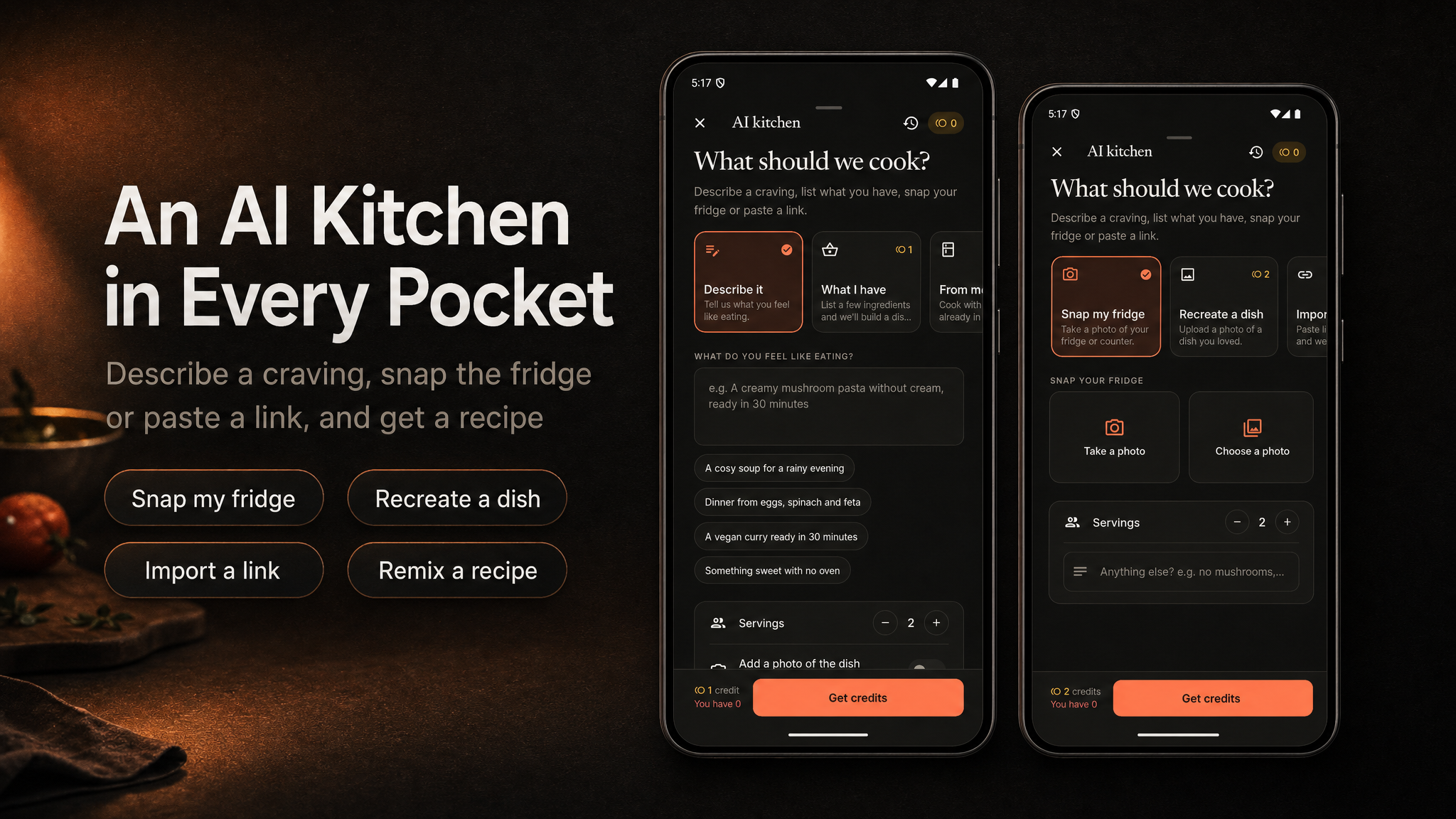
- AI kitchen and AI Studio: recipe writing, photo reading, food photos and voice guidance through your own AI provider keys, chosen per task in the admin panel
- One app design in light and dark
- 9-language app localization (ar, de, en, es, it, ja, ko, tr, zh)
- 9-language website (en, de, es, it, tr, ar, ja, ko, zh), with a right-to-left layout for Arabic
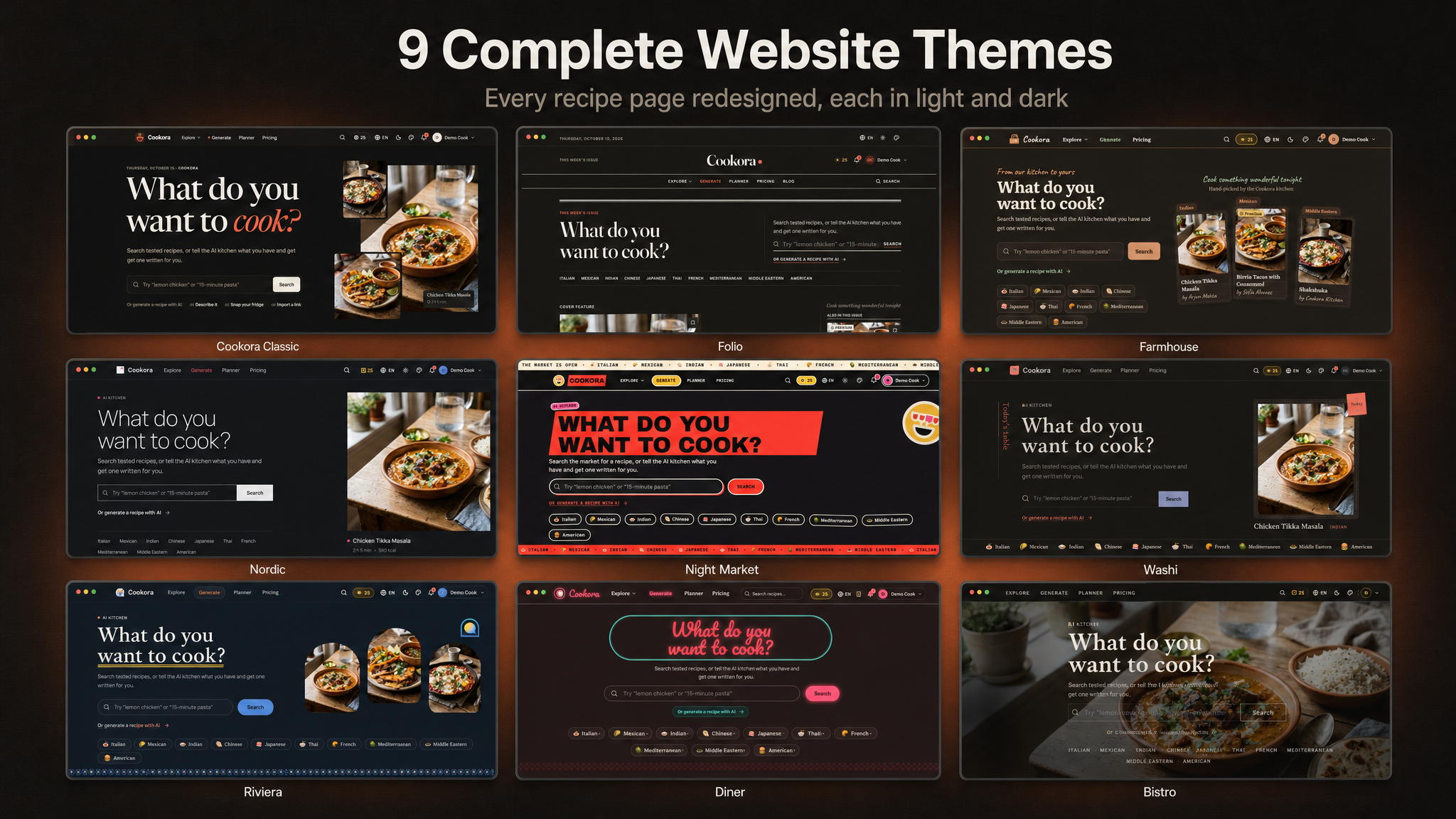
- 9 complete website themes (Cookora Classic, Folio, Farmhouse, Nordic, Night Market, Washi, Riviera, Diner, Bistro), each in light and dark, chosen from the admin panel
- Complete detailed documentation — Firebase, web platform / API, RevenueCat, and store release
Key Features
- Home Feed: A hero, curated collections, trending and new recipes, and personal shelves.
- Explore & Search: Browse by cuisine, course, diet, allergen-free, difficulty and time, and search with ingredients to include or exclude.
- AI Kitchen: Describe a craving, list what you have, cook from the pantry, snap the fridge, recreate a dish from a photo, import a recipe link or a cooking video, or remix any recipe. Each request is priced in credits and refunded automatically if it fails.
- Recipe Page: Servings scaler, metric / US units, grouped ingredient checklist, nutrition, tips, reviews with “I made this” photos, save, cookbook, plan and shopping list.
- Cook Mode: One step at a time, several timers at once, screen wake lock, read-aloud steps and a cook assistant; cooked recipes stay available offline.
- Meal Planner: The week’s breakfast, lunch, dinner and snack, with AI auto-plan.
- Shopping List & Pantry: A list merged by ingredient and unit and grouped by aisle, Instacart export, and a pantry with expiry reminders.
- Cookbooks: Save recipes and keep your own AI recipes in cookbooks, synced across devices.
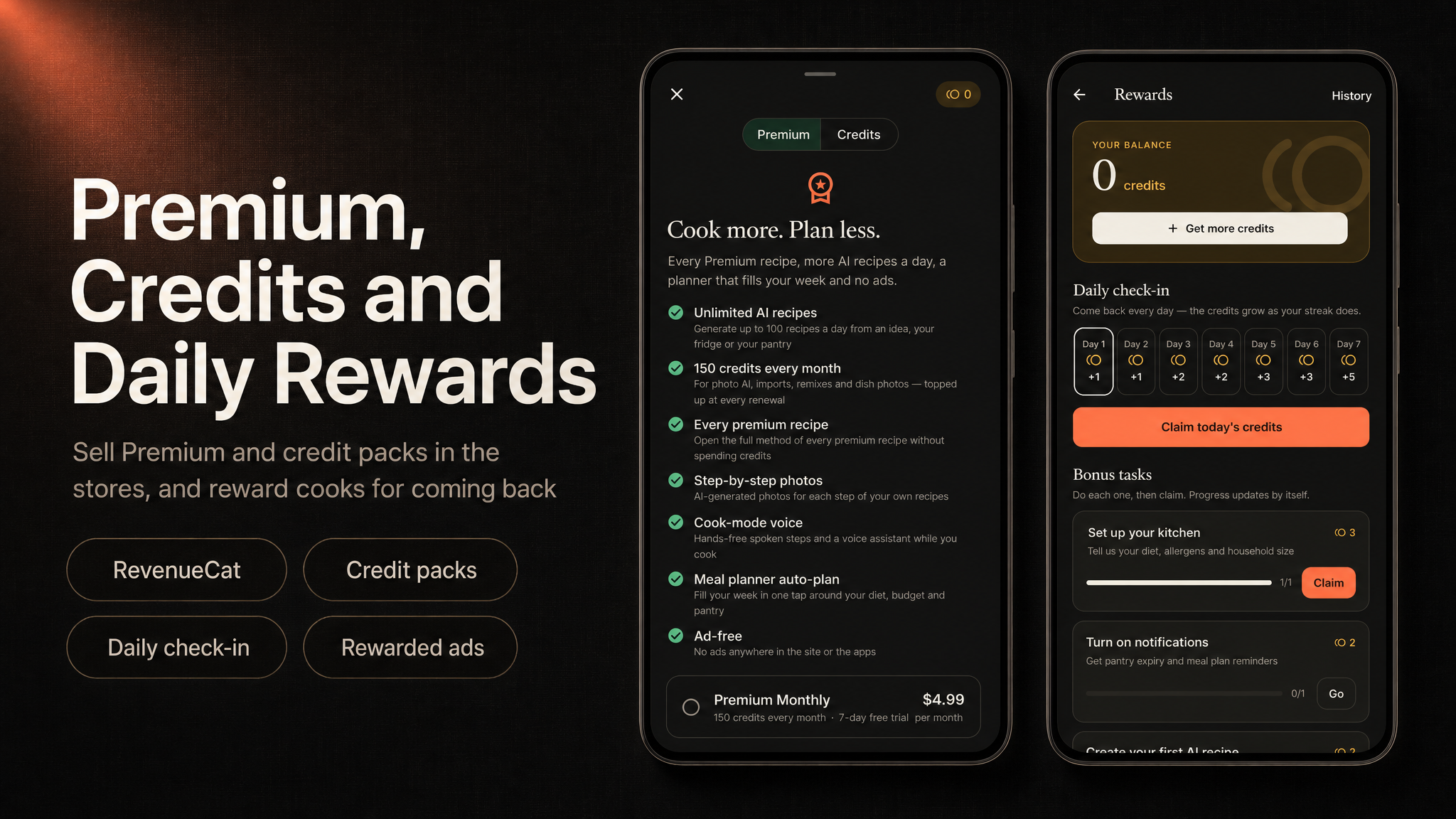
- Credits & Rewards: a sign-up bonus, a free monthly credit allowance, a 7-day daily check-in, server-verified reward tasks, and rewarded ads (paid only on AdMob’s signed callback) to earn credits.
- Premium Recipes: Free recipes, credit-unlocked premium recipes, and everything included with Premium.
- Creator Studio & Earnings: Cooks apply to publish, create recipes, and submit them for moderation. Earnings accrue per credit unlock and from a Premium revenue pool, tracked on an append-only ledger with CSV statements and creator-requested payouts — all administered from the admin panel.
- Premium Subscriptions: Monthly / yearly plans via RevenueCat with a monthly credit grant and every premium recipe.
- User Accounts: Quick guest start with optional Google, Apple, or email sign-in, keeping everything done as a guest.
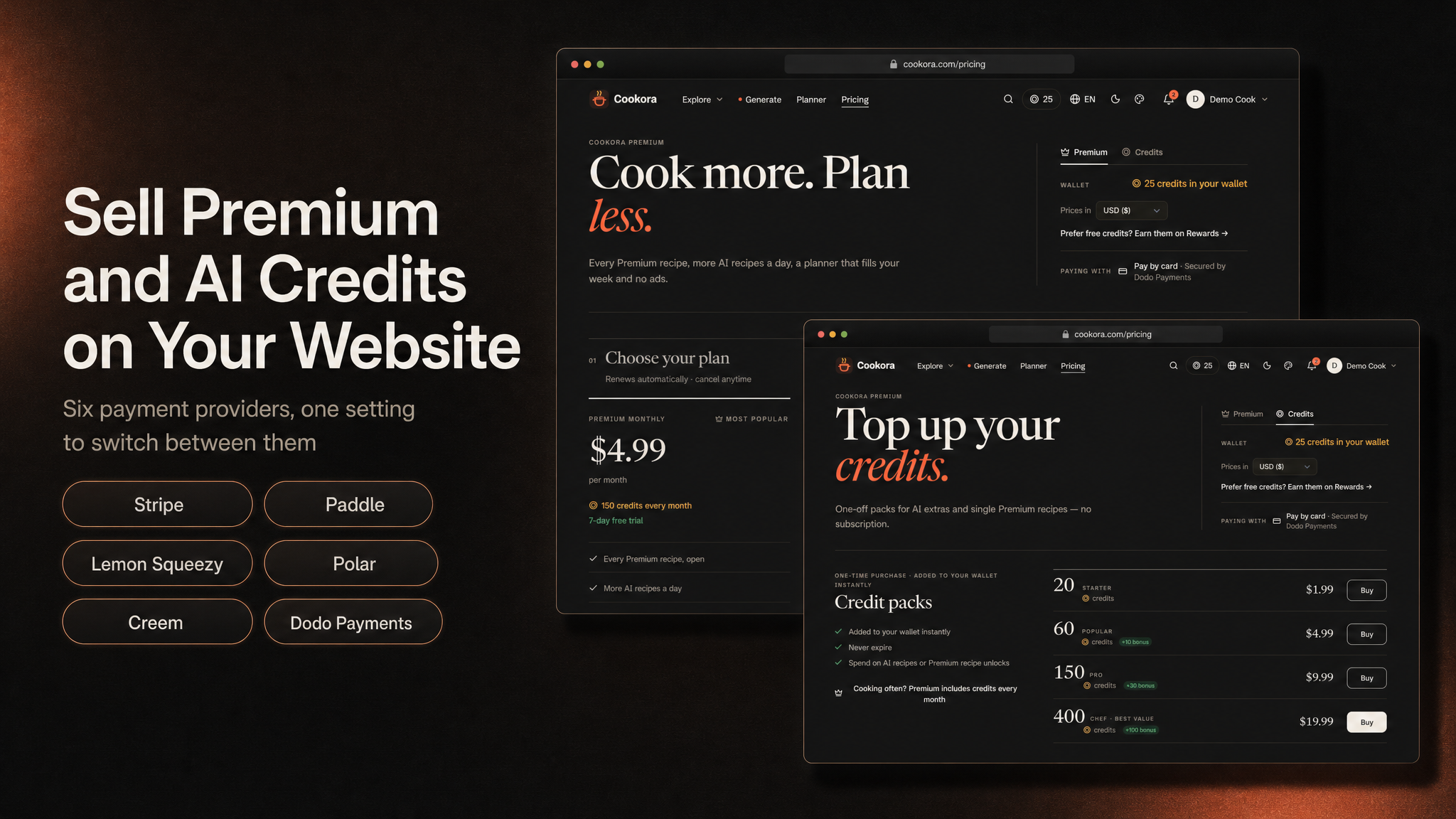
- Web Platform: Browser recipe site, web checkout (Stripe, Lemon Squeezy, Polar, Paddle, Creem, Dodo Payments), and a full admin CMS for recipes and the catalogue.
- AI Studio: Develop recipes in batches from a brief in the admin panel — review the plan, write, photograph and voice them, then publish them into the catalogue like any other recipe.
- Settings & Personalization: Light/dark mode, cooking preferences, and 9 languages.
- Monetization Ready: Premium subscriptions, a credit economy, rewarded AdMob ads, and conversion analytics built in.
- AI Cost Control: credits per request, a daily request limit per member, and a platform-wide daily and monthly AI spending limit set in the admin panel — when it is reached, new AI requests pause until the next day or month instead of running up your provider bill.
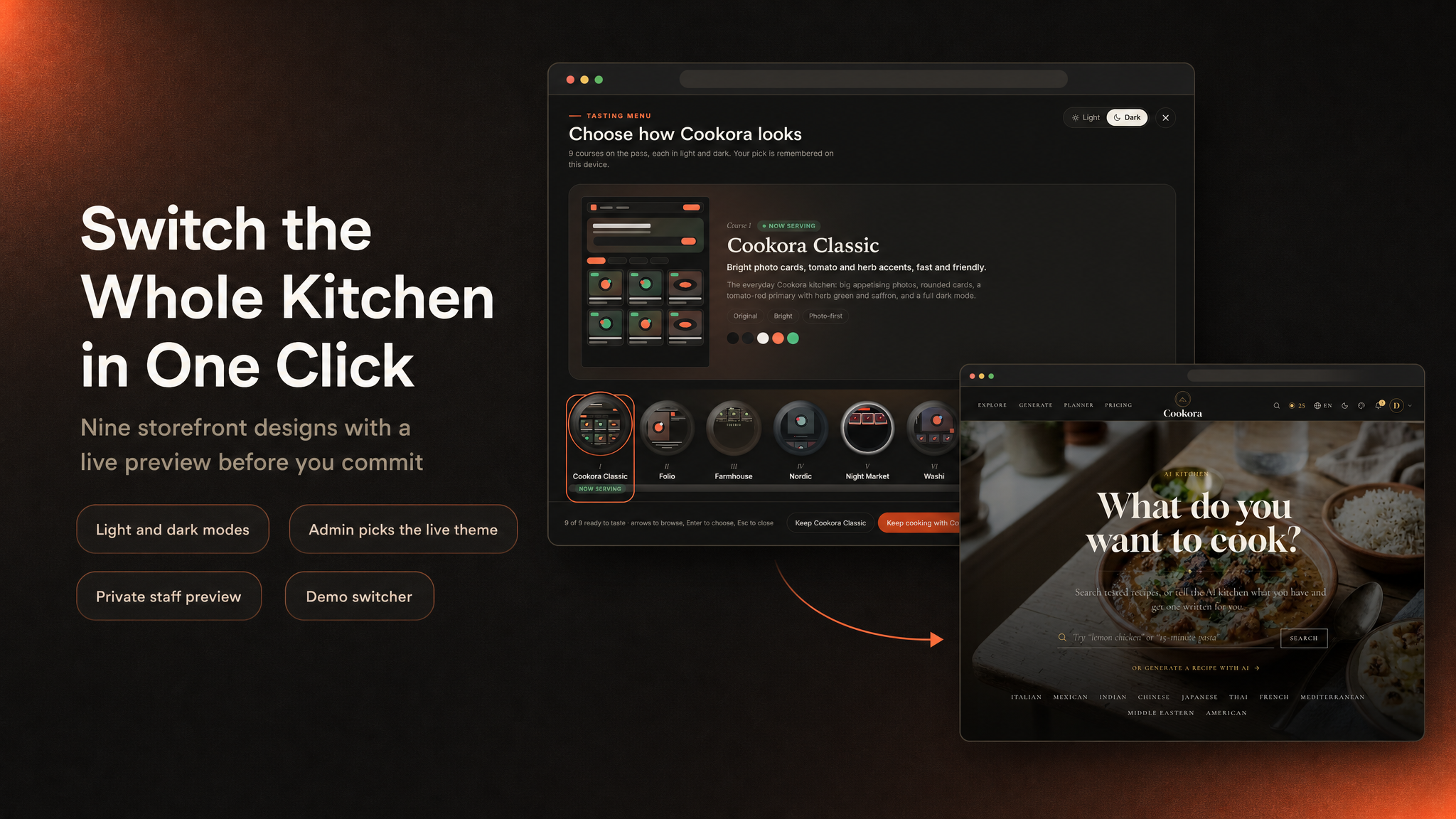
- 9 Website Themes, Light and Dark: nine complete designs for the recipe site, from the editorial Classic to a food magazine, a farmhouse recipe box, Scandinavian calm, a street-food night market, Japanese stillness, a Mediterranean riviera, a retro diner and a dark bistro. Every page is redesigned: home, recipe page, cook mode, AI kitchen, planner, pricing, account and sign-in. Each theme has a light and a dark mode. Pick the live theme in Admin > Appearance > Themes, preview any theme privately first, and let visitors try them in the Tasting Menu on a demo site. Prices, credits, Premium and checkout work the same in all of them.
- Branding: set the site name, logo and favicon once in Admin > Appearance > Branding and every theme uses them.
- Website in 9 Languages: English, German, Spanish, Italian, Turkish, Arabic (right to left), Japanese, Korean and Simplified Chinese.
- AI Providers per Task: route recipe writing, the cook assistant, photo reading, food photos, voice guidance and video import each to its own provider and model, on your own API keys (the supported services are listed under “Third-party services”), with a fallback when the first one fails.
- Web Checkout — 6 Payment Providers: sell credits and Premium from the website through
Stripe, Lemon Squeezy, Polar, Paddle, Creem or Dodo Payments. Pick one in
.env, test the credentials from the admin panel, and sync every plan and credit pack to it in one click. Webhooks are signature-checked and fulfilment is idempotent, so a payment grants exactly once. - Media Library with 9 Storage Back Ends & CDN: upload recipe photos, step photos and voice guidance in the admin panel and keep them on this server, Cloudflare R2, Amazon S3, DigitalOcean Spaces, Backblaze B2, Wasabi, Google Cloud Storage, MinIO or Bunny Storage — with Cloudflare, Bunny, CloudFront or any other CDN in front. Attach files with a picker instead of pasting links, and switch provider later without editing a single row.
- Editable Email Templates: verification code, welcome, password reset, purchase receipt and subscription mails, all editable with a live preview and your own branding. SMTP, Amazon SES, Mailgun or Postmark, configured from the admin panel and testable from it.
- Social Login: Google and Facebook sign-in on the website and Google / Apple in the app, with email-code verification before the first session, and account linking rather than duplicates.
- AI Studio — Recipe Batch Generator: describe a batch in a few words (“24 high-protein weeknight dinners”) and the AI plans it, writes every recipe with ingredients matched to the dictionary, photographs each dish and voices the steps. You review and edit every step, then publish the recipes as drafts under your house kitchen. Spending is capped per project and per month.
Important Notice to Our Valued Customers
We are committed to building a reliable and continuous business system, with your satisfaction and the success of
this product as our top priorities. Your feedback is crucial, and we encourage you to share any bugs, suggestions,
or new feature ideas. Your input directly supports our ongoing improvement and innovation.
We’re here to help — send us a message anytime through the CodeCanyon messaging system.
Thank you for being part of our journey.
Warm regards,
The Morningstarcode Team
| Author | morningstarcode |
|---|---|
| Price | $19 |
| Sales | 0 |
| Rating | 0 (0) |
| Published | Nov 5, 2026 |
| Last Update | Nov 5, 2026 |
| Compatible Software | Flutter 3.x |
| Demo Url | https://airecipe.laravelbeginner.net/en |
| Mobile Files Included | Dart, YAML, .kotlin, .swift, Layered PNG |
| Video Preview Resolution | 1080x2424 |
Categories
Tags
External listing. code.market does not sell this product and does not process payment for it. Pricing, payment, delivery, licensing, refunds, and support are handled by the third-party merchant on its own website. We may earn an affiliate commission from a referral. Details.
Products of the Week.
Submit🥇

Perceptle
Perceptle is a daily browser-based game that challenges you to test your sensory intuition through five quick estimation and rhythm-based rounds.
Other · 1 views · 0 clicksOther · Week 47 · 1 views · 0 clicks
🥈

Free LinkedIn Likes From Real
Get free LinkedIn likes on your posts from real members who react by hand. No
SaaS · 124 views · 2 clicksSaaS · Week 47 · 124 views · 2 clicks
🥉

STOP GUESSING WHAT TO POST
AI that learns your brand voice and builds a month of consistent, on-brand social content: carousels, posts and hooks that sound like you, not like everyone else's AI.
SaaS · 7,686 views · 71 clicksSaaS · Week 47 · 7,686 views · 71 clicks
#4

aaas.market
407 reliable micro tools for solo founders, marketers and creators. They work in your browser
SaaS · 122 views · 0 clicksSaaS · Week 47 · 122 views · 0 clicks