
Contact form new Generation v2

Description
Contact Form new generation
About
Welcome
This contact form is one of the safest forms of email sending that you can integrate into your application, it is complete, correctly developed, and respects the known best practices in order to guarantee its maintenance and its evolution.
Click here for online documentation
Features
- Full ASP.NET MVC with Razor and ViewModel binding
- Full Ajax call
- Based on Bootstrap responsive style
- You can send email with one or more attached files
- Receive a copy of the email sent
- Download the email sent in PDF format
- Use of Google’s new reCAPTCHA “I’m not a robot” to protect you from spam
- A flexible jQuery loading overlay page
- JQuery Client side validation
- Validation for required fields, email address and number of characters entered in the message min and max
- Summary validation form
- Confirmation email message in modal dialog
- Full code library to send email with System.Net.Mail name space
- Easy configuration of email and SMTP settings in the “web.config” file
- Source code full documented
- Layered development
- Clean code with defensive coding concept
- Turnkey email sending form
- Respect the web standard
Getting Started
Technology Features
- ASP.NET MVC 4
- C# language .NET Framework 4 or above
- Visual Studio 2012/2013 or above
- Must have Nuget package manager installed in Visual Studio if lower than VS2017
- For Visual Studio 2010 you must install MVC4 package
- MS IIS 6/7
- Rotativa library for converting HTML to PDF
Inside the Project
The project is developed in layer, it contains 3 layers :
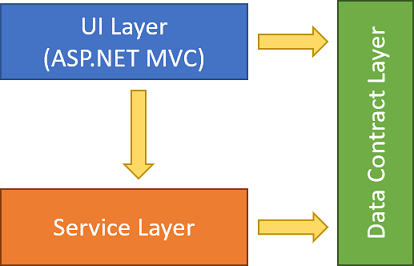
- UI Layer: that represent the ASP.NET MVC project
- Service layer: that represent the email sending class library
- Data contract layer: that represent data transfert object used to pass message between layers
Launch the Application
- Unzip project file
- With MS Visual Studio, Launch the *.sln file
- Right-click on ContactUs project and click on Set as startup project menu
- Rebuild the solution
- You must configure email and SMTP parameters befor test sending email, go to Configuring section to make
Configuring
Email Settings
In order to send email to recipient, you must set the correct value in configuration file :
- Open Web.config file in ContactUs web project
- In appSettings section set the correcte value for nameTo and emailTo Keys
- nameTo key : Set the recipient’s Name
- emailTo key : Set the recipient’s email address
   <appSettings>
       <!--Email Settings-->
       <!--Specify the correct value of each key bellow -->
       <add key="nameTo" value ="Dupont"/>
       <add key="emailTo" value ="dupont@sample.com"/>
       <!--End email settings-->
   </appSettings>
SMTP Settings
Here it’s very important step, you must set SMTP parameters to allow application send email, you can use Gmail SMTP service through your Gmail account, click here for more details.
- Open Web.config file in ContactUs web project
- Go to smtp section under system.net>mailSettings section
- host attribute : Set your host(mail server) name
- port attribute : Set host port number that allow you send email
- userName attribute : Set your mail server account/userName/login that let you to connect to your mail server provider
- password attribute : Set your mail server password that let you to connect to your mail server provider
   <system.net>
       <mailSettings>
           <smtp deliveryMethod="Network">
           <network defaultCredentials="false" enableSsl="true" host="smtp.sample.com" port="123" userName="contact@sample.comt" password="PASSWORD" />
           </smtp>
       </mailSettings>
   </system.net>
Captcha Settings
On this version we use the google reCaptcha V2, please refer to this link for more details click in following link What is reCAPTCHA?.
- Register your website on Google recaptcha and get your two keys : Site Key and Secret Key. Click here form more details
- Integrate Google reCAPTCHA JS API in your website
- Put your Site Key in the HTML, Figure 1
- Put your Secret Key on web config file, Figure 2
- You can Enable or Disable Captcha by setting the value “EnableCaptcha” key value on web config file, true to enable captcha and false to disable it. Figure 3.
Figure 1
   <div class="form-group">
       <div class="col-md-offset-2 col-md-10">
           <div name="Captcha" class="g-recaptcha" data-sitekey="6LffSToUAAAAAGm2hvf3qWyDqokNKJjqmFovn6Pq"></div>
           @Html.ValidationMessageFor(m => m.Captcha)
       </div>
   </div>
Figure 2
<add key="captchaSecretKey" value="6LffSToUAAAAAESDO6Avf8FD-wJWZA1QUfhYiPcF"/>
Figure 3
<add key="EnableCaptcha" value="false" />
Changelog
v1.0
v1.0 it’s the initial version of the project
v2.0
- Integrate page loader every Ajax call
- Fix bug : reload contact view after sending email with Ajax
- Fix of minor bugs

| Type | .NET Script |
|---|---|
| Author | derkoocy |
| Price | $12 |
| Sales | 9 |
| Rating | 0 (1) |
| Published | Jan 26, 2018 |
| Last Update | Feb 11, 2018 |
| Compatible Browsers | IE9, IE10, IE11, Firefox, Safari, Opera, Chrome, Edge |
| Compatible Software | Other |
| Demo Url | https://contactusdemo.azurewebsites.net/ |
| Source Files Included | C# CS, XML, JavaScript JS, JavaScript JSON, HTML, CSS |
Categories
Tags
External listing. code.market does not sell this product and does not process payment for it. Pricing, payment, delivery, licensing, refunds, and support are handled by the third-party merchant on its own website. We may earn an affiliate commission from a referral. Details.
Products of the Week.
Submit🥇

STOP GUESSING WHAT TO POST
AI that learns your brand voice and builds a month of consistent, on-brand social content: carousels, posts and hooks that sound like you, not like everyone else's AI.
SaaS · 7,312 views · 67 clicksSaaS · Week 46 · 7,312 views · 67 clicks
🥈

Conversational Backlinks for Busy Founders
Place Backlink Relevant Conversation for your domain across Forums and Conversations
Website · 46,579 views · 232 clicksWebsite · Week 46 · 46,579 views · 232 clicks
🥉

upvote.club
Free Social Media Engagement that Helps Boost Your Content. Upvote Club supports 19 social networks with 100+ engagement actions in one dashboard. Add links to your posts and get free engagement from real users.
SaaS · 44,520 views · 127 clicksSaaS · Week 46 · 44,520 views · 127 clicks
#4

Substack Posting API
Onboard your Agent to Substack. Write Publish on Substack via API
SaaS · 63,408 views · 206 clicksSaaS · Week 46 · 63,408 views · 206 clicks
#5

Seenshot App
Free, Fast, MacOS Screenshot app. Make Screenshot cmd+shift+2 and send it via link
Desktop App · 32,651 views · 127 clicksDesktop App · Week 46 · 32,651 views · 127 clicks
#6

Hand-Placed Backlinks $9.99 per link. Flat rate.
Buy hand-placed forum, Q-A and directory backlinks. Flat $9.99 per link, no subscriptions — you only pay for approved listings.
Website · 8,282 views · 19 clicksWebsite · Week 46 · 8,282 views · 19 clicks
#7

Free Invoice Generator - PDF Invoices in Your Browser, No Sign-Up
A free invoice maker for freelancers and small businesses: fill in the invoice, check the live preview, and download a PDF that looks exactly like it. Any currency, tax per item, three templates, no sign-up, and nothing leaves your device.
6,907 views · 29 clicksWeek 46 · 6,907 views · 29 clicks
#8

Merge PDF Files Free - Combine PDFs in Your Browser, No Upload
A free PDF merger for office workers, students, and freelancers: combine PDFs and images into one file in the browser, reorder files and pages, pick page ranges, keep bookmarks, and open password-protected PDFs. Nothing is uploaded, no sign-up, no watermark.
6,392 views · 18 clicksWeek 46 · 6,392 views · 18 clicks