ColorCraft - Coloring Book for Android
Description
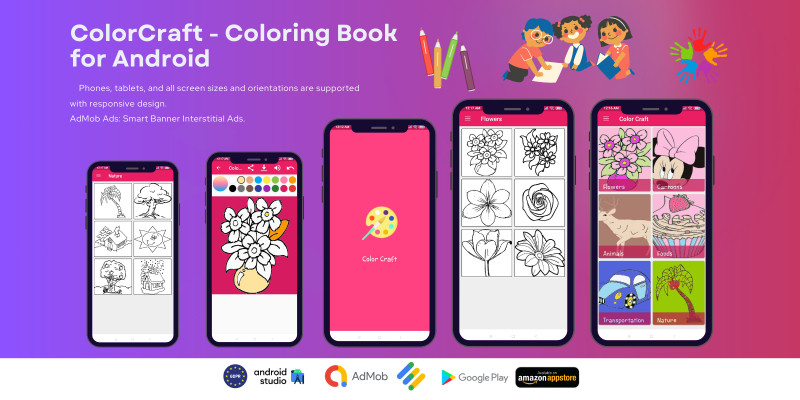
ColorCraft offers a unique and engaging coloring experience where you can fill images with color by simply tapping, all while enjoying a soothing music background. The app also provides the ability to zoom in and out for detailed coloring, undo any changes, share your colored masterpieces via social media, and save them directly to your device's gallery.
Features
ColorCraft - Coloring Book for AndroidColorCraft elevates your coloring experience with a variety of premium features:
- Awesome Animated Splash Screen to greet you with style.
- 6 Categories of coloring fun, offering unlimited pages to fill with vibrant colors.
- Flood Fill Mode with a tap-and-fill method, complete with satisfying sound effects.
- Zoom-In, Zoom-Out, and Move functionality using two fingers for detailed coloring.
- Undo Option to easily correct mistakes.
- Color Picker Tool with transparency settings, allowing for endless color combinations.
- Multiple Background Music Tracks that play randomly for each page, enhancing the creative ambiance with an enable/disable option.
- Save Colored Images directly to a specific folder in your gallery for easy access.
- Share Your Art with friends and family through other apps with a simple tap.
- Navigation Drawer includes essential features like Home, About, Share, and Rate the app for easy access.
- Android Studio Project is designed for easy customization with clean, organized code.
- RTL/LTR Support to accommodate various languages and orientations.
- Runtime Permissions to ensure smooth operation, particularly on Android 6.0.0 and above for storing images.
- Responsive Design that adapts to Phones, Tablets, and all screen sizes and orientations.
- AdMob Ads Integration with Interstitial and Smart Banner Ads for monetization.
- User Messaging Platform SDK to comply with GDPR for EU countries, including a reset ads consent option.
- In-App Review API allows users to rate and review the app without leaving the experience.
- Firebase Push Notifications to keep users engaged, even when the app is not active.
- Compliance with Google Play Families Policy ensures safety and appropriateness for all users.
- Comprehensive Documentation included for easy setup and customization.
Requirements
ColorCraft - RequirementsSystem Requirements:
- Operating System: Android 6.0 (Marshmallow) or higher.
- RAM: Minimum 2 GB RAM recommended for optimal performance.
- Storage: At least 100 MB of free storage for app installation and data.
- Internet Connection: Required for downloading additional content, ads, and updates.
Development Requirements:
- Android Studio: Latest version for development and customization.
- Java/Kotlin: Programming languages used for app development.
- Firebase Account: For push notifications and real-time data features.
- AdMob Account: For integrating ads and monetization features.
- User Messaging Platform SDK: Required for GDPR compliance and user messaging.
Hardware Requirements:
- Development Machine: A computer with sufficient resources to run Android Studio and test the app.
- Testing Devices: Phones and tablets of various sizes and specifications for testing responsiveness and functionality.
Instructions
ColorCraft - InstructionsHow to Use the App:
- Open the App: Launch the ColorCraft app from your device's home screen or app drawer.
- Select a Category: Choose from one of the 6 categories to browse available coloring pages.
- Pick a Coloring Page: Tap on a coloring page to open it and start coloring.
- Coloring: Use the Flood Fill Mode by tapping on the areas you want to color. Adjust the color using the Color Picker Tool and set the desired transparency.
- Zoom and Move: Use two fingers to zoom in, zoom out, and move around the coloring page for detailed coloring.
- Undo Changes: If needed, use the Undo Option to correct any mistakes.
- Background Music: Enjoy background music while coloring. Use the enable/disable button to control the music playback.
- Save Your Work: Save your colored images directly to a specific folder in your device’s gallery.
- Share Your Art: Share your finished coloring pages with friends and family through other apps by tapping the share button.
- Navigation Drawer: Access the app’s Home, About, Share, and Rate features via the Navigation Drawer for easy access to all app functions.
Customization Instructions:
- Open Android Studio: Import the ColorCraft project into Android Studio.
- Modify Code: Customize the app's features by editing the clean, organized code provided in the project.
- Adjust Design: Update the responsive design settings to fit your desired screen sizes and orientations.
- Integrate AdMob: Configure AdMob settings for interstitial and smart banner ads as per your monetization strategy.
- Set Up Firebase: Configure Firebase for push notifications and real-time data integration.
- Implement User Messaging Platform SDK: Ensure GDPR compliance and set up user messaging features.
- Test the App: Test the app on various devices and screen sizes to ensure responsiveness and functionality.
| Author | visionsdevs |
|---|---|
| Category | App Templates / Android / Applications / Miscellaneous |
| Price | $36 |
| Extended License | $108 |
| Rating | 1.00 from 1 rating |
| Reviews | 1 |
| First Release | Aug 12, 2024 |
| Last Update | Aug 12, 2024 |
| Files included | .java, .xml |
| Operating systems | Android 7.0, Android 8.0, Android 9.0, Android 10.0, Android 11.0, Android 12.0, Android 4.0, Android 5.0, Android 6.0 |
Categories
Tags
External listing. code.market does not sell this product and does not process payment for it. Pricing, payment, delivery, licensing, refunds, and support are handled by the third-party merchant on its own website. We may earn an affiliate commission from a referral. Details.
Products of the Week.
Submit🥇

STOP GUESSING WHAT TO POST
AI that learns your brand voice and builds a month of consistent, on-brand social content: carousels, posts and hooks that sound like you, not like everyone else's AI.
SaaS · 6,494 views · 59 clicksSaaS · Week 46 · 6,494 views · 59 clicks
🥈

Conversational Backlinks for Busy Founders
Place Backlink Relevant Conversation for your domain across Forums and Conversations
Website · 45,365 views · 229 clicksWebsite · Week 46 · 45,365 views · 229 clicks
🥉

upvote.club
Free Social Media Engagement that Helps Boost Your Content. Upvote Club supports 19 social networks with 100+ engagement actions in one dashboard. Add links to your posts and get free engagement from real users.
SaaS · 43,357 views · 124 clicksSaaS · Week 46 · 43,357 views · 124 clicks
#4

Substack Posting API
Onboard your Agent to Substack. Write Publish on Substack via API
SaaS · 62,287 views · 204 clicksSaaS · Week 46 · 62,287 views · 204 clicks
#5

Seenshot App
Free, Fast, MacOS Screenshot app. Make Screenshot cmd+shift+2 and send it via link
Desktop App · 31,549 views · 125 clicksDesktop App · Week 46 · 31,549 views · 125 clicks
#6

Hand-Placed Backlinks $9.99 per link. Flat rate.
Buy hand-placed forum, Q-A and directory backlinks. Flat $9.99 per link, no subscriptions — you only pay for approved listings.
Website · 7,261 views · 19 clicksWebsite · Week 46 · 7,261 views · 19 clicks
#7

Free Invoice Generator - PDF Invoices in Your Browser, No Sign-Up
A free invoice maker for freelancers and small businesses: fill in the invoice, check the live preview, and download a PDF that looks exactly like it. Any currency, tax per item, three templates, no sign-up, and nothing leaves your device.
5,879 views · 20 clicksWeek 46 · 5,879 views · 20 clicks
#8

Merge PDF Files Free - Combine PDFs in Your Browser, No Upload
A free PDF merger for office workers, students, and freelancers: combine PDFs and images into one file in the browser, reorder files and pages, pick page ranges, keep bookmarks, and open password-protected PDFs. Nothing is uploaded, no sign-up, no watermark.
5,431 views · 16 clicksWeek 46 · 5,431 views · 16 clicks