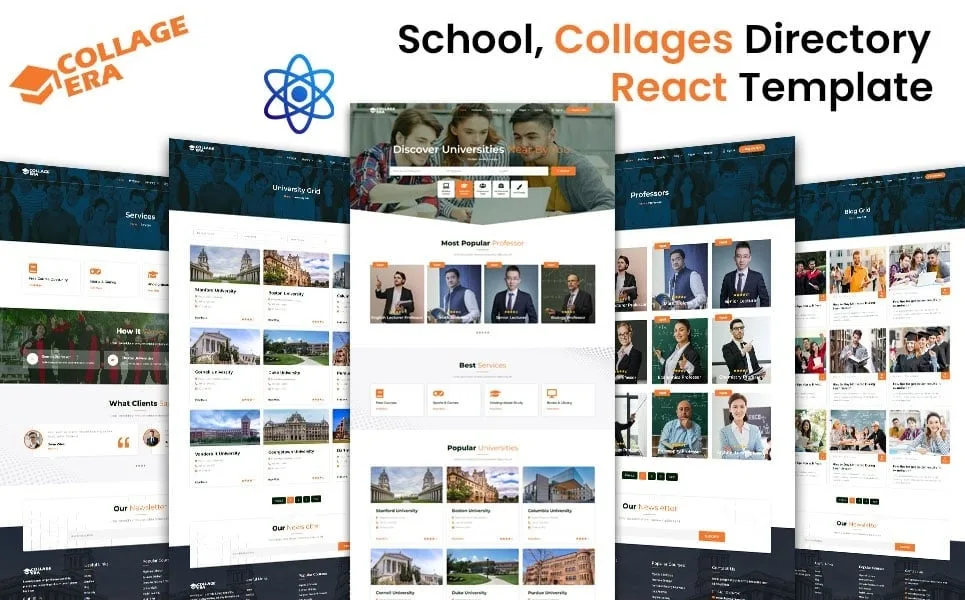
College Era - College, University and Online Course Educational React Website Template
Description

"College Era" redefines the landscape of educational websites with its cutting-edge React website template tailored for colleges, universities, and online course platforms. Seamlessly blending modern design aesthetics with robust functionality, College Era empowers educational institutions to create immersive digital experiences for students, faculty, and administrators alike.
1. Header
The header section typically contains the logo of the educational institution, navigation links to different sections of the website (such as Home, About, Courses, Admission, Contact), and possibly a search bar for finding specific information.
2. Hero Section
This section often includes a large, visually appealing banner image or video showcasing the campus, classrooms, or students engaging in learning activities. It may also include a brief introduction or welcome message.
3. About Section
The About section provides detailed information about the institution, its history, mission, vision, accreditation, facilities, and achievements. It could also feature testimonials from alumni, faculty, or current students.
4. Courses Section
This section displays the courses offered by the institution. Each course may have its own dedicated page with a description, objectives, curriculum, instructor information, and enrollment details. Users should be able to filter and search for courses based on various criteria such as department, level, or keyword.
5. Admission Section
The Admission section provides information about the admission process, requirements, deadlines, application forms, and contact details for admissions offices. It may also include FAQs to help prospective students understand the application process better.
6. Events Section
This section highlights upcoming events, workshops, seminars, conferences, or cultural activities organized by the institution. Users should be able to view event details, register for events, and add them to their calendars.
7. Testimonials Section
This section showcases testimonials from satisfied students, faculty members, or industry partners. Positive feedback can help build trust and credibility for the institution.
8. Blog Section
The blog section features articles, news updates, research findings, student achievements, and other relevant content. It allows the institution to share valuable information with its audience and establish thought leadership in the field of education.
9. Contact Section
The Contact section provides contact information, including the institution's address, phone number, email address, and social media links. It may also include a contact form for inquiries, feedback, or support requests.
10. Footer
The footer typically contains additional navigation links, copyright information, privacy policy, terms of service, and links to other relevant pages. It may also include quick links to popular sections of the website.
React Components and Features
- Reusable Components: Create reusable React components for common UI elements such as buttons, cards, forms, and modal dialogs to maintain consistency across the website.
- Responsive Design: Ensure that the website is responsive and looks good on various devices, including desktops, laptops, tablets, and smartphones.
- Routing: Use React Router to handle client-side routing and navigation between different pages of the website without full page reloads.
- State Management: Utilize React's built-in state management or external libraries like Redux to manage application state efficiently, especially for complex interactions.
- API Integration: Integrate APIs for features like course listings, event calendars, contact forms, and user authentication to fetch and update data dynamically.
- Authentication and Authorization: Implement user authentication and authorization features to allow students, faculty, and administrators to access protected resources and perform specific actions.
- SEO Optimization: Optimize the website for search engines by using proper HTML semantics, meta tags, structured data, and other SEO best practices to improve visibility and ranking in search results.
By incorporating these elements and features, a College Era React website template can provide a modern, user-friendly, and informative online platform for educational institutions to showcase their offerings and engage with their audience effectively.
Categories
Tags
External listing. code.market does not sell this product and does not process payment for it. Pricing, payment, delivery, licensing, refunds, and support are handled by the third-party merchant on its own website. We may earn an affiliate commission from a referral. Details.
Products of the Week.
Submit🥇

STOP GUESSING WHAT TO POST
AI that learns your brand voice and builds a month of consistent, on-brand social content: carousels, posts and hooks that sound like you, not like everyone else's AI.
SaaS · 6,104 views · 52 clicksSaaS · Week 46 · 6,104 views · 52 clicks
🥈

Conversational Backlinks for Busy Founders
Place Backlink Relevant Conversation for your domain across Forums and Conversations
Website · 44,707 views · 227 clicksWebsite · Week 46 · 44,707 views · 227 clicks
🥉

upvote.club
Free Social Media Engagement that Helps Boost Your Content. Upvote Club supports 19 social networks with 100+ engagement actions in one dashboard. Add links to your posts and get free engagement from real users.
SaaS · 42,719 views · 123 clicksSaaS · Week 46 · 42,719 views · 123 clicks
#4

Substack Posting API
Onboard your Agent to Substack. Write Publish on Substack via API
SaaS · 61,664 views · 204 clicksSaaS · Week 46 · 61,664 views · 204 clicks
#5

Seenshot App
Free, Fast, MacOS Screenshot app. Make Screenshot cmd+shift+2 and send it via link
Desktop App · 30,941 views · 124 clicksDesktop App · Week 46 · 30,941 views · 124 clicks
#6

Hand-Placed Backlinks $9.99 per link. Flat rate.
Buy hand-placed forum, Q-A and directory backlinks. Flat $9.99 per link, no subscriptions — you only pay for approved listings.
Website · 6,668 views · 19 clicksWebsite · Week 46 · 6,668 views · 19 clicks
#7

Free Invoice Generator - PDF Invoices in Your Browser, No Sign-Up
A free invoice maker for freelancers and small businesses: fill in the invoice, check the live preview, and download a PDF that looks exactly like it. Any currency, tax per item, three templates, no sign-up, and nothing leaves your device.
5,312 views · 19 clicksWeek 46 · 5,312 views · 19 clicks
#8

Merge PDF Files Free - Combine PDFs in Your Browser, No Upload
A free PDF merger for office workers, students, and freelancers: combine PDFs and images into one file in the browser, reorder files and pages, pick page ranges, keep bookmarks, and open password-protected PDFs. Nothing is uploaded, no sign-up, no watermark.
4,899 views · 15 clicksWeek 46 · 4,899 views · 15 clicks