
CodeCapture — Web Archiving Made Simple
Description
CodeCapture – Professional Website Downloader & Offline Archiving Tool
Transform any website into a complete offline archive with just a few clicks. CodeCapture is a powerful, cross-platform desktop application that downloads and organizes entire websites for offline viewing, development reference, or content preservation.
Key Features
- Complete Website Mirroring – Download HTML, CSS, JavaScript, images, fonts and more in a single operation
- Multi-threaded Performance – Capture websites quickly with configurable parallel downloads (up to 100 threads)
- Smart Link Rewriting – All internal links are automatically updated to work perfectly offline
- External Resource Capture – Option to download content from CDNs and third-party domains
- All File Types Support – Download any linked files including PDFs, DOCs, ZIPs, and more
- Authentication Support – Access protected content with Basic Auth or Bearer Token
- Custom HTTP Headers – Configure any headers needed for specialized websites
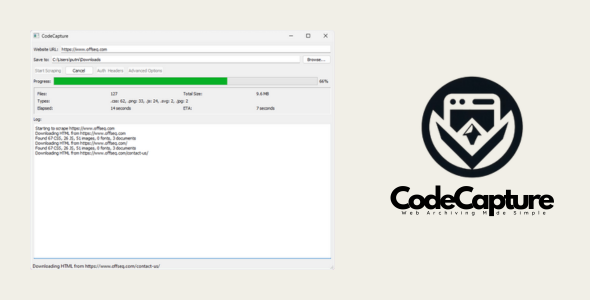
- Real-time Statistics – Monitor downloads with detailed metrics and estimated completion time
- Cross-Platform – Works on Windows and macOS without installation
Perfect For
- Web Developers – Study and reference professional websites offline
- Researchers – Save online resources for offline access or archival
- Content Creators – Capture reference material before it changes
- Digital Preservation – Archive important websites for historical purposes
- Educators – Create offline copies of educational resources
- Travelers – Download travel guides and maps for offline use
- Legal Professionals – Create evidence copies of online content
Technical Highlights
CodeCapture uses intelligent processing to ensure complete website functionality offline:
- CSS/JS resource extraction and path correction
- Base HREF handling for proper relative path functioning
- Structural directory organization by file type
- Full domain crawling with configurable depth control
- Detailed logging of all operations
- Responsive cancellation system for large operations
What You Get
- Standalone Windows executable (.exe) – no installation required
- Comprehensive documentation
- Free updates
CodeCapture is the professional solution for website archiving, offline browsing, web scraping, and content preservation. Download a complete snapshot of any website with all its assets for development reference, educational use, or offline access.
| Type | Windows App |
|---|---|
| Author | ambercode |
| Price | $14 |
| Sales | 4 |
| Rating | 0 (2) |
| Published | Mar 19, 2025 |
| Last Update | Mar 19, 2025 |
| Application Runtime | Native |
| High Resolution | No |
| Operating System Versions | Windows XP, Windows Vista, Windows 7, Windows 8 Desktop, Windows 8 Metro, Windows 10 |
Categories
Tags
External listing. code.market does not sell this product and does not process payment for it. Pricing, payment, delivery, licensing, refunds, and support are handled by the third-party merchant on its own website. We may earn an affiliate commission from a referral. Details.
Products of the Week.
Submit🥇

STOP GUESSING WHAT TO POST
AI that learns your brand voice and builds a month of consistent, on-brand social content: carousels, posts and hooks that sound like you, not like everyone else's AI.
SaaS · 7,346 views · 67 clicksSaaS · Week 46 · 7,346 views · 67 clicks
🥈

Conversational Backlinks for Busy Founders
Place Backlink Relevant Conversation for your domain across Forums and Conversations
Website · 46,624 views · 232 clicksWebsite · Week 46 · 46,624 views · 232 clicks
🥉

upvote.club
Free Social Media Engagement that Helps Boost Your Content. Upvote Club supports 19 social networks with 100+ engagement actions in one dashboard. Add links to your posts and get free engagement from real users.
SaaS · 44,566 views · 127 clicksSaaS · Week 46 · 44,566 views · 127 clicks
#4

Substack Posting API
Onboard your Agent to Substack. Write Publish on Substack via API
SaaS · 63,451 views · 206 clicksSaaS · Week 46 · 63,451 views · 206 clicks
#5

Seenshot App
Free, Fast, MacOS Screenshot app. Make Screenshot cmd+shift+2 and send it via link
Desktop App · 32,702 views · 127 clicksDesktop App · Week 46 · 32,702 views · 127 clicks
#6

Hand-Placed Backlinks $9.99 per link. Flat rate.
Buy hand-placed forum, Q-A and directory backlinks. Flat $9.99 per link, no subscriptions — you only pay for approved listings.
Website · 8,324 views · 19 clicksWebsite · Week 46 · 8,324 views · 19 clicks
#7

Free Invoice Generator - PDF Invoices in Your Browser, No Sign-Up
A free invoice maker for freelancers and small businesses: fill in the invoice, check the live preview, and download a PDF that looks exactly like it. Any currency, tax per item, three templates, no sign-up, and nothing leaves your device.
6,951 views · 29 clicksWeek 46 · 6,951 views · 29 clicks
#8

Merge PDF Files Free - Combine PDFs in Your Browser, No Upload
A free PDF merger for office workers, students, and freelancers: combine PDFs and images into one file in the browser, reorder files and pages, pick page ranges, keep bookmarks, and open password-protected PDFs. Nothing is uploaded, no sign-up, no watermark.
6,433 views · 18 clicksWeek 46 · 6,433 views · 18 clicks