
CodeBazaarr - PHP Multi-Vendor Script Marketplace

Description
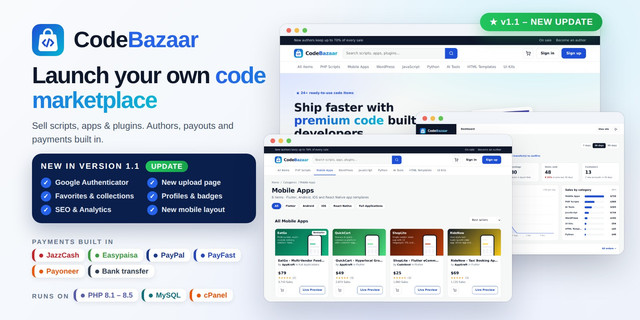
CodeBazaar is a complete multi-vendor marketplace script written in PHP 8 and MySQL. Authors upload and sell source code, scripts, mobile apps, plugins and templates. Buyers pay, download instantly and get a purchase code. You earn a commission on every sale, and author payouts can run automatically.
It installs on any cPanel hosting with a simple web installer. No framework, no Composer and no command line are needed.
Version 1.1 · PHP 8.1 – 8.5 · MySQL / MariaDB · cPanel ready

Live Demo
See it live before you buy: https://sourcecodee.newsut.store
What's New in Version 1.1
A big update for buyers, authors and admins. Existing 1.0 sites can upgrade in a few minutes – settings and data are kept.
1. Google Authenticator (two-factor sign-in)

- Optional for every account – buyer, author or admin – from Account settings
- Works with Google Authenticator, Microsoft Authenticator and Authy
- QR code made on your own server, secret stored encrypted
- Code box on the same sign-in card, also after Google / Facebook login
- Used codes cannot be reused, wrong attempts are limited
2. Backup Codes and Admin Reset

- 10 one-time backup codes with Download, Print and Regenerate
- 2FA can be turned off only while signed in, with a valid code
- Admin → Customers shows the 2FA status and can reset it for a lost phone
- "Secure account" badge for users with 2FA on
3. New Upload Page

- Authors choose a category first and see clear submission guidelines
- Name and description, features, requirements, instructions
- Development time and YouTube / Vimeo video
- Up to 15 tags and a message to the reviewer
- Editing a live item keeps it on sale – the update waits for review
4. Item Attributes by Category

- Files included, software version, framework, database
- CSS / JS framework and programming language
- Mobile apps: operating systems and app framework
- WordPress: WordPress version and "compatible with"
5. Locked Image Sizes and Upload Progress

- Preview image exactly 1600 × 800 px, icon exactly 200 × 200 px
- Wrong sizes are refused with a clear message
- Every file uploads as soon as it is chosen, with its own progress bar
- Large ZIP files are sent in small parts – no server upload-limit errors
6. Richer Item Page

- Features, requirements, instructions and video sections
- Attribute table on every item
- Sale price with the old price crossed out
- Favorite and collection icons
7. Favorites, Collections and Follow Feed


- "Add this item to a collection" window
- Private or public collections with a share link
- Sort, edit, delete and "Add all items to cart"
- Follow feed with new items from followed authors
8. Author Profiles and Badges

- Tabs: Profile, Portfolio (grid / list), Followers, Following
- Automatic badges: author level 1–6, exclusive author, top rated, elite author
- Customer, secure account and member-for-N-years badges
- Country flag and author stats
9. SEO and Analytics Menu

- Google Analytics 4, Tag Manager, Search Console and Bing verification
- Home page and per-category titles and descriptions
- Automatic sitemap.xml, robots.txt and IndexNow
- Product rich data (price, rating), breadcrumbs and tag pages
10. New Mobile Layout

- Menu with search and categories, cart and account
- Price button next to the title opens "Customize your selection"
- Account menu slides in from the right
- Admin: author detail page and "Release now" for on-hold earnings
Screenshots
Home page

Category page with filters

Checkout

Author – earnings dashboard

Follow feed

Admin dashboard

Payment gateways

Automatic payouts

All Features
For Buyers
- Modern, fast and mobile-friendly storefront
- Categories, tags, search, filters and sorting
- Item pages with screenshots, live preview, video, reviews and ratings
- Cart, coupon codes and secure checkout
- Instant downloads and a purchase code (license) for every order
- Favorites, collections and follow feed
- Sign up with email, Google or Facebook, plus "Forgot password" by email
- Optional Google Authenticator sign-in with backup codes
For Authors (Sellers)
- Any user can become an author from their own account
- Upload with live progress, attributes, features, requirements and video
- Description in simple text or HTML (safe HTML filter built in)
- Put items on sale with the old price crossed out
- Earnings dashboard with charts, sales list and balance
- Exclusive and non-exclusive author rates
- Purchase code verification for their buyers
- Connect Payoneer and get paid automatically
- Public profile with portfolio, followers and automatic badges
For You (Admin)
- Dashboard with sales, earnings, charts and recent orders
- Item review for new items and updates: approve, soft reject (with notes) or hard reject
- Orders, customers (with CSV export) and authors management
- Author detail page: disable / enable items, balance, "Release now" for on-hold earnings
- Commission settings, holding period and minimum payout
- Automatic author payouts on a schedule, with email alerts
- SEO and Analytics: Google Analytics, Search Console, titles, sitemap
- Edit logo, colors, texts, images, menus, pages and footer without code
- 3 color themes, maintenance mode and activity log
- Purchase verification API with API keys
- See each user's 2FA status and reset it for users who lost their phone
Payment Gateways
- PayPal – international buyers and cards
- JazzCash – mobile wallet and cards (Pakistan)
- Easypaisa – mobile wallet, shops and cards (Pakistan)
- PayFast – Visa, Mastercard, UnionPay and wallets (Pakistan)
- Bank transfer – manual, confirmed by admin
- Payoneer – automatic author payouts (Mass Payout API)
PayPal, JazzCash, Easypaisa, PayFast and Payoneer each have a Sandbox (testing) and Live (real money) mode. Bank transfer needs no API keys. You use your own merchant accounts and API keys, added from the admin panel and stored encrypted.
Sandbox Testing
- Get test (sandbox) keys from your gateway's developer or merchant portal.
- Admin → Payment gateways → click Set up on the gateway.
- Choose Sandbox (testing), paste the keys and save.
- Click Test connection, then turn the gateway on.
- When testing is done, switch to Live (real money) with your live keys.
- SMTP (cPanel mailbox, Gmail or any server), Brevo, SendGrid, Mailgun and Resend
- Emails for item review results, password reset and author payouts
- "Send test email" button
Security
- CSRF protection on all forms and prepared SQL statements
- Passwords hashed, API keys encrypted (libsodium)
- Optional Google Authenticator (TOTP) sign-in for every account
- Private folders and files protected with .htaccess
- Downloads only for buyers who paid
Requirements
- PHP 8.1, 8.2, 8.3, 8.4 or 8.5
- MySQL 5.7+ or MariaDB 10+
- PHP extensions: PDO MySQL, sodium, cURL, zip, mbstring
- Apache with mod_rewrite (standard on cPanel hosting)
What You Get
- Full PHP source code
- Web installer with optional demo content
- Upgrade package and English upgrade steps (UPGRADE.md) for 1.0 buyers
- 48-page "Zero to Hero" PDF guide with screenshots
- README, changelog and logo files
Installation
- Upload codebazaar-v1.1-full.zip to your hosting and extract it.
- Create a MySQL database in cPanel.
- Open yourdomain.com/install/ and follow the steps.
- Sign in to the admin panel and add your payment keys.
Already using version 1.0? Do not reinstall. Upload codebazaar-v1.1-upgrade.zip and follow UPGRADE.md (also in the PDF guide, Chapter 14). Your settings and data are kept.
Installation and Reskin Service
Don't want to do it yourself? We can install CodeBazaar on your domain and hosting, add your name, logo and colors, set up payment gateways and email, and test the full buy and sell flow. Use the message / support option on this item page.
Changelog
Version 1.1 – October 2026
- Google Authenticator two-factor sign-in with 10 backup codes and admin reset
- Author profiles (Profile, Portfolio, Followers, Following) and automatic badges
- New upload page: category first, attributes, features, requirements, instructions, video, 15 tags
- Locked image sizes (1600 × 800 / 200 × 200) and per-file upload progress
- Updates to live items wait for review while the item stays on sale
- Favorites, public / private collections and follow feed
- SEO and Analytics menu: GA4, Tag Manager, Search Console, sitemap, IndexNow
- New mobile layout
- Admin author page and "Release now" for on-hold earnings
- PHP 8.1 – 8.5 support, accessibility improvements, 48-page guide
Version 1.0 – September 2026
- Initial release: multi-vendor marketplace with item review
- PayPal, JazzCash, Easypaisa, PayFast and bank transfer
- Automatic Payoneer author payouts with email alerts
- Google / Facebook login and forgot password
- Editable texts, images, menus, pages and footer
Please note: you need your own domain, hosting and merchant accounts for each payment gateway and for Payoneer. Payoneer's payout API must be approved by Payoneer for your account. Always test with Sandbox keys before accepting real payments. Provider names are used for identification only.
Developed by SAMA Android Studio.
Features
Multi-vendor marketplace – authors sell, you earn commission Web installer – no command line or Composer needed Works on any cPanel hosting (PHP 8.1+ and MySQL) Payments: PayPal, JazzCash, Easypaisa, PayFast and bank transfer Automatic author payouts with Payoneer Sandbox and Live mode for every payment gateway API keys stored encrypted from the admin panel Google and Facebook login Forgot password by email SMTP, Brevo, SendGrid, Mailgun and Resend email support Item review system – approve, soft reject or hard reject Commission settings for exclusive and non-exclusive authors Holding period and minimum payout settings Coupon codes and on-sale ribbon Reviews and star ratings Purchase codes and verification API Instant downloads for paid buyers only Screenshot gallery and live preview on item pages Simple text or HTML item descriptions Author dashboard with earnings charts Admin dashboard with sales charts Customers list with CSV export Edit logo, texts, images, menus, pages and footer without code 3 color themes and maintenance mode Activity log Fully responsive, mobile-friendly design CSRF protection and secure password hashing
(New add) Google Authenticator (two-factor authentication) with 10 backup codes
35-page Zero to Hero PDF guide with screenshots
Requirements
PHP 8.1 or newer MySQL 5.7+ or MariaDB 10.3+ PHP extensions: PDO MySQL, sodium, cURL, zip, mbstring Apache with mod_rewrite (.htaccess support) Writable folders: /uploads and /storage SSL certificate (https) recommended for payments and Google/Facebook login
Instructions
INSTALLATION
1. In cPanel, open File Manager and upload the ZIP file to public_html (or a subfolder). 2. Extract the ZIP. Make sure the hidden .htaccess file is extracted too (File Manager > Settings > Show Hidden Files). 3. In cPanel > MySQL Databases, create a database and a user, and add the user to the database with ALL PRIVILEGES. 4. Open in your browser. 5. The installer checks your server. Every requirement must show a green tick. 6. Enter your website address, marketplace name, database details and your admin name, email and password. Tick "Install demo content" if you want sample data. 7. Click Install. You can now sign in to the admin panel. 8. Delete the "install" folder from your server (recommended).
AFTER INSTALLATION
1. Admin > Settings: set commission, payout rules and currency options. 2. Admin > Texts & images: upload your logo and favicon, edit website texts. 3. Admin > Menus and Pages: edit header and footer links and pages. 4. Admin > Payment gateways: add your PayPal, JazzCash, Easypaisa, PayFast or bank details. Test in Sandbox mode first, then switch to Live. 5. Admin > Email: set up SMTP or an email API and click "Send test email". 6. Admin > Login & API: add Google and Facebook keys for social login (optional). 7. Admin > Payouts: connect Payoneer for automatic author payouts (optional).
CRON JOB (OPTIONAL)
Payouts run automatically. For exact timing you can add a daily cron job in cPanel: php /home/USERNAME/public_html/cron/payouts.php
UPDATING
Upload the new files over the old ones. Do not replace config.php. Your data and settings are kept.
The full step-by-step guide with screenshots is in the documentation folder: documentation/CodeBazaar-Zero-to-Hero-Guide.pdf
| Author | SAMAAndroidStudio |
|---|---|
| Category | Scripts & Code / PHP Scripts |
| Price | $37 |
| Extended License | $111 |
| Likes | 1 |
| First Release | Sep 30, 2026 |
| Last Update | Oct 12, 2026 |
| Database | MySQL 8.0, MariaDB 10.x, MariaDB 11.x, SQLite 3.x |
| Files included | .php, .css, .html |
| Software version | PHP 8.0, PHP 8.1, PHP 8.2, PHP 8.3, PHP 8.4, PHP 8.5 |
| Programming language | PHP, JavaScript, Java |
Categories
Tags
External listing. code.market does not sell this product and does not process payment for it. Pricing, payment, delivery, licensing, refunds, and support are handled by the third-party merchant on its own website. We may earn an affiliate commission from a referral. Details.
Products of the Week.
Submit🥇

Perceptle
Perceptle is a daily browser-based game that challenges you to test your sensory intuition through five quick estimation and rhythm-based rounds.
Other · 1,489 views · 9 clicksOther · Week 47 · 1,489 views · 9 clicks
🥈

Free LinkedIn Likes From Real
Get free LinkedIn likes on your posts from real members who react by hand. No
SaaS · 1,632 views · 10 clicksSaaS · Week 47 · 1,632 views · 10 clicks
🥉

STOP GUESSING WHAT TO POST
AI that learns your brand voice and builds a month of consistent, on-brand social content: carousels, posts and hooks that sound like you, not like everyone else's AI.
SaaS · 9,176 views · 75 clicksSaaS · Week 47 · 9,176 views · 75 clicks
#4

aaas.market
407 reliable micro tools for solo founders, marketers and creators. They work in your browser
SaaS · 1,597 views · 5 clicksSaaS · Week 47 · 1,597 views · 5 clicks