
CoachCrayon | Tutoring App Flutter UI Kit
Description
CoachCrayon | Tutoring App Flutter UI Kit
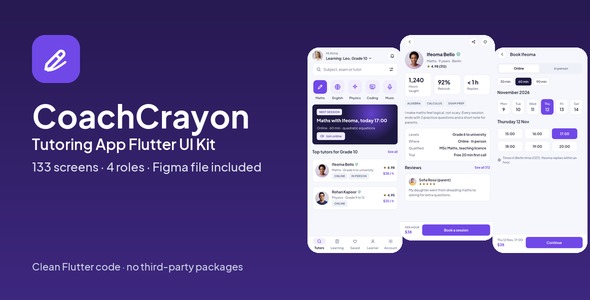
CoachCrayon is a complete Flutter UI kit for a tutoring and coaching business: 2 phone apps (Learner app and Tutor app) and 2 desktop admin panels (Centre admin and Super admin). 133 screens in clean Flutter code with no third-party packages, plus the matching Figma design file as a bonus.
Open the live demo and try every screen in your browser.
Demo Instructions
Live demo: https://uikits.appzenic.com/coachcrayon/
- Choose a role on the start page (for example the customer app or the admin panel) and open any screen from its list.
- Login is open to everyone: no account or sign-up is needed.
- On any sign-in screen you can use Email: demo@example.com and Password: Demo1234, then tap Sign in. Any other email and password also work, and you can leave the fields empty.
- This is a UI kit with sample data and no backend, so nothing you type is sent or saved.
4 apps, 133 screens
- Learner app (mobile, 47 screens): onboarding, sign in, create account, verify email, forgot password, who is learning, find a tutor, maths tutors, filters, search results, no tutors found, tutor profile, tutor reviews, pick a time, review and pay, payment failed, booked, learning, session detail, online session, notes and homework, hand in homework, progress report, rate the session, move session, cancel session, saved tutors, post a request, my requests, offers from tutors, messages, chat with tutor, notifications, learner profile, edit learner profile, account, personal details, payment methods, add a card, packs and credits, receipt, wallet, settings, help, invite friends, offline, family.
- Tutor app (mobile, 33 screens): sign in, apply to teach, forgot password, teaching profile, qualifications, waiting for approval, today, week, session, learner card, write session note, note sent, online session, learners, progress report, requests, send an offer, insights, earnings and payouts, payout account, my reviews, tutor profile, edit profile, availability, time off, prices and packs, messages, chat, notifications, settings, help, no sessions today, offline.
- Centre admin (desktop, 29 screens): sign in, overview, subjects, levels, add subject, tutors, verify tutor, tutor detail, learners, learner detail, sessions, session, calendar, requests, match tutor, reviews, payments, refund, packages and prices, reports, plan and billing, message templates, team and roles, activity log, settings, setup checklist, safeguarding, invite tutor, tutor payouts.
- Super admin (desktop, 24 screens): sign in, overview, centres, approve centre, plans and billing, payouts, disputes, support, broadcast, team and roles, activity log, system status, settings, centre detail, tutors, learners, sessions, dispute detail, ticket detail, plan editor, payout run detail, subject catalogue, promo codes, suspend centre.
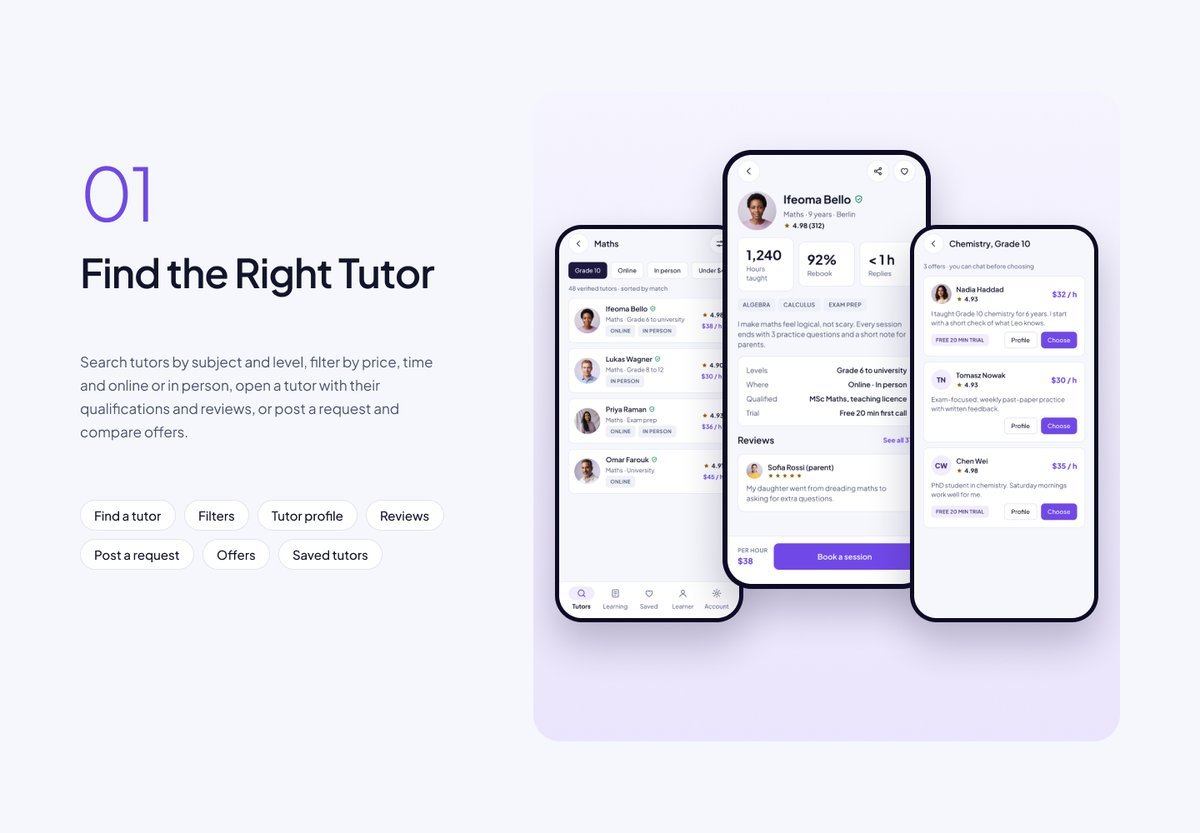
Find the Right Tutor
Search tutors by subject and level, filter by price, time and online or in person, open a tutor with their qualifications and reviews, or post a request and compare offers.
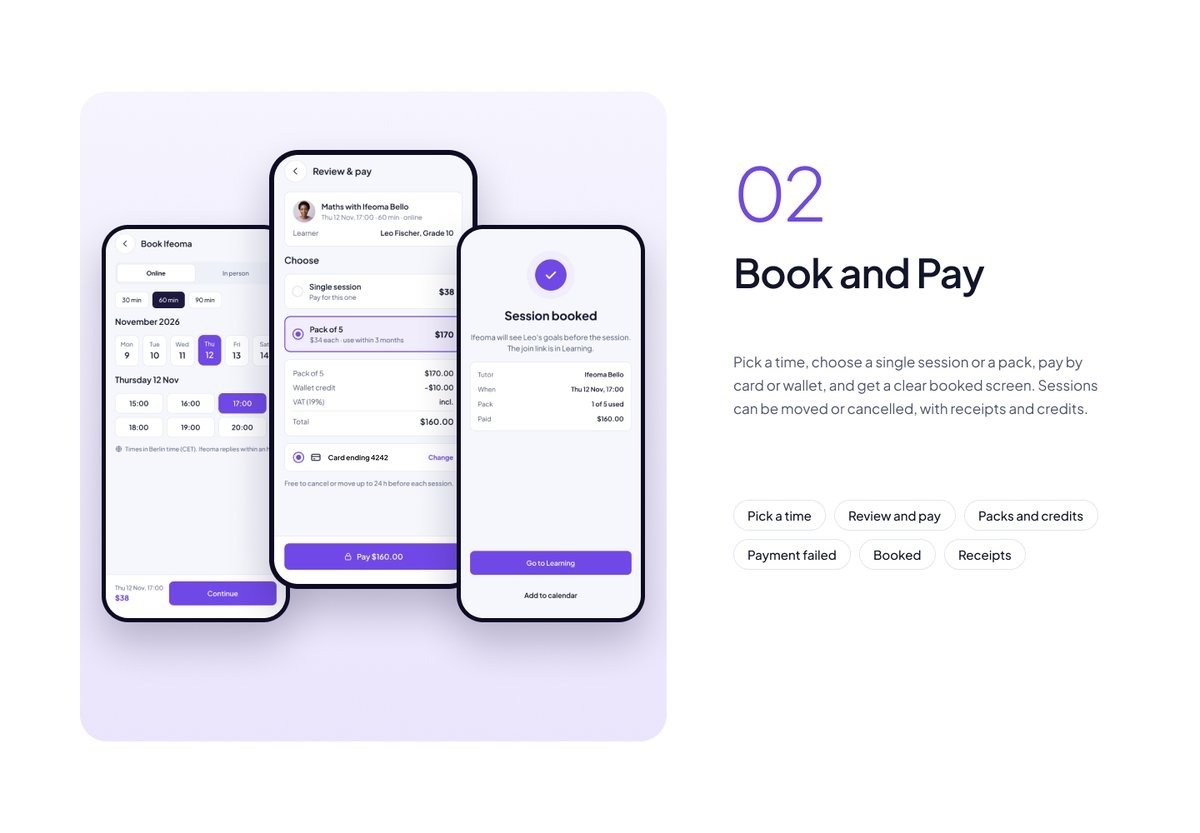
Book and Pay
Pick a time, choose a single session or a pack, pay by card or wallet, and get a clear booked screen. Sessions can be moved or cancelled, with receipts and credits.
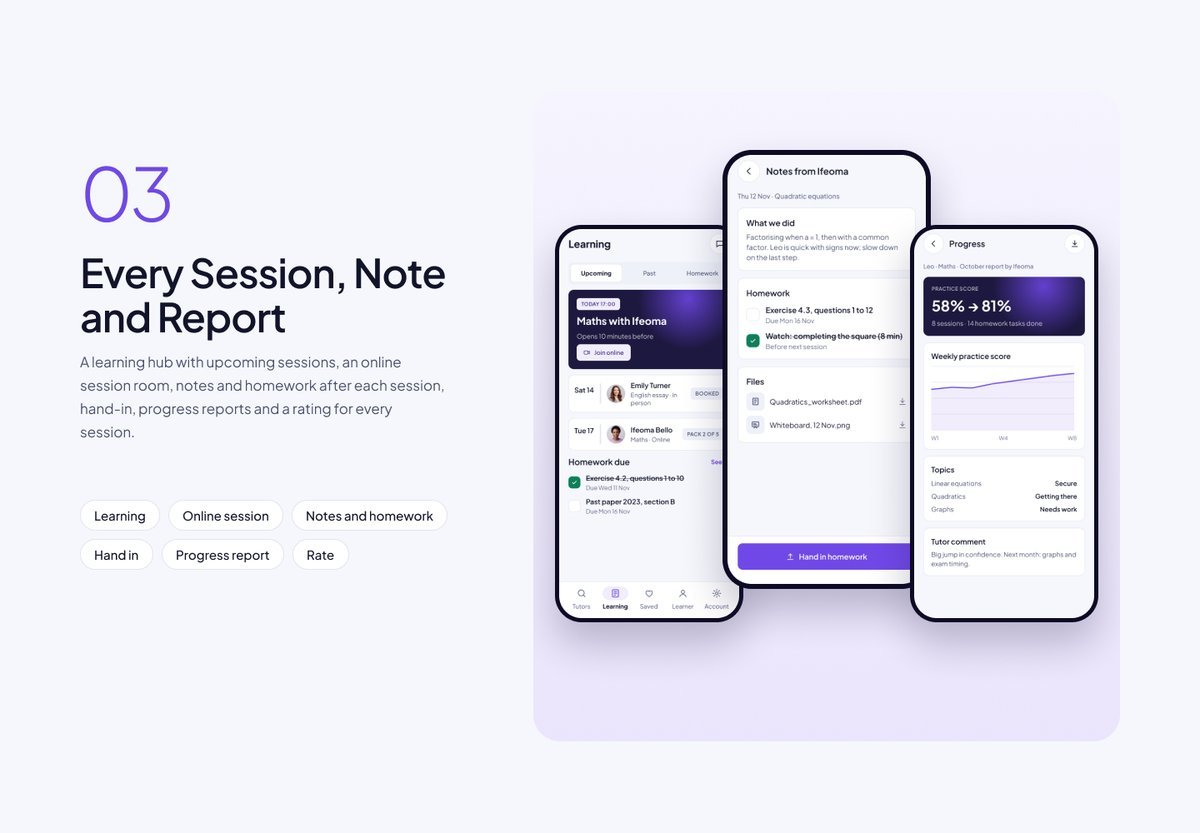
Every Session, Note and Report
A learning hub with upcoming sessions, an online session room, notes and homework after each session, hand-in, progress reports and a rating for every session.
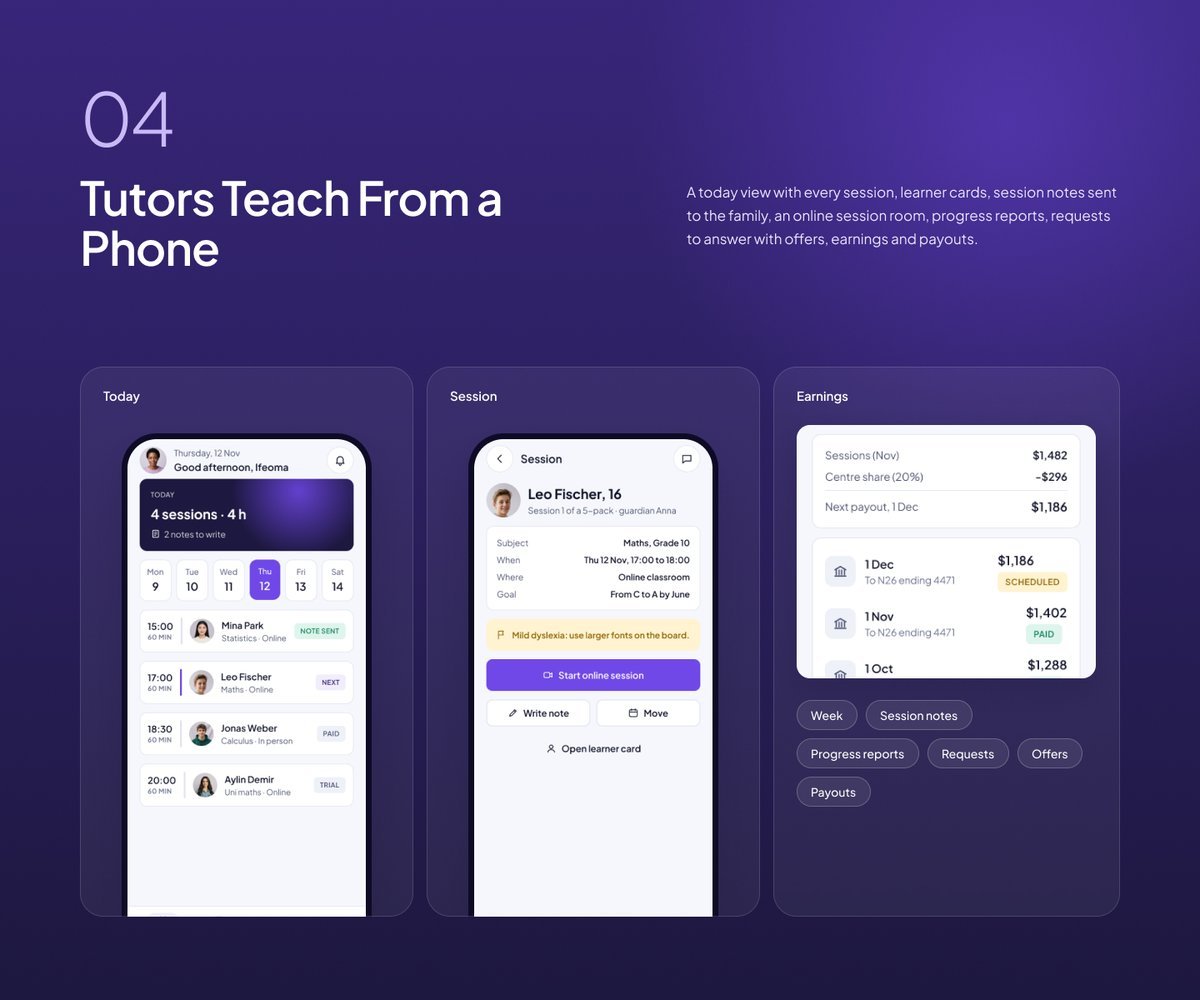
Tutors Teach From a Phone
A today view with every session, learner cards, session notes sent to the family, an online session room, progress reports, requests to answer with offers, earnings and payouts.
Desktop Consoles With a Sidebar
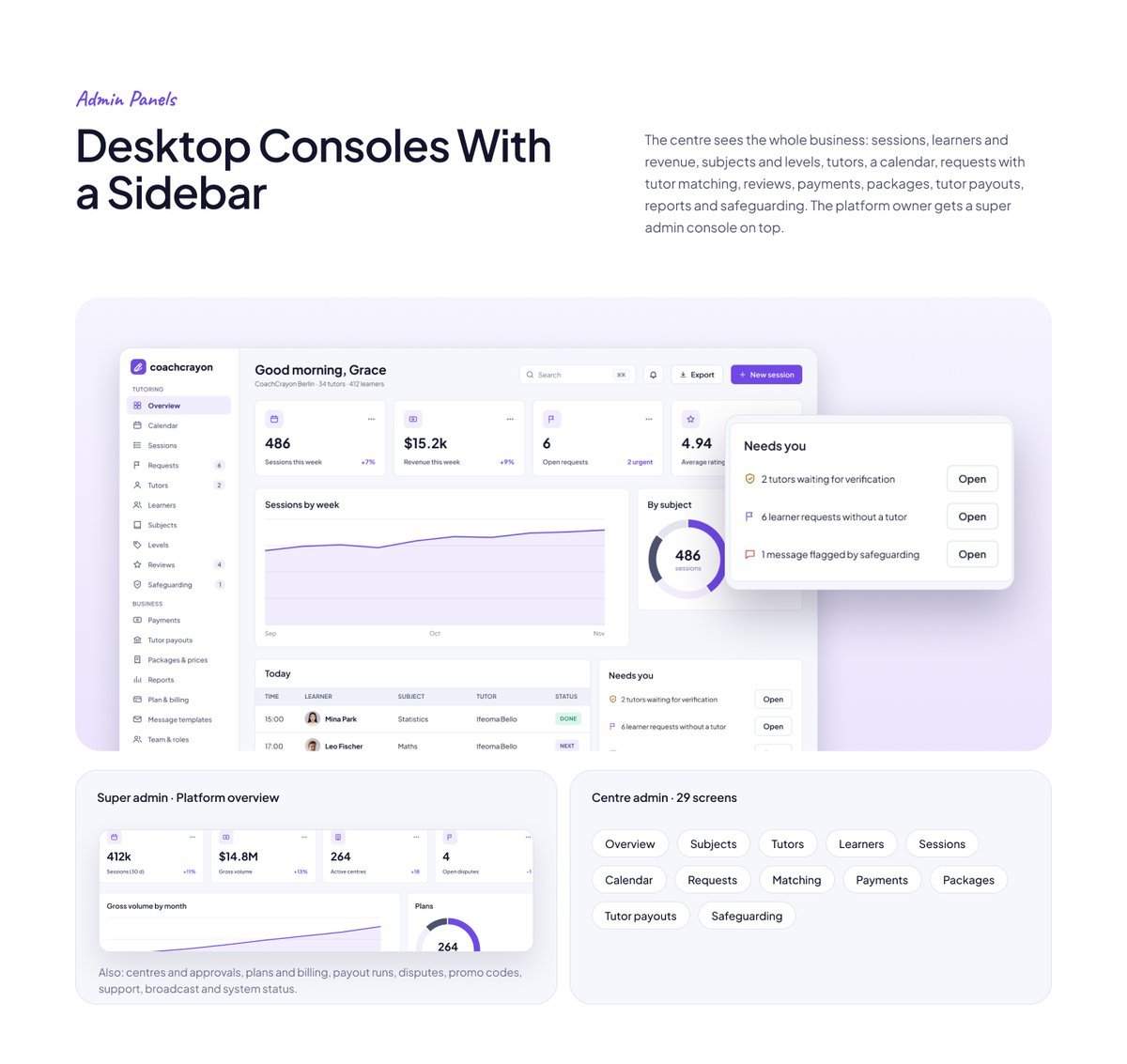
The centre sees the whole business: sessions, learners and revenue, subjects and levels, tutors, a calendar, requests with tutor matching, reviews, payments, packages, tutor payouts, reports and safeguarding. The platform owner gets a super admin console on top.
Clean Flutter code
- Only the Flutter SDK: no third-party packages, no network calls, no API keys. Run flutter pub get and flutter run.
- One theme: colours, text styles, control heights and radii live in token files. Change the primary colour once and every screen follows.
- A shared component library: buttons, chips, inputs, badges, switches, segmented controls, navigation bars, sidebar, tables, charts, modals and drawers. A Components page shows every variant.
- Every screen is reachable and works like a prototype: tabs, switches, chips and links respond.
- Responsive: phones from 360 pt, tablets, and desktop panels from 1024 pt. Below 900 pt the sidebar becomes a drawer, cards reflow and tables scroll sideways.
- Tested: every screen renders without overflow at phone, tablet and desktop sizes, and a test taps every button and link. flutter analyze reports 0 issues.
- All amounts in US dollars; sample names and cities from around the world.
What you get
- The full Flutter project (Android, iOS and web).
- Documentation: requirements, installation, folder structure, how to re-theme, how to add a screen, and the screen list per role.
- Bonus: the matching Figma design file (photo-free edition).
Requirements
This is a UI kit (front end only) without backend functionality: no server, database, user accounts or payments are included, and every screen shows sample data. To build it you need a current stable Flutter 3 release, plus Android Studio or Xcode for mobile builds. No other packages, accounts or API keys are needed.
Notes
This is a UI kit: there is no backend or payment gateway. Photo slots in the download are neutral placeholders for your own images; the sample photos appear in the demo and previews only.
How this kit was made
Concept, screens, flows and colours by our team. The Figma designs are made manually, and the skeleton-only Flutter code was converted from Figma using local in-house scripts for visual consistency. The full Flutter code and UI flows are then manually written, and every screen was reviewed and tested by our team. No third-party Figma-to-code service was used: the Figma to Flutter skeleton step used only our own local in-house scripts. The earlier header “Generated from the Figma kit, then reviewed.” in each screen file referred to that skeleton step and has been removed from every screen file. Only the images and assets shown inside the app screenshots and previews (sample photos, avatars and sketches) were made with Gemini AI, for presentation only; they are not included in the download. Full details are in the documentation.
| Author | Thinkcreative_Technologies |
|---|---|
| Price | $18 |
| Sales | 0 |
| Rating | 0 (0) |
| Published | Nov 11, 2026 |
| Last Update | Nov 11, 2026 |
| Compatible Software | Flutter 3.x |
| Demo Url | https://uikits.appzenic.com/coachcrayon/ |
| Mobile Files Included | Dart, YAML, JavaScript JSON, .kotlin, .h, .storyboard, .plist, .swift, HTML |
Categories
Tags
External listing. code.market does not sell this product and does not process payment for it. Pricing, payment, delivery, licensing, refunds, and support are handled by the third-party merchant on its own website. We may earn an affiliate commission from a referral. Details.
Products of the Week.
Submit🥇

STOP GUESSING WHAT TO POST
AI that learns your brand voice and builds a month of consistent, on-brand social content: carousels, posts and hooks that sound like you, not like everyone else's AI.
SaaS · 7,331 views · 67 clicksSaaS · Week 46 · 7,331 views · 67 clicks
🥈

Conversational Backlinks for Busy Founders
Place Backlink Relevant Conversation for your domain across Forums and Conversations
Website · 46,599 views · 232 clicksWebsite · Week 46 · 46,599 views · 232 clicks
🥉

upvote.club
Free Social Media Engagement that Helps Boost Your Content. Upvote Club supports 19 social networks with 100+ engagement actions in one dashboard. Add links to your posts and get free engagement from real users.
SaaS · 44,541 views · 127 clicksSaaS · Week 46 · 44,541 views · 127 clicks
#4

Substack Posting API
Onboard your Agent to Substack. Write Publish on Substack via API
SaaS · 63,427 views · 206 clicksSaaS · Week 46 · 63,427 views · 206 clicks
#5

Seenshot App
Free, Fast, MacOS Screenshot app. Make Screenshot cmd+shift+2 and send it via link
Desktop App · 32,676 views · 127 clicksDesktop App · Week 46 · 32,676 views · 127 clicks
#6

Hand-Placed Backlinks $9.99 per link. Flat rate.
Buy hand-placed forum, Q-A and directory backlinks. Flat $9.99 per link, no subscriptions — you only pay for approved listings.
Website · 8,300 views · 19 clicksWebsite · Week 46 · 8,300 views · 19 clicks
#7

Free Invoice Generator - PDF Invoices in Your Browser, No Sign-Up
A free invoice maker for freelancers and small businesses: fill in the invoice, check the live preview, and download a PDF that looks exactly like it. Any currency, tax per item, three templates, no sign-up, and nothing leaves your device.
6,927 views · 29 clicksWeek 46 · 6,927 views · 29 clicks
#8

Merge PDF Files Free - Combine PDFs in Your Browser, No Upload
A free PDF merger for office workers, students, and freelancers: combine PDFs and images into one file in the browser, reorder files and pages, pick page ranges, keep bookmarks, and open password-protected PDFs. Nothing is uploaded, no sign-up, no watermark.
6,410 views · 18 clicksWeek 46 · 6,410 views · 18 clicks