
Clipvio | AI Video Generator and Editor iOS App Template - SwiftUI
Description
Clipvio – AI Video Generator and Editor iOS App Template (SwiftUI)
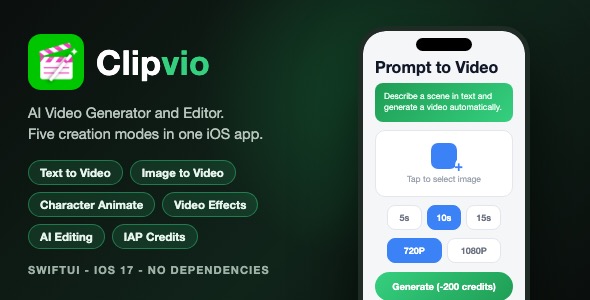
Clipvio is a complete, native iOS app template that puts five AI video creation modes in one polished SwiftUI app: Text to Video, Image to Video, Character Animate, Video Effects, and AI Video Editing. It ships with a credit-based monetization system (in-app purchases), iCloud sync, and 20+ localizations – ready for you to rebrand and publish.
Demo Instructions
- No login and no demo credentials are needed. The app launches directly – there is no account system.
- The app runs fully after build and install. Browsing all five modes, settings, tooltips, and the paywall works out of the box.
- Actual video generation calls YOUR backend. The template connects to a placeholder endpoint (https://yourdomain.com/api.php) with a placeholder API token. See the Configuration section in the documentation – insert your own generation endpoint and token (any server that accepts the simple JSON/BASE64 protocol included) and generation works end to end.
- To test purchases in the simulator, the included Products.storekit configuration file can be attached to the scheme (explained step by step in the documentation).
Important: Third-Party AI API Costs
The template is the iOS client only. Actual video generation is performed by AI generation APIs that your backend calls (e.g. a third-party text-to-video / image-to-video provider). Those third-party APIs charge per-generation usage fees that are billed to you by the provider, separate from the purchase of this template. You will need (1) a server implementing the simple JSON protocol included in the package, and (2) an account with an AI video provider whose per-video costs you should factor into your credit pricing. The credit prices in the app are fully configurable so you can cover your real API costs. See the “Third-Party API Costs” and “Configure Your Backend” sections in the documentation for details and sample JSON for every call.
Everything the App Does
- + Text to Video: describe a scene in text and generate an AI video from it
- + Duration selector: 5s, 10s, or 15s output length
- + Resolution selector: 480P, 720P, and 1080P output options
- + Audio toggle: generate videos with an audio track
- + Image to Video: animate a photo or illustration into a short AI video, with an optional animation-style prompt
- + Character Animate: upload a target video plus a character reference image and animate the character in the video
- + Video Effects: one-tap preset effects – Flying, Money Raining, Evaporating, Rotating, Inflating, Praying, Dancing – plus a custom effect text field
- + AI Video Editing: upload a video and apply Edit, Outpaint, Repaint, or Extend actions with an optional prompt
- + Negative prompt field (default value configurable in Settings)
- + Advanced AI Config settings: guidance scale, image size, seed, steps, remove-watermark toggle
- + Credit system: generation costs credits, balance shown in the top bar on every screen
- + In-app purchases with StoreKit 2: four consumable credit packs (Starter, Creator, Pro, Studio) and a weekly Pro subscription
- + Restore purchases and Terms of Use / Privacy Policy links on the paywall
- + Free credits grant: the backend announce call can grant free credits once per device
- + Paywall with feature list, credits packs, and subscription section
- + Generation job handling with progress states, error alerts, and result screen
- + Save generated videos and share them; export uses a clean file name
- + Photo library picking for images and videos (PHPicker and file based)
- + iCloud (CloudKit) sync of user settings via SwiftData, with automatic local fallback when iCloud is unavailable
- + Keychain-protected anonymous device ID used for the free-credit grant
- + Custom bottom tab bar with five tabs and per-tab intro tooltip popups (shown once, remembered)
- + Settings sheet with X-close animation and consistent design system
- + Support sheet for contacting the app owner
- + Toast notifications and haptic feedback on key actions
- + Custom fonts bundled (Manrope and Inter families)
- + Localized into 20+ languages including English, German, Spanish, French, Italian, Portuguese (Brazil), Polish, Dutch, Swedish, Norwegian, Danish, Finnish, Czech, Turkish, Arabic, Japanese, Korean, Thai, Vietnamese, Indonesian, and Malay
- + Light, clean visual design with green accent, custom icons, and app icon set (light, dark, and tinted variants)
Technology
- Language: Swift 5.9+, UI: SwiftUI, iOS deployment target: iOS 17.0
- Persistence: SwiftData with CloudKit sync (automatic fallback to local storage)
- StoreKit 2 for in-app purchases; Products.storekit test configuration included
- Frameworks used: SwiftUI, SwiftData, CloudKit, StoreKit, PhotosUI, Photos, AVFoundation, UIKit, Security, MessageUI
- Networking: lightweight JSON + Base64 upload client ready to point at your own PHP or any HTTP backend (endpoint and token are single-line configuration)
- No third-party dependencies – no CocoaPods, no SPM packages, no Carthage
- Universal Xcode project, iPhone first, runs on iPad
What the Buyer Gets
- Full Xcode source code of the app (Swift files, assets, fonts, app icons, launch images, localization files)
- Step-by-step HTML documentation with screenshots: setup, renaming, bundle ID, icon replacement, re-theming, backend configuration, and App Store submission checklist
- Preview screenshots (700 px tall JPEGs) and a 590×300 preview image
- StoreKit test configuration to demo purchases locally
- Permission-free structure: only photo library and file access as needed for picking media
Development Disclosure
Portions of this template’s source code were developed with AI-assisted tools. All code has been reviewed, tested, and curated by a human developer before publication.
Important Note
This is a source code template, not a compiled app. You need Xcode and basic iOS development knowledge to build, customize, and publish it. Video generation requires your own backend endpoint – configure it in one file as described in the documentation – and the AI generation APIs your backend calls carry their own per-generation usage costs, which are your responsibility as the app owner.
| Type | iOS App |
|---|---|
| Author | mefjudevllc |
| Price | $14 |
| Sales | 0 |
| Rating | 0 (0) |
| Published | Sep 14, 2026 |
| Last Update | Sep 14, 2026 |
| Compatible Software | Other |
| Compatible With | Swift |
| Mobile Files Included | .h |
Categories
Tags
External listing. code.market does not sell this product and does not process payment for it. Pricing, payment, delivery, licensing, refunds, and support are handled by the third-party merchant on its own website. We may earn an affiliate commission from a referral. Details.