
Chess Crown | Board Game with AI and Mate Puzzles - Unity Ready Project
Description
Chess Crown | Board Game with AI and Mate Puzzles – Unity Ready Project
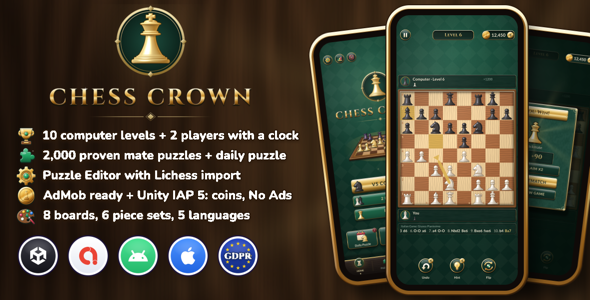
Screenshots: see the preview images above (real screenshots from an Android phone)
Android demo APK: https://zaviro.net/chess-crown/ChessCrown-Demo-v1.0.0.apk
Online documentation: https://zaviro.net/chess-crown/
★★★ Ready to Publish: vs Computer, 2 Players & 2,000 Mate Puzzles !! ★★★
★★★ Original C# Chess Engine with 10 Levels, Beginner to Champion !! ★★★
★★★ Puzzle Editor: Mate Puzzle Generator + Optional Lichess Import ★★★
★★★ AdMob + GDPR Consent Integration: Import Google’s Free Plugin to Switch It On ★★★
★★★ Unity IAP 5 + 5 Languages + One Game Config: Easy Reskin ★★★
Chess Crown is a complete chess game for Unity 6, ready to reskin and publish on Android and iOS. Play the computer on 10 levels, play a friend on the same phone with a chess clock, and solve 2,000 checkmate puzzles, with a Puzzle Editor to add as many more as you like.
Puzzle data source: all 2,000 puzzles in the included puzzles.csv were generated by the included puzzle generator (Chess Crown’s own engine and mate solver). None of them comes from Lichess or any other database, and the file is not a mix: a list in the download traces every puzzle to the generator run and engine game it came from. The Lichess import is an optional tool for puzzles you download yourself.
Ads: the AdMob and GDPR consent code is included, but Google’s Mobile Ads Unity plugin is not: you import it from Google (free) to switch ads on. Without it the game runs without ads.
Demo Instructions
- Open the demo APK on an Android phone (Android 7.0 or newer) and install it. Android may ask you to allow installs from your browser first.
- No email or password is needed. The game has no login, no user accounts and no admin panel, so there are no credentials: everything is playable from the first screen.
- The demo shows Google test ads: to build it, we imported Google’s free plugin into our own working copy of the project. The plugin is not part of the download; you import it yourself if you want ads. The demo’s shop is not connected to a store, so purchases show “Store not available”; in your own build they go through Google Play and the App Store.
- The Unity project runs in the editor right away: open it with Unity 6, choose Tools > Chess Crown > Open Main Scene and press Play.
Game modes
- vs Computer: 10 levels from beginner (about 250 Elo) to champion (about 2200), tuned with hundreds of engine games so each level is clearly stronger than the one before. Play white, black or random
- 2 players on one phone: pass and play, optional chess clock from 1 to 30 minutes with or without increment, and a board that turns for the player to move
- Puzzles: 2,000 checkmate puzzles, mate in 1 to mate in 4, ordered by difficulty and unlocked one after the other, with 3 stars each
- Daily puzzle: a new puzzle every day with a bigger reward and a streak counter
- Unfinished games are saved and continue from the home screen
Chess
- Complete rules: castling, en passant, promotion with a piece picker (or auto-queen), check, checkmate, stalemate, threefold repetition, 50-move rule, insufficient material, resign, draw by agreement and flag fall
- Move generation verified with the standard perft test positions, and the test is included: run it from Tools > Chess Crown > Engine after changing the engine
- A real chess engine in plain C#: alpha-beta (PVS) with a transposition table, quiescence search, null move pruning, late move reductions and a tapered evaluation
- The computer thinks on a background thread, and puzzle moves are checked by the solver on one too, so the game never freezes
- About 80 named openings: the opening name is shown as it is played (Ruy Lopez, Sicilian Najdorf…) and the computer plays varied first moves
- Hints show the best move with an arrow, undo takes a move back
- Tap or drag to move, legal move dots, last move and check highlights, coordinates, captured pieces, material balance and a move list in standard notation
Puzzles and Puzzle Editor
- The 2,000 puzzles are original: Chess Crown’s own engine played games against itself, the generator cut mate positions out of them and a mate solver proved each one (one winning first move and no faster mate). None of them comes from Lichess or any other database
- Any other move that still forces mate in time is accepted too: the solver proves it while the move plays
- Puzzles use the same CSV format as the free Lichess puzzle database
- Puzzle Editor: browse, search, reorder and sort the puzzles, step through each solution on a board
- Set up a position and let the solver find the mate and write the solution for you
- Check button that proves a puzzle, and one-click Play Test in the game scene
- Optional: import thousands of puzzles yourself from the Lichess puzzle database, filtered by theme and rating. Imported puzzles stay under the Lichess database license: if you ship them, you must credit Lichess (CC BY 4.0 attribution), as the documentation explains
- Generate new original mate puzzles with the engine
Rewards and economy
- Coins for wins against the computer (more for stronger levels), draws and solved puzzles; replays only pay for new stars
- Free daily Lucky Spin, plus extra spins for rewarded ads
- Star Chest that fills up with puzzle stars and wins
- Hints and undos bought with coins or earned with rewarded ads
- Stats: games won, drawn and lost against the computer, best level beaten, puzzles solved, stars and daily streak
- Rewards are saved the moment they are won, so closing the app during an animation never loses them
- Signed save (HMAC-SHA256): coins, hints, undos and No Ads can’t be edited by hand
- Daily rewards ignore clock tricks: setting the date back or changing the time zone gives no extra spin or daily puzzle reward
Monetization
- AdMob integration that needs a separate import: the code for banner, interstitial, rewarded and app open ads is included, but Google’s Mobile Ads Unity plugin is not (Google distributes it). Import it from Google for free and the integration switches itself on; without it the game runs without ads
- Google UMP consent form for GDPR (it comes with Google’s plugin, so it also needs that import), with a Privacy button in Settings when it is required, and the iOS tracking prompt (App Tracking Transparency) explained step by step
- Interstitial frequency and cooldown set in one place
- Unity IAP 5.4 (Google Play Billing Library 9, StoreKit 2): coin packs, a starter bundle and No Ads, restore purchases on iOS, payments that complete later are handled
- Receipt validation with Unity’s CrossPlatformValidator and obfuscated keys (release builds refuse any purchase they can’t verify), plus a ready hook to check purchases on your own server. Checks on the phone can be bypassed on rooted or jailbroken devices, so the documentation shows how to verify purchases on a server with the Google Play Developer API and the App Store Server API
- A purchase is never delivered twice, even if the app closes before the store confirms it
- No AdMob ids are included: you put your own App ID and ad unit ids in before you build. Until then the editor and development builds show simulated ads, and test devices give you test ads from your own ad units
Themes and polish
- A premium look of its own: green felt, polished brass and ivory, gold titles, chunky glossy buttons and full colour icons
- 8 boards, 6 piece sets and 6 backgrounds (green felt, walnut, leather, slate, black marble), unlocked with coins
- 5 languages included: English, French, Spanish, Portuguese and German. More are added in one CSV file. Right-to-left languages (Arabic, Hebrew, Persian) are not supported out of the box: they need a text shaping package such as RTLTMPro, as explained in the documentation
- Numbers formatted the way each language expects
- Move, capture, castle, check and promotion sounds, music, haptics
- Safe area and notch support, Android back button
For developers
- Unity 6 (6000.0 LTS), C#, uGUI and TextMesh Pro
- The chess engine is plain C# with no Unity code in it, easy to read, test and reuse
- Runtime and editor code in their own assemblies, no paid assets; every package comes from Unity’s Package Manager
- Computer levels, clocks, puzzles, economy, ads and shop settings in one Game Config asset
- Screens and popups are regular prefabs, easy to reskin
- A clear warning in the editor if the installed Unity IAP version isn’t supported, so purchases are never switched off silently
- No server and no running costs: the engine, puzzles and saves all run on the phone
- Step-by-step HTML documentation, also available online, including how to update to a new version safely
Requirements
- Unity 6000.0 LTS (made with 6000.0.84f1)
- For AdMob ads: the Google Mobile Ads Unity plugin, free from Google (not included, tested with 11.5.0)
- For in-app purchases: Unity IAP 5.x (com.unity.purchasing), Unity’s free In-App Purchasing package. It is not included in the download: the project lists it in its package manifest, so Unity’s Package Manager installs it when you open the project
- Android: Android Build Support module. Minimum API level 24 (Android 7.0), target API level 36 (Android 16), set explicitly in the Player Settings
- iOS: iOS Build Support module, a Mac with Xcode and CocoaPods. The game runs on iOS 13 and newer
Your own accounts and possible costs
AdMob and Unity IAP are third-party services. The integration code is included (Google’s Mobile Ads plugin is imported separately, see above), but you need to set up your own accounts to show real ads, sell in-app purchases and publish the game, and some of them have fees:
- Google AdMob: your own AdMob account, free to create, to show real ads and receive your earnings under Google’s terms
- Google Play Console: a developer account with a one-time registration fee (US$25 at the time of writing)
- Apple Developer Program: US$99 per year at the time of writing, plus a Mac to build for iOS
- Google and Apple keep a commission on in-app purchases, usually between 15% and 30%
These fees are charged by Google and Apple and are not part of the item price. Please check their current terms and prices before you publish.
What’s included
- The complete Unity project: code, chess engine, Puzzle Editor, art, sounds, fonts and 2,000 puzzles
- Not included: the Google Mobile Ads Unity plugin, which you import from Google; AdMob ids, which come from your own AdMob account; and Unity IAP, which Unity’s Package Manager installs when you open the project (the documentation explains all three)
- Documentation (HTML), also online, with step-by-step instructions to connect your own AdMob and store accounts
AI disclosure
An AI coding assistant (Claude by Anthropic) was used to help write the C# code (the game, the chess engine, the editor tools, and the code that draws the art and synthesizes the sounds) and the documentation, under the author’s direction, and everything was tested in Unity and on Android phones. No AI image, audio or music generator was used: all art, sounds and music are drawn and synthesized by the project’s own code, and the screenshots are real phone captures. The 2,000 puzzles were not made by AI either: the project’s own chess engine played games against itself and its mate solver proved each puzzle (classic search algorithms, not machine learning).
Credits
- Check and plus icons: Tabler Icons, MIT license
- Fonts: Cinzel and Lato, SIL Open Font License 1.1
- Lichess puzzle database (only for the optional import in the Puzzle Editor, none of its puzzles is included): database.lichess.org. Buyers who ship imported puzzles must credit Lichess
The licenses are included in the download. The code, chess engine, pieces, boards, backgrounds, user interface art, coin, logo, sounds and puzzles are original work created by the author (see the AI disclosure above). A few generic white UI shapes (circle, rounded rectangle, shadow, glow, light rays, triangle, spark, confetti piece and the progress bar fill) are drawn by the same code as in the author’s earlier item Tile Crown, and the ads, purchase, save and daily reward code follows the same structure. The design, icons, logo, sounds and screens of Chess Crown are its own.
The Android robot in the preview images is reproduced from work created and shared by Google and used according to terms described in the Creative Commons 3.0 Attribution License. Unity, Apple, iOS, Google, AdMob and Lichess are trademarks of their respective owners; their names and logos appear only to show what the project works with.
Changelog
1.0.0 – First release.
Support
Support desk: send your questions before you buy, your support requests after you buy and any other questions to https://zaviro.net/support. Please include your Unity version and the platform you build for. You can also leave a comment on the item page.
Note: every copy of Chess Crown sold here comes with an Envato license. We can’t be held responsible for problems with copies obtained anywhere else. Before you buy, please try the demo: it shows everything you get.
| Author | Zaviro |
|---|---|
| Price | $29 |
| Sales | 0 |
| Rating | 0 (0) |
| Published | Nov 9, 2026 |
| Last Update | Nov 9, 2026 |
| Compatible Software | Android 15.0, Android 12.0, Android 11.0, Android 10.0, Android 9.0 |
| Demo Url | https://zaviro.net/chess-crown/ChessCrown-Demo-v1.0.0.apk |
| Mobile Files Included | .xml, HTML |
Categories
Tags
External listing. code.market does not sell this product and does not process payment for it. Pricing, payment, delivery, licensing, refunds, and support are handled by the third-party merchant on its own website. We may earn an affiliate commission from a referral. Details.