
CashFlow Maximus | Forecast Tracker With Recurring Transactions and CSV Export - SwiftUI
Description
CashFlow Maximus – Personal Finance Forecast Calendar for iOS
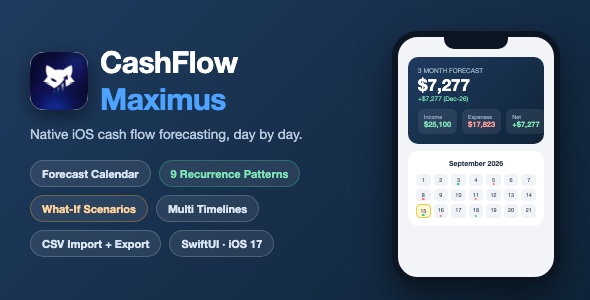
CashFlow Maximus is a native iOS cash flow forecasting template built entirely with SwiftUI. Enter your income and expense rules once, and the app projects your account balances day by day on a calendar, in weekly lists and in breakdown graphs. It ships with a sophisticated recurrence engine (9 patterns including business-day logic with US federal holidays), unlimited what-if scenarios, unlimited timelines, and full CSV import and export.
Demo Instructions
- No login and no demo credentials are needed. The app is 100% offline – there is no server, no account system and no API keys.
- On first launch the app automatically seeds realistic demo data: 4 accounts, 14 categories and 15 income, expense and scenario rules.
- To bring the demo data back at any time: Settings, then Restore Sample Data. To start from a blank state: Settings, then Reset All Data.
- Try it: open the Calendar tab and tap any day with dots to see that day’s projected transactions, or open the Graphs tab to see expenses by category and account.
Everything the App Does
- + Forecast calendar with month grid and week list views, swipe or arrow navigation
- + Projected balance card with forecast horizon of 1 to 11 months or 1 to 10 years
- + Income, Expenses and Net summary boxes – tap any box for a filtered transaction list
- + 9 recurrence patterns: one-time, weekly (multi-day), bi-weekly, twice monthly, monthly, nth weekday (for example 3rd Thursday or Last Friday), last business day, mid-month business day, and yearly
- + US business-day logic: weekends roll to the previous business day and 10 US federal holidays are respected
- + Scenario (what-if) items shown in yellow – toggle them on or off to see the impact on projections instantly
- + Day details popup with income, expense and net boxes, previous and next day navigation and a Today badge
- + Add and edit form: type, amount, title, payee or payer, account, category, recurrence editor, start and optional end date, notes
- + Graphs tab: expenses by category, expenses by account and a month-by-month income, expense and net breakdown table
- + Tap any bar, row or summary box to drill down into the underlying transactions grouped by date
- + Rules tab: all income, expense and scenario rules in one place with filter chips, sorting (date added, amount, alphabetical), enable toggles, swipe to delete or duplicate
- + Groups tab: accounts (checking, savings, credit card, cash) with starting balances, custom colors and 40+ icons, plus income and expense categories
- + Set default account and default categories, used when creating new entries
- + Unlimited timelines (variants): each timeline keeps isolated accounts, categories, rules and settings, with a quick switcher badge, a full manager, create, rename, delete and copy-data-on-create
- + CSV export with share sheet (accounts, categories and forecast sections, timeline-aware)
- + CSV import with a 4-step wizard: source selection (Files app, clipboard or another timeline), validation summary, sectional import and confirm – with merge (update) or replace modes
- + Funds tracking: available, allocated, committed, non-committed, remaining and remaining NC
- + Settings: forecast unit and horizon, show scenarios toggle, timeline management, restore sample data, reset all data
- + Empty states everywhere, realistic sample data, full dark mode support, clean card-based UI
Technology
- Language: Swift, SwiftUI
- Minimum iOS: 17.0
- State management: Swift Observation framework (@Observable) – modern replacement for ObservableObject
- Persistence: local JSON in UserDefaults through a PersistenceManager layer – no Core Data, no SwiftData, no server
- Architecture: a single observable CashFlowStore, a pure recurrence engine (Engine folder), services for CSV import and export, and one folder per feature
- Third-party dependencies: none – no CocoaPods, no SPM packages, no frameworks to install
- Navigation: NavigationStack, sheets with presentation detents, full screen cover for settings
- Xcode project: open the project, press Run – it builds and runs out of the box
What the Buyer Gets
- + Full Xcode source code (Swift files organized in Models, Engine, Store, Services, Views, Utils, Resources)
- + Xcode project with app icon asset catalog
- + documentation.html – step-by-step setup and customization guide with screenshots
- + Preview screenshots folder
- + Free future updates to this template
Development Disclosure
Portions of this template’s source code were developed with AI-assisted tools. All code has been reviewed, tested and verified by the author. The final product is a fully functional native iOS application.
Please Note
This is a source code template, not a compiled app. You need a Mac with Xcode (latest stable version recommended) to build, customize and run it. Basic Xcode knowledge is required: opening the project, changing the bundle identifier, and running on the simulator or your device. Extended knowledge helps for deeper customization such as renaming files or adding new screens.
| Type | iOS App |
|---|---|
| Author | mefjudevllc |
| Price | $14 |
| Sales | 0 |
| Rating | 0 (0) |
| Published | Sep 14, 2026 |
| Last Update | Sep 14, 2026 |
| Compatible Software | Other |
| Compatible With | Swift |
| Mobile Files Included | .h |
Categories
Tags
External listing. code.market does not sell this product and does not process payment for it. Pricing, payment, delivery, licensing, refunds, and support are handled by the third-party merchant on its own website. We may earn an affiliate commission from a referral. Details.
Products of the Week.
Submit🥇

STOP GUESSING WHAT TO POST
AI that learns your brand voice and builds a month of consistent, on-brand social content: carousels, posts and hooks that sound like you, not like everyone else's AI.
SaaS · 7,398 views · 67 clicksSaaS · Week 46 · 7,398 views · 67 clicks
🥈

Conversational Backlinks for Busy Founders
Place Backlink Relevant Conversation for your domain across Forums and Conversations
Website · 46,699 views · 232 clicksWebsite · Week 46 · 46,699 views · 232 clicks
🥉

upvote.club
Free Social Media Engagement that Helps Boost Your Content. Upvote Club supports 19 social networks with 100+ engagement actions in one dashboard. Add links to your posts and get free engagement from real users.
SaaS · 44,634 views · 127 clicksSaaS · Week 46 · 44,634 views · 127 clicks
#4

Substack Posting API
Onboard your Agent to Substack. Write Publish on Substack via API
SaaS · 63,519 views · 206 clicksSaaS · Week 46 · 63,519 views · 206 clicks
#5

Seenshot App
Free, Fast, MacOS Screenshot app. Make Screenshot cmd+shift+2 and send it via link
Desktop App · 32,769 views · 127 clicksDesktop App · Week 46 · 32,769 views · 127 clicks
#6

Hand-Placed Backlinks $9.99 per link. Flat rate.
Buy hand-placed forum, Q-A and directory backlinks. Flat $9.99 per link, no subscriptions — you only pay for approved listings.
Website · 8,385 views · 19 clicksWebsite · Week 46 · 8,385 views · 19 clicks
#7

Free Invoice Generator - PDF Invoices in Your Browser, No Sign-Up
A free invoice maker for freelancers and small businesses: fill in the invoice, check the live preview, and download a PDF that looks exactly like it. Any currency, tax per item, three templates, no sign-up, and nothing leaves your device.
7,014 views · 29 clicksWeek 46 · 7,014 views · 29 clicks
#8

Merge PDF Files Free - Combine PDFs in Your Browser, No Upload
A free PDF merger for office workers, students, and freelancers: combine PDFs and images into one file in the browser, reorder files and pages, pick page ranges, keep bookmarks, and open password-protected PDFs. Nothing is uploaded, no sign-up, no watermark.
6,488 views · 18 clicksWeek 46 · 6,488 views · 18 clicks