Cash Book - Business Finance System
Description
Table of Contents
Introduction Key Features System Requirements Installation Quick Start Guide User Guide Admin Guide API Integration Security Backup & Restore Troubleshooting Support Cash Book DocumentationIntroduction
Cash Book is a comprehensive financial management system designed for businesses with multiple branches. It offers robust features for tracking income, expenses, and managing financial transactions across different locations.
Key Features
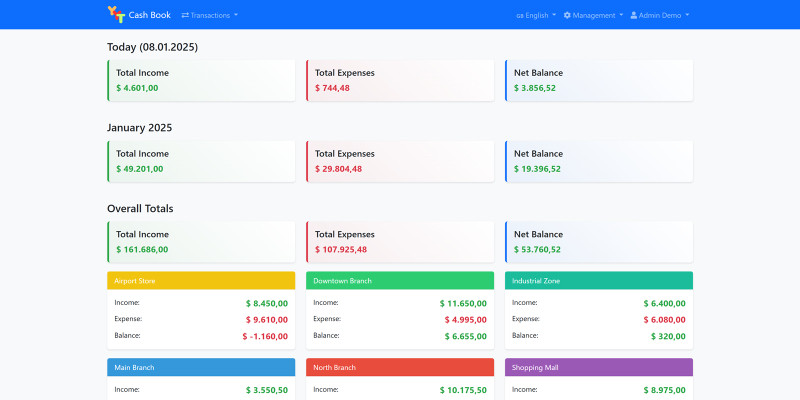
Multi-Branch Support
Manage multiple business locations from a single dashboard
Multi-Currency
Support for multiple currencies with automatic exchange rate updates
User Management
Role-based access control with admin and regular user roles
Financial Reports
Detailed financial reports with customizable date ranges
Backup System
Automated database backup and restore functionality
Multi-Language
Support for 13 languages including RTL languages
System Requirements
- PHP 7.4 or higher
- MySQL 5.7 or higher
- Apache/Nginx web server
- mod_rewrite enabled
- Required PHP Extensions:
- PDO
- PDO_MYSQL
- cURL
- GD
- ZIP
- OpenSSL
Installation
Before starting installation, make sure all system requirements are met.- Upload the files to your web server
- Create a new MySQL database
- Visit your domain where you uploaded the files
- Follow the installation wizard steps:
- Enter your Codester license key
- Configure database settings
- Create admin account
- Complete the installation
Quick Start Guide
1. First Login
Use your admin credentials to log in
2. Configure Settings
- Go to Admin Panel > Settings
- Set up your business information
- Configure email settings
- Set up currency preferences
3. Add Branches
Create your business branches
4. Add Users
Create user accounts for your staff
5. Start Recording
Begin recording your financial transactions
User Guide
Managing Transactions
Adding Transactions
- Click "Add Transaction" button
- Select transaction type (Income/Expense)
- Choose category
- Enter amount
- Select branch
- Add description (optional)
- Attach files (optional)
- Save transaction
Admin Guide
User Management
- Creating users
- Assigning roles
- Managing permissions
Branch Management
- Creating branches
- Branch settings
- Access control
System Settings
- General settings
- Currency settings
- Email settings
- Backup settings
API Integration
Exchange Rate API
<code>
class ExchangeRateService {
    private $apiKey;
    private $baseUrl = 'https://v6.exchangerate-api.com/v6/';

    public function __construct($apiKey) {
        $this->apiKey = $apiKey;
    }

    public function getExchangeRates($baseCurrency) {
        $url = $this->baseUrl . $this->apiKey . '/latest/' . $baseCurrency;
        return $this->makeRequest($url);
    }
}
                    </code>
Security Features
SQL Injection Prevention
- PDO prepared statements
- Parameter binding
- Input validation
XSS Protection
- HTML escaping
- Content Security Policy
- Input sanitization
Backup & Restore
Creating Backups
- Go to Backup Manager
- Select backup type:
- Full backup
- Database only
- Start backup process
- Download backup file
Troubleshooting
Common Issues
Login Problems
- Check credentials
- Clear browser cache
- Reset password if needed
Support
Contact Information
From Codester
Website: https://codester.com
Support Hours
Monday - Friday: 9:00 AM - 6:00 PM (UTC+3)
Response Time
We aim to respond to all support requests within 24-48 hours.
Features
## 4. Features
### 4.1 Multi-Branch Support - Manage multiple business locations - Branch-specific reporting - Branch access control
### 4.2 User Management - Role-based access control - User permissions - Activity logging
### 4.3 Financial Management - Income tracking - Expense tracking - Category management - Customer/Supplier management
### 4.4 Reporting - Financial reports - Branch reports - Category summaries - Date range filtering - Export capabilities
### 4.5 Multi-Language Support - Available in 13 languages: - Turkish (Türkçe) - English - Spanish (Español) - French (Français) - German (Deutsch) - Chinese (中文) - Japanese (日本語) - Arabic (العربية) - Russian (Русский) - Hindi (हिंदी) - Urdu (اردو) - Portuguese (Português) - Italian (Italiano)
- Language Features: - Easy language switching from the menu - Language preference saved per user - Complete translations for all interface elements - RTL support for Arabic and Urdu - Installation wizard available in all languages - Admin panel fully translated - Error messages and notifications in selected language - Date formats adapted to language conventions - Currency formats adapted to language conventions
- Language Management: - Set default language in admin settings - User-level language preference - Language selection during installation - Persistent language selection (saved in session and cookies) - Automatic language detection based on browser settings
### 4.6 Currency Management - Multiple currency support - Exchange rate management - Default currency setting
### 4.7 Notification System #### Email Notifications - New transaction notifications
Requirements
## 2. System Requirements
- PHP 7.4 or higher - MySQL 5.7 or higher - Web server (Apache/Nginx) - Required PHP Extensions: - PDO PHP Extension - MySQL PHP Extension - GD PHP Extension - JSON PHP Extension - Session PHP Extension
Instructions
### 3.1 Automatic Installation
1. Upload all files to your web server 2. Visit the installation URL (e.g., `http://your-domain.com/install`) 3. Follow the installation wizard: - Choose your language - Check system requirements - Configure database settings - Create admin account - Complete installation
### 3.2 Manual Installation 1. Upload all files to your web server 2. Create a new MySQL database 3. Import database schema from `database/schema.sql` 4. Configure database connection in `config/config.php` 5. Set appropriate permissions: - `uploads/` directory (777 or writable) - `config/` directory (777 during installation, 755 after)
| Author | cihatk |
|---|---|
| Category | Scripts & Code / PHP Scripts / Finance / Management |
| Price | $39 |
| Extended License | $117 |
| Likes | 1 |
| First Release | Jan 15, 2025 |
| Last Update | Jun 13, 2025 |
| Files included | .php, .css, .sql, JavaScript .js |
Categories
Tags
External listing. code.market does not sell this product and does not process payment for it. Pricing, payment, delivery, licensing, refunds, and support are handled by the third-party merchant on its own website. We may earn an affiliate commission from a referral. Details.