
Capsora | Flutter AI Wardrobe Stylist App Template
Description

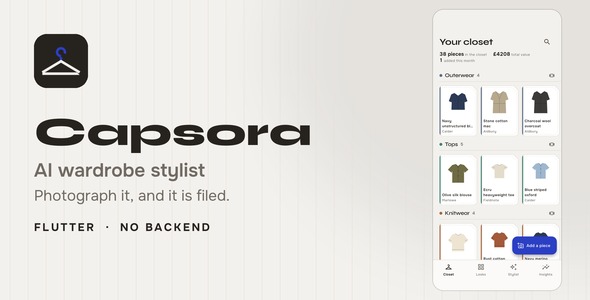
Capsora is a complete AI wardrobe app template built with Flutter, GetX and Material 3. Photograph a garment and a vision model names it, colors it, dates it by season and files it on the right rail. Then build a look by hand on a drag-and-drop canvas, or ask a stylist for three — from clothes the user already owns. 15 screens, light and dark, and every one of them runs with no API key, no account and no network.
Demo Instructions — the sign-in screen is a mock and contacts no server, so any credentials are accepted. Use demo@capsora.app / demo1234, or simply tap Sign in with both fields left empty. There is nothing to register, no API key to enter and no network required: Demo mode ships switched on, so the closet, the canvas, the stylist and the insights all answer on the device.
AI disclosure — two features in this app are produced by a third-party AI model at run time: reading the tags off a photograph of a garment, and putting an outfit together out of the user’s own closet. Nothing else in the app is AI-driven — every figure on the insights screen is computed in plain Dart on the device. The model is bring-your-own-key: you or your users supply a key for Google Gemini, OpenAI or Anthropic Claude, those services bill their own usage directly, and no key or credit is included with this item. With no key at all the app still runs end to end, because Demo mode assembles outfits on the device from the closet in front of it. No asset in this package is AI-generated: the item ships zero image assets — the sample garments, the color swatches, the onboarding plates and the app mark are all drawn by a CustomPainter at run time, and the three bundled typefaces are SIL Open Font License 1.1 releases with the full license text included. The only images the app ever shows as photographs are the ones its users take themselves.
What’s in the package
- Full Flutter source — 15 screens, light and dark, GetX architecture (View → Controller → Service → Model, lazy bindings per route)
- A local cost-per-wear engine in plain Dart: wears, cost per wear, dormant pieces and the closet’s palette, all computed on the device from the wear log
- Three AI providers as plain REST clients — Google Gemini (default), OpenAI, Anthropic Claude — bring-your-own-key, no vendor SDKs
- Demo mode, on out of the box: every screen populated, every signature interaction working, with no key at all
- Offline HTML documentation — every screen, a feature walkthrough with two animated GIFs, provider setup, connecting your own storage, renaming the app, re-theming, project structure, a terminal glossary and troubleshooting
- Five runtime dependencies in total, and zero image assets — every illustration in the UI is painted at run time
Who is this for
Developers shipping a wardrobe, closet or outfit app who want the hard parts already decided: what the model is asked for, what happens when it answers with something the user does not own, and where the numbers on the insights screen come from. The competing apps in this category are consumer products with funding behind them; what is missing on this marketplace is a template a developer can actually get running. This one runs on flutter run.
There is no backend

No Firebase project, no admin panel, no server of yours to keep up, and no account for your users to make. Nothing in this item phones home — the only requests it can make are the ones your user’s own key pays for. The closet lives behind a service layer whose methods already return Futures, so pointing it at Hive, Isar, SQLite or your own API is a change in one file and no screen changes. The single loudest complaint in the reviews of every competing app in this category is that the buyer could not get the backend running; this template does not have one to get running.
Photograph it and the tags fill in

Name, category, color, fabric, formality and season all come back from one picture, in one structured answer. Every one of them stays editable — a wrong color the user cannot correct is worse than no color at all, and it is the difference between a tool and a demo. Adding a piece by hand, with no photograph and no key, is the same form with the same fields.
Rails, not a grid

Nine rails, one per category, each a hairline with the clothes hanging under it. Tap a rail head and it opens as a grid — which is the view you want when you are hunting for one specific thing, and the wrong one for everything else. A grid of forty tiles is an inventory report; a rail is how a wardrobe is actually organized, and it is the reason this screen reads as clothes rather than as rows.
Lay an outfit out by hand

Drag to move, tap to select, then resize or restack — bring to front, send to back, pull another piece from any rail, name it and it is a saved look. Placements are stored as fractions of the canvas, not pixels, so a look arranged on a phone reopens correctly on a tablet, and the same placements draw the small collage on the look card without a second layout pass. The whole outfit can be logged as worn in one tap, which is what feeds the cost-per-wear numbers.
Only clothes you own

Two chips — the occasion and the weather, both chosen by the user, with no weather service to sign up for — and a button. The prompt lists the closet with its ids and tells the model to copy them exactly; every id that comes back is looked up before anything is drawn, ids that do not resolve are dropped, and an outfit left with fewer than two real pieces is thrown away whole rather than shown with a hole in it. A stylist that suggests a jacket you do not have is the entire failure mode of this category, and it is why most “AI wardrobe” apps quietly become mood boards.
What each piece actually cost you

Price divided by wears, counted on the device from the wear log — never stored on the garment, so it cannot drift out of date. It opens on the worst first, because the coat you wore twice is the one nobody goes looking for. Three honest non-answers are built in: a piece with no price recorded, a piece never worn, and a piece bought too recently to judge are all left out rather than given a made-up number. Alongside it: the closet’s palette as a stack of fabric swatches grouped by color name rather than by hex — two navy pieces shot under different lights are still one navy — and the pieces that have not been worn in three months.
Three AI providers, or none at all
- Google Gemini — the shipped default. A key is free and needs no credit card, so your users are never sent to a billing form, and it does both jobs: it reads photographs and it writes text
- OpenAI and Anthropic Claude
- Demo mode — outfits are put together on the device from the user’s own closet, so the app answers for clothes they add themselves, with no key and no network. Not a folder of canned sample outfits
Every provider is a plain REST client behind a one-method interface that knows nothing about clothes, which is why the same three adapters serve both of this app’s very different requests — reading the tags off a photograph, and assembling an outfit out of a list of ids. Adding a fourth provider is one class and one catalog entry, with no screen changes. Model names expire, and this template is built for that: the model id is an editable setting, a retired name produces a plain-language error with a button straight to the field that fixes it, and the documentation has a section on updating it.
15 screens, all wired up

Beyond the four signature screens: adding a piece by camera, gallery or hand; a garment’s own page with its price, its wears and its cost per wear; search with three rows of composable facets; a saved-looks grid and a look detail page; onboarding; sign-in and sign-up; provider settings; and a mock paywall. Every one of them themed twice, light and dark, both complete.
Everything, and nothing extra

- Full Flutter source, GetX, analyzer clean — 63 tests pass, including the cost-per-wear arithmetic, the three honest non-answers, the per-vendor JSON schema transforms and the sample closet’s own integrity
- API keys stored in the Keychain on iOS and EncryptedSharedPreferences on Android — never in plain preferences
- All demo data in one file: 38 garments and 180 days of wear history with realistic gaps in it, so the insights screen has something true to say on first launch
- Zero image assets — the sample garments, the color swatch stack, the onboarding plates and the app mark are all painted at run time, so there is no artwork to license and nothing to keep in sync. Garments your users photograph are shown as photographs
- Typefaces are bundled, not downloaded — the UI renders identically offline and on a cold first launch
- A distinctive fashion-desk design system: warm charcoal on cool linen with a single saturated blue used only for the things you can do, Syne + Onest typography, and a tailor-card shape — the top-right corner cut off the way a tailor notches a pattern piece, with a dashed topstitch drawn in the same pass as the fill. Every token is centralized, so the whole app re-skins from one color file
Get it running in five minutes
- Unzip, then
flutter pub get flutter run— Demo mode is already on, so the app is fully populated- Optional: paste a provider key in Settings to photograph a real garment and have a live model tag it
Requirements
To run and build the source code you need the Flutter SDK (version 3.29 or newer) and Dart 3.7 or newer, together with a Flutter-ready IDE — Android Studio or Visual Studio Code with the Flutter & Dart plugins. Runs on both Android and iOS from a single Flutter codebase (Material 3, null-safe).
Third-party costs and honest limits
Capsora runs entirely on the device, but the two AI features — reading the tags off a photograph, and putting an outfit together — are produced by a third-party AI provider that you or your users supply a key for. Connecting it to a live provider such as Google Gemini, OpenAI or Anthropic will involve those third-party services, which will incur their own separate costs and are not included in this item. Photographs a user adds are downscaled on the device and sent only to the provider whose key that user supplied; nothing is uploaded anywhere else. The tags a model returns are its reading of a picture, not a measurement — which is why every one of them stays editable.
What is not included
- No backend and no account system. Sign-in is a mock that contacts no server — the seam is drawn where your API call goes, and the documentation walks through it
- The closet is held in memory. It is seeded with 38 sample garments and resets when the app restarts; wiring a persistent store is a documented one-file change and is left to you. The only thing written to disk is the user’s API key
- No virtual try-on, no background removal and no image generation of any kind. This template reads photographs and writes text
- No weather service. The weather the stylist works from is a chip the user picks, not a live forecast
- The subscription screen is a mock — no payment code, receipt validation or store product is included
- No push or local notifications / reminders — nothing in the package schedules anything
- No AI provider key or credit is included, and no web or desktop build is shipped or supported
Support and updates
Questions about the item go through the comments tab on this page, which is where I read them. Support covers the code as it ships: getting the project to build, the documented setup steps, provider configuration, and defects in what is included. It does not cover your own modifications, third-party provider outages or pricing changes, or building new features to order.
Changelog
v1.0 — initial release.
| Type | Flutter App |
|---|---|
| Author | coderqh |
| Price | $28 |
| Sales | 1 |
| Rating | 0 (0) |
| Published | Sep 4, 2026 |
| Last Update | Sep 4, 2026 |
| Compatible Software | Flutter 3.x |
| Mobile Files Included | Dart, YAML, JavaScript JSON, .kotlin, .swift |
Categories
Tags
External listing. code.market does not sell this product and does not process payment for it. Pricing, payment, delivery, licensing, refunds, and support are handled by the third-party merchant on its own website. We may earn an affiliate commission from a referral. Details.