
CandAI | AI Trading Coach and Chart Drill - SwiftUI
Description
CandAI – AI-Powered Trading Coach & Chart Drill App (Swift / SwiftUI)
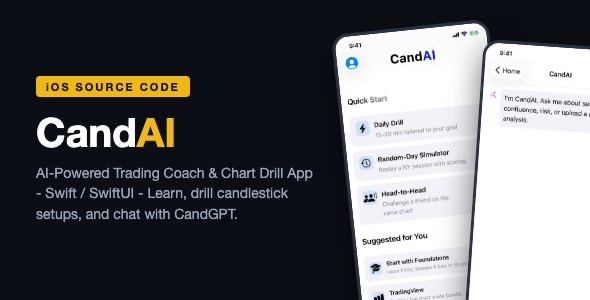
CandAI is a complete, native iOS trading-education app built in Swift and SwiftUI. Users learn candlestick chart analysis through 21 structured lessons, practice with a Daily Drill on live Binance market data, mark real chart patterns (FVG, iFVG, liquidity sweeps, BOS, order blocks, breakers), and chat with an AI trading coach (“CandGPT”) – including chart image analysis. Monetization is ready out of the box with Superwall paywalls and StoreKit 2 subscriptions.
Demo Instructions
- Open the project in Xcode, pick a simulator, and press Run.
- Complete the onboarding flow, then sign in with the built-in demo account:
- Email: review@candai.app
- Password: CandAI!2024
- Tap “Daily Drill” to practice marking FVGs on real Binance data, or open the “CandAI” tab to chat with CandGPT.
- Note: the bundled project uses placeholder configuration keys (see Configuration below). The demo login, lessons, Daily Drill, and live Binance charts all work immediately in the simulator. The CandGPT AI chat requires your own OpenAI key, and purchases require your own Superwall key.
Everything the App Does
- Onboarding – multi-step profile and experience questions that personalize the learning path.
- Home dashboard – Daily Drill, Random-Day Simulator, Head-to-Head challenges, streaks, and suggested lessons.
- Learn tab – 21 lessons with a full lesson reader, from chart foundations to advanced concepts.
- Hands-on chart drills – pinch-zoom, pan, and box-select candlestick charts on real Binance OHLC data; users mark FVG / iFVG, liquidity sweeps, break of structure (BOS), order blocks, and breaker blocks, then get instant scoring and coaching feedback.
- Coach modes – dedicated FVG Coach, Sweep Coach, and BOS Coach practice modes.
- Live chart – real-time market view powered by Binance public REST + WebSocket data (no API key required) plus TradingView widget embeds.
- Random-Day Simulator – practice reading a random historical trading day, head-to-head style.
- Quick Wins plan – short actionable tasks with completion tracking.
- Daily Drill + streaks – gamified daily practice with local notifications to keep streaks alive.
- CandGPT chat – AI assistant for trading questions, including uploading chart screenshots for analysis (OpenAI GPT-4o-mini).
- Profile tab – progress, settings, notification preferences, terms of use.
- Auth – Supabase email/password and Apple Sign-In, with a built-in demo login for reviewers and buyers.
- Monetization – Superwall paywalls + StoreKit 2 subscriptions with entitlement tracking.
Technology
- Swift 5 / SwiftUI, iOS 17+, Xcode 15+ (Xcode 26 tested)
- Supabase (Auth, PostgREST, Functions, Realtime, Storage) via the supabase-swift package
- SuperwallKit for paywalls + StoreKit 2 for subscriptions
- Binance public REST + WebSocket market data (no API key needed)
- OpenAI chat completions via plain URLSession (no heavy SDK)
- Custom SwiftUI candlestick chart engine (zoom, pan, pattern annotation)
Configuration (required before release)
The project ships with placeholder keys in Info.plist so it compiles and runs instantly. Replace these with your own values:
- SUPABASE_URL and SUPABASE_KEY – your free Supabase project URL and anon key (powers auth).
- SUPERWALL_API_KEY – your Superwall API key (powers paywalls and subscriptions).
- OPENAI_API_KEY – your OpenAI API key (powers the CandGPT chat).
Account deletion runs through the included Supabase Edge Function (supabase/functions/delete-user/index.ts). Deploy it with the free Supabase CLI (supabase functions deploy delete-user) – one command, steps in the documentation, Section 7.3.
Until you replace them, everything except the AI chat and in-app purchases works out of the box – including the demo login, all 21 lessons, the Daily Drill, and live Binance charts.
What You Get
- Full Xcode source project (one target, Swift Package Manager only – no CocoaPods)
- App icon (1024px) and full asset catalog
- Complete HTML documentation: setup, configuration, rename/re-bundle, and App Store submission checklist
- 18 professional screenshots
- StoreKit configuration file for local subscription testing
Important: Ongoing Third-Party Costs
The purchase price of this item covers the source code only. The app depends on third-party services that are billed separately by their providers. Before buying, understand that running every feature in production involves these ongoing costs:
- OpenAI API (CandGPT chat & chart analysis) – usage-based and billed per request by OpenAI. The app calls the
gpt-4o-minichat-completions endpoint, including image analysis for uploaded chart screenshots. You must add billing to your own OpenAI account and monitor your spend; costs scale with your users’ message volume. - Superwall (paywalls & subscription management) – a separate product with its own pricing tiers (see superwall.com/pricing). The free plan has limits; growing apps typically need a paid Superwall plan to keep paywalls and entitlements active.
- Supabase (authentication) – free while you stay within the free-plan limits. Supabase charges monthly once you exceed the free tier (active users, bandwidth, or database size), so a successful app will eventually require a paid Supabase plan.
Note: features that need no third-party account – all 21 lessons, the Daily Drill, the Random-Day Simulator, and live Binance charts – work out of the box with no ongoing cost, since Binance public market data is free and keyless.
AI-Assisted Development Disclosure
This app was developed with the assistance of AI coding tools, then reviewed, tested, and finalized by the author. It contains no third-party UI kits or code templates from other marketplaces.
Support
If you have any questions or need help getting set up, leave a comment on the item page or contact the author through the Envato profile form. Please rate the item if you find it useful – it helps a lot.
| Type | iOS App |
|---|---|
| Author | mefjudevllc |
| Price | $14 |
| Sales | 0 |
| Rating | 0 (0) |
| Published | Sep 24, 2026 |
| Last Update | Sep 24, 2026 |
| Compatible Software | Other |
| Compatible With | Swift |
| Mobile Files Included | .h |
Categories
Tags
External listing. code.market does not sell this product and does not process payment for it. Pricing, payment, delivery, licensing, refunds, and support are handled by the third-party merchant on its own website. We may earn an affiliate commission from a referral. Details.
Products of the Week.
Submit🥇

STOP GUESSING WHAT TO POST
AI that learns your brand voice and builds a month of consistent, on-brand social content: carousels, posts and hooks that sound like you, not like everyone else's AI.
SaaS · 7,398 views · 67 clicksSaaS · Week 46 · 7,398 views · 67 clicks
🥈

Conversational Backlinks for Busy Founders
Place Backlink Relevant Conversation for your domain across Forums and Conversations
Website · 46,699 views · 232 clicksWebsite · Week 46 · 46,699 views · 232 clicks
🥉

upvote.club
Free Social Media Engagement that Helps Boost Your Content. Upvote Club supports 19 social networks with 100+ engagement actions in one dashboard. Add links to your posts and get free engagement from real users.
SaaS · 44,634 views · 127 clicksSaaS · Week 46 · 44,634 views · 127 clicks
#4

Substack Posting API
Onboard your Agent to Substack. Write Publish on Substack via API
SaaS · 63,519 views · 206 clicksSaaS · Week 46 · 63,519 views · 206 clicks
#5

Seenshot App
Free, Fast, MacOS Screenshot app. Make Screenshot cmd+shift+2 and send it via link
Desktop App · 32,769 views · 127 clicksDesktop App · Week 46 · 32,769 views · 127 clicks
#6

Hand-Placed Backlinks $9.99 per link. Flat rate.
Buy hand-placed forum, Q-A and directory backlinks. Flat $9.99 per link, no subscriptions — you only pay for approved listings.
Website · 8,385 views · 19 clicksWebsite · Week 46 · 8,385 views · 19 clicks
#7

Free Invoice Generator - PDF Invoices in Your Browser, No Sign-Up
A free invoice maker for freelancers and small businesses: fill in the invoice, check the live preview, and download a PDF that looks exactly like it. Any currency, tax per item, three templates, no sign-up, and nothing leaves your device.
7,014 views · 29 clicksWeek 46 · 7,014 views · 29 clicks
#8

Merge PDF Files Free - Combine PDFs in Your Browser, No Upload
A free PDF merger for office workers, students, and freelancers: combine PDFs and images into one file in the browser, reorder files and pages, pick page ranges, keep bookmarks, and open password-protected PDFs. Nothing is uploaded, no sign-up, no watermark.
6,488 views · 18 clicksWeek 46 · 6,488 views · 18 clicks