
Callbook | Receipt Ledger Flutter App for Android and iOS With Paywall and Admin
Description
AI disclosure: AI tools were used to assist with parts of the code, documentation and graphics of this item. The author reviewed and tested the result. The product itself contains no AI features.
What it is
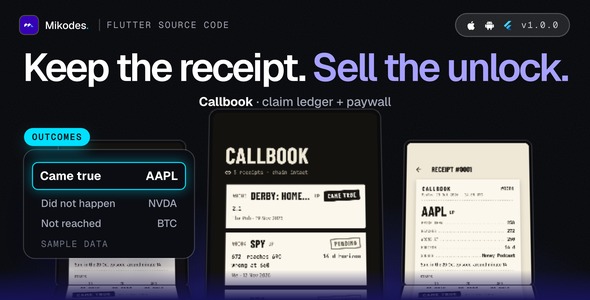
Callbook is Flutter source code for a record-keeping ledger of claims on Android and iOS, together with an operator console (MIKODES Admin Kit, Node.js server) to run the app as a small business. Keep receipts of the claims you see about markets, then check them later. A person logs a claim the moment they see it (“AAPL will reach 272 within 14 days”, a stock or ETF first, a coin or anything else too): the asset, up or down, the price then, the level it should reach, how long it has and where it came from. The app seals it as a receipt in a SHA-256 hash chain that cannot be edited or deleted, and later checks it against public daily prices. Over time every source gets an honest record. Callbook is a personal accountability tool: it gives no advice, makes no predictions and never tells anyone to buy or sell.
Who it is for
Developers and small studios who want a ready paid-unlock utility app for the stores: you rename it, add your store product ids, publish it under your account. It works for people who follow market commentators, newsletters, chat groups or friends and want proof of what was said and what happened, with no way to back-date a claim or quietly drop a wrong one.
Demo Instructions
The mobile app has no user accounts, so it has no login. The operator console demo is read-only (every change is refused). To try it:
- Open the demo page below and download the demo Android app (arm64 APK), or build the real app for Android and iOS from the download with flutter run.
- Finish onboarding, tap Log a call, pick an asset, choose up or down, type the price then, a level it should reach and a source, and seal it. The receipt shows its hash and, because the demo server is connected, “Co-signed by the server”.
- Open Sources to see the record per source, and Settings > Check the chain to recompute every hash. A claim is checked against closed daily prices, so a new one is checked from the next day; Settings > How calls are scored prints the rules.
- Open the operator console with the read-only login below and look at the paywall, features, price providers, signing, scoring and assets pages.
The demo server lists crypto assets only, because stock and ETF prices need your own Twelve Data key, which is never on a public demo. Screens in the preview images show labelled sample receipts on stock tickers.
Live demo and docs
- Demo: https://callbook-demo.mikodes.com/ (demo page with a demo Android app; examples are labelled)
- Operator console, read-only: https://callbook-demo.mikodes.com/admin
Email: demo@callbook.demo · Password: callbook-demo-2026 (read-only demo account) - Documentation: https://callbook-demo.mikodes.com/docs/
Monetisation
- Lifetime and yearly Pro unlock with restore, using the stores’ in-app purchase (store fees apply). On the basic tier a user can seal a number of receipts a month and follow a number of sources; both limits are settings.
- Server-side purchase verification for Apple (signed transactions and Server API) and Google Play, off by default.
- A revenue page in the console showing gross verified store transactions.
- Paywall, product ids, limits, brand name, accent colour and feature switches are changed from the console without a new build.
Every money setting starts empty: no product ids ship, so the paywall reads “Purchases are not set up yet” until you add your own ids. Nothing in this item promises any income.
Third-party services and costs (not included in the price)
- A Twelve Data API key and plan for stock and ETF prices (the provider’s own limits and terms apply); crypto prices come from Binance public data without a key
- Store accounts and the lifetime and yearly store products (no product ids ship)
- Release signing (Android keystore, iOS team and bundle id)
- Hosting, domain and https for the server (optional; the app works without it)
- Support, privacy and terms URLs (empty by default)
- Store listing text and screenshots for your own app
- Real-device testing before release
Core features
- Receipts in a hash chain: each call is sealed with a SHA-256 hash that includes the previous receipt. Nothing can be edited or deleted; hiding only removes a receipt from a list and it still counts in every record. Settings > Check the chain recomputes everything.
- Server co-signature: the server signs the receipt hash and the time it first saw it (Ed25519), the app verifies it with the server’s public key, and a signature that arrived late is shown as late. The server stores only the hash and the time.
- Checked by fixed rules: closed daily prices only, the first level touched decides (Came true or Did not happen), a claim that reaches neither is Not reached, and stamps at 1, 7 and 30 days. The rules are printed in the app.
- Per-source record: how many of each channel’s or person’s claims came true, counted from sealed receipts, with a Wilson 95 % interval and no share shown below 10 resolved claims (a setting).
- Markets: stocks and ETFs (Twelve Data key needed), crypto (Binance, CoinGecko fallback) and custom assets that you settle by hand. The list of assets is edited in the console.
- Share a receipt as an image and export the whole chain as CSV (paid unlock), onboarding, light and dark themes, erase all data.
- Works without a server: receipts are then sealed on the device only and prices are entered by hand.
Workflow
Install, onboarding, log a claim, seal it, wait for the closed prices, read the stamps and the per-source record. The app reads its settings from your server with ETag caching and works without it.
Admin: operator console
- Brand (name, accent, support URL) and legal URLs
- Paywall, receipt and source limits and store product ids
- Feature switches (stocks, custom assets, CSV, share image, per-source record, co-signature)
- Price providers with a rate limit each and write-only keys
- Signing key (Ed25519, write-only) and scoring settings
- Supported assets list
- Announcement banner and force update screen
- Opted-in installs (anonymous counts) and revenue
- Team, audit log, 2FA and notifications (MIKODES Admin Kit)
- Read-only demo mode
Security
- Console with team roles, 2FA and an audit trail.
- Purchase verification checks Apple signed transactions (JWS) and Google Play on the server.
- Secrets live in server/.env and in the console as write-only values (a .env.example without values is included).
- Usage counts are opt-in and anonymous; receipts and prices stay on the phone.
Tech stack
App: Flutter 3.41, Dart 3.11, sqflite, in_app_purchase, cryptography. Server: Node.js with Hono and better-sqlite3.
Requirements
- Flutter 3.41.4 or newer (Dart 3.11.1+); Android Studio for Android; Xcode for iOS (deployment target 16.0).
- Node.js 26 LTS (22.12 or newer also works) for the server; Linux or macOS.
- Apple Developer and Google Play developer accounts to publish and to create the store products.
- A Twelve Data API key for stocks and ETFs. Optional: App Store Server API key and Google Play service account for purchase verification.
External paid services are not included in the item price: developer accounts, store fees, price data plans, hosting, a domain with https for the server, and any service you connect.
What is included
- Flutter app source (Android and iOS)
- Node.js server with the operator console
- The app and server contract, .env.example, third-party licence list and documentation
Good to know before you buy
- Callbook records claims and checks them against daily closed prices. It is not a tool for buying or selling and not a source of advice, and a record says nothing about what a source will say next.
- Stock and ETF prices need your own Twelve Data key; without it only crypto and custom assets work. Check the price provider terms of the plan you use before you sell the app.
- Nothing was tested on a real device: the share sheet, in-app purchases and restore need your own testing before release. The server tests and an automated run of the app against a local server pass.
- The Dockerfile is untested. The Android release build is debug-signed until you add your own key.
Installation summary
1) Server: copy .env.example to .env, then npm ci, npm run build, npm start; open /admin, save a signing key and switch on a price provider. 2) App: set your brand and server URL in app/lib/brand.dart, set bundle id and signing, then flutter run or build. 3) Create the two store products and enter their ids in the console. Full steps are in the documentation.
Declarations
AI declaration: AI tools were used to assist with parts of the code, documentation and graphics of this item. The author reviewed and tested the result. The product itself contains no AI features.
Changelog
v1.0.0 (first marketplace release): receipts in a hash chain, server co-signature, checking, per-source record, stocks, ETFs, crypto and custom assets, CSV export, paywall with restore, announcement, force update, purchase verification, operator console.
Support
Support covers questions about the item and bugs in the included code. Help with your own store accounts, signing or custom changes is not part of item support. Contact: https://mikodes.com/support
Credits
Open-source packages are listed in the third-party licence list. Preview images are real screens with labelled sample data; device frames are illustrations. Not affiliated with Apple, Google, Binance, CoinGecko, Twelve Data or any market; their names only describe compatibility.
| Author | Mikodes |
|---|---|
| Price | $29 |
| Sales | 0 |
| Rating | 0 (0) |
| Published | Nov 19, 2026 |
| Last Update | Nov 19, 2026 |
| Compatible Software | Flutter 3.x |
| Demo Url | https://callbook-demo.mikodes.com |
| Mobile Files Included | Dart, YAML, JavaScript JSON, .kotlin, .plist, .swift, JavaScript JS, CSS, HTML |
Categories
Tags
External listing. code.market does not sell this product and does not process payment for it. Pricing, payment, delivery, licensing, refunds, and support are handled by the third-party merchant on its own website. We may earn an affiliate commission from a referral. Details.
Products of the Week.
Submit🥇

Perceptle
Perceptle is a daily browser-based game that challenges you to test your sensory intuition through five quick estimation and rhythm-based rounds.
Other · 1,800 views · 11 clicksOther · Week 47 · 1,800 views · 11 clicks
🥈

Free LinkedIn Likes From Real
Get free LinkedIn likes on your posts from real members who react by hand. No
SaaS · 1,935 views · 11 clicksSaaS · Week 47 · 1,935 views · 11 clicks
🥉

STOP GUESSING WHAT TO POST
AI that learns your brand voice and builds a month of consistent, on-brand social content: carousels, posts and hooks that sound like you, not like everyone else's AI.
SaaS · 9,478 views · 76 clicksSaaS · Week 47 · 9,478 views · 76 clicks
#4

aaas.market
407 reliable micro tools for solo founders, marketers and creators. They work in your browser
SaaS · 1,899 views · 5 clicksSaaS · Week 47 · 1,899 views · 5 clicks