
Bumper Blitz - Pinball Game for TikTok Live | Python Script
Description
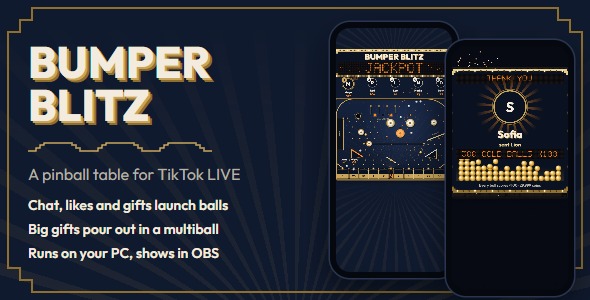
A pinball table your TikTok LIVE chat plays Bumper Blitz puts a pinball table in a brass-and-lacquer cabinet on your stream. A viewer types a word in chat and the plunger fires a steel ball with their name on it. The ball runs the orbit and the rollover lanes, bounces off bumpers and a windmill, and drops into one of eleven score slots. Its points go to that viewer, likes and gifts launch more balls, and a big gift sends a multiball stream of gold balls.
Self-hosted: it runs on your own PC. A Python server reads your LIVE and runs the pinball physics, and the game screen is a web page you add to OBS, TikTok LIVE Studio or another app with a Browser Source at 1080×1920.
Key features How viewers play Type play, main or go in chat (the words are adjustable) to launch one steel ball, once every 5 seconds per viewer (adjustable). Every 100 likes from a viewer launch one more ball for them (adjustable). Gifts launch 1 ball per coin, up to 300 per gift (adjustable). A bigger gift launches 300 gold balls whose points are multiplied, so the gift is worth its coins: a 29,999-coin gift makes every gold ball score x100. Waiting balls take turns per player at the plunger, so one big gift never blocks everyone else. Points add up per viewer with no rounds. The top 3 to 6 players show as avatar circles at the top of the screen, and the leaderboard is kept when the server restarts. The table The plunger fires each ball with a random power, so balls take different paths across the table. Left orbit (+5), three rollover lanes (+2 each, all three lit +50), a ramp (+5) and a kickout hole that holds a ball and fires it back (+10). Five pop bumpers, a moving bumper that slides across the middle and a windmill that turns over the jackpot (+1 per hit), plus two slingshots and a field of pegs. Eleven score slots: 5, 25, 10, 1, 2, a narrow 100-point jackpot, 2, 1, 5, 25, 50. Every slot value and every point on the table is editable. A dot-matrix display in the backbox shows scores, jackpots, launches and how to play. Gifts and thank-yous Gifts under 10 coins get a notification, gifts from 10 coins a marquee banner with fireworks, and gifts from 500 coins a full-screen spotlight with the sender’s photo and a tray filling with balls. Both limits are adjustable. A gift’s balls launch when its thank-you appears. A big gift’s balls pour out of the tray as its spotlight ends and fire in a fast multiball stream. Big thank-yous wait their turn, so every gifter gets their own moment. Made for streaming The table runs on the server, so OBS, preview windows and page refreshes always show the same balls. The screen is locked to 9:16. Everything that matters sits in the upper part; the bottom stays a calm lower cabinet because the LIVE chat covers it on viewers’ phones. When chat is quiet, attract mode chases the lamps and shows how to play, and a house ball rolls now and then. House balls never score, never reach the leaderboard and always wait behind viewers’ balls. A light effects mode for slower streaming PCs. The server window shows the links and a new Admin Panel password at every start, then lists every gift and jackpot. Admin Panel Four tabs: Live, TikTok, Settings and Sounds. It also works on a phone on the same Wi-Fi.
Table status: balls on the table, balls waiting at the plunger and whose they are, lane lamps, jackpots, the last scores and a muted preview of the game screen. Pause the table, clear it, send house balls, and follow an activity log of gifts, likes, jackpots and the TikTok connection. Test everything without going live: launch balls, chat, send likes and any gift as a test viewer. Settings for chat words, cooldown, likes, balls per gift, launch speed, balls on the table, attract mode, the thank-you limits, every slot value and every point on the table, with a live example for each group. Replace any of the ten sound effects with your own MP3, WAV or OGG file and set each volume. Before you buy: the TikTok connection and its costs The connection to your LIVE depends on external services that are not part of this item and that we do not control: TikTok’s unofficial live data, read through the open-source TikTokLive library, and Euler Stream, a third-party service that signs each connection. Future changes to TikTok’s API or to these services can stop the connection until TikTokLive and this item are updated. Possible ongoing cost: Euler Stream’s free plan has a daily request limit. The game runs on the free plan without a key, but if you stream often or keep reaching that limit, you may need a paid Euler Stream plan. Paid plans are monthly subscriptions billed by Euler Stream at their own prices, which can change, and they are not included in the price of this item. You are responsible for any costs and account requirements needed to go live and stay connected: a TikTok account that is allowed to go LIVE, any Euler Stream plan you choose, your internet connection and your streaming software. TikTok is a trademark of ByteDance Ltd. This item is not made, endorsed or supported by TikTok or Euler Stream. Requirements Windows 11 (tested). A start script for macOS and Linux is included. Python 3.10 or newer OBS Studio, TikTok LIVE Studio, Streamlabs Desktop or another app with a Browser Source A TikTok account that can go LIVE. The game never asks for your TikTok password. What’s included Full Python, HTML, CSS and JavaScript source code. The table, balls, display and effects are drawn in code. Documentation with screenshots: installation, OBS, the TikTok connection, connection status and debugging, every rule and Admin Panel setting, and how to change colors, fonts and the logo Ten original sound effects Start scripts: START_GAME.bat for Windows, start_game.sh for macOS and Linux No TikTok gift artwork. During a real LIVE the thank-yous show the gift icon TikTok sends with each gift. Installation Install Python 3.10 or newer. On Windows, tick “Add Python to PATH”. Open the Source folder and double-click START_GAME.bat (start_game.sh on macOS and Linux). It installs the requirements and starts the server. Copy the Admin Panel password from the server window. In OBS, add a Browser Source with the address http://localhost:5000 at 1080×1920. Open http://localhost:5000/admin, log in and launch a test ball with “Test without going live”. Go live, type your TikTok username in the TikTok tab and click Connect. Support and updates Ask through the Support tab on this item’s page. Please include your operating system, your Python version and a screenshot of the server window. Updates are free for buyers: download the newest version from your Downloads page. The changelog lists what changed.
Changelog Version 1.0.0 (October 2026): first release.
| Author | arizu_studio |
|---|---|
| Price | $13 |
| Sales | 0 |
| Rating | 0 (0) |
| Published | Oct 30, 2026 |
| Last Update | Oct 30, 2026 |
| Application Runtime | Native |
| High Resolution | Yes |
| Operating System Versions | Windows 11, Windows 10 |
Categories
Tags
External listing. code.market does not sell this product and does not process payment for it. Pricing, payment, delivery, licensing, refunds, and support are handled by the third-party merchant on its own website. We may earn an affiliate commission from a referral. Details.
Products of the Week.
Submit🥇

STOP GUESSING WHAT TO POST
AI that learns your brand voice and builds a month of consistent, on-brand social content: carousels, posts and hooks that sound like you, not like everyone else's AI.
SaaS · 7,379 views · 67 clicksSaaS · Week 46 · 7,379 views · 67 clicks
🥈

Conversational Backlinks for Busy Founders
Place Backlink Relevant Conversation for your domain across Forums and Conversations
Website · 46,664 views · 232 clicksWebsite · Week 46 · 46,664 views · 232 clicks
🥉

upvote.club
Free Social Media Engagement that Helps Boost Your Content. Upvote Club supports 19 social networks with 100+ engagement actions in one dashboard. Add links to your posts and get free engagement from real users.
SaaS · 44,605 views · 127 clicksSaaS · Week 46 · 44,605 views · 127 clicks
#4

Substack Posting API
Onboard your Agent to Substack. Write Publish on Substack via API
SaaS · 63,491 views · 206 clicksSaaS · Week 46 · 63,491 views · 206 clicks
#5

Seenshot App
Free, Fast, MacOS Screenshot app. Make Screenshot cmd+shift+2 and send it via link
Desktop App · 32,739 views · 127 clicksDesktop App · Week 46 · 32,739 views · 127 clicks
#6

Hand-Placed Backlinks $9.99 per link. Flat rate.
Buy hand-placed forum, Q-A and directory backlinks. Flat $9.99 per link, no subscriptions — you only pay for approved listings.
Website · 8,358 views · 19 clicksWebsite · Week 46 · 8,358 views · 19 clicks
#7

Free Invoice Generator - PDF Invoices in Your Browser, No Sign-Up
A free invoice maker for freelancers and small businesses: fill in the invoice, check the live preview, and download a PDF that looks exactly like it. Any currency, tax per item, three templates, no sign-up, and nothing leaves your device.
6,986 views · 29 clicksWeek 46 · 6,986 views · 29 clicks
#8

Merge PDF Files Free - Combine PDFs in Your Browser, No Upload
A free PDF merger for office workers, students, and freelancers: combine PDFs and images into one file in the browser, reorder files and pages, pick page ranges, keep bookmarks, and open password-protected PDFs. Nothing is uploaded, no sign-up, no watermark.
6,464 views · 18 clicksWeek 46 · 6,464 views · 18 clicks