
Buildora | Laravel No-Code AI Website Generator SaaS Platform With Flutter Android and iOS App

Description
Buildora | Laravel No-Code AI Website Generator SaaS Platform With Flutter Android and iOS App
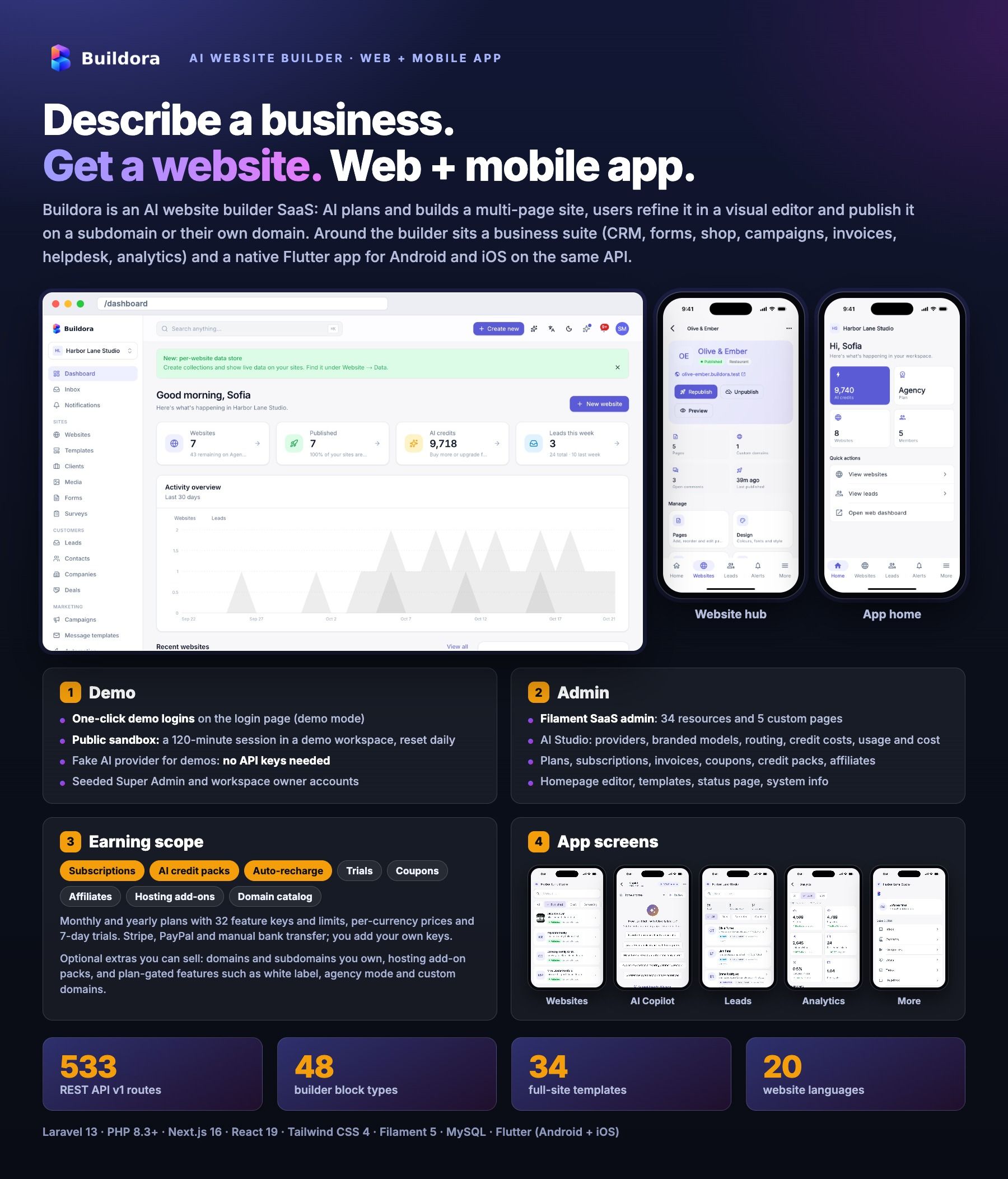
Buildora is a complete AI website builder SaaS you can run as your own business. Your customers describe their
business, the AI plans and builds a multi-page website, they refine it in a drag-and-drop visual editor, then publish it on a
subdomain of your platform or on their own domain, or export it as a ZIP. Around the builder sits a full business suite: online store, forms,
leads and CRM, per-website database, blog, email campaigns, automation, invoicing, helpdesk, loyalty, ads reporting and analytics.
It ships as a Web + Mobile App package: a Laravel 13 backend with a Filament SaaS admin panel and
533 REST API v1 routes, a Next.js 16 web app (100+ screens: marketing site, workspace dashboard and editor) and a
native Flutter app for Android and iOS (140+ screens) that uses the same API. You sell plans and AI credit packs, choose the
AI providers and models with your own keys, and manage every customer, website, domain and payment from one admin panel.
AI Disclosure
|
Were AI tools used to create this item? Yes. AI coding and writing assistants were used to generate and assist with parts of this item:
All code and content were reviewed, tested and edited by the author, and the item ships with its automated test suites (backend, web and Flutter). AI features included in the item. Buildora contains these AI features, all running on your own AI provider account (OpenAI, Anthropic Claude, Google Gemini, OpenRouter or Omniroute, an OpenAI-compatible gateway):
These features send the briefs, page content, attachments and prompts a user submits to the AI provider you configure with your own API keys. All providers ship disabled with no keys; the rest of the platform works without them, and a demo mode returns sample output without any key. Provider usage is billed to you by the provider and is not included in the item price. |
Third-Party Accounts and Costs
|
You need your own accounts with these services, and you pay their fees directly. None of them is included in the item price.
|
Live Demo
Website builder & workspace
buildora.bugbuild.com/login
Email: demo@buildora.test · Password: 12345678
Or tap the one-click Demo user button on the sign-in page. Build a website with AI, open the visual editor, publish, and try the store, forms, CRM, data store, blog, campaigns and finance tools.
SaaS admin panel
buildoraapi.bugbuild.com/admin
Email: admin@buildora.test · Password: 12345678
Or tap the one-click admin button on the admin sign-in page. See the whole SaaS admin panel: customers, plans, payments, AI providers, templates, domains and settings.
Live sandbox, no sign-up
Open buildora.bugbuild.com and click Try the live demo: it opens a 120-minute session in a shared sandbox workspace that is reset every day (checkout, payments, domain purchases, webhooks and real e-mails are blocked there).
Android app
Download the demo APK — connects to the live demo; sign in with demo@buildora.test / 12345678.
Documentation
buildoradocs.bugbuild.com
Sign-in is rate limited (5 attempts per minute); wait a minute after several wrong passwords. A fresh installation contains no demo accounts; it creates only the Super Admin you enter in the installer.
What You Get
- Laravel Backend and SaaS Admin — REST API v1 (533 routes, OpenAPI 3 spec with 94 documented paths), Filament admin panel (36 resources, 6 custom pages), published-site server for subdomains and custom domains, web installer.
- Next.js Web App — public marketing site, pricing and help pages, workspace dashboard, the full-screen visual editor and every business tool (100+ screens).
- Flutter Mobile App — one native codebase for Android and iOS (no WebView wrapper): websites, AI Studio, leads and CRM, store, finance, marketing, team and billing, with push notifications and deep links.
- Site library — 48 builder blocks, 34 full-site templates in 24 categories, 47 ready-made section variants and 5 business modules.
- Full source code, migrations, seeders with demo data, automated tests and documentation, in
Main_Files/WebSourceCode,Main_Files/AppSourceCodeandMain_Files/documentation. - Plain, readable PHP, TypeScript and Dart — no encoded files and no licence server.
- Web installer — requirements check, database, migrate, first Super Admin and settings; it locks itself after the first run. CLI install,
buildora:updateand abuildora:doctorproduction readiness check.
Application Features
AI Website Generation
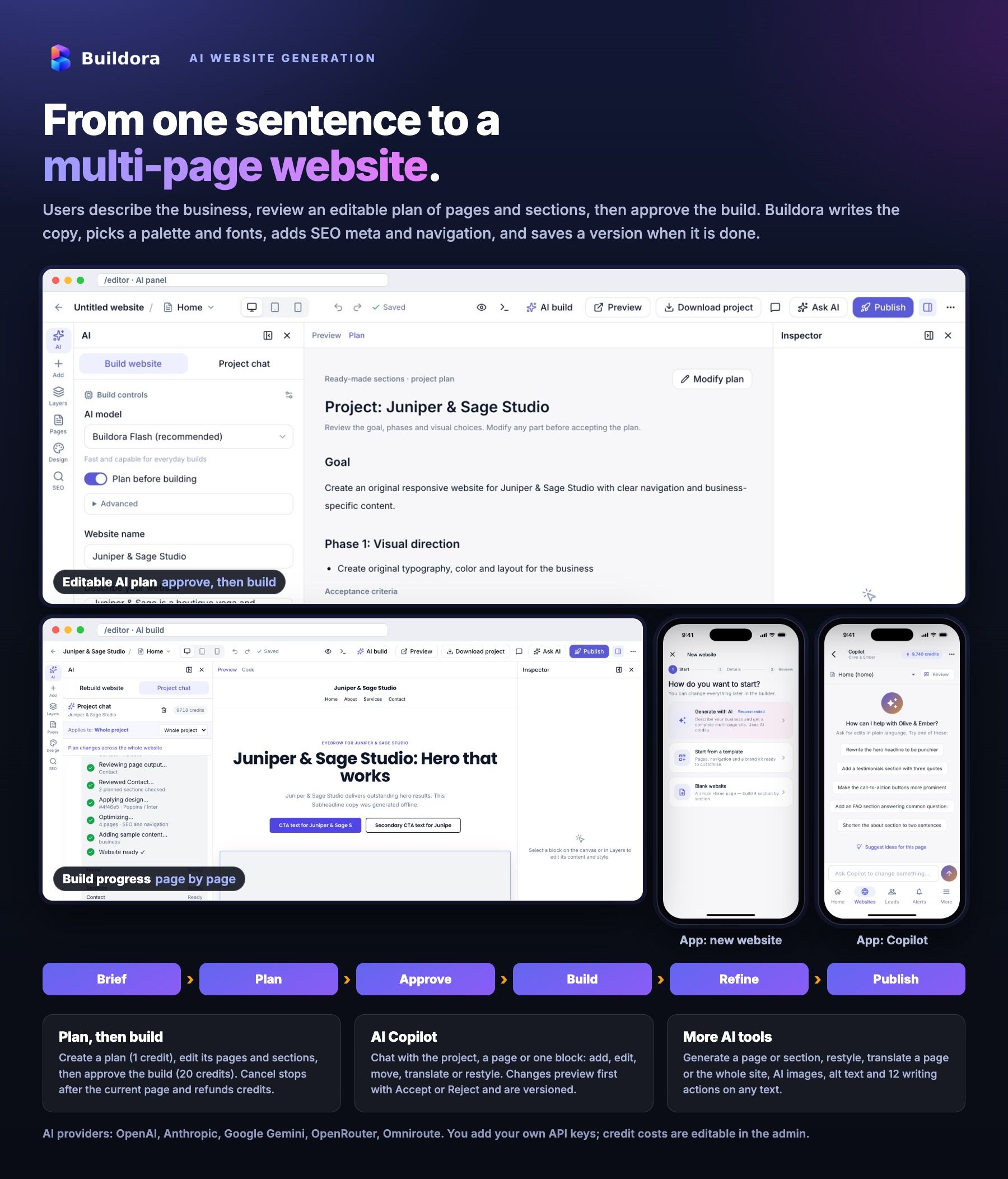
- Three ways to start: AI build from a business brief, from a template or blank; 9 website types and 20 content languages
- Build options: admin-defined branded AI models per plan, plan-before-building, Custom design (freely composed block trees) or Ready-made sections (component library), primary colour, tone, quick questions and project research
- Editable plan (pages, slugs, sections, implementation phases) → approve and build, with live progress per page, cancel (credits refunded, finished pages kept) and resume
- The AI writes up to 12 pages × 10 sections: colour palette, font pair (39 Google Fonts), light/dark mode, design direction, copy, brand kit, per-page SEO meta, navigation and sample items for business modules, with a quality gate and repair pass on every page
- AI Copilot / project chat (Ctrl/⌘+K or “Ask AI” on a block): chat, add, edit, remove, move, translate, restyle and make responsive; image and document attachments (TXT, MD, CSV, PDF, DOCX); preview with Accept/Reject, every applied change versioned
- Generate page, generate section, replace section, restyle the site, translate page or website, AI image generation to the media library, alt text and a 12-action content tool (rewrite, shorten, expand, grammar, SEO, headlines, CTA, FAQ and more)
- Project research: web results (Brave Search API or Wikipedia) and Wikimedia Commons images, importable into Media
- Credit cost per action set by the admin, cost and balance shown before running, every AI call logged
Visual Editor
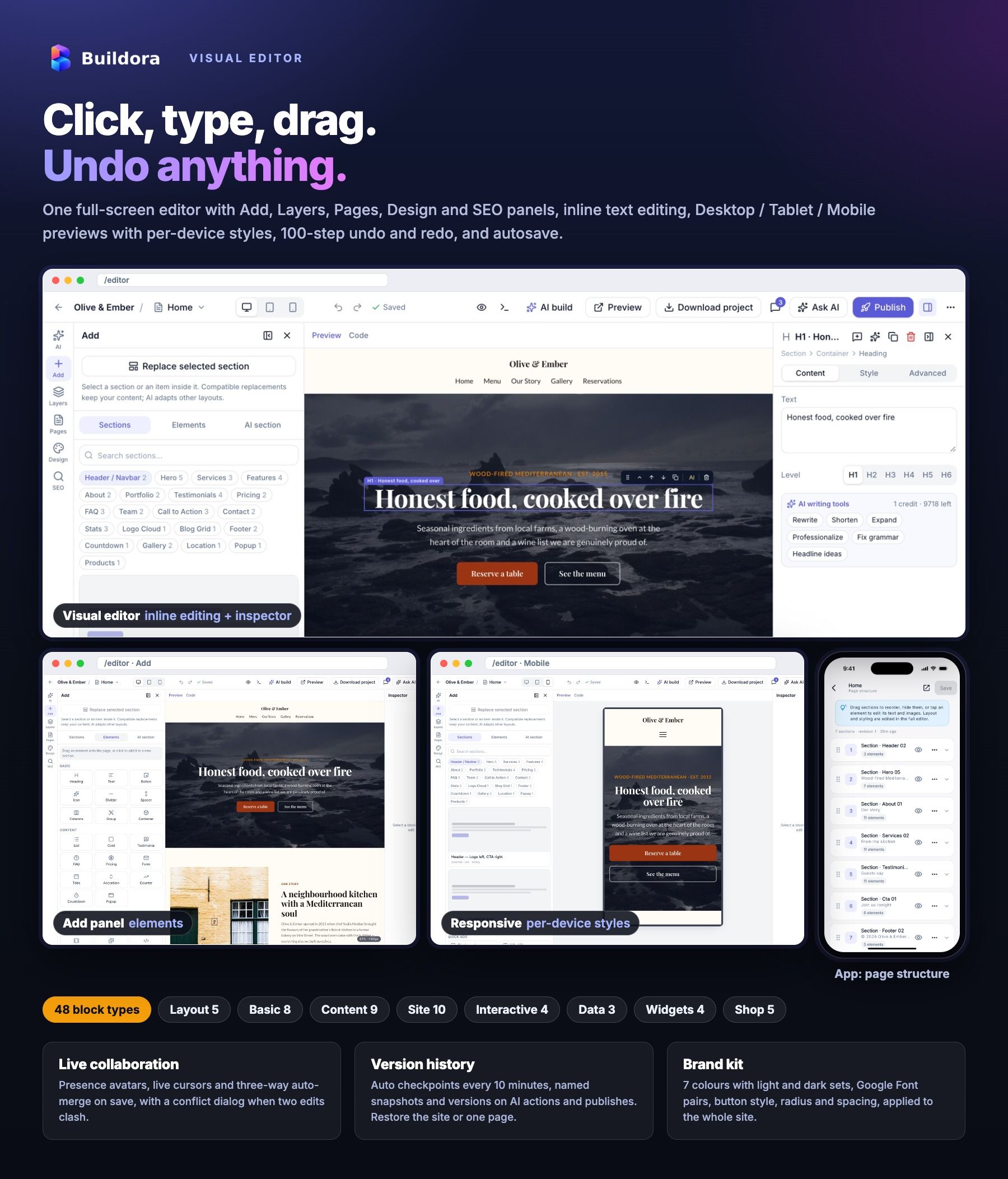
- Full-screen editor with AI, Add, Layers, Pages, Design and SEO panels and a Content / Style / Advanced inspector
- 48 block types in 8 groups: layout, basic, content, site, interactive (tabs, accordion, carousel, gallery), data, widgets (counter, countdown, popup, embed) and shop
- Inline text editing, drag and drop on the canvas and in the layer tree, rename, 100-step undo/redo, autosave, keyboard shortcuts and an editor console with slash commands
- Desktop, tablet and mobile previews with per-breakpoint style overrides and hide-on-device; scroll animations, anchors and custom classes
- Brand kit: logo, favicon, 7 colours with separate light and dark sets, Google Fonts, button style, radius, container width and spacing
- Global header and footer with a navigation editor; code view (HTML/CSS, page JSON) and custom head/body code per page or site
- Live collaboration: presence avatars, live cursors, “who is editing” indicators and three-way auto-merge on save with a per-change conflict dialog
- Comments on the site, a page or a block with replies, @mentions and resolve; version history with named snapshots, auto checkpoints and page or site restore
- Multilingual sites: locale switcher with translation status, AI translation, language switcher block and RTL output for Arabic, Urdu, Hebrew and Persian
- Media library: upload, import from URL, folders, crop, alt text and automatic responsive WebP variants
Templates, Business Modules and Published Sites
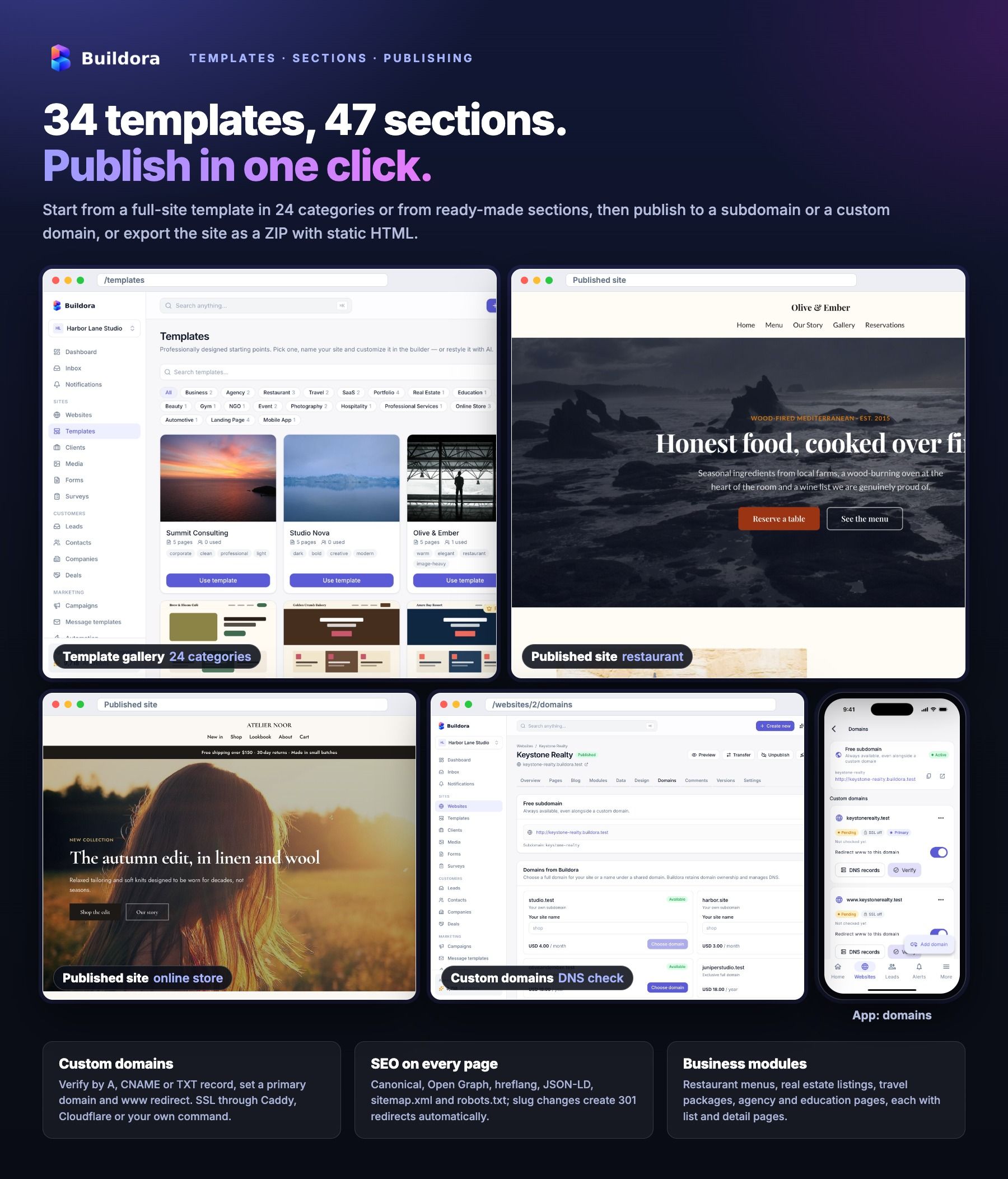
- 34 full-site templates in 24 categories (restaurant, cafe, hotel, travel, real estate, law, clinic, gym, SaaS, app, portfolio, shop, blog, podcast, construction, auto, coming soon, link-in-bio and more) with search, a category filter and a premium filter
- Component library: 47 section variants in 21 categories (hero, features, pricing, testimonials, team, FAQ, CTA, gallery, footer and more)
- 5 business modules: Restaurant (menus, opening hours), Real Estate (properties, agents), Travel (packages, destinations), Agency (services, portfolio, case studies) and Education (programs, teachers, admissions), each with public list and detail pages and an inquiry form
- Pages manager: reorder, set home, clone, generate with AI, automatic 301 redirect on slug change
- Publish, unpublish and per-site maintenance; sites live on
{subdomain}.your-sites-domainwith an optional “Made with” badge per plan - Custom domains with DNS instructions, verification, primary domain and www redirect; SSL through Caddy on-demand TLS, Cloudflare, a load balancer or your own certbot/acme.sh command
- Domain catalog to sell domains or subdomains you own, optional Docker hosting servers and hosting add-on packs
- Password-protected preview links and ZIP export of the static site (pages, assets, sitemap, robots and data store export)
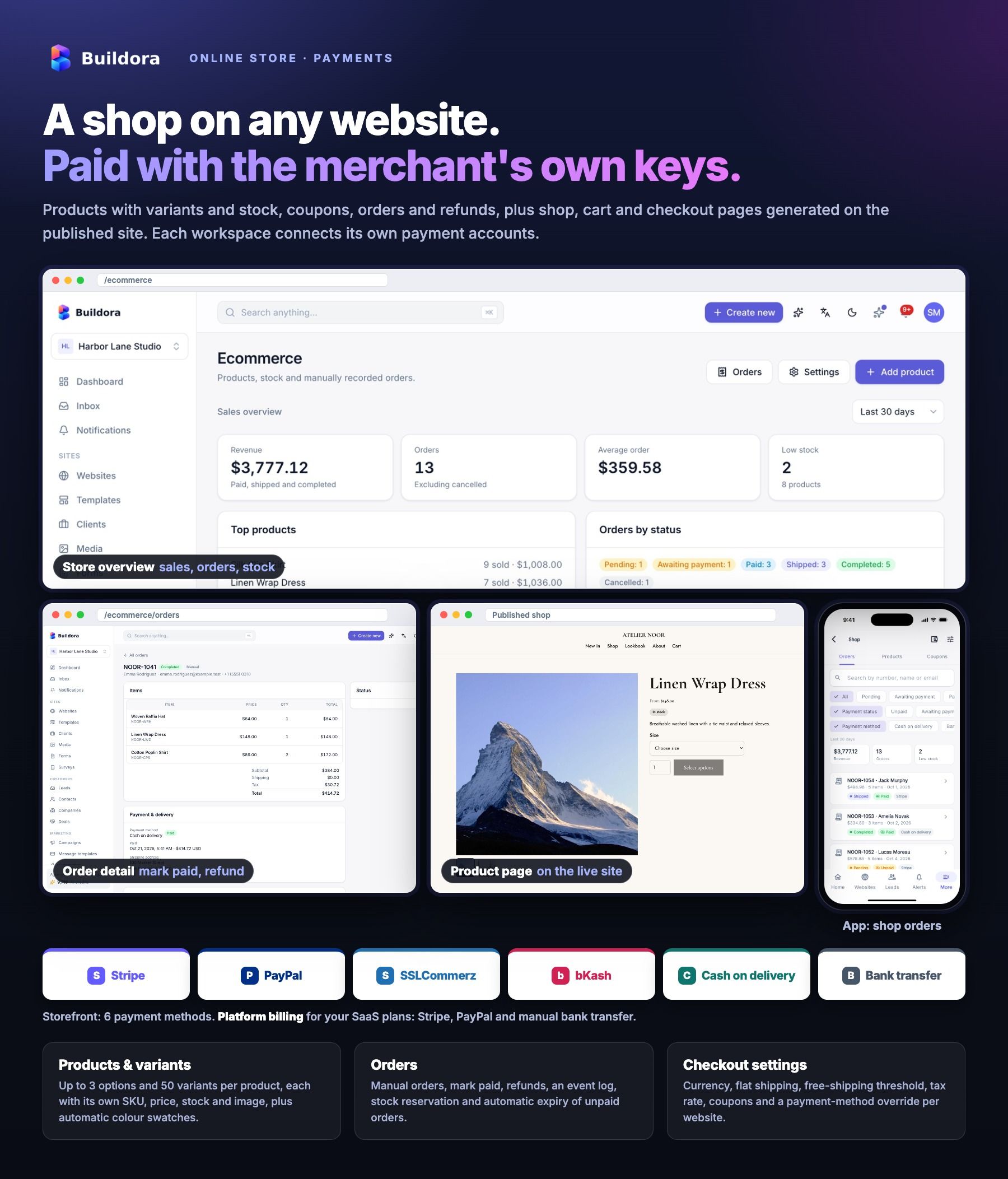
Online Store, Payments and Finance
- Products with compare-at price, SKU, category, images, stock and low-stock alerts, and variants (up to 3 options and 50 variants) with automatic colour swatches
- Shop blocks for product grid, product detail, cart, checkout and cart button; public product, cart and checkout pages included in the sitemap
- Coupons, flat shipping with a free-shipping threshold, tax, manual orders, mark paid, refunds, stock reservation and auto-expiry of unpaid orders
- Storefront payments into the merchant’s own account: Stripe Checkout, PayPal, SSLCommerz and bKash, plus cash on delivery and bank transfer, with signed webhooks, test connection and per-website overrides
- Invoicing: invoices, estimates, recurring invoices, expenses with receipts, partial payments, PDF download and a public client view
- Loyalty: members, points, rewards, redemptions and editable tiers
Payment services: Stripe, PayPal, SSLCommerz and bKash are third-party services. You and your customers create and maintain your own merchant accounts, credentials, webhooks and compliance settings and pay their transaction and currency fees.
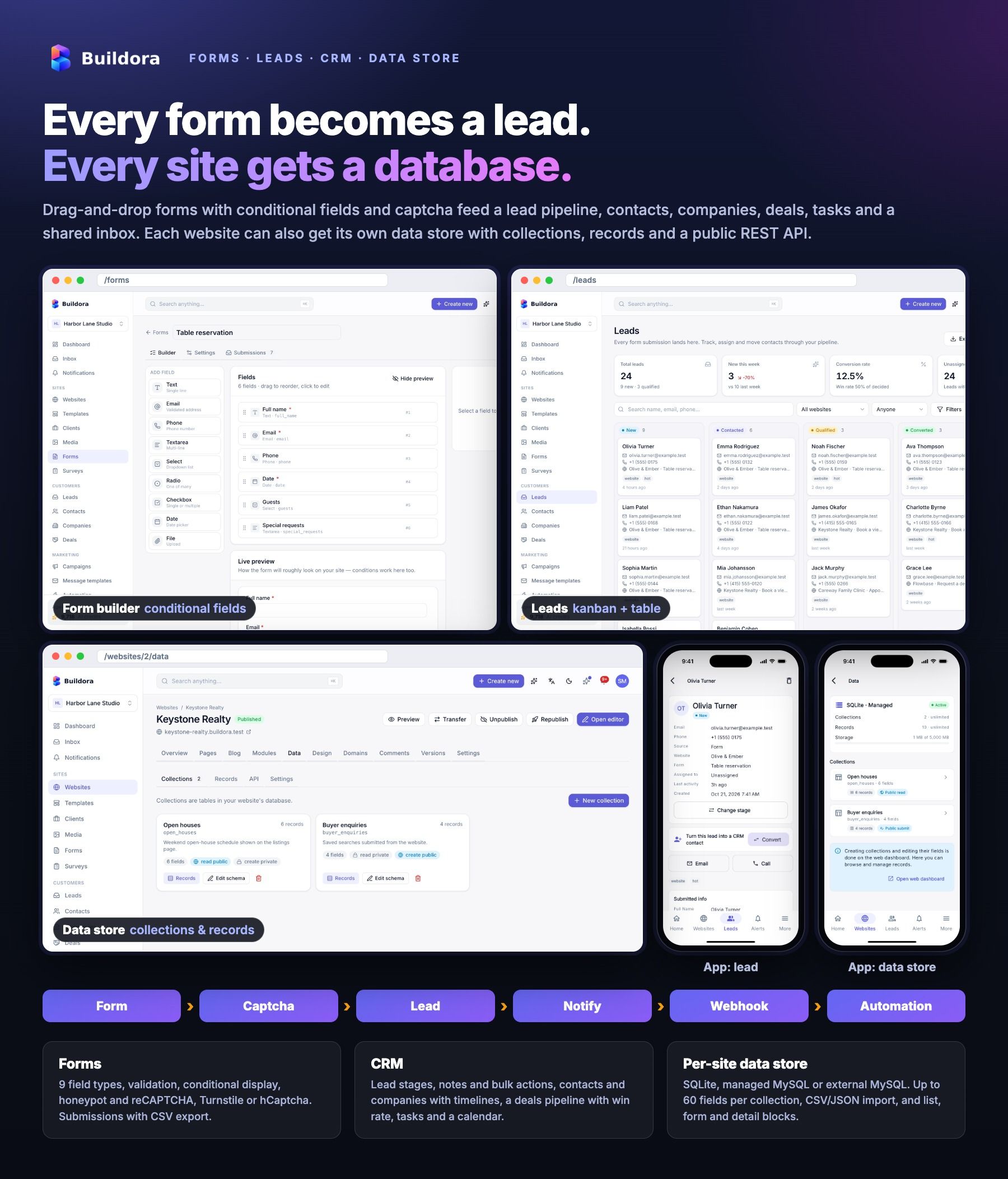
Forms, Leads, CRM and Data Store
- Form builder: 9 field types, validation, conditional display, success message or redirect, e-mail notifications, per-form webhook, honeypot and captcha (reCAPTCHA v3/v2, Cloudflare Turnstile, hCaptcha), submissions with CSV export
- Leads with UTM, referrer and page, kanban and table views, notes, bulk actions and convert to contact
- CRM: contacts, companies, deals pipeline with win rate, tasks with priorities and assignees, and a calendar of appointments and due tasks
- Inbox for lead submissions and tickets with canned replies; helpdesk tickets and a knowledge base with a public help center per workspace
- Per-website data store: SQLite, managed MySQL or external MySQL; collections with 12 field types, records with search, import and export, and engine migration
- Data blocks (list, form, detail) with optional SEO detail pages, and a public REST API for each collection with access rules and rate limits
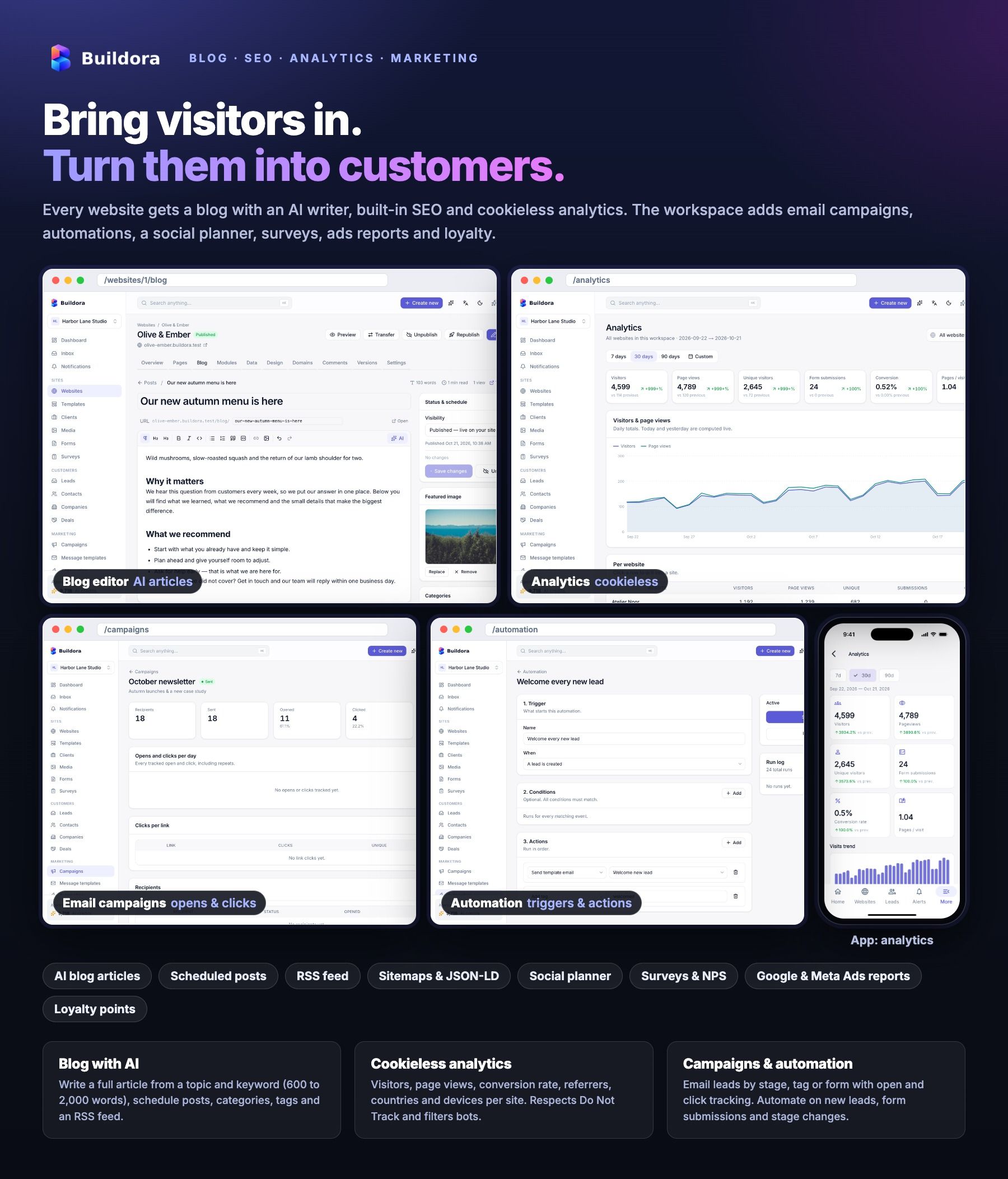
Blog, SEO, Analytics and Marketing
- Blog per website: rich-text editor, categories, tags, scheduled posts, translations, RSS feed and an AI article generator with 16 in-editor AI actions
- SEO: per-page title, description, canonical, Open Graph, Twitter card and noindex; live SEO checks in the editor; JSON-LD, hreflang, sitemap.xml, robots.txt, redirects (301/302/307/308) and a custom 404 page
- Tracking on published sites: GA4, GTM, Meta Pixel, TikTok, Hotjar and Microsoft Clarity by ID, with a cookie-consent banner
- Analytics: built-in cookieless tracker with visitors, page views, conversions, top pages, referrers, countries, devices and browsers, with CSV export
- Email campaigns to filtered leads with merge tags, scheduling, test e-mail, open and click tracking and one-click unsubscribe
- Automation: triggers, conditions and actions (send template, tag, change stage, notify, delay) with a run log
- Social planner with a calendar and AI captions, ads reporting (Google Ads and Meta Ads API, others by manual entry or CSV) with profit and ROAS, and surveys with NPS
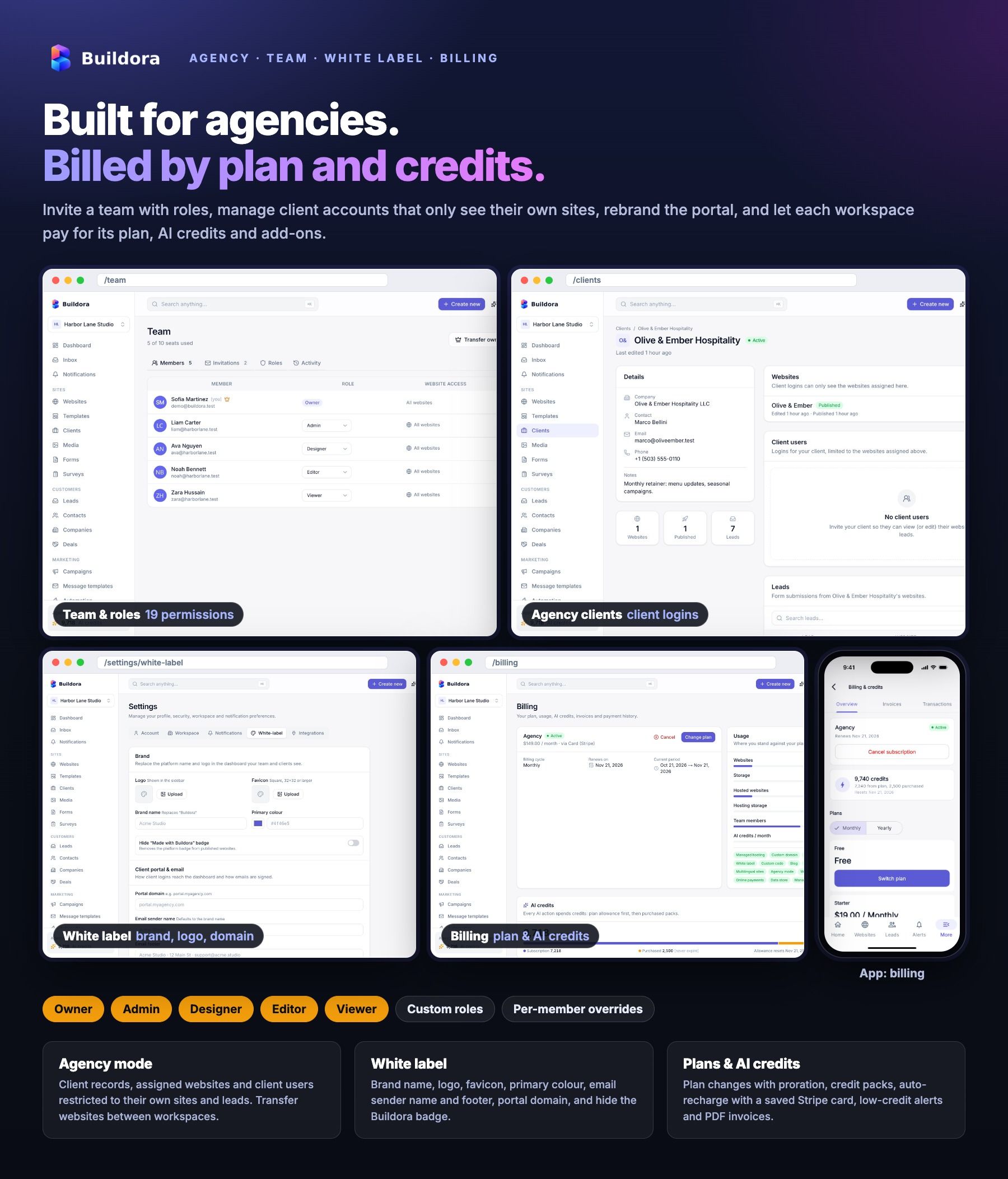
Agency, Team, White Label, Billing and Credits
- Multiple workspaces per user with a switcher, ownership transfer and conversion to an agency workspace
- Team invitations with Owner, Admin, Designer, Editor and Viewer roles, custom roles, 19 permissions and an activity log
- Agency mode: client records, assigned websites, client logins limited to their own sites, and website transfer between workspaces
- White label per workspace: brand name, logo, favicon, colour, e-mail sender name and footer, portal domain and hidden badge
- Plans with monthly and yearly prices, per-currency prices, trials and 32 feature keys and limits; plan changes with proration, cancel and resume
- AI credits: monthly allowance, credit packs, auto-recharge with a saved Stripe card, low-credit alerts and optional rollover
- Platform billing with Stripe, PayPal and manual bank transfer (proof upload), coupons, PDF invoices and an affiliate program
- Account security: two-factor authentication (TOTP and recovery codes), Google login, API tokens, GDPR data export and account deletion with a grace period
- Notifications by e-mail, in-app and push with per-event preferences, outbound webhooks (HMAC signed) and a developer page with the OpenAPI spec
SaaS Admin Panel
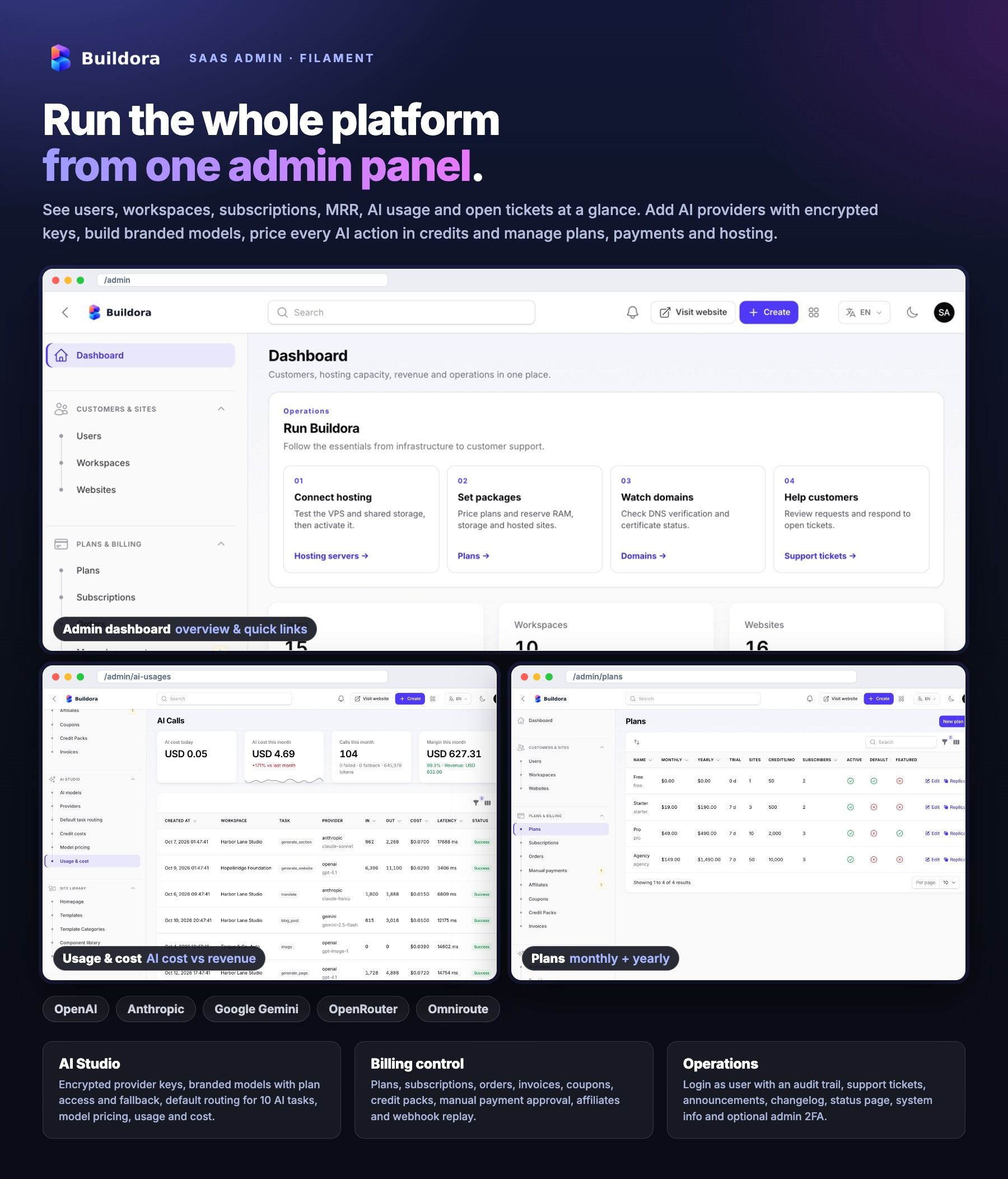
- Dashboard with users, workspaces, websites, active subscriptions, MRR, revenue, AI credits used, signups, AI cost vs revenue and hosting overview
- Users with audited login as user, ban and verification; workspaces with limit overrides; websites
- Plans, subscriptions, orders, invoices, coupons, credit packs, manual payments, hosting add-ons and affiliates
- AI Studio: providers with encrypted keys, branded AI models per plan with fallback, task routing, model pricing, usage and cost, and credit costs per action
- Site library: templates, template categories, component library, media, and a public-pages editor with draft and preview: homepage sections with photos, About, Contact, Pricing page, a platform blog, Terms / Privacy / Refund pages and Bangla / Arabic translations of your own text
- Domains, domain catalog, hosting servers and data stores; support tickets, announcements, changelog, status page components and incidents, webhook events and activity log
- Settings in 14 tabs (general, auth, AI, payments, storage, mail, captcha, analytics, scripts, maintenance, mobile app, data store, ads and platform), 13 editable e-mail templates and a system info page with queue and scheduler health
- Staff admins with permission groups, optional mandatory 2FA for admins, and the admin UI in English, Bangla and Arabic (RTL)
Flutter Mobile App (Android + iOS)
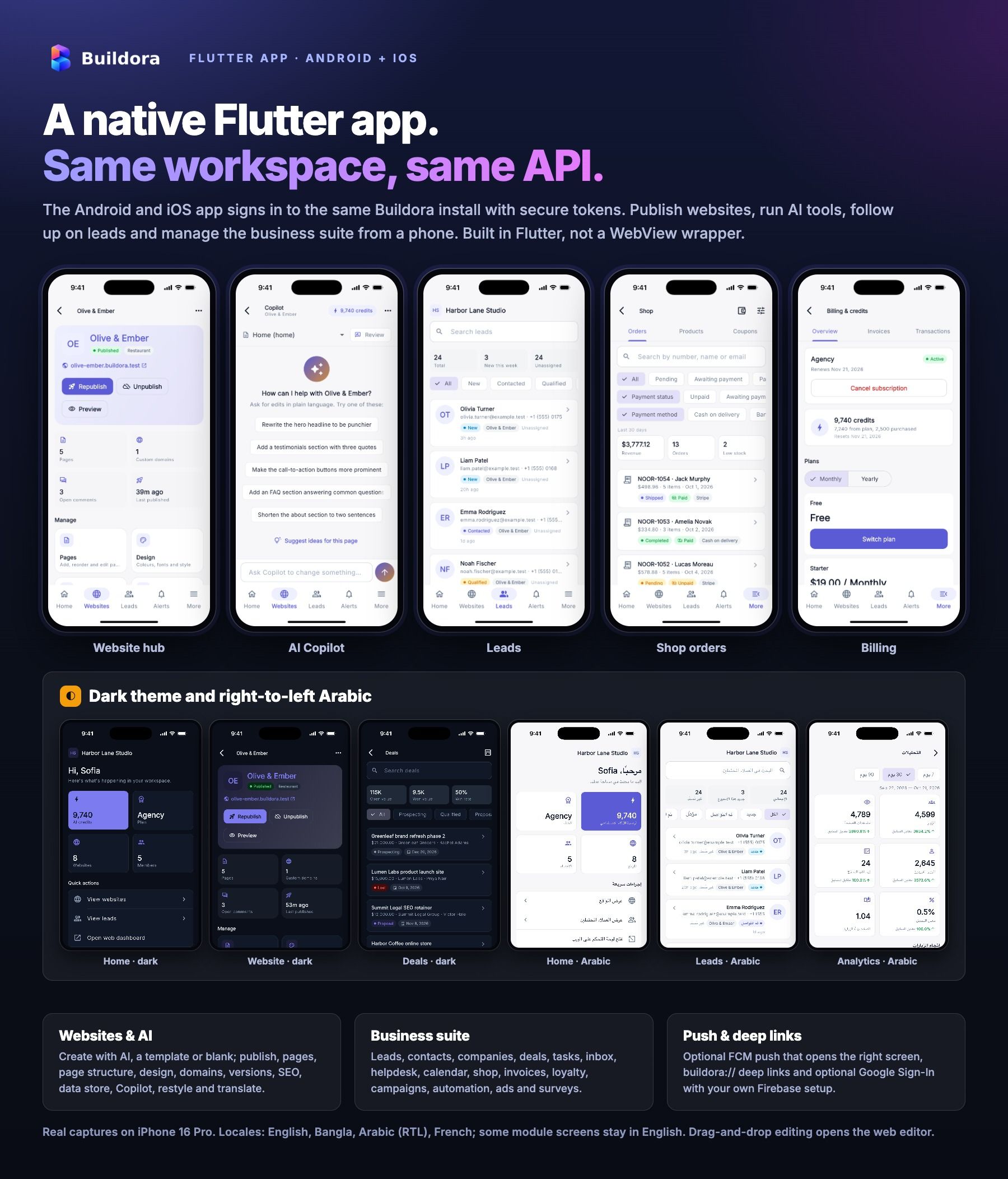
- Native Flutter app (Riverpod, go_router, Dio) with login, registration, two-factor login, Google Sign-In (optional), password reset and workspace switcher
- Websites: create with AI, from a template or blank; publish, pages, page structure editing, brand kit design, domains, SEO and redirects, versions, comments, modules, settings, ZIP export and data store records
- AI Studio: live build progress, streaming Copilot chat with review-before-apply, restyle, translate, research and an AI writer; template gallery with live preview
- Leads, contacts, companies, deals board, tasks, inbox, helpdesk, calendar and agency clients
- Shop orders, products with variants and coupons; invoices, estimates, recurring invoices, expenses with receipt photos and loyalty
- Forms, media library (camera, gallery or file upload, crop), blog with AI posts, knowledge base, message templates and analytics
- Email campaigns, automation, social planner, ads tracking and surveys
- Team and roles, billing with coupons and payment-proof upload, white label, integrations, webhooks, API tokens, devices and sessions, and support tickets
- FCM push notifications with tap-to-open,
buildora://deep links, light/dark/system theme - Layout, styling and adding sections open the web editor already signed in; on Android, checkout opens your web billing in the external browser; the iOS build sells nothing (billing is read-only, App Store 3.1.1)
- In-app account deletion (Settings → Account → Delete account) with a 14-day grace period you can cancel
- Push and Google Sign-In need your own Firebase project and Google OAuth clients (Google services with their own terms and possible usage charges)
Languages, Themes and RTL
- Web app and admin panel UI in English, Bangla and Arabic (right-to-left)
- Published websites in 20 content languages with AI translation, hreflang and RTL output for Arabic, Urdu, Hebrew and Persian
- Mobile app language files in English, Bangla, Arabic (RTL) and French; several module screens in the app are still English only
- Light and dark themes on the web; light, dark or system theme in the app
Installation and Operations
- Web installer and
buildora:installCLI,buildora:update,buildora:doctorreadiness report and a demo reset command - Laravel queue worker and scheduler (cron every minute); shared hosting can run the queue from cron
- Collaboration and progress use HTTP polling, so no WebSocket server is needed
- Storage on the local disk, Amazon S3 or S3-compatible services (Cloudflare R2, DigitalOcean Spaces, MinIO, Wasabi)
- Mail through SMTP or Amazon SES
Technologies Used
- Laravel 13 (PHP 8.3+), Filament 5, Livewire 4, Fortify (authentication, 2FA), Sanctum (API tokens) and dompdf (PDF invoices)
- Next.js 16, React 19, TypeScript, Tailwind CSS 4, Radix UI, TanStack Query, dnd-kit, TipTap and CodeMirror
- MySQL 8.0+ or MariaDB 10.6+
- Flutter with Dart 3.12+, Riverpod, go_router and Dio (Android and iOS)
- Firebase Cloud Messaging HTTP v1 for push (your own project)
System Requirements
Web Platform
- PHP 8.3 or newer with bcmath, ctype, curl, dom, fileinfo, json, mbstring, openssl, PDO (pdo_mysql), tokenizer, xml, zip, intl and gd or imagick
- MySQL 8.0+ or MariaDB 10.6+; Apache or Nginx with the backend document root on
backend/public - Node.js 20.9+ (22 LTS recommended) to build and run the Next.js app (Node server with pm2, Vercel, Netlify, Render or cPanel Node.js App)
- The web app and the API on the same parent domain (for example
example.comandapi.example.com) - A wildcard DNS record for the published-sites domain pointing to the backend; HTTPS for payments, webhooks, mobile login and push
- Cron for the scheduler (
schedule:runevery minute) and a queue worker (Supervisor or systemd), or a cron-driven queue on shared hosting - Writable
storage,bootstrap/cacheand.env; Composer 2
Mobile App
- Flutter (stable) with Dart 3.12+; Android Studio for Android (min Android 7.0), Xcode on macOS for iOS (iOS 15+)
- Your own app name, package/bundle id, icons, signing keys and Apple developer team
- A Firebase project for push notifications (optional; the app runs without it)
- Google Play Console and/or Apple Developer accounts to publish
Important Notes About Third-Party Services
See Third-Party Accounts and Costs at the top of this page: you supply your own accounts and keys for every external service.
How integrations were tested: AI providers, Stripe, PayPal, SSLCommerz, bKash, the Google and Meta Ads APIs, Google login and FCM push were verified during development with simulated (faked) responses in the automated test suites (1,400+ backend tests and 1,100+ Flutter tests). Test each integration with your own sandbox credentials before going live.
Services contacted without an account: published websites load icons from unpkg (Lucide) and fonts from Google Fonts, the API reference page loads Swagger UI from jsDelivr, default avatars come from ui-avatars.com and template placeholder images from picsum.photos. Mention them in your privacy policy, or replace them with your own hosted files.
Honest notes: a fresh install has no AI provider enabled; add your keys before the AI tools can generate. The social planner plans and reminds but does not post to social networks. Ads reporting connects to Google Ads and Meta Ads only; other platforms use manual entry or CSV. The domain catalog sells domains you already own; there is no registrar integration and no built-in Let’s Encrypt client. Recurring off-session charges (auto-recharge, hosting add-ons, domain renewals) use Stripe. The inbox and helpdesk have no inbound e-mail (IMAP) or live chat. The mobile app manages websites and content natively, while full visual editing opens the web editor. Composer, npm and Flutter packages remain under their own licences (see the documentation for credits).
Documentation
Installation, configuration, admin and workspace guides and app build steps: View Documentation.
The same files are in the documentation folder inside the download.
Support
Support is included for the period shown on the item page (6 months by default), Sunday to Thursday, 10:00–18:00 (GMT+6), with response targets from 1 to 3 business days by priority. Please include your purchase code.
Changelog
Version 1.0.0
Initial release:
- Multi-workspace SaaS with plans, trials, subscriptions, AI credits, credit packs, coupons, affiliates and a Filament SaaS admin panel
- AI website generation from a brief with planning, live progress, cancel and resume; AI Copilot, restyle, translate, page and section generation and AI images
- Visual editor with 48 blocks, responsive styles, layers, undo/redo, version history, comments and live collaboration with auto-merge
- 34 templates, 47 section variants and 5 business modules
- Publishing on subdomains and custom domains, preview links, ZIP export, domain catalog and optional Docker hosting
- Online store with variants, coupons and storefront payments (Stripe, PayPal, SSLCommerz, bKash, cash on delivery, bank transfer)
- Forms, leads, CRM, tasks, calendar, inbox, helpdesk, knowledge base and per-website data store with a public API
- Blog, SEO tools, analytics, email campaigns, automation, social planner, ads reporting, surveys, invoicing and loyalty
- Teams, custom roles, agency clients, white label, 2FA, API tokens, outbound webhooks and notifications
- Platform billing with Stripe, PayPal and manual payments, web installer, updater and readiness check
- English, Bangla and Arabic (RTL) UI; 20 website content languages
- Flutter Android/iOS app on REST API v1 with FCM push and deep links
| Author | BugBuild-Labs |
|---|---|
| Price | $9 |
| Sales | 4 |
| Rating | 0 (0) |
| Published | Nov 16, 2026 |
| Last Update | Nov 16, 2026 |
| Compatible Software | Flutter 3.x, Flutter 2.x, Flutter 1.x |
| Demo Url | https://buildora.bugbuild.com |
| Mobile Files Included | Dart, YAML, Layered PNG, JavaScript JS, CSS, LESS, Sass, Stylus, PHP, HTML |
Categories
Tags
External listing. code.market does not sell this product and does not process payment for it. Pricing, payment, delivery, licensing, refunds, and support are handled by the third-party merchant on its own website. We may earn an affiliate commission from a referral. Details.
Products of the Week.
Submit🥇

Perceptle
Perceptle is a daily browser-based game that challenges you to test your sensory intuition through five quick estimation and rhythm-based rounds.
Other · 767 views · 2 clicksOther · Week 47 · 767 views · 2 clicks
🥈

Free LinkedIn Likes From Real
Get free LinkedIn likes on your posts from real members who react by hand. No
SaaS · 921 views · 8 clicksSaaS · Week 47 · 921 views · 8 clicks
🥉

STOP GUESSING WHAT TO POST
AI that learns your brand voice and builds a month of consistent, on-brand social content: carousels, posts and hooks that sound like you, not like everyone else's AI.
SaaS · 8,482 views · 74 clicksSaaS · Week 47 · 8,482 views · 74 clicks
#4

aaas.market
407 reliable micro tools for solo founders, marketers and creators. They work in your browser
SaaS · 914 views · 1 clicksSaaS · Week 47 · 914 views · 1 clicks