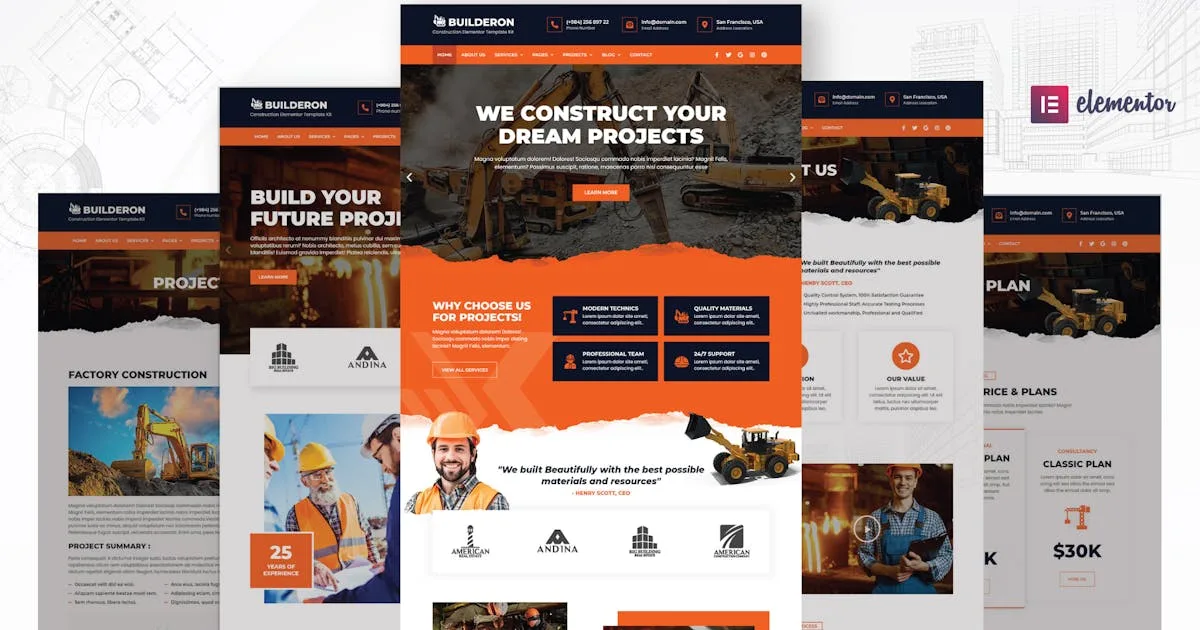
Builderon – Construction Elementor Template Kit
Description
Highlighted Features
- Modern & Professional Design
- 23+ Ready to use Templates
- 45+ Ready to use Blocks Elements
- Shop Ready templates
- Fully Responsive Layout
- Speed optimized for Fast-loading
- Fully Customizable
- Works with most Elementor themes
- No Coding Required
Page templates included
- Global Kit Styles – Customize Fonts in one place
- Home 1
- Home 2
- About Us
- Services
- Services detail
- Career
- Career detail
- Team
- Team details
- Pricing
- Projects
- Project detail
- Testimonial
- FAQ
- Contact
- Blog
- Shop / Products
- Shop / Products Detail
- Single Page for Theme Builder
- Single Post for Theme Builder
- 404 Error Page
- Inquiry form
- Search Result for Theme Builder
- Header for Theme Builder
- Footer for Theme Builder
- Coming Soon
Unique Blocks/Sections included
- About Block 1
- About Block 2
- About Block 3
- About Block 4
- Service Block 1
- Service Block 2
- Service Block 3
- Service Block 4
- Feature Block 1
- Feature Block 2
- Feature Block 3
- Case Study Block 1
- Case Study Block 2
- Portfolio Block 1
- Portfolio Block 2
- Portfolio Block 3
- Pricing Block 1
- Pricing Block 2
- Pricing Block 3
- Team Block 1
- Team Block 2
- Team Block 3
- Process Block 1
- Process Block 2
- Process Block 3
- Subscribe Block 1
- Subscribe Block 2
- Subscribe Block 3
- Counter Block 1
- Counter Block 2
- Counter Block 3
- Countdown Block
- Callback Block 1
- Callback Block 2
- Callback Block 3
- Brand/Client Block 1
- Brand/Client Block 2
- Brand/Client Block 3
- Testimonial Block 1
- Testimonial Block 2
- Accordion Block 1
- Accordion Block 2
- Accordion Block 3
- Form Popup Block
- Contact Block 1
- Contact Block 2
- Contact Block 3
- More Default Blocks
How to import Templates & Blocks
- You need to install a Template Kit Importer plugin to be able to import templates that have been downloaded from Envato. Install and Activate the “Template Kit Import” plugin from Plugins > Add New in WordPress
- Once the plugin is activated, go to Tools > Template Kit
- Click on Upload Template Kit ZIP File to browse to your builderon-construction-elementor-template-kit.zip file and Import.
- Builderon Template Kit preview will be appear. Click on View Installed Kit.
- An orange banner will be appear to install required additional plugins. Click Install Requirements buton.
- A popup will be appear listing the plugins needs to be installed and activated. Click Install Requirements to proceed.
- Start importing your templates and blocks by clicking the Import Template button.
Categories
Tags
External listing. code.market does not sell this product and does not process payment for it. Pricing, payment, delivery, licensing, refunds, and support are handled by the third-party merchant on its own website. We may earn an affiliate commission from a referral. Details.
Products of the Week.
Submit🥇

STOP GUESSING WHAT TO POST
AI that learns your brand voice and builds a month of consistent, on-brand social content: carousels, posts and hooks that sound like you, not like everyone else's AI.
SaaS · 4,696 views · 45 clicksSaaS · Week 45 · 4,696 views · 45 clicks
🥈

Conversational Backlinks for Busy Founders
Place Backlink Relevant Conversation for your domain across Forums and Conversations
Website · 42,589 views · 225 clicksWebsite · Week 45 · 42,589 views · 225 clicks
🥉

upvote.club
Free Social Media Engagement that Helps Boost Your Content. Upvote Club supports 19 social networks with 100+ engagement actions in one dashboard. Add links to your posts and get free engagement from real users.
SaaS · 40,634 views · 120 clicksSaaS · Week 45 · 40,634 views · 120 clicks
#4

Substack Posting API
Onboard your Agent to Substack. Write Publish on Substack via API
SaaS · 59,591 views · 200 clicksSaaS · Week 45 · 59,591 views · 200 clicks
#5

Seenshot App
Free, Fast, MacOS Screenshot app. Make Screenshot cmd+shift+2 and send it via link
Desktop App · 28,968 views · 124 clicksDesktop App · Week 45 · 28,968 views · 124 clicks
#6

Hand-Placed Backlinks $9.99 per link. Flat rate.
Buy hand-placed forum, Q-A and directory backlinks. Flat $9.99 per link, no subscriptions — you only pay for approved listings.
Website · 4,761 views · 19 clicksWebsite · Week 45 · 4,761 views · 19 clicks
#7

Free Invoice Generator - PDF Invoices in Your Browser, No Sign-Up
A free invoice maker for freelancers and small businesses: fill in the invoice, check the live preview, and download a PDF that looks exactly like it. Any currency, tax per item, three templates, no sign-up, and nothing leaves your device.
3,418 views · 17 clicksWeek 45 · 3,418 views · 17 clicks
#8

Merge PDF Files Free - Combine PDFs in Your Browser, No Upload
A free PDF merger for office workers, students, and freelancers: combine PDFs and images into one file in the browser, reorder files and pages, pick page ranges, keep bookmarks, and open password-protected PDFs. Nothing is uploaded, no sign-up, no watermark.
3,158 views · 14 clicksWeek 45 · 3,158 views · 14 clicks