
BudgetBee | Flutter Budget Tracker and Savings Jar App (Android, iOS, Web, Offline)
Description
Demo Instructions
- No login needed. The app has no accounts, so there is no email or password to enter. All data stays on the device (in a web demo: in your browser).
- On first launch tap Next through the 3 intro slides. The app then opens with sample data already loaded: 2 wallets, about 60 entries over 3 months, budgets, 2 savings goals, marked no-spend days and a savings jar.
- Open the Streak tab to try the No-Spend Challenge calendar and the Savings Jar.
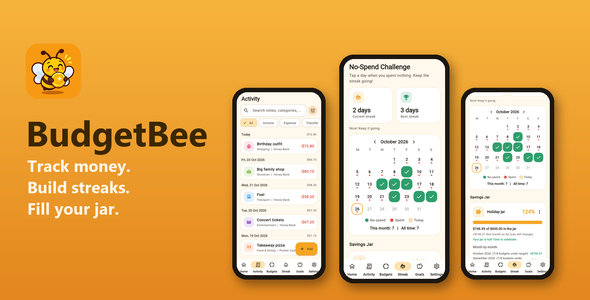
BudgetBee is a complete, offline personal finance app built with Flutter. Track income and expenses across cash, bank and card wallets, set monthly budgets, reach savings goals, and keep a streak of no-spend days. Its two twist features are the No-Spend Challenge (a monthly calendar with current and best streak) and the Savings Jar (a jar with a target that fills with the unused money of every budget that stays under its limit). Everything is stored on the device: no server, no account, no ads, no tracking. The app has no push notifications or reminders.
Features
- Wallets (cash, bank, card) with opening balances and transfers between wallets
- Income and expense entries with category, amount, date, note and wallet
- 14 default categories with icons and colours, plus your own custom categories
- Repeating entries (weekly or monthly), created automatically, with correct handling of month ends
- Monthly budget per category with progress bars and warnings when close to or over the limit
- Dashboard: month income, expense and balance, donut chart by category and a 6-month bar chart
- Search and filters (text, type, wallet, category, date range); swipe to delete with undo
- Savings goals with progress and an Add money action
- No-Spend Challenge: tap the days you spent nothing; days that already have an expense cannot be marked and future days are locked
- Savings Jar: set a name and target; unused budget money drops into the jar, with a month-by-month list
- Currency symbol setting (16 symbols), numbers formatted with intl
- CSV export and JSON backup and restore (share sheet and file picker)
- Light and dark theme, 3-slide onboarding, settings, empty and error states
- Exact whole-cent money math (no floating-point rounding errors), covered by unit tests
Easy to reskin
- App name, colours and feature switches live in one config file (
lib/config/app_config.dart) - All on-screen texts live in one strings file (
lib/config/strings.dart) - Artwork (logo, onboarding and empty-state pictures) is included in
assets/images - Launcher icons for Android, iOS and web and splash screens are already set up
- Clean, commented code using Provider for state management
What is included in the download
- Full Flutter source code (Android, iOS and web projects)
- Buyer guide in
documentation/index.htmlwith pictures of the main screens: installation, running, renaming the app and package id, reskinning, editing texts, Android and iOS signing, splash screens, launcher icons, FAQ and third-party credits android/key.properties.exampleshowing how to set up your own signing key- Test suite: 58 automated unit and widget tests (money math, budgets, streaks, savings jar, recurring entries, backup, CSV, screens)
- Artwork (app icon, logo, onboarding and empty-state pictures), README and changelog
Requirements
- Flutter 3.41 or newer (Dart 3.11 or newer)
- Android Studio or VS Code with the Flutter plugin
- Android: SDK Platform 36 (compileSdk 36, targetSdk 36); the app runs on Android 7.0 or newer (minSdk 24)
- For iOS builds: a Mac with Xcode and an Apple developer account; minimum iOS version is 14.0
- For Android release builds: your own signing keystore (the guide shows how to create one)
Not included
- No signing keys or keystores (you create your own)
- No backend, cloud sync, user accounts or multi-device sync: data stays on the device
- No bank connections and no currency conversion
- No app lock (PIN or biometrics)
- No push notifications or reminders
- No Google Play or App Store accounts, and no publishing service
- No ready-made signed APK or IPA files
AI disclosure
- Code and documentation: AI-assisted tools helped write the code and the documentation.
- Graphics: the app icon, logo, onboarding and empty-state pictures were made with AI image tools.
- Review and testing: the author reviewed and tested everything. The project includes 58 automated unit and widget tests. The app has not been run on every device and OS version, so please test it on your own devices before you publish.
Credits
Open-source Flutter packages from pub.dev, each under its own licence: provider (MIT), shared_preferences (BSD-3-Clause), intl (BSD-3-Clause), fl_chart (MIT; uses equatable, MIT, and vector_math, BSD-3-Clause), share_plus (BSD-3-Clause), file_picker (MIT), path_provider (BSD-3-Clause), cupertino_icons (MIT). Dev only: flutter_launcher_icons (MIT), flutter_lints (BSD-3-Clause). Flutter SDK and Material Icons (BSD-3-Clause / Apache-2.0). No font files are bundled: the app uses the platform font. The full list is in the documentation.
Changelog
Version 1.0.3 – Minimum iOS raised to 14.0 (needed by file_picker 13). Resuming a paused repeating entry no longer back-fills the paused period. A no-spend mark is dropped once an expense is recorded on that day. Savings Jar keeps budget limits per month. CSV export neutralises text cells starting with – = + @ tab or CR. Generated plugin files and unused texts removed.
Version 1.0.2 – Android SDK versions set explicitly (compileSdk 36, targetSdk 36, minSdk 24), release signing block fixed, screenshots in the guide, credits and AI disclosure.
Version 1.0.1 – New No-Spend Challenge calendar with streaks and a Savings Jar.
Version 1.0.0 – First release: wallets, entries, categories, repeating entries, budgets, dashboard charts, goals, CSV export, backup and restore, themes.
| Author | certainity |
|---|---|
| Price | $23 |
| Sales | 0 |
| Rating | 0 (0) |
| Published | Nov 6, 2026 |
| Last Update | Nov 6, 2026 |
| Compatible Software | Flutter 3.x |
| Mobile Files Included | Dart, YAML, JavaScript JSON, .kotlin, .plist, .swift, HTML |
Categories
Tags
External listing. code.market does not sell this product and does not process payment for it. Pricing, payment, delivery, licensing, refunds, and support are handled by the third-party merchant on its own website. We may earn an affiliate commission from a referral. Details.
Products of the Week.
Submit🥇

Perceptle
Perceptle is a daily browser-based game that challenges you to test your sensory intuition through five quick estimation and rhythm-based rounds.
Other · 1 views · 0 clicksOther · Week 47 · 1 views · 0 clicks
🥈

Free LinkedIn Likes From Real
Get free LinkedIn likes on your posts from real members who react by hand. No
SaaS · 124 views · 2 clicksSaaS · Week 47 · 124 views · 2 clicks
🥉

STOP GUESSING WHAT TO POST
AI that learns your brand voice and builds a month of consistent, on-brand social content: carousels, posts and hooks that sound like you, not like everyone else's AI.
SaaS · 7,686 views · 71 clicksSaaS · Week 47 · 7,686 views · 71 clicks
#4

aaas.market
407 reliable micro tools for solo founders, marketers and creators. They work in your browser
SaaS · 122 views · 0 clicksSaaS · Week 47 · 122 views · 0 clicks