
Bravo WordPress Security Plugin - Hide My WP, Stop Hacks!
Description
Bravo WordPress Security Plugin is the choice for all your website security needs from Hide Wordpress Completely to Firewall, AntiVirus, 2 Factor Authentication, reCaptcha and more!.
Take Control of your WordPress Website Security with Bravo
WordPress is fast becoming the CMS of choice when it comes to easy to install, simple to use and relatively secure websites right out of the box. But the more you customize and change by adding your own Theme, tweaking PHP and adding Plugins for increased functionality, the easier it becomes for your site to be hacked.
Keeping your site secure is so important for obvious reasons – maximum uptime, increased growth, no abandoned shopping carts, customer data security and maintaining a website that runs smoothly and reliably as possible are all super important.
With Bravo you can manage all of your security needs from the one simple interface with the familiarity of the WordPress dashboard – so simple, no coding required.
Over 35 Gobsmacking Security Features
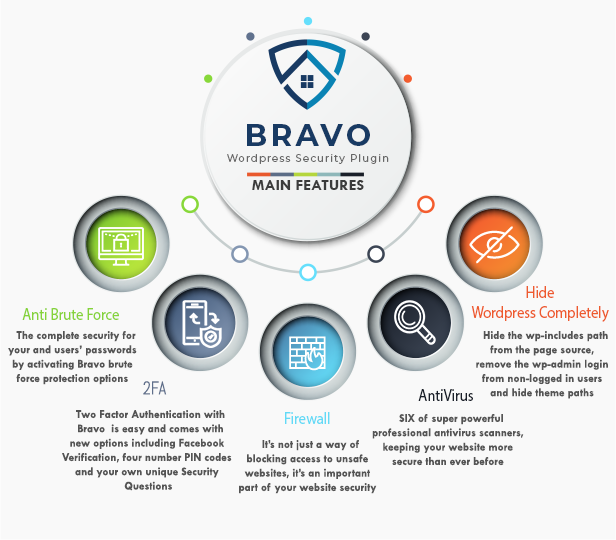
With over 35 fully featured security features it’s hard to cover them all, but check out a few of the most compelling reasons you should Activate Bravo for WordPress on all of your websites today.
- Hide WordPress
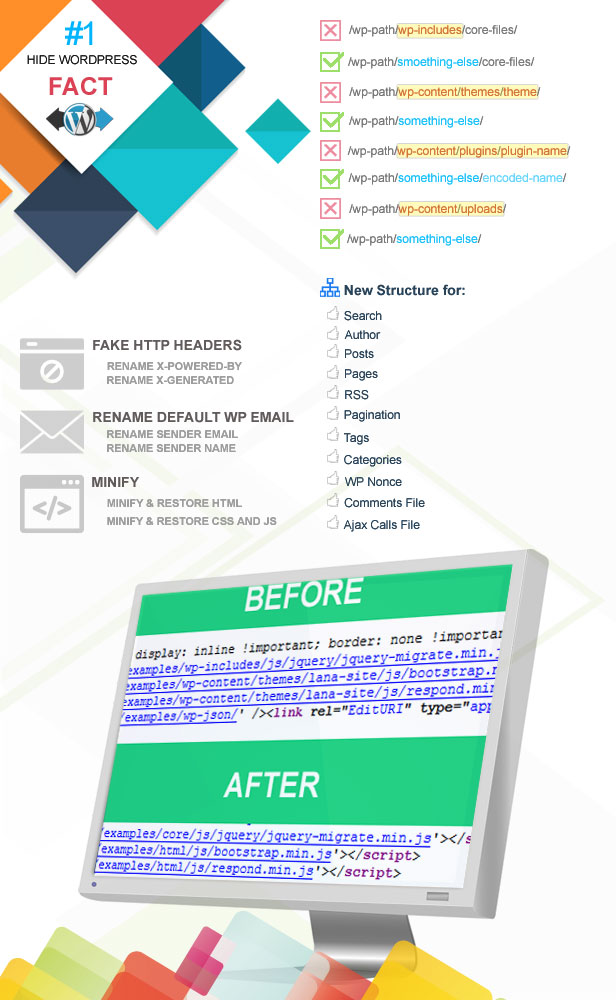
- Hackers scan massive amounts of websites looking for easy vulnerabilities to exploit and one thing they can take advantage of is unsecured WordPress websites, especially those that don’t change default Passwords or leave the username Admin as the default login – yeouch! With Bravo for WP you can easily hide the wp-includes path from the page source, remove the wp-admin login from non-logged in users and hide theme paths. All of these things means most mass scans will pass right over your site and move on. How good is that?
- Two Factor Authentication
- A simple thing that many developers, designers and users overlook, but also one of the best ways to increase your security! Enabling Two Factor Authentication with Bravo for WP is easy and comes with options including Facebook Verification, four number PIN codes and your own unique Security Questions – all things which will increase your security and decrease your vulnerability to hackers.
- Professional Antivirus
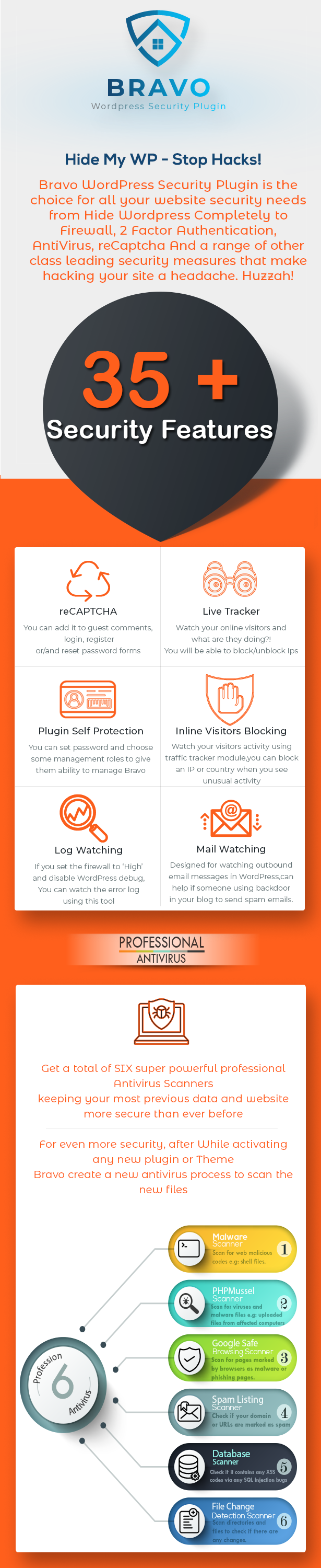
- With Bravo Security for WordPress you get a total of SIX super powerful
professional antivirus scanners, keeping your most previous data and website
more secure than ever before:
- Malware Scanner: Scan for web malicious codes e.g: shell files.
- PHPMussel Scanner: Scan for viruses and malware files e.g: uploaded files from affected computers.
- Google Safe Browsing Scanner: Scan for pages marked by browsers as malware or phishing pages.
- Spam Listing Scanner: Check if your domain or URLs are marked as spam.
- Database Scanner: Scan database to check if it contains any XSS codes via any SQL Injection bugs at your Wordpress installation.
- File Change Detection Scanner: Scan directories and files to check if there are any changes.
- For even more security, after activating any new plugin or Theme, Bravo can create a new antivirus process to scan the new files. It’s comprehensive, ready to go from Activation and multilayered for top level security against viruses.
- Firewall
- A Firewall is a network security measure that places a set of rules on incoming and outgoing traffic on your website in order to protect servers, websites and of course your users individual computers. It’s not just a way of blocking access to unsafe websites, it’s an important part of your website security and it is fully optioned in Bravo – chose from a Low, Medium or High level of security. Don’t worry if it sounds too technical, a full break-down and video tutorial are available to help you setup the best system for you.
- White and Black Lists
- Another powerful way of blocking malicious attempts to log-in to your WP install is by initializing Black Lists of certain users and email addresses. Really easy to set up and you can take it as far as you wish with additional functionality that allows you to prevent particular email hosts from registering as well.
- Anti Brute Force Attacks
- Ugh.. why do they do it? Brute Force attacks are when a user or a bot (most likely multiple bots) attempt to log into your website over and over again multiple times, even as many as millions of times per hour with guessed credentials causing thousands of login attempts to wp-login.php per minute causing your site to crash and even worse, full site lockouts. Bravo protects you against this by hiding your wp-login.php files or changing it (it’s up to you!), enabling 2 Factor Authentication and a range of other class leading security measures that make hacking your site a headache. Huzzah!
- reCaptcha
- An excellent way to increase the security of your website and stop malicious spammers dead in their tracks is by using the best practise reCaptcha forms to your Posts, Pages, Logins, Comments and Registration pages. Make sure a human is on the other end of that IP address so you can rest easy and get on with the important work!







Beat the Hackers at their own Game
One of the best investments you can ever make for a small fee is to protect your digital space with a wide range of fool proof security measures in one single plugin. Don’t over-do it with multiple plugins when Bravo can handle it all without the bloat.
Simple interface, lifetime support plus lifetime FREE UPDATES means you will always be ahead of the game and your site will be secure without any hassle and no coding required. There are also loads of tutorials and a wiki filled with FAQ to help you get the most out of your new security features.
+35 WORDPRESS SECURITY FEATURES
- Hide WordPress: Hide version from all scripts and styles call inside the pages source.
- Hide wp-login.php: Create new login link and a 404 error will appear to the default login link.
- Hide wp-admin: Only the login link can redirect you to the wp-admin dashboard.
- Prevent Proxy: wp-admin Dashboard will allow real connections only.
- Allow Custom Connections: wp-admin Dashboard will allow some whitelist countries or/and IPs only.
- Advanced Firewall: ‘Firewall profiles’ is advanced option, You are able to choose High, Medium or Low Level of security.
- 2-Step Verification: You are able to choose from many options when you decide to enable 2-Step Verification. Available options: Two factor authentication, Facebook Verification, Four numbers pin code and Security question.
- reCAPTCHA: reCAPTCHA is important to save your host resources and your WordPress safe from spam, You can add it to guest comments, login, register or/and reset password forms.
- Housekeeping: Clean your WordPress, Just delete unused files, comments, revisions, trashes, transient feed or/and relationships.
- Database Backups: Manually or Scheduling Database backups, both options are available.
- Professional Antivirus: Malware scanner, PHPMussel scanner, File Change Detection, Google Safe Browsing Checker, DB scanner and Spam Lisiting checker.
- Auto Scan Attachments: Attachments will be scanned while it is being uploading.
- Scan New Plugins & Themes: After you activate your new plugin or theme, Bravo will create a new antivirus process to scan the new files.
- Brute Force Protection: The complete security for your and users’ passwords by activating Bravo brute force protection options.
- Blacklist Usernames: Prevent some usernames from register or log in.
- Blacklist email provider: Prevent some email hosting from register like e.g: mail.ru.
- Min & Max Usernames Length: Minimum and Maximum chars for registered usernames.
- Moderate New Members: New members will be need admin approval before they can use their dashboard.
- Accounts Protection: You are able to define the login method (email only or username only or both as default), No weak passwords, Maximum Login Attempts and Whitelist IPs.
- Who is Online (Live Tracker): Watch your online visitors and what are they doing?!, You will be able to see all their browsing details and block/unblock Ips.
- Inline Visitors Blocking: Watch your visitors activity using the traffic tracker module and you can block and IP or country when you see unusual activity.
- Cronjobs (Events Schedules): You have full control to set what is the appropriate time to run your events.
- DB Prefix Wizard: A wizard was designed to change WP database prefix.
- Development & Maintenance Mode: There two modes in order to close your site, Development mode will allow some roles to view site as usual as they know it, but Maintenance mode will close site for all.
- Bandwidth Saver: Bravo lets you prevent ‘Hotlinking & iFrames’, Your hosted images will not show at other websites, and your website will be not shown in iframe.
- Plugin Self Protection: You can set password and choose some management roles to give them ability to manage Bravo.
- Idle Logout: The plugin will clear the current sessions for logged in users if they hold their accounts without using after (n) seconds, you will choose the duration before forcing them to log in again.
- Mail Watching: This tool designed for watching outbound email messages in WordPress. It can help if someone using backdoor in your blog to send spam emails.
- Error Pages: Continuing our efforts to hide WordPress, We designed this tool to use our 404 templates instead of your theme 404 pages.
- Log Watching: If you set the firewall to ‘High’ and disable WordPress debug, You can watch the error log using or tool.
Reviews

Support
Item support includes:- Free Access to our HelpDesk
- Availability of the author to answer questions
- Answering technical questions about item’s features
- Assistance with reported bugs and issues
- Help with included 3rd party assets
How To Use
- Wordpress Firewall
- Two Factor Authentication
- Hide Wordpress
- Wordpress Antvirus
- Wordpress Malware Scanner
- Change Wordpress DB Prefix
- Wordpress Salts & Keys
- Wordpress Config Security
- Wordpress Housekeeping
- reCAPTCHA Wordpress
- Wordpress Cron Jobs
- Wordpress Database Backup
- Wordpress Error Pages
Change Log
v 2.2.11 (6 Feb 2018)
-Fixed: Multi-site issues with the hide WP tool.
-Fixed: The new feed callback for hid WP tool.
-Fixed: Traffic current page URL.
v 2.2.10 (4 Feb 2018)
- Hide wp-includes path from the page source.
- Hide plugins path from the page source.
- Hide themes path from the page source.
- Rename search base and query.
- Rename posts base and query.
- Rename pages base and query.
- Rename categories base and query.
- Rename tags base and query.
- Rename feeds base and query.
- Rename pagination base and query.
- Rename comments file.
- Rename ajax file.
- Rename _wpnonce.
- Remove adminbar for non-admin users.
- Remove WP version.
- Remove feed links from the page source.
- Remove API JSON links from the page source.
- Remove resources hints from the page source.
- Remove weblog client link from the page source.
- Remove windows writer manifest link from the page source.
- Remove post/page shortlink from the page source.
- Fake HTTP Headers for X-Powered-By.
- Fake HTTP Headers for X-Generator.
- Change E-mail Sender E-Mail.
- Change E-mail Sender Name.
- Minfy HTML.
- Minfy CSS.
- Minfy JS.
v 1.2.11
GEO IP System Fixed.
v 1.2.10
Initial Release For The Pro Version
Categories
Tags
External listing. code.market does not sell this product and does not process payment for it. Pricing, payment, delivery, licensing, refunds, and support are handled by the third-party merchant on its own website. We may earn an affiliate commission from a referral. Details.
Products of the Week.
Submit#1

wanapi.app
Wan API is a developer platform for the Wan video model family. Compare Wan 3.0, Prime and Pro specifications and prices, then prepare a request in the preview playground.
Other · 8,753 views · 23 clicksOther · Week 42 · 8,753 views · 23 clicks
#2

wanapi.ai
Wan API is a developer platform for the Wan video model family. Compare Wan 3.0, Prime and Pro specifications and prices, then prepare a request in the preview playground.
Other · 8,102 views · 14 clicksOther · Week 42 · 8,102 views · 14 clicks
#3

yee.site
Your link in bio, but a real website. Start from beautiful templates and ready-made sections, then add a shop, bookings, a blog and as many pages as you need. Perfect for your link in bio, portfolio or personal site.
Other · 14,255 views · 24 clicksOther · Week 42 · 14,255 views · 24 clicks
#4

upvote.club
Free Social Media Engagement that Helps Boost Your Content. Upvote Club supports 19 social networks with 100+ engagement actions in one dashboard. Add links to your posts and get free engagement from real users.
SaaS · 35,147 views · 104 clicksSaaS · Week 42 · 35,147 views · 104 clicks
#5

Seenshot App
Free, Fast, MacOS Screenshot app. Make Screenshot cmd+shift+2 and send it via link
Desktop App · 23,634 views · 115 clicksDesktop App · Week 42 · 23,634 views · 115 clicks
#6

Conversational Backlinks for Busy Founders
Place Backlink Relevant Conversation for your domain across Forums and Conversations
Website · 35,399 views · 206 clicksWebsite · Week 42 · 35,399 views · 206 clicks
#7

Substack Posting API
Onboard your Agent to Substack. Write Publish on Substack via API
SaaS · 54,248 views · 190 clicksSaaS · Week 42 · 54,248 views · 190 clicks
#8

codester.com
SocialDesk+: Omnichannel Social Commerce & Business Management Platform This is stronger than simply “Social Commerce and Messaging” because it tells buyers this is a complete business platform, not just a messaging script. Turn Social Conversations Into Sales SocialDesk+ is a complete omnichannel social commerce and business management platform built for businesses that sell and communicate with customers through social media. Instead of switching between WhatsApp, Facebook, Instagram and TikTok, businesses can manage customer conversations, comments, products, leads, follow-ups, automation, teams and business reports from one professional workspace. And because the full source code is included, developers, agencies and entrepreneurs can customize, rebrand and launch SocialDesk+ as their own business solution or SaaS platform. 🚀 Build Your Own Social Commerce Business SocialDesk+ gives you the foundation to launch: - Your own SaaS platform - A white-label social CRM - A social-commerce management system - A customer communication platform - A business messaging solution - A custom solution for clients - A multi-business subscription platform 💬 Connect Your Customers Supported social channels include: WhatsApp • Facebook • Instagram • TikTok Bring supported conversations into one centralized workspace and help businesses respond faster without constantly switching between platforms. 🛍️ More Than a Messaging Platform SocialDesk+ combines communication with the tools businesses need to manage customer opportunities: Inbox Manage customer conversations from connected channels. Comments Monitor and respond to social-media comments. Customers & Leads Organize customer information and potential buyers. Products & Catalog Manage products and give your team quick access to product information. Follow-Ups Make sure potential customers don't get forgotten. Automation Automate repetitive customer questions and responses. AI Assistant Provide AI-assisted communication when configured. Team Management Give managers and staff access to the business workspace. Reports & Analytics Track activity using business reports and analytics. The current product listing already includes these capabilities. 🔥 Why Buyers Will Want It Launch Faster Start with an already-built business platform instead of developing the entire system from zero. Customize Everything The full source code is included, allowing developers to change branding, features, workflows and integrations. Build a SaaS Create multiple business workspaces and offer SocialDesk+ as a subscription-based service. Sell to Businesses Offer it to retailers, restaurants, service businesses, online sellers, agencies and other businesses that communicate with customers through social media. Mobile + Web + Backend This isn't just a mobile UI template. It includes: - Flutter mobile application - Python / FastAPI backend - Web interface - Administration tools - Database infrastructure - API-based architecture - SQLite / PostgreSQL support - Android and iOS project structure 💼 One Platform. Multiple Business Opportunities. For SaaS Entrepreneurs Launch your own subscription platform and allow multiple businesses to operate inside separate workspaces. For Software Agencies Customize and rebrand the platform for clients instead of building an omnichannel business system from scratch. For Developers Use the complete source code as a foundation for your own social-commerce or customer-management product. For Businesses Deploy a dedicated version for your own customer-service and social-commerce operations. 🧩 What's Included Mobile - Flutter / Dart - Android - iOS project Backend - Python - FastAPI - SQLAlchemy - Alembic Database - SQLite - PostgreSQL Web - HTML5 - CSS3 - JavaScript Deployment - Docker - Docker Compose - Production configuration Business Platform - Multi-workspace architecture - Authentication - Teams - Customers - Products - Messaging - Comments - Automation - Reports - Subscriptions - Administration The current listing also documents third-party integrations such as Meta, TikTok, Stripe, Firebase, SMTP and optional OpenAI configuration. ⚡ What Makes SocialDesk+ Different? You're not buying a simple: ❌ Chat UI ❌ WhatsApp clone ❌ Flutter template ❌ Admin dashboard ❌ Basic CRM You're getting a complete business platform foundation that can be customized, branded and commercialized. Connect. Automate. Manage. Grow. SocialDesk+ Omnichannel Social Commerce & Business Management Platform One important change I'd make to the current listing The current page starts with: “A simple guide to managing your social conversations, customers, products and business activity.”
Other · 21,609 views · 35 clicksOther · Week 42 · 21,609 views · 35 clicks
#9

sandbook.app
Sandbook reads EPUB, PDF, web pages and scanned pages aloud with Kokoro TTS, an open neural voice model that runs on your iPhone, free and offline. Choose from 41 natural voices in English, Spanish, French, Italian, Brazilian Portuguese and Hindi and follow each word as it is spoken. Try the same voices in your browser first with the free Kokoro TTS online demo.
Other · 21,498 views · 18 clicksOther · Week 42 · 21,498 views · 18 clicks