Boutique Kids Creative WordPress Theme
Description

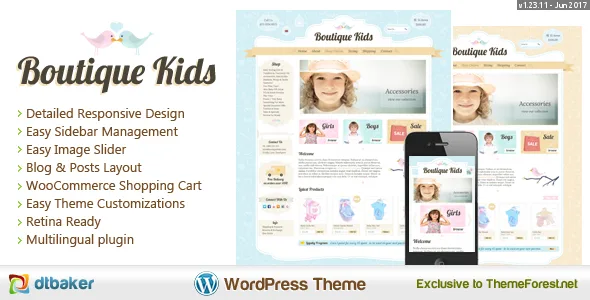
Boutique Kids is a sweet and graphically detailed design. It features a vintage styled curved border, flag on the menu, hanging boxes for your header information and lots of different side bar shapes. This theme is perfect for any clothing store, toy shop, kids, family, creative, children’s or art themed website.
Boutique Kids Creative is a unique Premium WordPress theme that is easy to setup and comes with a great set of features. We use the Elementor Visual Page Builder to make adding/changing your content super easy. Boutique Kids is compatible with the professional WooCommerce e-Commerce system which means it’s easy to start selling products in no time. All graphics included; there’s nothing else to buy.


Latest Update: Version 1.23.11 on 2017-06-13.
Boutique Kids Creative is a unique Premium WordPress theme that is easy to setup and comes with a great set of features. This theme is perfect for any clothing store, toy shop, kids, family, creative, childrens or art themed website. Boutique Kids is compatible with the professional WooCommerce e-Commerce system which means it’s easy to start selling products in no time.
- WordPress 4.8 compatible!
- Brand new easy installation wizard – watch the video to see how great this really is. No messing about with tricky settings, just click a few buttons and you’re up and running like the live demo.
- Retina Ready graphics
- Creative and very easily Customizable Design
- No complicated frameworks – if you need to do advanced changes it will be easy
- Easy sidebar manager (left/right/footer widgets)
- Fancy blog post shortcode layout: example
- Google Font Selector
- Easy image slider: example
- Professional e-Commerce option with WooCommerce
- Responsive CSS Layout – iPhone and Tablet friendly (can be disabled so full site shows on mobile)
- LESS files included for some of the CSS files (optional)
- Four great default gallery styles: example
- Google Map button shortcode – easily insert a Google Map onto any page: example
- Horizontal and Vertical icon box: example
- Opening hours widget: example
- Social icons widget: example
- Contact Forms through ContactForm7 plugin: example
- Easy theme customisations
- 5 different styles for sidebar widget areas
- Full Documentation provided – check it out!
- Straight forward CSS and HTML markup making it easy for more advanced users to customize
- Default content included so you can get up and running like the demo site in no time (watch the video to see how easy it really is)


This creative WordPress theme comes with easy to use shortcodes:
- Columns: Insert columns of various sizes.
- Line Dividers: Insert a bird, heart, circle or rounded rectangle divider line with a click of a button.
- Google Map: Insert a Google Map onto any page (or sidebar) with no code knowledge at all.
- Icon Boxes: Choose from over 200 icons, pick your color and create great looking page layouts with these easy to use icon boxes.
- Enhanced Gallery View: The WordPress standard gallery has been improved so you get a better view of what your gallery will look like when editing the page. Comes with 4 custom gallery styles.
- Fancy Text Banners: Easily create a banner with a title, text and action button (see home page of demo for example).
 (example of easy to use WordPress Banner shortcode. Just click and type, no code!)
 (easily insert fontawesome icon boxes, select any icon and choose a color)

Change font styles, colors, sizes, page layouts, logo and more from one easy to use area. Preview your changes before going live!


This theme is responsive for Desktop, Mobile and Tablet. (responsive can also be disabled in settings if you need to).



This theme comes with a unique and easy to use Sidebar Manager. Easily control if sidebars appear on the left or right of your pages, or hide them all together. Simply navigate to the page you wish to change (eg: the home page) and change the option from the top admin bar.
You can even choose which sidebar to display on individual pages. A great feature for getting that unique looking website. Below is a preview:


You can also control the background style of any WordPress widget. Hint: use ‘default’ option for footer widget items.


This theme is compatible with the very popular free WooCommerce plugin. WooCommerce allows you to easily and professionally list your products for sale and manage you website orders. Here are some of the features:
- Sell physical, digital and virtual products
- Multiple images per product
- Simple, grouped and configurable products
- Discount coupon management
- Automatic related products
- Product reviews
- Tax by location
- Currency options
- Multiple shipping options
- Layered product navigation
- Customer account area
- Inventory tracking
- Detailed order management
- Product import / export
- Custom widgets – recent / featured products, shopping cart, product search
- PayPal standard
- Moneybookers / Skrill
- Cheque payments
Photoshop Files Included
Web designers: Photoshop files are sliced and ready to go.

Quick Setup Guide:
New to websites? Here are the steps you need to follow to get up and running with this website theme.
- Purchase a “domain name” (e.g. yourbusiness.com)
- Purchase “WordPress website hosting” (hosting is the computer server that runs your website and emails 24/7)
- Some popular providers for domain names and hosting are: BlueHost, DreamHost and WPengine. Generally the more you pay the faster your website will load.
- Talk to your chosen hosting provider to setup your “WordPress” and make sure it works. You should be able to login to your “WordPress Dashboard” with a username and password.
- Once you are at this point, come back here and purchase this WordPress theme.
- Once purchased, go to and press “Download” and then “Installable WordPress file only”. This will download a small (less than 20MB) zip file to your desktop.
- Login to your WordPress dashboard, go to Appearance > Themes > Add New > Upload and choose the ZIP file you just downloaded.
- After uploading the theme to WordPress choose the “Activate” option
- Follow the setup wizard steps.
Requirements
- Some basic knowledge on how to use WordPress
- WordPress 4.8 or above running on your website
- The ability to install WordPress themes and plugins
- Advanced Changes: you will need good PHP/CSS/HTML knowledge or be prepaired to hire someone from Envato Studio to perform advanced modifications for you.
Documentation
Full documentation for this theme is available by clicking here: Boutique Kids – WP Theme Documentation. Please read the documentation before purchase to ensure all the features meet your requirements. Feel free to ask any questions if something is not clear.
We also have an installation video, watch how easy this theme is to setup: Click Here
Elementor Page Builder
This theme is comatible with the Elementor page builder. Elementor is a very powerful and very good WordPress page builder. Using Elementor will help you design amazing looking pages very quickly and easily.
More details about the Elementor page builder are here:
- Read the documentation available here:
- Watch the Videos on Youtube here:
- Stay up to date on the latest new features via Facebook here:
Upgrading to Elementor Pro
This theme is compatible with the Free version of Elementor. It is already extremely powerful, but you can take it to the next level by purchasing the 3rd party Pro version. For a small extra fee you get access to great new features such as: Form Builders, Slides, Portfolio, Global Widgets, Custom CSS, Pro Pre-Made Templates, WooCommerce addons, Flip Box, Masonry Layout, Share Buttons and much more.

To find out more and to purchase Elementor Pro please click here:
Support


Changelog:
Here is a list of theme changes:
- Version: 1.23.11 Date: 2017-06-13 – WordPress 4.8 update
- Version: 1.23.10 Date: 2017-05-01 – WooCommerce fixes
- Version: 1.23.9 Date: 2017-04-24 – WooCommerce update – WordPress update
- Version: 1.23.8 Date: 2016-11-08 – Two column layout fixes
- Version: 1.23.7 Date: 2016-11-02 – Two column layout fixes
- Version: 1.23.6 Date: 2016-10-12 – Elementor page builder support
- Version: 1.23.5 Date: 2016-09-12 – Support for WordPress 4.6.1 – Elementor page builder support – New menu and border color options – New PSD documents
- Version: 1.23.4 Date: 2016-08-15 – Google maps fix
- Version: 1.23.3 Date: 2016-06-11 – Zoom CSS fix
- Version: 1.23.2 Date: 2016-03-28 – Logo configuration options
- Version: 1.23.1 Date: 2016-03-17 – Latest WordPress version fixes – Default content improvements
- Version: 1.22 Date: 2015-07-22 – WooCommerce template update and gallery fix
- Version: 1.21 Date: 2015-07-05 – prettyPhoto fixes
- Version: 1.20 Date: 2015-06-24 – WordPress 4.2.2 support and gallery fix
- Version: 1.19 Date: 2015-05-24 – WordPress 4.2.2 support
- Version: 1.18 Date: 2014-12-19 – updated social plugins
- Version: 1.17 Date: 2014-12-05 – fix for child themes
- Version: 1.16 Date: 2014-12-05 – fix for google fonts
- Version: 1.15 Date: 2014-11-26 – woocommerce product column layout fix
- Version: 1.14 Date: 2014-11-19 – footer css fix in widget area
- Version: 1.13 Date: 2014-11-15 – view full site button added to mobile menu
- Version: 1.12 Date: 2014-11-12 – esc_attr fixes
- Version: 1.11 Date: 2014-11-03 – css fancy blog fix
Categories
Tags
External listing. code.market does not sell this product and does not process payment for it. Pricing, payment, delivery, licensing, refunds, and support are handled by the third-party merchant on its own website. We may earn an affiliate commission from a referral. Details.
Products of the Week.
Submit🥇

STOP GUESSING WHAT TO POST
AI that learns your brand voice and builds a month of consistent, on-brand social content: carousels, posts and hooks that sound like you, not like everyone else's AI.
SaaS · 4,708 views · 45 clicksSaaS · Week 45 · 4,708 views · 45 clicks
🥈

Conversational Backlinks for Busy Founders
Place Backlink Relevant Conversation for your domain across Forums and Conversations
Website · 42,604 views · 225 clicksWebsite · Week 45 · 42,604 views · 225 clicks
🥉

upvote.club
Free Social Media Engagement that Helps Boost Your Content. Upvote Club supports 19 social networks with 100+ engagement actions in one dashboard. Add links to your posts and get free engagement from real users.
SaaS · 40,650 views · 120 clicksSaaS · Week 45 · 40,650 views · 120 clicks
#4

Substack Posting API
Onboard your Agent to Substack. Write Publish on Substack via API
SaaS · 59,606 views · 200 clicksSaaS · Week 45 · 59,606 views · 200 clicks
#5

Seenshot App
Free, Fast, MacOS Screenshot app. Make Screenshot cmd+shift+2 and send it via link
Desktop App · 28,984 views · 124 clicksDesktop App · Week 45 · 28,984 views · 124 clicks
#6

Hand-Placed Backlinks $9.99 per link. Flat rate.
Buy hand-placed forum, Q-A and directory backlinks. Flat $9.99 per link, no subscriptions — you only pay for approved listings.
Website · 4,776 views · 19 clicksWebsite · Week 45 · 4,776 views · 19 clicks
#7

Free Invoice Generator - PDF Invoices in Your Browser, No Sign-Up
A free invoice maker for freelancers and small businesses: fill in the invoice, check the live preview, and download a PDF that looks exactly like it. Any currency, tax per item, three templates, no sign-up, and nothing leaves your device.
3,434 views · 17 clicksWeek 45 · 3,434 views · 17 clicks
#8

Merge PDF Files Free - Combine PDFs in Your Browser, No Upload
A free PDF merger for office workers, students, and freelancers: combine PDFs and images into one file in the browser, reorder files and pages, pick page ranges, keep bookmarks, and open password-protected PDFs. Nothing is uploaded, no sign-up, no watermark.
3,172 views · 14 clicksWeek 45 · 3,172 views · 14 clicks