
Bookyvent - AI Event Booking Flutter App UI Template
Description


Bookyvent – AI Event Booking Flutter App UI Template
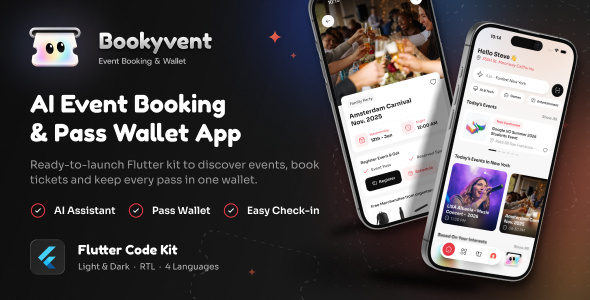
24 screens, 4 sheets and 2 dialogs. Light and dark themes. English, Arabic (full RTL), Hindi and French. Phones, tablets and the web. Clean, tested Flutter code.
A complete Flutter UI template for an event discovery and booking app. Users pick their city, browse today’s highlights and nearby events, search and filter, read event details, register and pay, keep every pass in a wallet that unfolds into “My Passes”, check in by scanning a QR code, and find events by asking an AI assistant by voice or text. Stubbie, an animated ticket mascot drawn in code, reacts across the app. Run flutter pub get, hit run, and every flow is browsable in a couple of minutes, with no backend or configuration required.
Live demo: https://bookyvent.vercel.app
Demo Instructions
Sign-in is simulated, so the forms accept any well-formed input:
- Onboarding: drag up or tap Get Started
- Login and Sign Up: any valid email (for example demo@example.com) and a password of 8 characters or more, or tap Google / Apple
- Location: pick a city from the list, or tap Get Current Location
- Register for an event: open an event, tap Register, fill in the form and pay with the demo card; no money moves
- Check-in: open a pass, show its QR code on a second screen and scan it from the Scan button on Home
- AI assistant: tap the mascot button and type or say a request such as “free music events today”
- Settings: Profile for Dark Mode and Language (English, Arabic right to left, Hindi, French); both are remembered between launches
Why Bookyvent
- Runs out of the box. Demo repositories power every screen, so no server, database or API key is needed to explore the app.
- A mascot that comes alive. Stubbie is drawn and animated in code: it dispenses on the splash, floats, blinks, follows your finger, stretches when pulled and reacts with moods, crisp at any size. One setting swaps it for your own logo.
- Pass wallet. Passes stack like cards, unfold with a drag and grow into the full “My Passes” screen with past events, each with its QR code.
- Real device features. QR check-in with the camera, voice input through the phone’s speech recognition, current location and address lookup on an OpenStreetMap map, sharing and contact links all work on the device.
- Feature-first architecture. 14 feature modules each own their screens, widgets, models and data; 40 shared widgets and centralised colour, spacing, type and motion tokens live in one place.
- Clean, tested codebase. 225 Dart files with zero
flutter analyzeissues, plus 237 widget tests covering every feature, with layout checks on a small phone and a tablet, in light and dark, left to right and right to left, at 1.3× text.
Screens
- Entry: Animated Splash, Onboarding that morphs into Login and Sign Up, Reset Password
- Location: Choose Your Location with a live map, city grid, area list, place search and current location
- Discover: Home, Explore, Filters, Search with recent searches, Categories, Event Listings
- Events: Event Details with host, attendees, location map and event store, Product Info sheet, Complete Registration, Payment dialog, success ticket
- Passes: Pass wallet and My Passes with history, QR Check-in
- AI assistant: voice and text requests with matching events
- Profile: Profile, Edit Profile, Favorites, Notifications, AI Usage, Language sheet, Rate Us sheet, Contact & Support with FAQ, About, Privacy Policy, Terms
Features
- Light and dark mode from a centralised colour token system
- English, Arabic, Hindi and French, with full right-to-left layout; adding a language takes a JSON file and a short code edit
- Responsive on phones and tablets, with text scaling up to 130%
- Pull to refresh with the mascot on Home and Explore
- Favorites, recent searches, profile, language and theme saved on the device
- Validated login, sign-up, registration and edit-profile forms with keyboard handling
- Named GetX routes declared in one file
- Sora and Fredoka One fonts bundled for offline use
- Android and iOS configured (SDK 36, unique package id), release signing pre-wired, dark native launch screens
- Web build inside a device preview (iPhone, iPad, Pixel and Galaxy frames, picked from a menu), ready to host as a live demo
Requirements
- Flutter 3.47 or newer (stable channel) with Dart 3.13 or newer
- Android Studio or VS Code
- Xcode (latest stable) with CocoaPods for iOS builds; iOS 15+
Tech Stack
Flutter / Dart · GetX (routing and translations) · shared_preferences · flutter_map with OpenStreetMap · geolocator · geocoding · mobile_scanner · qr_flutter · speech_to_text · image_picker · share_plus · url_launcher · flutter_svg · google_fonts (bundled fonts) · flutter_localizations · device_preview (web demo only)
What You Get
- Full Flutter source code for Android, iOS and Web
- All image, icon and font assets
- Localization files for English, Arabic, Hindi and French
- 237 widget tests
- Step-by-step offline HTML documentation with screenshots in light and dark
Documentation
The download includes offline HTML documentation (Documentation/index.html). It covers:
- Getting started, step by step for non-technical buyers and developers: installing Flutter and an editor, opening the project, running it on an emulator, a phone or the web, and building a release
- Customise: app name, package name / bundle identifier, colours, fonts, logo and mascot, launcher icon, splash screen, contact links, translations and demo data
- Simulated features: which flows are demos and how to connect a real backend
- Screenshots of the main screens in light and dark mode
- Project structure, permissions, release signing, tests, credits and changelog
Important Note
Bookyvent is a UI template / front-end app kit. It does not include a backend, admin panel, database, payment gateway or AI service. All content is served from local demo data so every screen is browsable immediately. The data layer is separated behind repository classes, making it straightforward to connect your own API.
Sign-in, payments, notifications and the AI assistant are simulated: the AI assistant matches keywords against the demo events on the device, and nothing is sent to a server or charged. The camera scanner, voice input, current location, maps, sharing and contact links work on the device.
Third-Party Services and Costs
None are required: the template runs without any API keys, and no keys are included. Maps use the public OpenStreetMap tiles, whose usage policy applies; for a published app, point the map at a tile provider you have an agreement with. If you connect your own services (for example sign-in, payments, an AI service or push notifications), you use your own accounts and keys, and any usage costs are your responsibility.
AI Disclosure
AI-assisted tools were used during the development of this item, to help write and review parts of the code and the documentation. Everything was reviewed, tested and finalised by our team. The app’s AI assistant is a demo: it matches keywords against the demo events on the device and sends no data to any AI service.
Credits
- Sora and Fredoka One fonts, SIL Open Font License 1.1 (licence files included)
- Map data © OpenStreetMap contributors, Open Database License
- Open-source Flutter packages listed in the Tech Stack (MIT, Apache 2.0, BSD-2-Clause and BSD-3-Clause licences; details in the documentation)
- Design and Stubbie the mascot by WRTeam Design
Changelog
Version 1.0.0 – Initial release
Support
Item support is provided in line with Envato’s Item Support Policy. If you have a question before or after purchase, get in touch through the item support tab.
If Bookyvent helped you ship faster, a rating is genuinely appreciated. Thank you for your support!
| Author | WRTeam_Design |
|---|---|
| Price | $18 |
| Sales | 0 |
| Rating | 0 (0) |
| Published | Nov 19, 2026 |
| Last Update | Nov 19, 2026 |
| Compatible Software | Flutter 3.x |
| Demo Url | https://bookyvent.vercel.app |
| Mobile Files Included | Dart, YAML, JavaScript JSON, .kotlin, .swift, HTML |
Categories
Tags
External listing. code.market does not sell this product and does not process payment for it. Pricing, payment, delivery, licensing, refunds, and support are handled by the third-party merchant on its own website. We may earn an affiliate commission from a referral. Details.
Products of the Week.
Submit🥇

Perceptle
Perceptle is a daily browser-based game that challenges you to test your sensory intuition through five quick estimation and rhythm-based rounds.
Other · 1,800 views · 11 clicksOther · Week 47 · 1,800 views · 11 clicks
🥈

Free LinkedIn Likes From Real
Get free LinkedIn likes on your posts from real members who react by hand. No
SaaS · 1,935 views · 11 clicksSaaS · Week 47 · 1,935 views · 11 clicks
🥉

STOP GUESSING WHAT TO POST
AI that learns your brand voice and builds a month of consistent, on-brand social content: carousels, posts and hooks that sound like you, not like everyone else's AI.
SaaS · 9,478 views · 76 clicksSaaS · Week 47 · 9,478 views · 76 clicks
#4

aaas.market
407 reliable micro tools for solo founders, marketers and creators. They work in your browser
SaaS · 1,899 views · 5 clicksSaaS · Week 47 · 1,899 views · 5 clicks