
Bookly | Flutter eBook App with NestJS Backend and Next.js Admin Panel
Description
Complete eBook Business Solution – Three Projects in One Package
Bookly is a complete, production-ready eBook platform built with modern technologies and a scalable architecture. It provides everything you need to launch and manage your own digital library, eBook store, subscription-based reading platform, or online publishing business.
With a single purchase, you get three complete projects in one download — a Flutter mobile application for Android and iOS, a NestJS backend with PostgreSQL, and a customizable Next.js web-based admin panel. All three are included in the package; nothing is delivered separately.
Download Demo App Admin Panel DemoDemo logins are listed in the Demo Instructions section below.
Demo Instructions
Use the details below to test the mobile application and the admin panel before buying. No registration is needed – the accounts are ready to use.
1. Mobile Application
Install the demo app from Google Play: Download Demo App
Email: mosaraf.kabbik@gmail.com
Password: 12345678
2. Admin Panel
Open the admin panel demo: https://bookly.admin.pondeet.com/
Email: admin@bookly.local
Password: ChangeMe@123
3. Documentation
https://mh152796.github.io/bookly-documentation/
Feature walkthrough plus full setup guides for the app, backend and admin panel, an API reference, the database schema and an FAQ. Publicly accessible – no purchase required.
Both demo accounts are shared and the demo database is reset periodically, so any changes you make there are temporary.
Important – Third-Party Services and Possible Costs
Bookly is a complete, self-hosted package. You receive the full source code for all three projects, with no licence keys and no subscription payable to us.
Some features connect to third-party services. Those services are not included in this purchase. Each one is billed to you directly by its provider, under that provider’s own terms and pricing.
Please note: buyers are responsible for any and all fees charged by external services. This includes hosting, developer accounts, app store commissions, payment processing fees, storage, email delivery and any usage beyond a provider’s free tier. None of these fees are part of the item price, and none of them are collected by us.
The services Bookly can use, and what they typically cost, are listed below. Please review this list before buying.
- Hosting (required): any VPS or cloud host with Node.js 20+ and PostgreSQL 14+. Paid, billed by your hosting provider.
- Firebase (required for the mobile app): Authentication for Google and Apple sign-in, Cloud Firestore and Cloud Messaging for push notifications. Free Spark plan covers typical usage; usage-based beyond it, billed by Google.
- Apple Developer Program (required to publish on iOS): USD 99 per year, paid to Apple.
- Google Play Developer account (required to publish on Android): USD 25 one-time, paid to Google.
- Transactional email, any SMTP provider (required for email sign-up): sign-up uses email OTP verification. Free tiers are common; paid above them.
- In-app purchases, Google Play Billing and Apple In-App Purchase (optional): Apple and Google take a commission on every sale, typically 15-30%. The backend verifies purchases directly with the Google Play Developer API and the App Store Server API.
- Subscription management, RevenueCat (optional): free tier available; paid above their revenue threshold.
- Online payments, PipraPay (optional): hosted web checkout for book purchases, rentals and subscriptions; per-transaction fees set by the provider.
- Not integrated – bKash, Nagad, SSLCommerz, Stripe: these names can be selected in the admin panel’s Payment Gateways screen but no checkout integration for them is included in this version. Adding one is your own development work.
- Push notifications, Firebase Cloud Messaging (optional): free tier available; usage-based beyond it.
- Advertising, Google AdMob (optional): free to integrate; you earn revenue, subject to AdMob terms.
- File storage / CDN, Cloudflare R2 or Bunny.net (optional): usage-based; local disk storage also works at no extra cost.
- Google Fonts (optional): the app and admin panel load their fonts from Google Fonts at run time. Free; bundle the font files yourself to avoid it.
- IP geolocation, ip-api.com (optional): detects the reader’s country for regional pricing. Free for non-commercial use; their paid plan is required for commercial use.
- Reader look-ups – Free Dictionary API, Wikipedia API, Google Translate (optional): free public services used by the in-reader dictionary, Wikipedia and translation tools. No account needed; availability is not guaranteed by their operators.
The item price covers the source code and documentation only. You will need hosting, a Firebase project, and an Apple and/or Google developer account to publish to the stores. Every service marked optional can be left out; the platform runs without it, with the matching feature switched off. The full list, including who bills you for each service, is repeated in the documentation’s Third-Party Services and Costs table. Third-party pricing is outside our control and may change, so please check each provider’s current rates before you buy. We support our own code, but we cannot support, waive or refund any third-party service fees or account approvals.
Everything Is Included in the Download
Your purchase includes the complete source code for all three projects in a single download. There is nothing to request, unlock, or contact us for.
- Flutter App – full Android and iOS source
- Backend – full NestJS + PostgreSQL source, with the database schema
- Admin Panel – full Next.js source
- Documentation – feature walkthrough and step-by-step setup for all three, plus API reference, database schema and an FAQ
Real-World Apps Built with Bookly
Bookly is built to be customized and adapted for different eBook businesses, publishing platforms, brands, and market requirements. Here are some real-world applications built on top of Bookly and customized according to their specific requirements.
Murchona
A customized eBook application built on top of Bookly and adapted for its own branding, content, and business requirements.
View on Google Play →ePustak
A customized eBook application developed using Bookly as the foundation, with modifications made to meet its specific product, content, and user experience requirements.
View on Google Play →Akkhorik
A customized eBook platform developed on top of Bookly and further adapted to meet specific business, UI/UX, content management, and monetization requirements.
View on Google Play →These apps demonstrate how Bookly can be used as a production-ready foundation and customized into a unique eBook platform for different brands, markets, languages, business models, and feature requirements.
Complete Business Solution
Bookly is more than just an eBook reader application. It is a complete business solution designed to help you launch, manage, and grow your own digital publishing and eBook platform.
Whether you want to build an eBook store, digital library, subscription reading platform, online publishing service, or digital content business, Bookly provides the complete foundation you need.
- Mobile Application: Flutter application for Android and iOS.
- Backend: Separate NestJS backend with PostgreSQL.
- Admin Panel: Modern Next.js admin panel for complete business management.
- Monetization: Support for eBook purchases, rentals, subscriptions, and advertisements.
- Push Notifications: Send instant and scheduled notifications to your users.
- App Version Management: Manage app version information and update prompts from the admin panel.
- Fully Customizable: Customize the application, backend, and admin panel according to your business requirements.
3 Complete Projects in One Package
With one purchase, you get the complete eBook ecosystem instead of purchasing or developing each component separately.
1. Flutter eBook App
A feature-rich Flutter application for Android and iOS with eBook reading, library management, subscriptions, In-App Purchases, advertisements, localization, RTL support, bookmarks, notes, highlights, Text-to-Speech, dictionary, translation, push notifications, app version management, and more.
2. NestJS Backend
A separate and professionally structured NestJS backend powered by PostgreSQL, organised into clear feature modules with a scalable architecture designed to support the complete eBook platform. Includes Swagger API documentation and the full database schema.
3. Customizable Next.js Admin Panel
A modern Next.js web-based admin panel that provides centralized management for books, categories, authors, publishers, subscriptions, payments, reviews, notifications, app versions, banners, home content, legal pages, and more.
Why Purchase Bookly?
Save significant development time and cost by getting the complete platform instead of purchasing or developing each component separately.
- Android and iOS Application: Launch your own professional eBook application using Flutter.
- Backend Included: A separate NestJS + PostgreSQL backend with a scalable, modular architecture.
- Next.js Admin Panel: Manage your complete eBook business from a modern web-based administration panel.
- Complete Source Code: Customize the mobile app, backend, and admin panel according to your business requirements.
- Push Notifications: Send instant and scheduled notifications to your users.
- App Version Management: Manage application versions and update prompts from the admin panel.
- Modern Architecture: The mobile app, backend, and admin panel are separated into independent projects for easier development, deployment, maintenance, and scaling.
- Ready to Customize: Use Bookly as the foundation for your own eBook store, digital library, subscription platform, or online reading service.
Backend Architecture and Security
The Bookly backend is built with NestJS and PostgreSQL, providing a strong foundation for building and scaling a modern eBook platform.
- NestJS Backend: Built using a modern and structured Node.js framework, organised into clear feature modules for maintainable server-side development.
- PostgreSQL Database: Uses PostgreSQL as the primary relational database for reliable and structured data management, with multilingual content stored as JSONB.
- Paginated APIs: List endpoints are paginated with a consistent response envelope, so large catalogues stay responsive.
- Background Jobs: Optional job queue for scheduled work such as rental-expiry reminders and scheduled notifications.
- Built-in Security: Security headers, configurable rate limiting with stricter limits on login and registration, a CORS allowlist, and bcrypt password hashing.
- Protected Book Files: Book files are only served to readers who purchased, rented, or subscribed to that title, with optional expiring signed links to prevent link sharing.
- Flexible File Storage: Store files on Cloudflare R2, Bunny.net, or local disk – selected automatically from your configuration.
- Scalable Architecture: The backend is maintained as a separate project, allowing you to scale and deploy it independently from the mobile application and admin panel.
- Easy Maintenance: A structured backend architecture makes it easier for developers to add new APIs, features, integrations, and business logic.
Easy and Secure Configuration
To make deployment and customization easier, environment-specific configurations and required credentials are managed through .env files.
- Environment-Based Configuration: Configure server, database, authentication, storage, and third-party service credentials through environment variables.
- Fully Documented: Every supported environment variable is documented with its default and purpose in
.env.example. - Credential Separation: Sensitive environment-specific credentials are separated from the application source code.
- Deployment Friendly: Configure the required environment values according to your deployment environment.
Next.js Admin Panel
The Bookly Admin Panel is built with Next.js and provides centralized control over your complete eBook business.
- Category Management
- Book Management
- Publisher Management
- Author Management
- User Management
- Payment Gateway / In-App Purchase: Configure In-App Purchase products for book purchase and subscription.
- Subscription Plans
- Sales Reports: Book sales and subscription sales.
- Legal Pages: Manage Privacy Policy and other legal pages.
- Reviews
- Notifications: Push Notifications and Scheduled Push Notifications.
- App Version Management
- Banner Management
- Home Management
Push Notifications
Keep your users informed and engaged with push notification support integrated into the platform.
- Instant Push Notifications: Send notifications to mobile application users.
- Scheduled Push Notifications: Schedule notifications for a future date and time.
- Admin Controlled: Manage notification content and delivery from the Next.js admin panel.
Requires a free Firebase project – see the third-party services note above.
App Version Management
Manage mobile application version information from the admin panel and keep users informed when a new version is available.
- Manage application version information.
- Display update prompts to users when required.
- Manage version-related configuration centrally from the admin panel.
Key Application Features
- Dynamic Content Control: Easily change content or reorder components from the backend for any screen in real-time.
- Smart Prompts: In-app version update dialog and a customizable home promotional banner dialog that can be targeted to users.
- Push Notifications: Send instant and scheduled push notifications to users.
- App Version Management: Manage application version information and update prompts from the backend.
- Authentication: Secure sign-up and login including email sign-up with OTP verification, forgot password, and Apple and Google social login.
- Library Management: Automatic reading progress tracking, open from last read location, offline reading, and a dedicated bookmarked books section.
- Monetization: In-App Purchases for one-time book sales, book rentals, recurring subscription models via RevenueCat, and dynamic AdMob integration.
- Localization and RTL: Out-of-the-box support for English, Bangla, Hindi and Arabic across both the app interface and the book catalogue. Customizable system to easily add or remove languages, plus full RTL layout support for Arabic.
- Search: Search functionality allowing users to find content quickly by author name or specific book titles.
Reader Capabilities
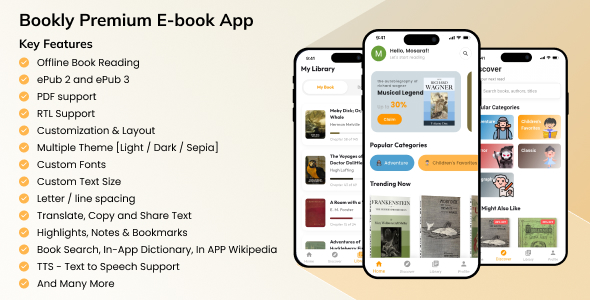
- Format Support: Rendering of ePub 2, ePub 3, and PDF documents.
- Dedicated PDF Reader: A separate PDF reader plugin integrated for a smoother and more reliable PDF reading experience.
- Content Security: Built-in anti-screenshot protection for ebooks to safeguard your digital content.
- Smart Parsing: Automatically extracts ePub cover images and handles internal and external web links.
- Custom Reading Experience: Multiple reading themes (Light, Dark, Sepia), custom font selection, adjustable text sizing, and fine-tuned letter and line spacing.
- Built-in Research Tools: Highlight text to access an in-app dictionary, Wikipedia lookups, and direct translations.
- Text-to-Speech: Built-in Text-to-Speech support in the ePub reader for hands-free audio reading.
- Navigation and Tracking: Chapter lists, reading time left estimation, pages left tracking, and smart last-read locator.
- Annotations: Create, list, and manage custom user notes, text highlights, and page bookmarks.
- Social Sharing: Easily copy and share favorite text snippets directly from the reader.
App Screenshots and UI Preview


What You Need to Get Started
- Node.js 20 LTS or newer, and PostgreSQL 14 or newer, for the backend and admin panel.
- Flutter 3.44.x or newer and Java 21.0.9 for Android builds.
- Xcode 16.x and CocoaPods 1.16.2+ for iOS builds, on a Mac.
- A server or hosting account to run the backend and admin panel.
- Basic familiarity with Flutter and Node.js is recommended for customization.
Full step-by-step setup instructions for all three projects are included in the documentation, along with a feature walkthrough, an API reference, the database schema, and an FAQ covering common build errors.
Changelog
Version 1.1.1 – 23 Sep 2026
- New: NestJS + PostgreSQL backend now included in the download package, with full source, database schema and Swagger API documentation.
- New: Next.js admin panel now included in the download package, with full source.
- New: Documentation expanded with a feature walkthrough, backend setup, admin panel setup, API reference, database schema, and an FAQ covering common build errors.
- New: Push notification support added, including instant and scheduled notifications managed from the admin panel.
- New: Dedicated PDF reader plugin integrated for a smoother PDF reading experience.
- Improvement: Sign Up flow updated — email sign up now uses OTP verification sent over SMTP, replacing the previous Firebase email/password sign up.
- Improvement: Full app configured for Android modern edge-to-edge display.
- Improvement: UI/UX upgraded across the application.
- Improvement: Many more enhancements throughout the app.
- Fix: Fixed several minor bugs.
Version 1.1.0 – 14 Mar 2026
- New: Added in-app version update dialog.
- New: Custom home promotional banner dialog for targeted user promotions.
- New: Anti-screenshot protection added for ebooks.
- Improvement: UI/UX refinements for a smoother user experience.
- Improvement: Core engine optimized for much faster book loading.
- Improvement: Dynamic AdMob integration for safer developer testing.
- Fix: Resolved reader layout issues on specific devices.
Version 1.0.0 – 3 Mar 2026
- Initial Release
Support and Contact Information
If you have any questions, require customization services, or need technical support before or after your purchase, please reach out:
Email:
mosarofdiu123@gmail.com
Phone / WhatsApp:
+8801609563816
LinkedIn:
Mosaraf Hossain
| Type | Flutter App |
|---|---|
| Author | mosarofdiu123 |
| Price | $37 |
| Sales | 7 |
| Rating | 5 (4) |
| Published | Mar 4, 2026 |
| Last Update | Oct 1, 2026 |
| Compatible Software | Flutter 3.x |
| Mobile Files Included | Dart, YAML, JavaScript JSON, .java, .kotlin, .plist, .swift, JavaScript JS, CSS, HTML |
Categories
Tags
External listing. code.market does not sell this product and does not process payment for it. Pricing, payment, delivery, licensing, refunds, and support are handled by the third-party merchant on its own website. We may earn an affiliate commission from a referral. Details.
Products of the Week.
Submit🥇

STOP GUESSING WHAT TO POST
AI that learns your brand voice and builds a month of consistent, on-brand social content: carousels, posts and hooks that sound like you, not like everyone else's AI.
SaaS · 7,397 views · 67 clicksSaaS · Week 46 · 7,397 views · 67 clicks
🥈

Conversational Backlinks for Busy Founders
Place Backlink Relevant Conversation for your domain across Forums and Conversations
Website · 46,697 views · 232 clicksWebsite · Week 46 · 46,697 views · 232 clicks
🥉

upvote.club
Free Social Media Engagement that Helps Boost Your Content. Upvote Club supports 19 social networks with 100+ engagement actions in one dashboard. Add links to your posts and get free engagement from real users.
SaaS · 44,633 views · 127 clicksSaaS · Week 46 · 44,633 views · 127 clicks
#4

Substack Posting API
Onboard your Agent to Substack. Write Publish on Substack via API
SaaS · 63,518 views · 206 clicksSaaS · Week 46 · 63,518 views · 206 clicks
#5

Seenshot App
Free, Fast, MacOS Screenshot app. Make Screenshot cmd+shift+2 and send it via link
Desktop App · 32,767 views · 127 clicksDesktop App · Week 46 · 32,767 views · 127 clicks
#6

Hand-Placed Backlinks $9.99 per link. Flat rate.
Buy hand-placed forum, Q-A and directory backlinks. Flat $9.99 per link, no subscriptions — you only pay for approved listings.
Website · 8,384 views · 19 clicksWebsite · Week 46 · 8,384 views · 19 clicks
#7

Free Invoice Generator - PDF Invoices in Your Browser, No Sign-Up
A free invoice maker for freelancers and small businesses: fill in the invoice, check the live preview, and download a PDF that looks exactly like it. Any currency, tax per item, three templates, no sign-up, and nothing leaves your device.
7,012 views · 29 clicksWeek 46 · 7,012 views · 29 clicks
#8

Merge PDF Files Free - Combine PDFs in Your Browser, No Upload
A free PDF merger for office workers, students, and freelancers: combine PDFs and images into one file in the browser, reorder files and pages, pick page ranges, keep bookmarks, and open password-protected PDFs. Nothing is uploaded, no sign-up, no watermark.
6,487 views · 18 clicksWeek 46 · 6,487 views · 18 clicks