
BookEase Pro - Fullstack Booking Python
Description
It comes with:
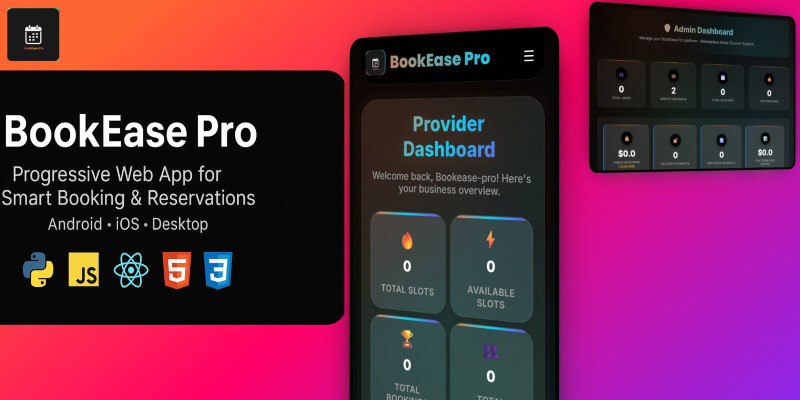
- Professional Admin Dashboard for managing users, providers, and bookings.
- Provider Dashboard to manage services, availability, and customers.
- User Booking System with authentication, scheduling, and secure payments.
- Full notification system (email, in-app, push).
- Two platform modes: Marketplace Mode (multi-provider) and Single Business Mode (individual provider).
- Optimized for both mobile and desktop view.
Whether you’re building a marketplace for services or running a single business, BookEase Pro Plus gives you all the tools to launch quickly and scale easily.
Features
Features
- 🔑 Authentication: login, register, Google OAuth, password reset.
- 📊 Admin Dashboard: bookings, revenue, analytics, notifications.
- 🧑💼 Provider Dashboard: services, bookings, profiles, branding.
- 📅 Advanced Booking: smart slots, availability, recurring slots, approvals.
- 💳 Payments: Stripe integration, escrow system, refund management.
- 📢 Notifications: email, push, in-app alerts.
- 🔒 Security: CSRF protection, XSS prevention, role-based access.
- 📱 Responsive templates & PWA features.
Requirements
Requirements
- Python 3.10+ (tested with Python 3.11)
- pip (Python package manager)
- Virtual environment (recommended)
- SQLite database (default) or PostgreSQL (optional)
- Stripe account (for payments)
Instructions
Instructions
- Unzip the project folder.
- Create and activate a virtual environment:
python -m venv venv source venv/bin/activate # Linux/Mac venvScriptsactivate # Windows - Install dependencies:
pip install -r requirements.txt - Copy
.env.example→.envand fill credentials (DB, email, secret key, Stripe). - Copy
config_example.py→config.pyand configure keys (Stripe, VAPID, etc.). - Run the app:
python app.py - Open in browser: http://127.0.0.1:5000
Admin Login
- URL: http://127.0.0.1:5000/admin_login
- Email:
mybook@gmail.com - Password:
vr22&#ex
| Author | freddy2010 |
|---|---|
| Category | Scripts & Code / Python |
| Price | $155 |
| Extended License | $465 |
| Likes | 4 |
| First Release | Oct 1, 2025 |
| Last Update | Oct 1, 2025 |
| Files included | .py, .css, .html, JavaScript .js |
Categories
Tags
External listing. code.market does not sell this product and does not process payment for it. Pricing, payment, delivery, licensing, refunds, and support are handled by the third-party merchant on its own website. We may earn an affiliate commission from a referral. Details.
Products of the Week.
Submit🥇

Perceptle
Perceptle is a daily browser-based game that challenges you to test your sensory intuition through five quick estimation and rhythm-based rounds.
Other · 1,489 views · 9 clicksOther · Week 47 · 1,489 views · 9 clicks
🥈

Free LinkedIn Likes From Real
Get free LinkedIn likes on your posts from real members who react by hand. No
SaaS · 1,632 views · 10 clicksSaaS · Week 47 · 1,632 views · 10 clicks
🥉

STOP GUESSING WHAT TO POST
AI that learns your brand voice and builds a month of consistent, on-brand social content: carousels, posts and hooks that sound like you, not like everyone else's AI.
SaaS · 9,176 views · 75 clicksSaaS · Week 47 · 9,176 views · 75 clicks
#4

aaas.market
407 reliable micro tools for solo founders, marketers and creators. They work in your browser
SaaS · 1,597 views · 5 clicksSaaS · Week 47 · 1,597 views · 5 clicks