
BlockGate | App and Website Blocker with Screen Time and Parental PIN
Description
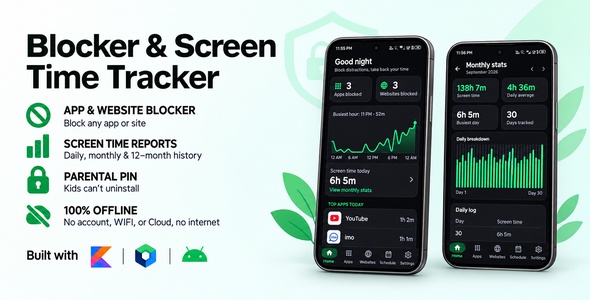
BlockGate is a complete, production-ready native Android app that blocks distracting apps and websites. Pick the apps and sites that eat your time, and opening them shows a full-screen block page instead. Unblock windows let chosen ones through at set times, a parent PIN keeps children from switching anything off, and a screen time report shows where the hours actually go.
BlockGate runs 100% on the device. There is no server, no account, no sign-up, and the app does not even request the INTERNET permission. The blocklist, schedules, settings and screen time history are all stored in a local Room database. That means no backend to rent, no API keys to configure, no monthly hosting bill, and nothing for you to maintain after you publish. You buy the source, rebrand it, and ship it.
The full Kotlin source code is included, built with Jetpack Compose, Material 3, Hilt and Room in a clean MVVM architecture. This is a native Android app, not Flutter or a WebView wrapper.
Blocking That Actually Holds
Most blockers can be switched off by the same impulse they are meant to stop. BlockGate is built so that a block only comes off on purpose:
- The block page has no unlock. There is no code or PIN to type on it. Blocks only come off inside the app, so the block page itself can never be argued with.
- No reflex taps. The Close button fills up over 3 seconds and only then turns on. The fill follows frame time, so turning off animations in Developer options does not skip it.
- Unblocking is deliberate. Removing a block, saving or turning on an unblock window, or turning off uninstall protection takes a random 12-character code typed into 12 boxes, or the parent PIN when one is set.
- The escape routes are covered. With uninstall protection on, the block page also covers the uninstall screens, the app’s App info page and its own page in Accessibility settings, so the service cannot be quietly switched off or the app removed.
- Time really runs out. When an unblock window ends, whatever is on screen is checked again, so a user cannot stay inside an app past the end of their break.
Download Demo APK
Try BlockGate on your own Android phone before you buy. Install the demo APK, block an app or a website, and open it.

Main Features
App Blocking
- Block any app that has a launcher icon, including pre-installed apps like Chrome and YouTube
- Opening a blocked app shows a full-screen block page instead
- Searchable app picker with app icons
- Blocked-app count shown on Home
Website Blocking
- Block a domain and every subdomain: blocking
youtube.comalso blocksm.youtube.comandwww.youtube.com - Works in Chrome, Samsung Internet, Firefox, Edge, Brave, Opera, DuckDuckGo and more
- Popular sites are one tap away in the Block a website dialog
- The address bar is read only while at least one website is blocked, and nothing is read while the user is typing in it
- New browsers can be added with one line of code
Parent PIN
- Optional 4-digit PIN for parents, typed into 4 boxes and checked as soon as the last digit is in, with no button to press
- Once set, every unblock, unblock window and uninstall-protection change asks for the PIN instead of the typed code
- A one-time recovery code is shown when the PIN is set (Copy / Share), and Forgot PIN? uses it to set a new PIN, fully offline
- After 5 wrong tries, entry pauses for 30 seconds, then 1, 5 and 15 minutes. The pause is timed from boot, so changing the phone’s clock does not skip it
- The PIN and recovery code are stored only as salted PBKDF2 hashes, never as typed
Unblock Windows
- Weekly or one-day windows that let chosen apps and websites, or everything, through, e.g. a lunch break
- Windows can run past midnight
- A notification says when a window opens
- Edited on a full page with Save always in reach, and Back asks before discarding changes
- Alarms are re-armed automatically after a phone restart or an app update
Uninstall Protection
- Optional device-admin lock so the app cannot be removed on impulse
- Android greys out Force stop for the app while protection is on
- The block page covers the uninstall dialog, App info and the app’s Accessibility settings page
- Uninstalling any other app is never blocked
Screen Time Analytics
- Animated hour-by-hour chart of today on Home: tap or drag to read any hour
- The day’s total and top apps
- Monthly report with an animated bar for every day of the month: touch or drag across the bars to read a day, e.g. “14 Oct · 3h 20m”
- Day-by-day log for the last 12 months
- Android itself keeps per-day usage for only about 10 days, so BlockGate saves each day’s total to its own database, even on days the app is never opened
- The report opens instantly from saved history, then refreshes in the background
Built-in Help
- Permission status with one-tap fixes
- Battery optimization status
- Step-by-step guide for Android 13+ “Restricted setting”
- List of supported browsers
Design & Theming
- Light, Dark and System themes, and the block page follows the same theme
- Five selectable accent colours
- Material Design 3 with a five-tab bottom navigation bar: Home, Apps, Websites, Schedule and Settings
- Spacing, text and page width adapt to the screen: tighter on small 320dp phones, width-capped on tablets and in landscape
- Respects the system font size, and nothing clips at large font sizes
- Shared design system: every screen is built from the same cards, rows and components
Private & Crash-Safe
- No internet permission, no ads, no analytics and no tracking SDKs
- Website addresses are checked in memory and never stored, logged or shared
- Excluded from Google Drive backup, while phone-to-phone transfer still works
- Every database, file and system call is guarded, so users see a short, friendly message instead of a crash
What You Get
- Full Kotlin source code: a native Android project for Android Studio
- 90 automated tests: 74 JVM unit tests and 16 instrumented database and parent PIN tests
- Clean MVVM architecture with Hilt dependency injection, separated into data, domain, features and UI layers
- Release builds already shrunk and obfuscated with R8, for a release APK of about 1.7 MB
- A one-page landing website for the app, in the same colours
- Detailed documentation covering setup, rebranding, the Google Play review and future updates
Easy To Rebrand
BlockGate is written to be made yours quickly. Everything a user sees is branded in three places only: the app name string, one configuration file (AppConfig.kt) and the launcher icon. Every class, theme, database and settings file uses neutral names, so there is nothing else to rename. The included documentation walks through each step:
- Replacing the launcher icon with Android Studio’s Image Asset tool, including the Android 13+ themed icon
- Changing the package name with Android Studio’s refactor tool, with a checklist to confirm nothing was missed
- Setting your app name, tagline, version and suggested websites
- Adding your privacy policy URL, with a ready list of what the policy must say for this app
- Editing the accent colours, palette, spacing and text styles
- Creating a keystore and building a signed release AAB
Ready For Google Play
Apps that use the Accessibility API, usage access and device admin get extra review on Google Play. Everything the app itself must do is already built in:
- Prominent disclosure dialog shown before the user is ever sent to Accessibility settings
- No
INTERNETpermission: no data leaves the device - Only the user-grantable exact alarm permission. The restricted
USE_EXACT_ALARMis not requested - The documentation includes the exact wording for the Accessibility API and usage access declarations in Play Console
Technical Details
| Language | Kotlin 2.4.20 |
| UI | Jetpack Compose, Material 3 |
| Architecture | MVVM, Kotlin Coroutines & Flow |
| Dependency injection | Hilt 2.60.1 |
| Database | Room 2.8.5, local only |
| Navigation | Navigation Compose |
| Build | Gradle 9.8 (wrapper included), AGP 9.4.1, KSP |
| Platform | Android only (native) |
| Min / Target SDK | Android 7.1 (API 25) / API 37 |
| Orientation | Portrait and landscape, phones and tablets |
| Backend | None: fully offline |
Every library used in the app is open source from Google, AndroidX or JetBrains under the Apache-2.0 licence, and safe for commercial use.
Requirements
- The latest stable Android Studio, with AGP 9.4 support
- JDK 17 or newer to start Gradle. The build’s own JDK is downloaded automatically
- An Android phone for testing. Blocking uses the Accessibility service, which an emulator only partly supports
- Basic Kotlin and Android Studio knowledge to rebrand and publish
Perfect For
- Students who want to block social media while studying
- Parents who want to limit apps and websites on a child’s phone
- Anyone cutting down on doomscrolling and short-video apps
- Digital wellbeing and productivity app publishers
- Developers who want a finished, tested app blocker to publish under their own brand
- Learning a modern native Android stack: Compose, Hilt, Room and Accessibility services
Support
If you run into a problem or have a question about setting the app up, please get in touch through the item support tab and I will help. If BlockGate works well for you, a rating on the item is genuinely appreciated.
| Author | Shahinlabs |
|---|---|
| Price | $29 |
| Sales | 0 |
| Rating | 0 (0) |
| Published | Oct 8, 2026 |
| Last Update | Oct 8, 2026 |
| Compatible Software | Android 15.0, Android 12.0, Android 11.0, Android 10.0, Android 9.0, Other |
| Mobile Files Included | .xml |
Categories
Tags
External listing. code.market does not sell this product and does not process payment for it. Pricing, payment, delivery, licensing, refunds, and support are handled by the third-party merchant on its own website. We may earn an affiliate commission from a referral. Details.