
Blistora | Flutter Medication Reminder and Refill Tracker App With Laravel Cloud Backup
Description
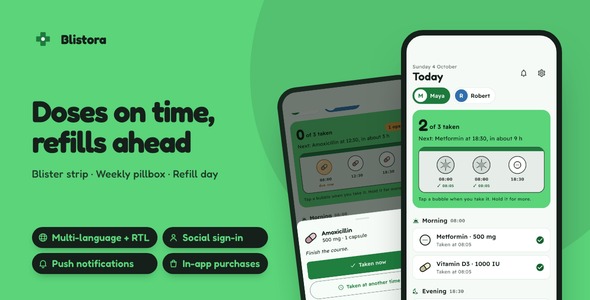
Blistora keeps a whole household’s medicines on one phone: a blister strip you press through dose by dose, a seven-day pillbox, a refill day computed from the pills still in the box, reminders the phone fires by itself, and the sign-in, purchase, push, language and backup layers already wired, with a Laravel cloud backup server, its admin panel and a landing page in the same download. 19 screens, light and dark, English, Spanish and Arabic.
Demo Instructions
The live preview starts on a page with four demos, described under Open every part before you buy. The sign-in screen in the demo app accepts whatever you type, or nothing at all: enter the pair below or tap Sign in with both fields empty. Demo mode is already on, so the Today tab lands on a sample household of two people and seven medicines with a month of recorded doses, and no account or server is involved.
- Email: demo@blistora.app
- Password: demo1234
- Admin panel, after you install the included back end: admin@blistora.test / password
Why Blistora
- The hard part of a medicine app is finished: five schedule rules counted from the start date, a strip that knows which dose is due, late or missed, a pillbox that scores the week, and a supply engine that spends pills along the real schedule to find the refill day, each a pure Dart engine with its own tests.
- The account layer is wired, not sketched: Google and Apple sign-in, in-app purchases, push, analytics and crash reports, biometric lock, update prompts, three languages, a share sheet and remote images are switched on from one config file; the paywall lifts the free plan’s one-person limit.
- A backup server and a landing page are in the box:
backend/is a Laravel cloud backup with a Filament admin panel that copies each account’s household to your server after every change and opens any snapshot record by record;landing/is a one-page site in Blistora’s palette. 132 app tests pass, and the back end has 94 more of its own.
Nine things you will not have to build
- Google and Apple sign-in: the sign-in screen trades the provider’s id token for a session on the included back end, and only shows the buttons for the providers you have configured.
- In-app purchases and the Pro paywall: Blistora Pro, the plan that allows more than one person, sits behind App Store and Play products; store prices are shown, the unlock survives offline, restore is one tap.
- Push notifications: the admin panel’s Send notification page reaches every install, now or at a scheduled time, and a tap can open the Supply or Today tab; dose reminders are local and are never confused with a push.
- Analytics and crash reports: screen views and real errors, behind a consent switch in Settings; names, medicines and doses never leave the phone.
- Face ID, Touch ID and fingerprint lock: a household’s medicine list is private, so the app can ask for a face or a finger on launch; the switch is disabled where nothing is enrolled.
- Three languages with RTL: English, Spanish and Arabic on every screen, the Arabic strip and pillbox laid out right to left; a new language is one copied file, and the server replies in the same language.
- Update prompts: announce a release on the admin panel’s App updates page and the app shows a gentle or a required update prompt from its next launch.
- Share sheet: a person’s care card leaves the phone as an image through the system share sheet, anchored on iPad, ready for a doctor or a pharmacist.
- Remote images: pictures from your server’s URLs, files the app wrote or bundled assets, with placeholders and fallbacks, for the screens you add next.
Open every part before you buy
The Live Preview is a hub, not only the app: four demos on one page, and the All demos link at the top of each brings you back to it:
- The app: Blistora built for the web, in a phone frame, with the sample household on the Today tab.
- The manual: the 42-chapter HTML documentation that ships in the download, opened as is.
- The admin panel: a read-only snapshot of a real install: the dashboard, each sidebar page, the Backups list and one snapshot opened record by record.
- The landing page: the one-page site from the download, exactly as it renders.
The full source code is included with every license type, Regular and Extended alike.
Six screens that carry the app
- The blister strip: the day’s doses sit on a blister card; tap a bubble and it presses through, the foil tears and the time drops in under it; hold one to record another time or skip it with a reason.
- The pillbox: the week as a seven-day organizer by morning, noon, evening and bedtime, each compartment filled, slashed or marked missed, with this week’s and the last 30 days’ adherence.
- The supply runway: every medicine’s pills spent along its real schedule to the last one, and a refill day that lands before it, ahead of the days the pharmacy is closed, with the household on one trip.
- Schedules that match the label: every day, every few days, chosen weekdays, a cycle such as 21 on and 7 off, or as needed with a daily maximum, half tablets included.
- The care card: one person’s medicines, doses, times of day, supply and last 30 days on a pharmacy-label card, shared as an image.
- Reminders: each open dose becomes a notification at its time with the app closed, a second nudge if it is not marked, and a reminder on each refill day.
Around them: onboarding, sign-in and sign-up, the dose sheet, medicine detail and editor, the person editor, the refill sheet, upcoming reminders, Settings with dose times, reminders and your data, Cloud backup, About and the Pro screen.
Landing page included
Under landing/ is a one-page product site for Blistora: a hero with two phone mock-ups of the strip and the pillbox, three feature tiles, a gallery of the screens, an FAQ and store buttons, set in the app’s own palette and typefaces. Change the copy and the store links, then host it anywhere that serves static HTML.
Laravel back end included
backend/ is the cloud backup Blistora signs in to: an account per user, and after each change the app sends its people, medicines, dose history and refills as a snapshot that the server keeps, five versions per account by default. A new phone signs in and restores the latest one in a single tap. The Filament admin panel lists who has backups and opens any snapshot person by person and dose by dose, stores pictures, publishes App updates, sends and schedules push notifications with a Push history page, exchanges Google and Apple tokens, and ships with a Docker compose file. Give the app the address with --dart-define=API_BASE_URL or type it into Settings. PHP 8.4 or Docker is required.
Under Blistora’s hood
- Three pure Dart engines: schedule, supply and adherence, each tested on its own and liftable into another app.
- GetX, kept thin: a view, a controller and the
CabinetServicefor each screen; the screens call the engines and never do arithmetic of their own. - One reminder plan, rebuilt after every change: the next 14 days of doses and refill days go to the phone through one gateway, the same one that carries push.
- One config file:
feature_config.dartholds product ids, client ids and every switch. - One palette file: recolor the app there and the launcher icon and the landing page are regenerated from the same values.
What you get: the complete Flutter source with the nine built-in layers above, the Laravel cloud backup with its admin panel, the landing page, a README, offline HTML documentation (42 chapters, 32 figures), the sample household, light and dark themes, and 8 original illustrations with their SVG sources.
AI disclosure
AI-assisted tools were used to help write and review the source code and the documentation of this item. The author reviewed, tested and finalized every part before release. The illustrations are SVG drawings written as code for this item; no image-generation model was used. The app itself has no AI features.
Notes
Blistora records what a person types in and reminds them at the times they chose. It is a personal organizer rather than a medical device: it offers no dosing advice, checks no interactions, and the reminders carry no action buttons, so a dose is always marked inside the app.
Reminders are local notifications scheduled by the phone; on Android, exact timing relies on the exact-alarm permission, which Google Play asks a reminder app to declare. Until the included back end is deployed, the app runs on its bundled sample household in demo mode. There are no Figma or Sketch files; the interface is defined in the Dart source.
External costs, none of them part of the price: Google Sign-In, Sign in with Apple and push notifications run on developer accounts and services you hold yourself, namely an Apple Developer Program membership, a Google Play Console account and a Firebase project, and the same accounts carry analytics, in-app purchases and publishing to the stores. The host that runs the backup server is a further service you pick and pay for. Each provider bills you on its own terms; those charges are not included in the price of this item.
| Author | coderqh |
|---|---|
| Price | $69 |
| Sales | 0 |
| Rating | 0 (0) |
| Published | Oct 13, 2026 |
| Last Update | Oct 13, 2026 |
| Compatible Software | Flutter 3.x |
| Mobile Files Included | Dart, YAML, JavaScript JSON, .kotlin, .swift, JavaScript JS, CSS, PHP, HTML |
Categories
Tags
External listing. code.market does not sell this product and does not process payment for it. Pricing, payment, delivery, licensing, refunds, and support are handled by the third-party merchant on its own website. We may earn an affiliate commission from a referral. Details.
Products of the Week.
Submit🥇

Perceptle
Perceptle is a daily browser-based game that challenges you to test your sensory intuition through five quick estimation and rhythm-based rounds.
Other · 1 views · 0 clicksOther · Week 47 · 1 views · 0 clicks
🥈

Free LinkedIn Likes From Real
Get free LinkedIn likes on your posts from real members who react by hand. No
SaaS · 124 views · 2 clicksSaaS · Week 47 · 124 views · 2 clicks
🥉

STOP GUESSING WHAT TO POST
AI that learns your brand voice and builds a month of consistent, on-brand social content: carousels, posts and hooks that sound like you, not like everyone else's AI.
SaaS · 7,686 views · 71 clicksSaaS · Week 47 · 7,686 views · 71 clicks
#4

aaas.market
407 reliable micro tools for solo founders, marketers and creators. They work in your browser
SaaS · 122 views · 0 clicksSaaS · Week 47 · 122 views · 0 clicks