
BiteIQ – SwiftUI Diet, Calorie and Nutrition App Template
Description

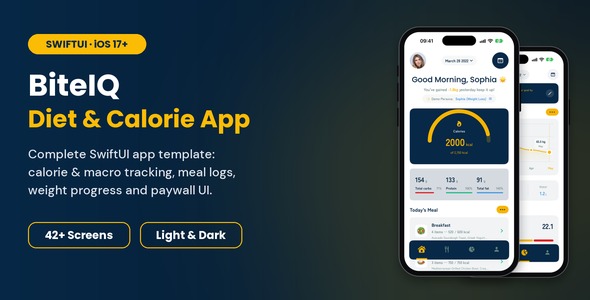
Launch your own iOS diet and calorie tracking app in days, not months. BiteIQ is a complete, ready-to-run 100% native iOS (SwiftUI) nutrition application template targeting iOS 17.0+ with 42+ polished screens & states: daily calorie tracking, AI meal scanning, macro breakdown (Protein, Carbs, Fat), water tracker, interactive weight logs, reports, and premium subscriptions. Change the name, colours, and logo, connect your backend, and it’s yours.
Watch It in Action
- ▶ Full Demo Video: full walkthrough of every screen
- ▶ Promo Video: quick highlights
Demo Instructions
As BiteIQ is a 100% native iOS (SwiftUI) application template, testing is conducted directly in Xcode Simulator or on an iOS device (iOS 17.0+). You can test and explore all features of the app immediately using these demo credentials:
- Email: demo@biteiq.app
- Password: Password123!
- Verification Code: 1234 (any 4 digits verify automatically)
You can also create a new account via the Sign Up screen or test social sign-in buttons. All authentication flows include built-in validation and simulated verification.
Make It Yours in Minutes
Whether you’re building a calorie counter, keto tracker, intermittent fasting companion, or sports nutrition app, BiteIQ gives you the whole iOS app. You just make it your own:
- Your brand colour everywhere: change one primary colour and every button, progress ring, chip, and highlight updates.
- Your name and logo: app name, app icon, and launch logo in a few clicks.
- Your fonts: swap the fonts in one file.
- Your content: food items, meals, and photos come from simple sample data you replace with your own.
- Your backend: login, sign up, and code verification are wired up; add your API calls and go.
- Pick what you need: each screen is self-contained, so remove what you don’t need and keep the rest.
No third-party libraries, nothing to install. Open the project, press Run, and start customising.
Highlight Features
- 42+ screens and states built with pure, native SwiftUI architecture (iOS 17.0+)
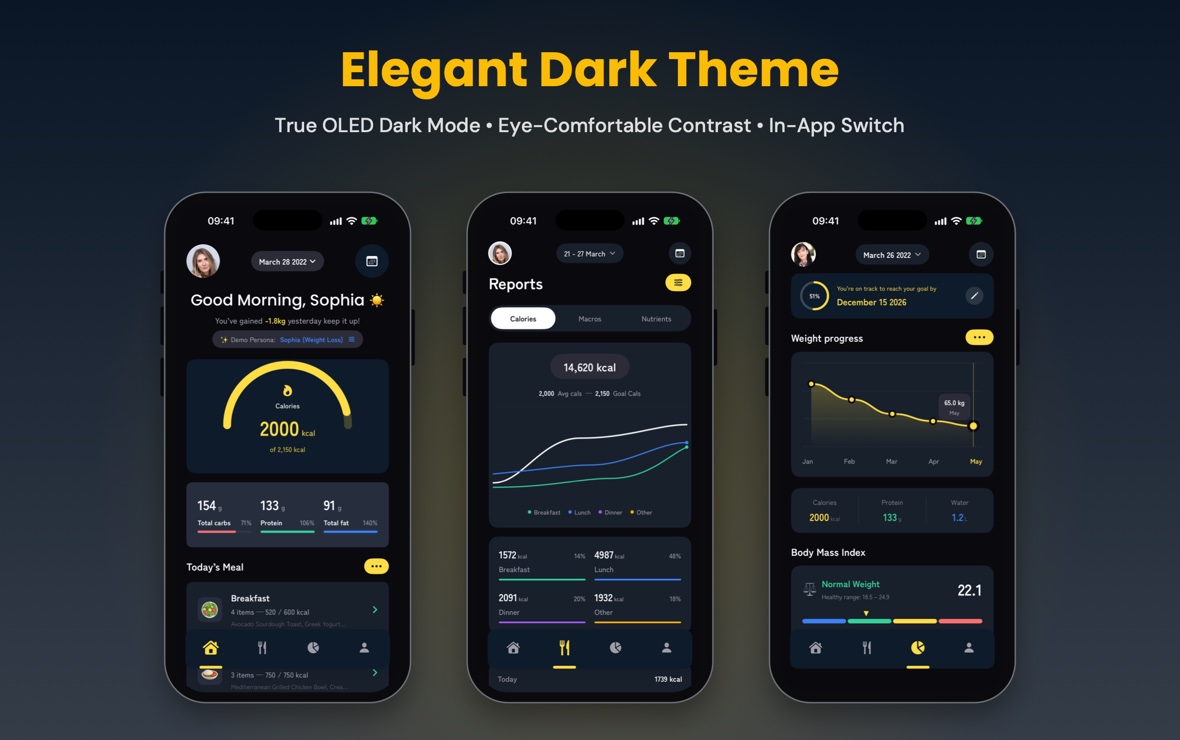
- Custom-redesigned native iOS interface with full Light Mode and Dark Mode (including an in-app appearance switch)
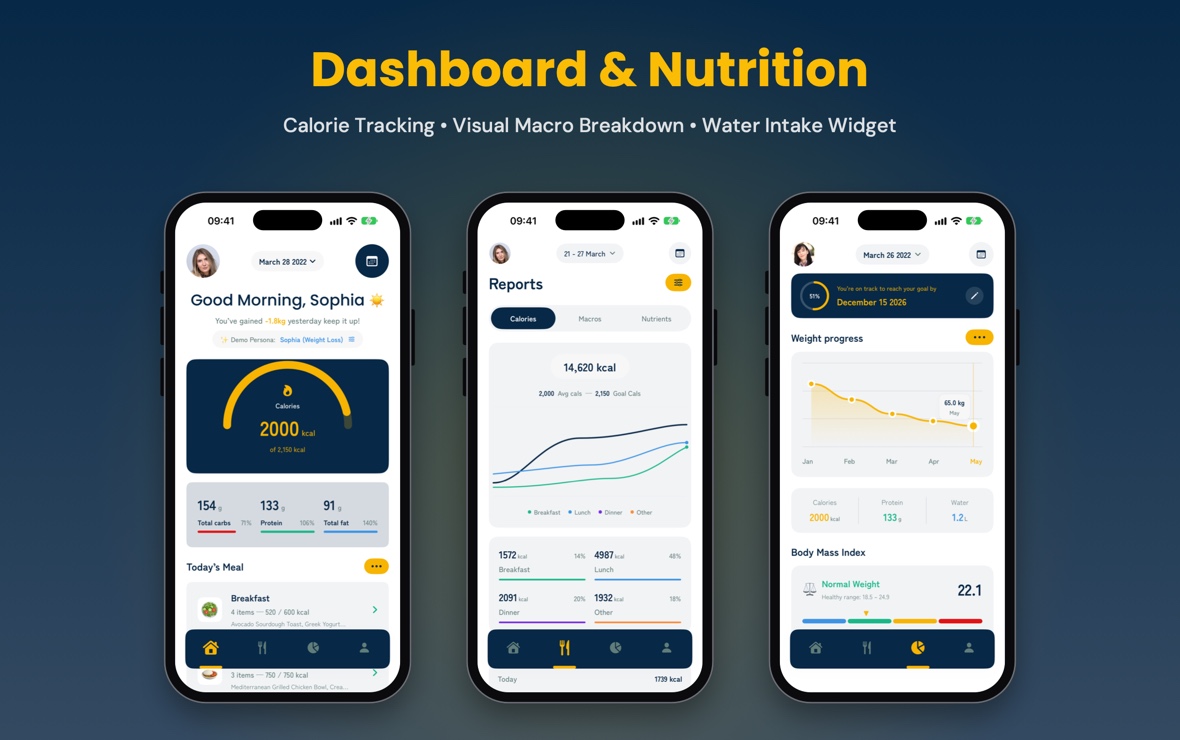
- Visual Calorie Ring & Macro Breakdown: Protein, Carbs, and Fat distribution rings
- Interactive Water Intake Tracker with animated cup progress and quick increments
- AI Camera Food Scanner viewfinder overlay with scanning animations
- Categorized Meal Logging for Breakfast, Lunch, Dinner, and Snacks
- Food Search & Nutri-Grade Ratings (letter grades A to E)
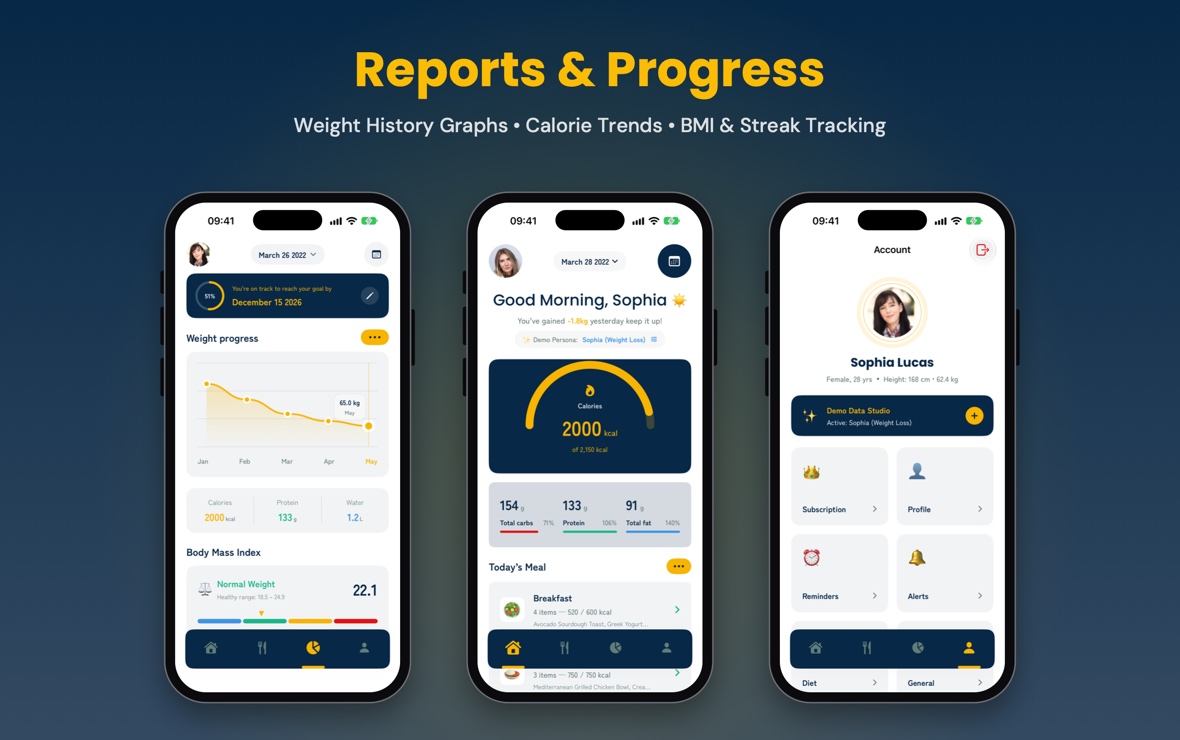
- Interactive Progress Tracker with dynamic weight chart and streak tracker
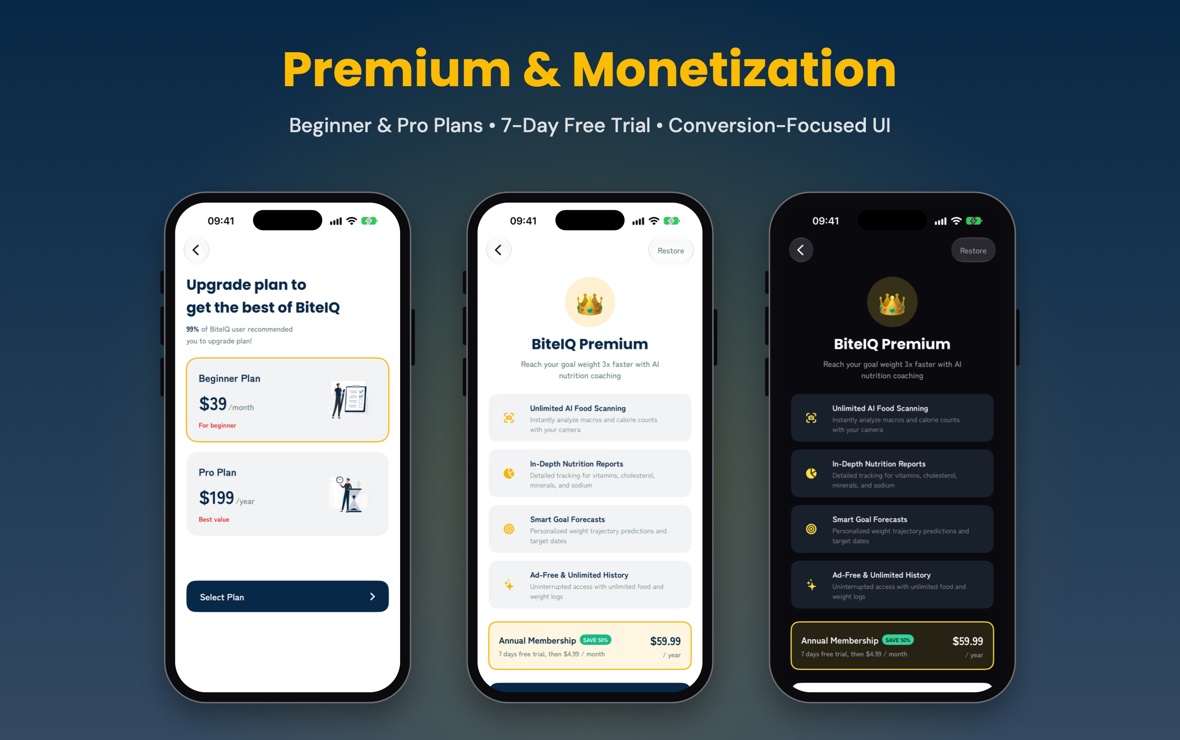
- Monetization-Ready Paywalls: Beginner & Pro subscription plans with 7-day trial
- Animated Navigation Drawer (Side Menu) with user profile and quick links
- VoiceOver accessibility labels and Dynamic Type support
- Clean, commented, pure SwiftUI code with zero linter errors
- Apple Privacy Manifest (PrivacyInfo.xcprivacy) included for App Store compliance

Included Screens
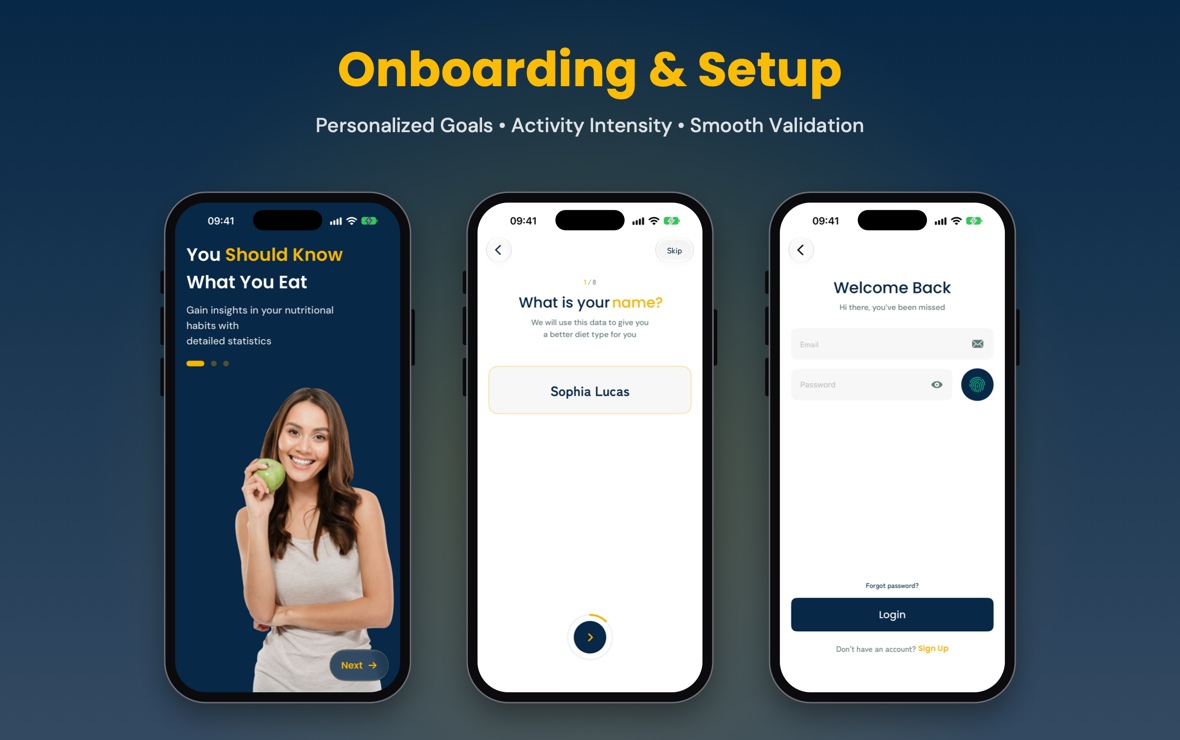
- Launch Screen, Animated Splash, and Welcome Carousel
- Onboarding Steps (weight goal, gender, age, height, weight, activity intensity, target date)
- Login, Sign Up, Forgot Password, and Verification Code (OTP)
- Dashboard (Home) with Calorie Ring, Macro Distribution, and Water Intake Widget
- Meal Tracker with Breakfast, Lunch, Dinner, and Snack breakdown
- Food Search with filters and Nutri-Grade A–E rating cards
- Food Detail with comprehensive Nutrition Facts table and serving picker
- AI Camera Food Scanner overlay with macro confirmation sheet
- Progress Tracker with interactive weight graphs, history charts, and streak logs
- Profile, Edit Profile, Weight Goal Adjustments, and Reminders
- Premium Pop-up, Subscription Plan Cards (Beginner / Pro), and Contact Support
Technology and Framework
- Minimum iOS Target: iOS 17.0 or later
- Swift 5.10 / Swift 6
- 100% Native SwiftUI (iOS platform)
- Xcode 16.0 or later
- Privacy Manifest (PrivacyInfo.xcprivacy)
What’s Included
Every license includes the complete, standard iOS source code package:
- Full Xcode project source code (pure SwiftUI, minimum target iOS 17.0)
- Apple Privacy Manifest (PrivacyInfo.xcprivacy declaring required-reason APIs)
- Offline HTML documentation (installation, customisation, project structure, changelog)
- Clean placeholder asset catalog & vector icons
- Free lifetime updates
- Item support
These are standard components included for all users. Note: Design/Figma files are not included in the download package; the entire UI is delivered as native, customizable SwiftUI code.
Please Note & Design Origin
UI Design & Package Contents: BiteIQ’s user interface has been custom-redesigned and engineered natively in SwiftUI by KD Mobile Apps with adaptive Light/Dark Mode theming and custom SwiftUI components. No Figma files or external design files are included in the package. All media assets in the download package are clean, original placeholder images and vector icons created specifically for BiteIQ. No unlicensed third-party stock photography is distributed. Easily replace them with your own brand photography in Xcode’s Asset Catalog. Fonts (Poppins, Zen Kaku Gothic Antique, DM Sans) are free under the SIL Open Font License.
Backend Infrastructure, Maintenance & Possible Additional Costs
BiteIQ runs fully out of the box with built-in sample data. A live backend server or database is not included. Please note that the buyer is solely responsible for all costs, hosting fees, third-party API charges, and ongoing maintenance associated with any backend infrastructure they choose to integrate with the app, including for example:
- Backend or server hosting, cloud functions, and database services (e.g. Firebase, Supabase, AWS, or custom servers)
- Ongoing backend server administration, security updates, and API maintenance
- Third-party APIs (for example nutrition database APIs, email, or SMS for verification codes)
- An Apple Developer Program membership to publish on the App Store
- Apple’s commission on In-App Purchases and subscriptions
Support Facility
Free lifetime updates and friendly support. Need assistance, have a question, or need guidance on customizing BiteIQ? Contact us anytime through the Support tab on the CodeCanyon item page.
AI Disclosure
In accordance with Envato’s AI disclosure requirements, AI-assisted tools were utilized to assist with code formatting, documentation drafting, and generating placeholder vector/media assets. All core SwiftUI architecture, custom UI components, navigation, and logic were designed, implemented, and thoroughly tested by our engineering team.
Changelog
Version 1.0.0 — Initial Release (October 28, 2026)
- Initial public release of BiteIQ targeting iOS 17.0+ and Xcode 16.0+ in pure SwiftUI.
- 42+ screens and states across Onboarding, Auth, Calorie & Macro Dashboard, Meal Logging, Food Search & AI Scanner, Progress Analytics, and Profile/Premium flows.
- Full Light & Dark Mode support, type-safe NavigationStack routing, and Apple PrivacyInfo.xcprivacy manifest.
| Author | KavinduDissanayake |
|---|---|
| Price | $50 |
| Sales | 0 |
| Rating | 0 (0) |
| Published | Nov 5, 2026 |
| Last Update | Nov 5, 2026 |
| Compatible Software | Other |
| Compatible With | Swift |
| Demo Url | https://youtu.be/5AalrCO_eL0 |
| Mobile Files Included | .xib/.nib, HTML |
Categories
Tags
External listing. code.market does not sell this product and does not process payment for it. Pricing, payment, delivery, licensing, refunds, and support are handled by the third-party merchant on its own website. We may earn an affiliate commission from a referral. Details.
Products of the Week.
Submit🥇

STOP GUESSING WHAT TO POST
AI that learns your brand voice and builds a month of consistent, on-brand social content: carousels, posts and hooks that sound like you, not like everyone else's AI.
SaaS · 7,337 views · 67 clicksSaaS · Week 46 · 7,337 views · 67 clicks
🥈

Conversational Backlinks for Busy Founders
Place Backlink Relevant Conversation for your domain across Forums and Conversations
Website · 46,607 views · 232 clicksWebsite · Week 46 · 46,607 views · 232 clicks
🥉

upvote.club
Free Social Media Engagement that Helps Boost Your Content. Upvote Club supports 19 social networks with 100+ engagement actions in one dashboard. Add links to your posts and get free engagement from real users.
SaaS · 44,549 views · 127 clicksSaaS · Week 46 · 44,549 views · 127 clicks
#4

Substack Posting API
Onboard your Agent to Substack. Write Publish on Substack via API
SaaS · 63,434 views · 206 clicksSaaS · Week 46 · 63,434 views · 206 clicks
#5

Seenshot App
Free, Fast, MacOS Screenshot app. Make Screenshot cmd+shift+2 and send it via link
Desktop App · 32,683 views · 127 clicksDesktop App · Week 46 · 32,683 views · 127 clicks
#6

Hand-Placed Backlinks $9.99 per link. Flat rate.
Buy hand-placed forum, Q-A and directory backlinks. Flat $9.99 per link, no subscriptions — you only pay for approved listings.
Website · 8,307 views · 19 clicksWebsite · Week 46 · 8,307 views · 19 clicks
#7

Free Invoice Generator - PDF Invoices in Your Browser, No Sign-Up
A free invoice maker for freelancers and small businesses: fill in the invoice, check the live preview, and download a PDF that looks exactly like it. Any currency, tax per item, three templates, no sign-up, and nothing leaves your device.
6,934 views · 29 clicksWeek 46 · 6,934 views · 29 clicks
#8

Merge PDF Files Free - Combine PDFs in Your Browser, No Upload
A free PDF merger for office workers, students, and freelancers: combine PDFs and images into one file in the browser, reorder files and pages, pick page ranges, keep bookmarks, and open password-protected PDFs. Nothing is uploaded, no sign-up, no watermark.
6,417 views · 18 clicksWeek 46 · 6,417 views · 18 clicks