Backlink Monster - Unlimited Comment Backlinks
Description
What is Backlink Monster?
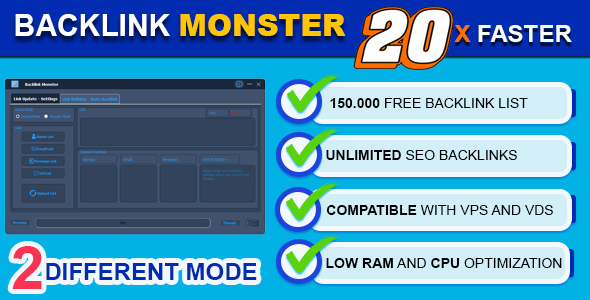
Backlink Monster is a high-level bot with highly advanced features that fulfills your backlink needs. Backlink Monster, which allows you to get hundreds of backlinks within minutes, aims to get you easy and fast backlinks by sending comments to websites with wordpress infrastructure. So you will be able to get thousands of backlinks and improve your websites in terms of SEO and Marketing.
What is Normal Mode? : Normal mode is the mode that allows you to get backlinks by commenting on the wordpress (URL) pages you have added directly.
What is Monster Mode? : Monster Mode is the mode of submitting comments by automatically finding the URL page of the domains that have been added, with intuitive methods. In this mode, only the web address is sufficient and it will find any page itself and post comments. Thanks to this mode, you don’t need to search for wordpress commentable page lists, just add domains that you can find more easily and it will do the rest.
What are the Features of Backlink Monster?
✅ It offers a free backlink list (Normal Mode) of 120,000 different site URLs + 30,000 different domain lists (Monster Mode).
✅ Allows you to get Unlimited Comments backlinks.
✅ It is 20x faster than its competitors.
✅ With its 2 different mode features, it not only sends URL comments, but also sends comments automatically by finding the commentable pages of the main domains with its advanced intuitive feature (Monster Mode).
✅ Instantly records successful and unsuccessful submissions with its automatic recording feature.
✅ Provides real-time report in the program interface.
✅ Allows you to use your own lists.
✅ Backlink Monster automatically recognizes wordpress sites, so you don’t have to spend time filtering your lists.
✅ Works seamlessly on VPS and VDS.
✅ Random Emails, Names and Messages.
✅ By adding your keywords to the list of names, it allows you to get backlinks on the keywords randomly.
✅ You can easily import your own Emails, Names and Messages as text documents.
✅ Full Help Guide Documentation (Documentation.PDF)
✅ Video user guide for beginner level.
✅ Video tutorial for professional use.
✅ Ability to follow the execution results through the real-time LOG panel.
✅ Low RAM and CPU optimization.
When Do Backlinks Appear?
Comment backlinks start appearing on the page after target sites approve your comments. Then it will start appearing in SEO and SERP tools such as ahref, semrush in 1 – 15 days.
Why Do You Need Backlink Monster?
Search engine optimization (SEO) is important to increase your website’s ranking, drive organic traffic, and strengthen your online presence. However, SEO strategies can be time-consuming and laborious. That’s where we offer a solution to help you: Backlink Monster.
Backlink Monster is a powerful tool to improve your website’s SEO performance. This program helps you automatically generate high-quality backlinks and contributes to your website ranking high in search engine results pages (SERPs).
Who is Backlink Monster Useful for?
Bloggers and Content Creators: Backlinks are a way for bloggers and content creators to reach a wider audience and get their content discovered by more people. Backlink Monster gives them organic traffic increase and more readers.
Internet Marketers: Automating the backlink building process is a huge advantage for Internet marketers. Backlink Monster saves time and effort and makes marketing strategies more effective.
Business Owners: Business owners want their websites to get organic traffic and attract potential customers. Backlink Monster supports business owners’ SEO efforts and helps them stay one step ahead of their competitors.
SEO Professionals: For SEO professionals, backlink building can make up a significant portion of the time their clients spend optimizing their websites. Backlink Monster makes the job of SEO experts easier and allows them to serve more customers.
What are the Advantages of this Program?
Automatic Backlink Generation: The program automatically generates high quality backlinks for your website and helps increase your ranking.
Save Time and Effort: Backlink Monster, Auto Backlink Getter, saves time and effort for you by automating the backlink creation process.
Credibility and Quality: The program creates high-quality backlinks in a targeted manner and increases the credibility of your website.
Competitive Advantage: Backlink Monster allows you to stay one step ahead of your competitors and helps you rank high in search engines.
Backlink Monster speeds up your SEO efforts, increases your website visibility and strengthens your online presence. Get this program today for more traffic, more customers and more success!
How Does the Backlink Monster License Work?
Send me your e-mail address and envato purchase code you want to license and I will get back to you with a license key (it can take up to 12 hours depending on the number of requests).
The license code is valid only for the email, the envato purchase code and the machine it is installed on. If you want to install Backlink Monster on another machine, you should proceed with the purchase and follow the same instructions.
Do you have any questions or problems?
Write to the support ticket or contact zeytinappz@gmail.com and we will assist you as quickly as we can.
System Requirements
- Windows 7, Windows 8/8.1, Windows 10, Windows 11,Windows Server 2012, Windows Server 2012 R2, Windows Server 2016, Windows Server 2019, Windows Server 2022 - Min. 1GB of RAM
Categories
Tags
External listing. code.market does not sell this product and does not process payment for it. Pricing, payment, delivery, licensing, refunds, and support are handled by the third-party merchant on its own website. We may earn an affiliate commission from a referral. Details.
Products of the Week.
Submit🥇

wanapi.app
Wan API is a developer platform for the Wan video model family. Compare Wan 3.0, Prime and Pro specifications and prices, then prepare a request in the preview playground.
Other · 5,373 views · 14 clicksOther · Week 42 · 5,373 views · 14 clicks
🥈

wanapi.ai
Wan API is a developer platform for the Wan video model family. Compare Wan 3.0, Prime and Pro specifications and prices, then prepare a request in the preview playground.
Other · 5,033 views · 11 clicksOther · Week 42 · 5,033 views · 11 clicks
🥉

yee.site
Your link in bio, but a real website. Start from beautiful templates and ready-made sections, then add a shop, bookings, a blog and as many pages as you need. Perfect for your link in bio, portfolio or personal site.
Other · 10,967 views · 18 clicksOther · Week 42 · 10,967 views · 18 clicks
#4

upvote.club
Free Social Media Engagement that Helps Boost Your Content. Upvote Club supports 19 social networks with 100+ engagement actions in one dashboard. Add links to your posts and get free engagement from real users.
SaaS · 31,867 views · 104 clicksSaaS · Week 42 · 31,867 views · 104 clicks
#5

Seenshot App
Free, Fast, MacOS Screenshot app. Make Screenshot cmd+shift+2 and send it via link
Desktop App · 20,384 views · 114 clicksDesktop App · Week 42 · 20,384 views · 114 clicks
#6

Conversational Backlinks for Busy Founders
Place Backlink Relevant Conversation for your domain across Forums and Conversations
Website · 32,169 views · 204 clicksWebsite · Week 42 · 32,169 views · 204 clicks
#7

Substack Posting API
Onboard your Agent to Substack. Write Publish on Substack via API
SaaS · 51,099 views · 190 clicksSaaS · Week 42 · 51,099 views · 190 clicks
#8

codester.com
SocialDesk+: Omnichannel Social Commerce & Business Management Platform This is stronger than simply “Social Commerce and Messaging” because it tells buyers this is a complete business platform, not just a messaging script. Turn Social Conversations Into Sales SocialDesk+ is a complete omnichannel social commerce and business management platform built for businesses that sell and communicate with customers through social media. Instead of switching between WhatsApp, Facebook, Instagram and TikTok, businesses can manage customer conversations, comments, products, leads, follow-ups, automation, teams and business reports from one professional workspace. And because the full source code is included, developers, agencies and entrepreneurs can customize, rebrand and launch SocialDesk+ as their own business solution or SaaS platform. 🚀 Build Your Own Social Commerce Business SocialDesk+ gives you the foundation to launch: - Your own SaaS platform - A white-label social CRM - A social-commerce management system - A customer communication platform - A business messaging solution - A custom solution for clients - A multi-business subscription platform 💬 Connect Your Customers Supported social channels include: WhatsApp • Facebook • Instagram • TikTok Bring supported conversations into one centralized workspace and help businesses respond faster without constantly switching between platforms. 🛍️ More Than a Messaging Platform SocialDesk+ combines communication with the tools businesses need to manage customer opportunities: Inbox Manage customer conversations from connected channels. Comments Monitor and respond to social-media comments. Customers & Leads Organize customer information and potential buyers. Products & Catalog Manage products and give your team quick access to product information. Follow-Ups Make sure potential customers don't get forgotten. Automation Automate repetitive customer questions and responses. AI Assistant Provide AI-assisted communication when configured. Team Management Give managers and staff access to the business workspace. Reports & Analytics Track activity using business reports and analytics. The current product listing already includes these capabilities. 🔥 Why Buyers Will Want It Launch Faster Start with an already-built business platform instead of developing the entire system from zero. Customize Everything The full source code is included, allowing developers to change branding, features, workflows and integrations. Build a SaaS Create multiple business workspaces and offer SocialDesk+ as a subscription-based service. Sell to Businesses Offer it to retailers, restaurants, service businesses, online sellers, agencies and other businesses that communicate with customers through social media. Mobile + Web + Backend This isn't just a mobile UI template. It includes: - Flutter mobile application - Python / FastAPI backend - Web interface - Administration tools - Database infrastructure - API-based architecture - SQLite / PostgreSQL support - Android and iOS project structure 💼 One Platform. Multiple Business Opportunities. For SaaS Entrepreneurs Launch your own subscription platform and allow multiple businesses to operate inside separate workspaces. For Software Agencies Customize and rebrand the platform for clients instead of building an omnichannel business system from scratch. For Developers Use the complete source code as a foundation for your own social-commerce or customer-management product. For Businesses Deploy a dedicated version for your own customer-service and social-commerce operations. 🧩 What's Included Mobile - Flutter / Dart - Android - iOS project Backend - Python - FastAPI - SQLAlchemy - Alembic Database - SQLite - PostgreSQL Web - HTML5 - CSS3 - JavaScript Deployment - Docker - Docker Compose - Production configuration Business Platform - Multi-workspace architecture - Authentication - Teams - Customers - Products - Messaging - Comments - Automation - Reports - Subscriptions - Administration The current listing also documents third-party integrations such as Meta, TikTok, Stripe, Firebase, SMTP and optional OpenAI configuration. ⚡ What Makes SocialDesk+ Different? You're not buying a simple: ❌ Chat UI ❌ WhatsApp clone ❌ Flutter template ❌ Admin dashboard ❌ Basic CRM You're getting a complete business platform foundation that can be customized, branded and commercialized. Connect. Automate. Manage. Grow. SocialDesk+ Omnichannel Social Commerce & Business Management Platform One important change I'd make to the current listing The current page starts with: “A simple guide to managing your social conversations, customers, products and business activity.”
Other · 18,494 views · 35 clicksOther · Week 42 · 18,494 views · 35 clicks
#9

sandbook.app
Sandbook reads EPUB, PDF, web pages and scanned pages aloud with Kokoro TTS, an open neural voice model that runs on your iPhone, free and offline. Choose from 41 natural voices in English, Spanish, French, Italian, Brazilian Portuguese and Hindi and follow each word as it is spoken. Try the same voices in your browser first with the free Kokoro TTS online demo.
Other · 18,446 views · 17 clicksOther · Week 42 · 18,446 views · 17 clicks