
BackErase | AI Image Background Remover Windows App
Description
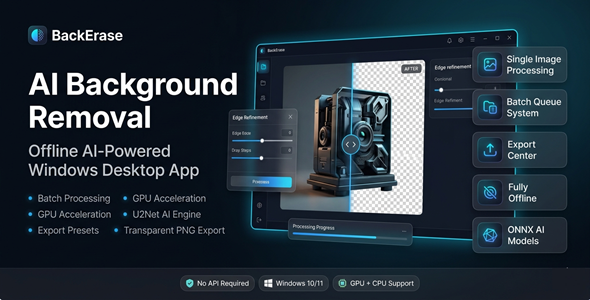
Remove Image Backgrounds Instantly — 100% Offline, AI-Powered
Stop wasting hours cutting out backgrounds manually.
BackErase uses advanced AI to remove backgrounds in seconds — no internet, no API, no subscription.
Built for Windows. Optimized for speed.
Process one image or hundreds — all on your own machine.



Perfect For
✔ eCommerce sellers (Amazon, Etsy, Shopify)
✔ Product photographers
✔ Graphic designers
✔ Digital marketers
✔ Freelancers & agencies
✔ Social media content creators
Features
 |
AI Background Removal (U2Net & U2NetP ONNX) State-of-the-art AI models deliver clean, accurate cutouts. Works on hair, fur, complex edges — no manual tracing needed. |
|
100% Offline Processing No internet. No API. No data sent to the cloud. Your images stay private — always. |
|
GPU Acceleration (DirectML) + CPU Fallback Harness your GPU for lightning-fast processing. Automatically falls back to CPU if no GPU is available. |
|
Batch Processing with Queue System Remove backgrounds from dozens or hundreds of images at once. Set it and walk away — let BackErase do the work. |
|
Before / After Comparison Slider Instantly see the result side-by-side with the original. Verify quality before you export. |
|
Edge Refinement (Hair & Fine Detail) Intelligent edge smoothing for professional-grade results. Handles wisps of hair and fine product edges with ease. |
|
Background Replacement Swap in a solid color, gradient, custom image, or blur effect. Create polished, ready-to-publish visuals in one click. |
|
Export Presets (eCommerce-Ready) Built-in presets for Amazon, Etsy, Instagram, and more. Export at the exact size and format each platform requires. |
|
PNG Transparency & Copy to Clipboard Export with full transparency support. Or copy directly to clipboard for instant use anywhere. |
|
History Tracking System Never lose a processed image. Browse your full processing history and re-export any time. |
|
Drag & Drop Support Drop images straight into the app — no file browsing needed. Smooth, intuitive workflow from the first second. |
Why You Need This
❌ Spending hours manually cutting out product backgrounds
❌ Paying monthly fees for cloud-based removal tools
❌ Uploading private product images to unknown servers
❌ Getting inconsistent results from generic online tools
BackErase solves all of this.
It runs entirely on your Windows PC — fast, private, and accurate.
You get professional results in seconds.
No subscriptions. No limits. No compromise.
How You Can Profit
✔ Process product photos for your eCommerce store in minutes
✔ Offer background removal as a freelance service on Fiverr or Upwork
✔ Batch-process client product catalogs and charge per image
✔ Create clean product shots for Amazon, Etsy, and Instagram
✔ Speed up your design agency workflow and take on more clients
Every hour you save is money you keep.
This is not just a tool — it’s a competitive advantage.
⚡ Fast Results
No learning curve. No complex setup.
Open the app, drop your images, click process.
GPU acceleration means results in seconds — not minutes.
Batch mode means you process your whole catalog while you grab a coffee.
Example:
Process 50–100 product images in just a few minutes.
That’s hours of manual work — done automatically.
Simple 3-Step Setup
 |
Step 1 — Download & Install Run the installer on your Windows PC. No internet or API key required. |
 |
Step 2 — Add Your Images Drag and drop single images or whole folders. Select your AI model and processing options. |
 |
Step 3 — Export & Use Choose your export preset and hit Export. Get clean, transparent PNGs ready for any platform. |
- Version 1.0.0 – Initial release with full AI background removal, batch processing, GPU acceleration, edge refinement, background replacement, and export presets
 |
Does BackErase require an internet connection? No. BackErase is 100% offline. All AI processing happens locally on your Windows PC. |
|
Do I need a powerful GPU to use it? No. BackErase works on any Windows PC. GPU acceleration is optional — it automatically uses CPU if needed. |
|
How many images can I process at once? There is no hard limit. The batch queue system handles large catalogs with ease. |
|
What image formats are supported? BackErase supports common formats including JPG, PNG, BMP, and WEBP. Exports are saved as transparent PNG files. |
|
Is there a monthly subscription or usage fee? No. It is a one-time purchase. Pay once, use it forever — no hidden fees. |
|
Can I replace the background with a custom image? Yes. BackErase supports color fills, gradients, blur effects, and your own custom background images. |
| Type | Windows App |
|---|---|
| Author | GoGrowTools |
| Price | $19 |
| Sales | 1 |
| Rating | 0 (0) |
| Published | May 18, 2026 |
| Last Update | May 18, 2026 |
| Application Runtime | Native |
| Operating System Versions | Windows 11, Windows 10 |
Categories
Tags
External listing. code.market does not sell this product and does not process payment for it. Pricing, payment, delivery, licensing, refunds, and support are handled by the third-party merchant on its own website. We may earn an affiliate commission from a referral. Details.
Products of the Week.
Submit🥇

STOP GUESSING WHAT TO POST
AI that learns your brand voice and builds a month of consistent, on-brand social content: carousels, posts and hooks that sound like you, not like everyone else's AI.
SaaS · 7,359 views · 67 clicksSaaS · Week 46 · 7,359 views · 67 clicks
🥈

Conversational Backlinks for Busy Founders
Place Backlink Relevant Conversation for your domain across Forums and Conversations
Website · 46,642 views · 232 clicksWebsite · Week 46 · 46,642 views · 232 clicks
🥉

upvote.club
Free Social Media Engagement that Helps Boost Your Content. Upvote Club supports 19 social networks with 100+ engagement actions in one dashboard. Add links to your posts and get free engagement from real users.
SaaS · 44,581 views · 127 clicksSaaS · Week 46 · 44,581 views · 127 clicks
#4

Substack Posting API
Onboard your Agent to Substack. Write Publish on Substack via API
SaaS · 63,469 views · 206 clicksSaaS · Week 46 · 63,469 views · 206 clicks
#5

Seenshot App
Free, Fast, MacOS Screenshot app. Make Screenshot cmd+shift+2 and send it via link
Desktop App · 32,719 views · 127 clicksDesktop App · Week 46 · 32,719 views · 127 clicks
#6

Hand-Placed Backlinks $9.99 per link. Flat rate.
Buy hand-placed forum, Q-A and directory backlinks. Flat $9.99 per link, no subscriptions — you only pay for approved listings.
Website · 8,339 views · 19 clicksWebsite · Week 46 · 8,339 views · 19 clicks
#7

Free Invoice Generator - PDF Invoices in Your Browser, No Sign-Up
A free invoice maker for freelancers and small businesses: fill in the invoice, check the live preview, and download a PDF that looks exactly like it. Any currency, tax per item, three templates, no sign-up, and nothing leaves your device.
6,965 views · 29 clicksWeek 46 · 6,965 views · 29 clicks
#8

Merge PDF Files Free - Combine PDFs in Your Browser, No Upload
A free PDF merger for office workers, students, and freelancers: combine PDFs and images into one file in the browser, reorder files and pages, pick page ranges, keep bookmarks, and open password-protected PDFs. Nothing is uploaded, no sign-up, no watermark.
6,445 views · 18 clicksWeek 46 · 6,445 views · 18 clicks