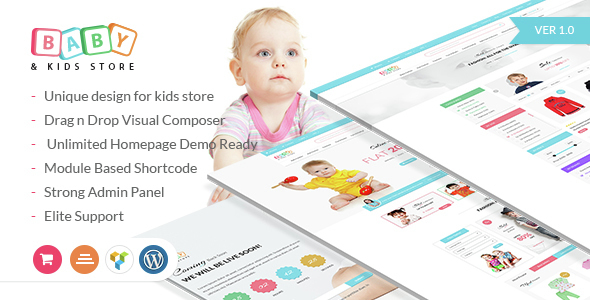
Baby & Kids Store eCommerce Woocommerce WordPress Theme
Description

Baby & Kids store E-commerce WordPress Theme is a very adorable one with vibrant colors and with eye-catching designs. As the name suggests, it is the best theme for those e-commerce online stores or websites involved in retailing of baby/child /kids products.
Not only does this WP theme include all essential elements for a child care based ecommerce site, it is geared to install in a single click and is accompanied by a video tutorial to make set-up very easy.
The salient features of this playful template are as follows- Customizer Option added.
- Sticky & Fix header
- Active admin panel
- Advanced Ajax functionality (filter/cart/sorting)
Baby & Kids store e-commerce WordPress Theme provides with seven customizable home pages which can be used to make your website look creative. Further, regular updates ensure continuous improvement to the site and customer experience.
Contribute to make nurturing easy with Baby and kids store e-commerce Wordpress Theme!

Introduction
There are a number of themes in the market for developing websites which attract and keep customers engaged for a longer period of time. But not every theme will provide you with almost all the required features with extra ones to get the best results, greater than expectations. Baby and Kids Store eCommerce Woocommerce WordPress theme will provide you with the best theme for stores that want to create websites related to kids’ stuff.
With attractive and colorful features, you will get to attract a greater number of customers than you did earlier. So whether you have an established business or are a start-up, we have this theme that can be commonly used by such stores. The theme has been specifically made to serve the interests of business people who want to take their businesses to heights.
The theme will let you enjoy all the commonly found features in such a theme with the addition of innovative features that have been specifically made to be added to your website. It has been made with consideration of the fact that the website which will be based on this theme is for the products for the little kids and babies. And thus it needs to be different from other technological products’ related businesses.
Why is the theme so special?
Well, the theme is quite special in itself with several unique features which you must not have experienced or seen before. For the online stores or websites that are involved in selling products for babies, kids and children this one is the best theme you can find. People with retail business in the same field can take advantage of this theme.
The catchy designs will surely leave you mesmerized when you see the demos. And the prepared website will do the same to your users or customers. If you are worried about how and in how much time you will be able to set up the theme, leave it to us. The theme provides you with a video tutorial that will let you understand the set-up process clearly and within time.
Next thing, you can install the theme at just a single click. You do not have to go through the tiring process of studying the whole concept that takes a lot of time also. Use of vibrant colors according to the current need and interests of the people you can design the webpages on your website in the most wonderful as well as an easy and informative way.
Availability of several demos and their installation
The theme provides several demo layouts which you can try before finalizing. Trying out the themes helps you select the most suitable one so that you receive maximum benefit from the same. The amazing part is that you get ready to use the demo layout that can be used with just one click. Also, you get to judge by looking at several options which are not available in case of other similar themes.
Seven home page layouts
As said earlier, the theme, called the Baby and Kids Store WordPress theme, consists of a look which is familiar to the eyes. This familiarity lets more persons approach you. In addition to the feature, the theme lets you enjoy seven home page layouts. These are seven different home screen layouts. Here you get to use several essentials like the navigation bar, the cart location as well as the search bar.
Even the home page link is in its commonplace. So these features are sort of untouched as they are in their usual locations. But there are things different than the usual ones. This innovation comes in the place for various different modules for the website. There are changes in the module for monthly offers. Changes in the latest news or advanced search form layout offer you creativity with the chance to come up with something new and catchy.
In addition to all this, you can do certain customizations in the themes. You also get to build new pages right from scratch by making use of the theme elements. This you can do with the use of the page builder provided to you with the theme options. One can choose any of the options from the list of the varying home page layouts considering your needs and preferences.
Product Page Layouts
Now, talking of the importance of various pages on the website, it is the home page that generates most of the interest. And on the second number, comes the product view page. The reason why this page holds so much importance is that the viewers will want to get a look at the products which they have been searching for. They sometimes want to have a look at all the products at a single look. While for some it is okay with a few products at once.
Also, there should be enough description about each product to allow the customer to get ideas of the products rightly. So to serve this purpose of the website, the theme comes in four different product page layouts to cater to different needs. First, there are two grids layouts. One of these has four columns that are of the thumbnails. It makes use of full width of the page.
Another one uses three columns with the product filter pane on the left as it should be. Besides these two, the customers can also see the products and details of the same through a list view. This lets them fit in search results. And in the last layout, you get a complete gallery of the products’ images. Features responsible for making the theme the best
Several salient features of this theme are as follows:
• Drag and drop visual composer page builder that is worth $33 • One click demo install • Filter visual composer class along with bootstrap class • Unique design for the kids’ store • Strong admin panel • Ajax cart • Module based shortcodes • Customizer option added • Video tutorial • Ajax product filter • Ajax sorting • Unlimited homepage demo ready facilities • Shop listing grid and list view • Sticky and fix header • Category product listing with sidebar • Blog pages
Update
- Latest WP version support
- latest Woocommerce support
- Major CSS upgrade
- Flash sale issue fixed
- Fatal error fixed
- Review massage issue fixed

5th May 2021

- Plugins Updated

7th Sep 2020
- shop page archive error fix
- ajax filter plugin update
- minor issue fixed

21st August 2020
- Full theme re-optimized
- Wp 5.5 version compatible
- Woocommerce Version compatible
- Testimonial section issue fix
- One click demo menu issue fix
- Babystore Master Plugin update
- Body font and heading font size changing option included
- RTL stylesheet optimize and rebuild
- Speed optimization

5.0 version
-- php error fix
-- woocommerce version support
-- latest wp version support
-- more faster than before
5th Oct 2019
- mini cart issue fix
- babystore master plugin update
Ver 1.0.2

- One click demo install
- documantation update
- Video tutorial added
- 4 more module shortcode created
Categories
Tags
External listing. code.market does not sell this product and does not process payment for it. Pricing, payment, delivery, licensing, refunds, and support are handled by the third-party merchant on its own website. We may earn an affiliate commission from a referral. Details.
Products of the Week.
Submit#1

wanapi.app
Wan API is a developer platform for the Wan video model family. Compare Wan 3.0, Prime and Pro specifications and prices, then prepare a request in the preview playground.
Other · 7,886 views · 19 clicksOther · Week 42 · 7,886 views · 19 clicks
#2

wanapi.ai
Wan API is a developer platform for the Wan video model family. Compare Wan 3.0, Prime and Pro specifications and prices, then prepare a request in the preview playground.
Other · 7,258 views · 11 clicksOther · Week 42 · 7,258 views · 11 clicks
#3

yee.site
Your link in bio, but a real website. Start from beautiful templates and ready-made sections, then add a shop, bookings, a blog and as many pages as you need. Perfect for your link in bio, portfolio or personal site.
Other · 13,309 views · 20 clicksOther · Week 42 · 13,309 views · 20 clicks
#4

upvote.club
Free Social Media Engagement that Helps Boost Your Content. Upvote Club supports 19 social networks with 100+ engagement actions in one dashboard. Add links to your posts and get free engagement from real users.
SaaS · 34,213 views · 104 clicksSaaS · Week 42 · 34,213 views · 104 clicks
#5

Seenshot App
Free, Fast, MacOS Screenshot app. Make Screenshot cmd+shift+2 and send it via link
Desktop App · 22,708 views · 114 clicksDesktop App · Week 42 · 22,708 views · 114 clicks
#6

Conversational Backlinks for Busy Founders
Place Backlink Relevant Conversation for your domain across Forums and Conversations
Website · 34,497 views · 204 clicksWebsite · Week 42 · 34,497 views · 204 clicks
#7

Substack Posting API
Onboard your Agent to Substack. Write Publish on Substack via API
SaaS · 53,370 views · 190 clicksSaaS · Week 42 · 53,370 views · 190 clicks
#8

codester.com
SocialDesk+: Omnichannel Social Commerce & Business Management Platform This is stronger than simply “Social Commerce and Messaging” because it tells buyers this is a complete business platform, not just a messaging script. Turn Social Conversations Into Sales SocialDesk+ is a complete omnichannel social commerce and business management platform built for businesses that sell and communicate with customers through social media. Instead of switching between WhatsApp, Facebook, Instagram and TikTok, businesses can manage customer conversations, comments, products, leads, follow-ups, automation, teams and business reports from one professional workspace. And because the full source code is included, developers, agencies and entrepreneurs can customize, rebrand and launch SocialDesk+ as their own business solution or SaaS platform. 🚀 Build Your Own Social Commerce Business SocialDesk+ gives you the foundation to launch: - Your own SaaS platform - A white-label social CRM - A social-commerce management system - A customer communication platform - A business messaging solution - A custom solution for clients - A multi-business subscription platform 💬 Connect Your Customers Supported social channels include: WhatsApp • Facebook • Instagram • TikTok Bring supported conversations into one centralized workspace and help businesses respond faster without constantly switching between platforms. 🛍️ More Than a Messaging Platform SocialDesk+ combines communication with the tools businesses need to manage customer opportunities: Inbox Manage customer conversations from connected channels. Comments Monitor and respond to social-media comments. Customers & Leads Organize customer information and potential buyers. Products & Catalog Manage products and give your team quick access to product information. Follow-Ups Make sure potential customers don't get forgotten. Automation Automate repetitive customer questions and responses. AI Assistant Provide AI-assisted communication when configured. Team Management Give managers and staff access to the business workspace. Reports & Analytics Track activity using business reports and analytics. The current product listing already includes these capabilities. 🔥 Why Buyers Will Want It Launch Faster Start with an already-built business platform instead of developing the entire system from zero. Customize Everything The full source code is included, allowing developers to change branding, features, workflows and integrations. Build a SaaS Create multiple business workspaces and offer SocialDesk+ as a subscription-based service. Sell to Businesses Offer it to retailers, restaurants, service businesses, online sellers, agencies and other businesses that communicate with customers through social media. Mobile + Web + Backend This isn't just a mobile UI template. It includes: - Flutter mobile application - Python / FastAPI backend - Web interface - Administration tools - Database infrastructure - API-based architecture - SQLite / PostgreSQL support - Android and iOS project structure 💼 One Platform. Multiple Business Opportunities. For SaaS Entrepreneurs Launch your own subscription platform and allow multiple businesses to operate inside separate workspaces. For Software Agencies Customize and rebrand the platform for clients instead of building an omnichannel business system from scratch. For Developers Use the complete source code as a foundation for your own social-commerce or customer-management product. For Businesses Deploy a dedicated version for your own customer-service and social-commerce operations. 🧩 What's Included Mobile - Flutter / Dart - Android - iOS project Backend - Python - FastAPI - SQLAlchemy - Alembic Database - SQLite - PostgreSQL Web - HTML5 - CSS3 - JavaScript Deployment - Docker - Docker Compose - Production configuration Business Platform - Multi-workspace architecture - Authentication - Teams - Customers - Products - Messaging - Comments - Automation - Reports - Subscriptions - Administration The current listing also documents third-party integrations such as Meta, TikTok, Stripe, Firebase, SMTP and optional OpenAI configuration. ⚡ What Makes SocialDesk+ Different? You're not buying a simple: ❌ Chat UI ❌ WhatsApp clone ❌ Flutter template ❌ Admin dashboard ❌ Basic CRM You're getting a complete business platform foundation that can be customized, branded and commercialized. Connect. Automate. Manage. Grow. SocialDesk+ Omnichannel Social Commerce & Business Management Platform One important change I'd make to the current listing The current page starts with: “A simple guide to managing your social conversations, customers, products and business activity.”
Other · 20,741 views · 35 clicksOther · Week 42 · 20,741 views · 35 clicks
#9

sandbook.app
Sandbook reads EPUB, PDF, web pages and scanned pages aloud with Kokoro TTS, an open neural voice model that runs on your iPhone, free and offline. Choose from 41 natural voices in English, Spanish, French, Italian, Brazilian Portuguese and Hindi and follow each word as it is spoken. Try the same voices in your browser first with the free Kokoro TTS online demo.
Other · 20,658 views · 17 clicksOther · Week 42 · 20,658 views · 17 clicks