
Axe VPN Flutter App With Admin Panel
Description
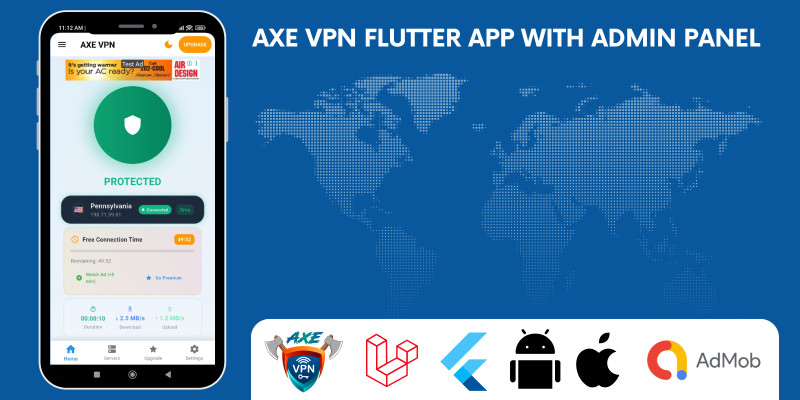
Built with Flutter 3.38.7, Axe VPN delivers a high-performance, secure, and scalable cross-platform experience. Featuring OpenVPN support, a powerful Laravel-based admin dashboard, and built-in monetization via subscriptions and AdMob, this app is ready for Android 13+ and iOS 16+. Launch your own branded VPN service in days — not months. ✓ Live on Play Store: Download Now
Features
✨ Key Features
- One-tap connect/disconnect
- Support for 100+ global servers (API-driven)
- Kill switch & auto-reconnect on network change
- OpenVPN (Android/iOS) and WireGuard protocol support
- Modern Material 3 design with dynamic theming
- Real-time speed and ping testing
- Data usage tracker and connection history
- Smooth animations and intuitive navigation
- Subscription plans (Google Play & App Store)
- AdMob banners and interstitial ads
- Premium-only features (e.g., unlimited locations)
- Revenue-ready out of the box
- Manage servers, users, and subscriptions
- Send push notifications via Firebase (FCM)
- Real-time analytics and user activity dashboard
- Add/remove servers without app updates
Requirements
Shared or VPS hosting, Flutter basic knowledge App Publication knowledge
Instructions
🧩 How to Use This Item
1️⃣ Setup Backend (Laravel)
- Upload the Laravel folder to your hosting.
-
Run
composer installandphp artisan migrate --seed. -
Set
.envvalues (DB, APP_URL, FCM key). - Login to Admin Panel → Add servers, plans, and settings.
2️⃣ Configure VPN Servers
- Install OpenVPN or WireGuard on VPS.
- Add server IP, protocol, and config in Admin Panel.
3️⃣ Setup Flutter App
- Open project in VS Code / Android Studio.
-
Update
API_BASE_URLin config. -
Add
google-services.json&GoogleService-Info.plist. - Set AdMob IDs and Subscription Product IDs.
4️⃣ Connect Firebase & Payments
- Enable FCM in Firebase, copy server key to Laravel.
- Add In-App Products in Play Console / App Store.
5️⃣ Build & Test
-
Run
flutter runfor testing. -
Build release:
-
Android →
flutter build appbundle --release - iOS → Archive via Xcode.
-
Android →
6️⃣ Go Live
- Manage servers, users, and notifications from Admin Panel.
- Add/remove VPN servers anytime — no app update needed!
| Author | quickro |
|---|---|
| Category | App Templates / Flutter / Full Applications |
| Price | $80 |
| Extended License | $240 |
| Likes | 2 |
| First Release | Nov 2, 2025 |
| Last Update | Mar 23, 2026 |
| Operating systems | Android 8.0, iOS 11.0, Android 9.0, iOS 12.0, Android 10.0, iOS 14.0, iOS 13.0, iOS 15.0, Android 11.0, Android 12.0 |
Categories
Tags
External listing. code.market does not sell this product and does not process payment for it. Pricing, payment, delivery, licensing, refunds, and support are handled by the third-party merchant on its own website. We may earn an affiliate commission from a referral. Details.
Products of the Week.
Submit🥇

STOP GUESSING WHAT TO POST
AI that learns your brand voice and builds a month of consistent, on-brand social content: carousels, posts and hooks that sound like you, not like everyone else's AI.
SaaS · 5,037 views · 47 clicksSaaS · Week 45 · 5,037 views · 47 clicks
🥈

Conversational Backlinks for Busy Founders
Place Backlink Relevant Conversation for your domain across Forums and Conversations
Website · 43,049 views · 226 clicksWebsite · Week 45 · 43,049 views · 226 clicks
🥉

upvote.club
Free Social Media Engagement that Helps Boost Your Content. Upvote Club supports 19 social networks with 100+ engagement actions in one dashboard. Add links to your posts and get free engagement from real users.
SaaS · 41,076 views · 122 clicksSaaS · Week 45 · 41,076 views · 122 clicks
#4

Substack Posting API
Onboard your Agent to Substack. Write Publish on Substack via API
SaaS · 60,027 views · 202 clicksSaaS · Week 45 · 60,027 views · 202 clicks
#5

Seenshot App
Free, Fast, MacOS Screenshot app. Make Screenshot cmd+shift+2 and send it via link
Desktop App · 29,392 views · 124 clicksDesktop App · Week 45 · 29,392 views · 124 clicks
#6

Hand-Placed Backlinks $9.99 per link. Flat rate.
Buy hand-placed forum, Q-A and directory backlinks. Flat $9.99 per link, no subscriptions — you only pay for approved listings.
Website · 5,177 views · 19 clicksWebsite · Week 45 · 5,177 views · 19 clicks
#7

Free Invoice Generator - PDF Invoices in Your Browser, No Sign-Up
A free invoice maker for freelancers and small businesses: fill in the invoice, check the live preview, and download a PDF that looks exactly like it. Any currency, tax per item, three templates, no sign-up, and nothing leaves your device.
3,820 views · 17 clicksWeek 45 · 3,820 views · 17 clicks
#8

Merge PDF Files Free - Combine PDFs in Your Browser, No Upload
A free PDF merger for office workers, students, and freelancers: combine PDFs and images into one file in the browser, reorder files and pages, pick page ranges, keep bookmarks, and open password-protected PDFs. Nothing is uploaded, no sign-up, no watermark.
3,528 views · 14 clicksWeek 45 · 3,528 views · 14 clicks