
Automated LinkedIn Connection Requester

Description
DESCRIPTION
Our application streamlines the process of connecting with professionals on LinkedIn by sending connection requests based on specific roles and locations you select. It simplifies networking and outreach efforts by automating the connection request sending process.This tool is designed to save you time and help you expand your professional network efficiently.
Here you can check demo video: Watch Now
PROJECT REQUIREMENT
- Window operating System
- Google Chrome
- Linkedin Account
GETTING STARTED
After downloading, Run the application.
ACTIVATION KEY
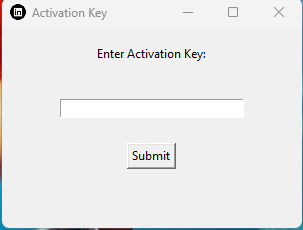
After the first time run it will ask for an activation key. You have to enter the envato purchase Id in the place of the Activation key(no need to enter symbols only number). It will not ask again for the activation key unless you have changed the desktop or installed the new window. After the activation key screen a Linkedin Connect Bot screen will open.
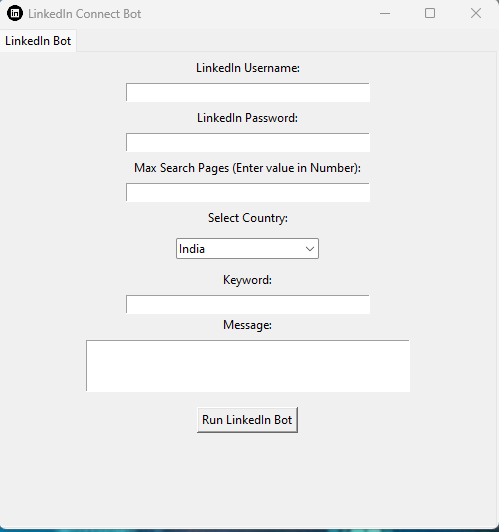
There are input field at the starting page of the application, Here below is the stepwise details of the field.
Step 1: LinkedIn CredentialsThere are two fields at starting for username and password, Provide your LinkedIn credentials, including your username and password. (Note: We never share or save your credentials details anywhere, it’s completely in your local system)
Step 2: Set the Max PagesDetermine how many connection requests you want to send at a time. Enter the number of pages, with each page containing a certain number of connections (e.g., 10 connections per page). This will help manage the number of requests.
Step 3: Define Role and LocationSpecify the criteria for the people you want to connect with. This could include their role/job title and location. This will help filter and search for relevant LinkedIn profiles.
Step 4: Craft a MessageIf you want to personalize your connection requests, provide a message that will be sent along with the requests. This message should be professional and courteous.
Step 5: Start the ProcessOnce you’ve configured your preferences, click a “Run” button to initiate the connection process.
Step 6: Monitor ProgressKeep an eye on your app’s progress as it sends connection requests. It should work through the pages you specified, sending requests to the desired LinkedIn users.
Step 7: Adjust Settings (if necessary)You can adjust the app settings, such as the number of pages, criteria, or message, for future connection campaigns based on your results and feedback.
Note: If Security challenge and 2FA appear than you have to pass this challange manually.Please note that automating LinkedIn actions can sometimes be against LinkedIn’s terms of service, and LinkedIn may take actions against accounts that engage in excessive automation. It’s important to use such tools responsibly and ethically. Always consider LinkedIn’s policies and guidelines, and be mindful of not spamming or harassing other users on the platform.
If you face any issue please email us: info.pankajkumarg@gmail.com| Type | Windows App |
|---|---|
| Author | impankajkumar |
| Category | Apps / Windows |
| Price | $31 |
| Sales | 4 |
| Rating | 0.00 from 1 rating |
| Published | Nov 8, 2023 |
| Last Update | Mar 24, 2025 |
| Application Runtime | Native |
| Operating System Versions | Windows 10 |
External listing. code.market does not sell this product and does not process payment for it. Pricing, payment, delivery, licensing, refunds, and support are handled by the third-party merchant on its own website. We may earn an affiliate commission from a referral. Details.
Products of the Week.
Submit🥇

STOP GUESSING WHAT TO POST
AI that learns your brand voice and builds a month of consistent, on-brand social content: carousels, posts and hooks that sound like you, not like everyone else's AI.
SaaS · 5,044 views · 47 clicksSaaS · Week 45 · 5,044 views · 47 clicks
🥈

Conversational Backlinks for Busy Founders
Place Backlink Relevant Conversation for your domain across Forums and Conversations
Website · 43,057 views · 226 clicksWebsite · Week 45 · 43,057 views · 226 clicks
🥉

upvote.club
Free Social Media Engagement that Helps Boost Your Content. Upvote Club supports 19 social networks with 100+ engagement actions in one dashboard. Add links to your posts and get free engagement from real users.
SaaS · 41,084 views · 122 clicksSaaS · Week 45 · 41,084 views · 122 clicks
#4

Substack Posting API
Onboard your Agent to Substack. Write Publish on Substack via API
SaaS · 60,038 views · 202 clicksSaaS · Week 45 · 60,038 views · 202 clicks
#5

Seenshot App
Free, Fast, MacOS Screenshot app. Make Screenshot cmd+shift+2 and send it via link
Desktop App · 29,400 views · 124 clicksDesktop App · Week 45 · 29,400 views · 124 clicks
#6

Hand-Placed Backlinks $9.99 per link. Flat rate.
Buy hand-placed forum, Q-A and directory backlinks. Flat $9.99 per link, no subscriptions — you only pay for approved listings.
Website · 5,185 views · 19 clicksWebsite · Week 45 · 5,185 views · 19 clicks
#7

Free Invoice Generator - PDF Invoices in Your Browser, No Sign-Up
A free invoice maker for freelancers and small businesses: fill in the invoice, check the live preview, and download a PDF that looks exactly like it. Any currency, tax per item, three templates, no sign-up, and nothing leaves your device.
3,828 views · 17 clicksWeek 45 · 3,828 views · 17 clicks
#8

Merge PDF Files Free - Combine PDFs in Your Browser, No Upload
A free PDF merger for office workers, students, and freelancers: combine PDFs and images into one file in the browser, reorder files and pages, pick page ranges, keep bookmarks, and open password-protected PDFs. Nothing is uploaded, no sign-up, no watermark.
3,538 views · 14 clicksWeek 45 · 3,538 views · 14 clicks