
Aurelo | AI Photo and Video Editor With In-App Purchases - SwiftUI Template
Description
Aurelo – AI Prompt Photo and Video Editor for iOS
MANDATORY PAID THIRD-PARTY SERVICES – READ BEFORE PURCHASING
This item CANNOT produce real AI content without ongoing, paid third-party services that YOU must set up and pay for after purchase:
- OpenAI API (paid, pay-per-use) – required for real AI image generation and editing
- Stability AI API (paid, pay-per-use) – alternative provider for AI image generation and editing
- Replicate API (paid, pay-per-use) – required for real AI video generation
- Backend hosting (paid) – a server running the included PHP/Python backend, reachable over HTTPS
These are mandatory, recurring costs separate from this purchase price. Usage is billed by each provider per request. Each provider requires you to open your own account and API key, and each has its own Terms of Service and usage policies that you must review and agree to before enabling it – none of these accounts or keys are part of this purchase. A free “mock” provider is included in the backend so you can test every feature without any account or key, but its results are placeholders, not real AI output. All on-device editor features (crop, filters, shapes, text, draw, mask, erase, layers, export) work fully offline with no costs. If you are not willing to set up and pay for these services, please consider whether this item fits your needs before purchasing.
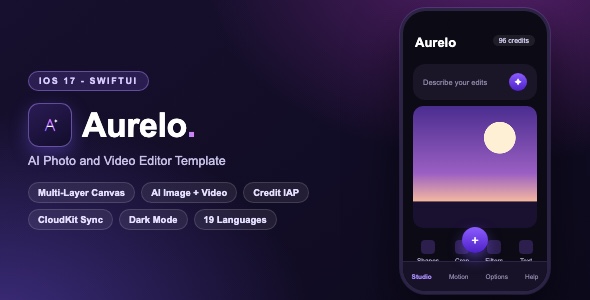
Aurelo is a complete, production-ready SwiftUI template for an AI-powered photo and video editor, styled with a premium violet “aurora” theme. Users import or generate images, edit them with a professional multi-layer canvas (crop, filters, draw, shapes, text, mask, erase), and send prompt-based generation and editing requests to your own backend. It also includes a full text-to-video generation screen, a credit economy with In-App Purchases, iCloud settings sync, and 19 built-in localizations.
Important: The AI image and video generation features work through a JSON backend. A complete working backend is included in the backend/ folder (PHP and Python, with a free mock provider so everything works out of the box). For real AI results the backend connects to the third-party AI provider APIs listed above – the buyer is responsible for all associated API usage and hosting costs.
Demo Instructions
- No login and no demo credentials are required. The app has no user account system.
- The app is a source-code template that connects to a JSON backend for AI generation. For security reasons the shipped code contains a placeholder endpoint and token (no real API keys are included – see the Security note below).
- Everything that runs on-device works immediately after building: import photos, the multi-layer editor (crop, rotate, shapes, text, filters, draw, line, mask, erase, layers), undo/redo, canvas settings and export/save flows.
- A ready-to-run backend is included (
backend/api.phpandbackend/api.py). Its free mock provider needs no accounts and no API keys: runpython3 backend/api.py, point the app at it and AI image generation, video generation and credit delivery all work immediately with placeholder results. - For production AI results, switch the backend’s provider to OpenAI (gpt-image-1), Stability AI (Stable Image Core) or Replicate (video) by editing one configuration block – setup steps in
backend/README.mdand the documentation. - The paywall can be exercised without any purchase (StoreKit configuration file
Products.storekitis included for local testing). - Mandatory setup after purchase: change the bundle identifier (
com.aurelo.app– Xcode target General tab) and replace the four In-App Purchase product IDs inAPI/iAP.swift(theProductIDenum) with your own, then create the matching products in your App Store Connect record. Step-by-step instructions are in the documentation (sections 4 and 10).
Everything the App Does
- Studio tab: multi-layer editing canvas with checkerboard, solid or gradient backgrounds
- Import photos from the library (single and multi-select) or camera
- Text-to-image AI generation and prompt-based image-to-image AI editing
- Prompt bar with “describe your edits” input and one-tap sparkles generate button
- Crop tool with aspect-ratio presets and interactive resize handles
- Rotate tool: 90-degree steps, free rotation, flip horizontal and vertical
- Smart Filters: blur, brightness, contrast, saturation with live Core Image rendering
- Shapes: square, circle, triangle, diamond, pentagon, hexagon, heptagon, octagon
- Free Draw with color picker and brush size, plus a Line Draw tool
- Text tool with font, size and color options
- Mask brush and Eraser tools with adjustable size
- Layers panel: visibility toggles, drag-to-reorder, multi-select and merge
- Full undo and redo history
- Canvas settings: size presets, aspect ratios, resolution (2K/4K), background color and gradients
- Export flattened canvas, save to Photos, share sheet (JPEG/PNG)
- Motion tab: text-to-video generation with resolution, duration, shot type, audio and watermark options, plus status polling and save to Photos
- Options tab: AI config (negative prompt, guidance scale, seed, steps, image size)
- Credit balance displayed in the header, deducted per generation
- Paywall with credit packs (50/120/300) and a weekly Pro subscription
- Free starter credits delivered from the backend on first launch
- In-App Purchase System: consumable credit packs, auto-renewable subscription, restore purchases, transaction listener
- iCloud (CloudKit) sync of settings and credit flags with automatic local fallback
- Keychain-persistent unique device ID
- Smart rating prompts (session-based and generation-based)
- Help screen with support contact form
- Haptic feedback, animated toasts, loading states and empty states
- Custom tab bar with floating add button
- Light and dark mode with a full dark theme
- Compact-device layout support (iPhone SE) and portrait orientation
- 19 localizations: English, Arabic, Czech, Danish, German, Spanish, Finnish, French, Indonesian, Japanese, Korean, Malay, Norwegian (Bokmal), Dutch, Polish, Portuguese (Brazil), Swedish, Thai, Vietnamese
Technology
- Language: Swift 5, SwiftUI
- Minimum iOS: 17.0
- Persistence: SwiftData, CloudKit, UserDefaults, Keychain
- Payments: Native In-App Purchase System (no wrappers)
- Image processing: Core Image, Core Graphics, PhotosUI, Photos
- Third-party dependencies: None – 100% native frameworks, no CocoaPods, no SPM packages
- Backend: Working reference backend included –
api.php(PHP 7.4+) andapi.py(Python 3, standard library only). Providers: mock (free, no setup), OpenAI, Stability AI, Replicate - Fonts: Inter and Manrope bundled (SIL Open Font License)
What the Buyer Gets
- Full Xcode source code of the Aurelo app (Swift/SwiftUI, no compiled libraries)
- Assets: complete icon set (light, dark and tinted), color asset catalog, tool icons, launch images
- StoreKit configuration file for local purchase testing
- 19 Localizable.strings files
- Working backend implementation (
backend/folder): api.php + api.py with a free mock provider, README with setup, provider comparison and curl test commands - Step-by-step documentation.html with screenshots: setup, rename, re-skin (exact file list), backend deployment on shared hosting, credit system explained, In-App Purchase App Store Connect walkthrough, App Privacy guide, version-update migration guide, full Troubleshooting / FAQ
- Third-party license files: LICENSE-THIRD-PARTY.md and OFL-1.1.txt (font attributions)
- Preview screenshot archive
Security Note
The template ships with no API keys, tokens or secrets. The backend endpoint and client token in editorApp.swift are clearly marked placeholders. The documentation explains exactly where to insert your own.
Development Disclosure (AI Tools)
In line with Envato’s AI disclosure policy: portions of this template’s source code, documentation and graphic assets were created or assisted with AI-powered development tools, then reviewed, edited, tested and verified by a human developer. The template builds and runs exactly as described.
Please Note
This is a source-code template, not a compiled application. Basic Xcode knowledge is required to build, customize and publish the app. Buyers are responsible for their own backend service, Apple Developer account, App Store submission and any AI provider costs.
Ongoing costs disclosure: The AI image and video generation features require external paid API services. The buyer is responsible for all ongoing backend hosting expenses and all third-party AI API expenses incurred by the app after purchase.
| Author | mefjudevllc |
|---|---|
| Price | $14 |
| Sales | 0 |
| Rating | 0 (0) |
| Published | Oct 26, 2026 |
| Last Update | Oct 26, 2026 |
| Compatible Software | Other |
| Compatible With | Swift |
| Mobile Files Included | .xib/.nib |
Categories
Tags
External listing. code.market does not sell this product and does not process payment for it. Pricing, payment, delivery, licensing, refunds, and support are handled by the third-party merchant on its own website. We may earn an affiliate commission from a referral. Details.