
Atlas - WordPress Knowledge Base
Description
About
Atlas – WP – Knowledgebase plugin helps you create a self-serve online library of information about a product, service, department, or topic, helping you to reduce your support volume and increase customer satisfaction.
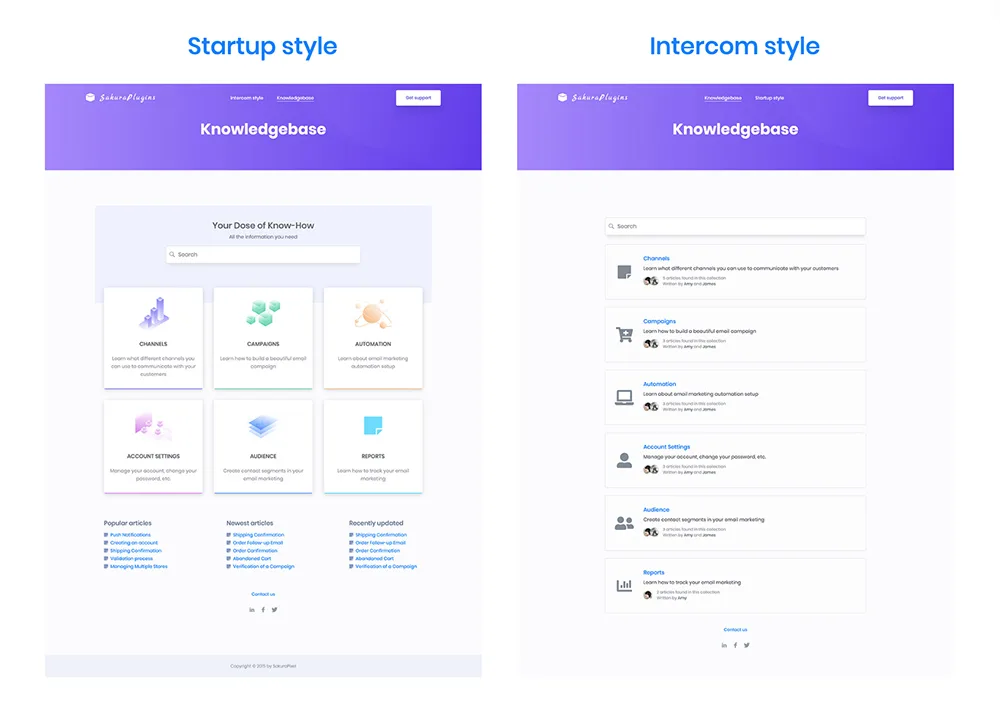
Atlas comes with a modern look and feel and two beautifully designed, mobile-ready themes to match your brand.
General features
- Two beautifully designed templates (Intercom and Startup style)
- Capture customer satisfaction
- Gutenberg ready (switch to Gutenberg blocks from settings)
- Easily control permalinks from the admin
- Edit all frontend labels from within the admin interface
- Search functionality
- Custom CSS suport
- Search functionality
- Extra custom fields for Categories (Color, Font Icon and Image)
- Comprehensive documentation
Sidebars
There are 4 Atlas sidebars available
- Atlas – Article Sidebar ( shows on article single page )
- Atlas – Category Sidebar ( shows on Atlas category page )
- Atlas – Search Result Sidebar ( shows on Atlas search result list )
- Atlas – Home Sidebar ( shows on Atlas knowledge base home page )
Widgets
There are 6 Atlas widgets available
- Popular Articles
- Recently Updated
- Newest Articles
- Newest In Category
- Recently Updated In Category
- Recently Viewed
NOTE! Sidebars and widgets work with the Startup frontend style.
NOTE! Currently, Atlas supports only one category level, we believe that’s a better user experience for both frontend users and admin editors.
Categories do have three extra custom fields that are being used within the frontend (Color, Font Icon, and Image). NOTE! To use font icons with categories make sure you enable FontAwesome from the settings page.
Prioritizing User Experience (UX) on Your KnowledgeBase Page
- Purposeful information ( Ensure the questions and answers shown are providing value to the users to make decisions about your product )
- Contact or support options ( If a user doesn’t have their problem solved or a question answered, offer a method for them to directly contact you )
Categories
Tags
External listing. code.market does not sell this product and does not process payment for it. Pricing, payment, delivery, licensing, refunds, and support are handled by the third-party merchant on its own website. We may earn an affiliate commission from a referral. Details.
Products of the Week.
Submit🥇

STOP GUESSING WHAT TO POST
AI that learns your brand voice and builds a month of consistent, on-brand social content: carousels, posts and hooks that sound like you, not like everyone else's AI.
SaaS · 3,956 views · 35 clicksSaaS · Week 45 · 3,956 views · 35 clicks
🥈

Conversational Backlinks for Busy Founders
Place Backlink Relevant Conversation for your domain across Forums and Conversations
Website · 41,601 views · 222 clicksWebsite · Week 45 · 41,601 views · 222 clicks
🥉

upvote.club
Free Social Media Engagement that Helps Boost Your Content. Upvote Club supports 19 social networks with 100+ engagement actions in one dashboard. Add links to your posts and get free engagement from real users.
SaaS · 39,629 views · 114 clicksSaaS · Week 45 · 39,629 views · 114 clicks
#4

Substack Posting API
Onboard your Agent to Substack. Write Publish on Substack via API
SaaS · 58,660 views · 198 clicksSaaS · Week 45 · 58,660 views · 198 clicks
#5

Seenshot App
Free, Fast, MacOS Screenshot app. Make Screenshot cmd+shift+2 and send it via link
Desktop App · 28,044 views · 122 clicksDesktop App · Week 45 · 28,044 views · 122 clicks
#6

Hand-Placed Backlinks $9.99 per link. Flat rate.
Buy hand-placed forum, Q-A and directory backlinks. Flat $9.99 per link, no subscriptions — you only pay for approved listings.
Website · 3,901 views · 19 clicksWebsite · Week 45 · 3,901 views · 19 clicks
#7

Free Invoice Generator - PDF Invoices in Your Browser, No Sign-Up
A free invoice maker for freelancers and small businesses: fill in the invoice, check the live preview, and download a PDF that looks exactly like it. Any currency, tax per item, three templates, no sign-up, and nothing leaves your device.
2,580 views · 17 clicksWeek 45 · 2,580 views · 17 clicks
#8

Merge PDF Files Free - Combine PDFs in Your Browser, No Upload
A free PDF merger for office workers, students, and freelancers: combine PDFs and images into one file in the browser, reorder files and pages, pick page ranges, keep bookmarks, and open password-protected PDFs. Nothing is uploaded, no sign-up, no watermark.
2,401 views · 13 clicksWeek 45 · 2,401 views · 13 clicks