
App Cleaner - Android App Source Code by CodeMaxInfotech
Description



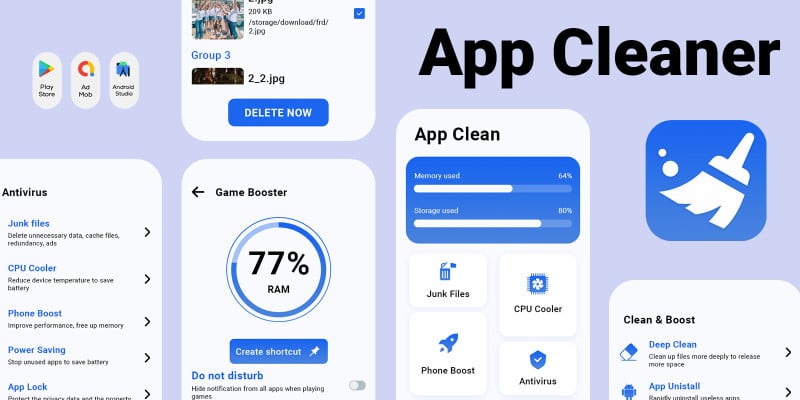
Introducing App Cleaner, the ultimate solution for optimizing your Android device's performance and safeguarding your privacy. With a comprehensive suite of features including Applocker, App Manager, Junk Cleaner, Speed Booster, CPU Cooler, Battery Saver, Duplicate File Remover, and Notification Manager, App Cleaner empowers you to take control of your device like never before.
Features
Key Features:
- Speed Booster: Say goodbye to sluggish performance! App Cleaner eliminates auto-start applications running in the background, boosting processing speed, and conserving battery life.
- Junk Cleaner: Is your phone constantly running out of space? Our best-in-class Junk Cleaner swiftly removes cache files and other unnecessary clutter, freeing up storage and enhancing overall performance.
- Battery Saver: Worried about your battery draining too quickly? App Cleaner's Battery Saver feature analyzes usage patterns and identifies power-hungry apps, allowing you to hibernate them and extend battery life.
- CPU Cooler: Keep your device running smoothly by preventing overheating. App Cleaner detects and closes apps that could lead to temperature spikes, effectively cooling down your device.
- Applocker: Protect your sensitive data with ease. Applocker enables you to secure apps, photos, messages, and other private information with a password or pattern, ensuring your privacy remains intact.
Additional Features:
- App Manager: Take control of your apps with advanced management tools.
- Smart Charge: Optimize your charging process for improved battery health.
- Notification Manager: Keep your notifications organized and easily accessible.
Experience the unparalleled performance and privacy protection of App Cleaner – download now and unleash the full potential of your Android device!
Requirements
- Android Studio - Android - SDK JDK/JRE - AdMob Account - Play Store Account
Instructions
- Unzip Project File - Open Project File On Android Studio - Run Project - Change UI Design Colors, App Logo And Splash Screen Image For Reskin
| Author | CodeMaxInfotech |
|---|---|
| Category | App Templates / Android / Applications / Miscellaneous |
| Price | $35 |
| Extended License | $105 |
| Likes | 1 |
| First Release | May 12, 2024 |
| Last Update | Sep 9, 2024 |
| Files included | .sql, Layered .png, .apk, .dex, .db, .java, .xml, build.settings |
| Operating systems | Android 7.0, Android 8.0, Android 9.0, Android 10.0, Android 11.0, Android 12.0, Android 6.0 |
Categories
Tags
External listing. code.market does not sell this product and does not process payment for it. Pricing, payment, delivery, licensing, refunds, and support are handled by the third-party merchant on its own website. We may earn an affiliate commission from a referral. Details.
Products of the Week.
Submit🥇

STOP GUESSING WHAT TO POST
AI that learns your brand voice and builds a month of consistent, on-brand social content: carousels, posts and hooks that sound like you, not like everyone else's AI.
SaaS · 3,586 views · 33 clicksSaaS · Week 45 · 3,586 views · 33 clicks
🥈

Conversational Backlinks for Busy Founders
Place Backlink Relevant Conversation for your domain across Forums and Conversations
Website · 41,109 views · 222 clicksWebsite · Week 45 · 41,109 views · 222 clicks
🥉

upvote.club
Free Social Media Engagement that Helps Boost Your Content. Upvote Club supports 19 social networks with 100+ engagement actions in one dashboard. Add links to your posts and get free engagement from real users.
SaaS · 39,167 views · 113 clicksSaaS · Week 45 · 39,167 views · 113 clicks
#4

Substack Posting API
Onboard your Agent to Substack. Write Publish on Substack via API
SaaS · 58,202 views · 198 clicksSaaS · Week 45 · 58,202 views · 198 clicks
#5

Seenshot App
Free, Fast, MacOS Screenshot app. Make Screenshot cmd+shift+2 and send it via link
Desktop App · 27,593 views · 120 clicksDesktop App · Week 45 · 27,593 views · 120 clicks
#6

Hand-Placed Backlinks $9.99 per link. Flat rate.
Buy hand-placed forum, Q-A and directory backlinks. Flat $9.99 per link, no subscriptions — you only pay for approved listings.
Website · 3,476 views · 18 clicksWebsite · Week 45 · 3,476 views · 18 clicks
#7

Free Invoice Generator - PDF Invoices in Your Browser, No Sign-Up
A free invoice maker for freelancers and small businesses: fill in the invoice, check the live preview, and download a PDF that looks exactly like it. Any currency, tax per item, three templates, no sign-up, and nothing leaves your device.
2,168 views · 16 clicksWeek 45 · 2,168 views · 16 clicks
#8

Merge PDF Files Free - Combine PDFs in Your Browser, No Upload
A free PDF merger for office workers, students, and freelancers: combine PDFs and images into one file in the browser, reorder files and pages, pick page ranges, keep bookmarks, and open password-protected PDFs. Nothing is uploaded, no sign-up, no watermark.
2,008 views · 13 clicksWeek 45 · 2,008 views · 13 clicks