
APK Beaver | Windows Desktop App to Convert Websites into Android APK and AAB
Description
Turn Any Website into a Signed Android App – No Coding Required
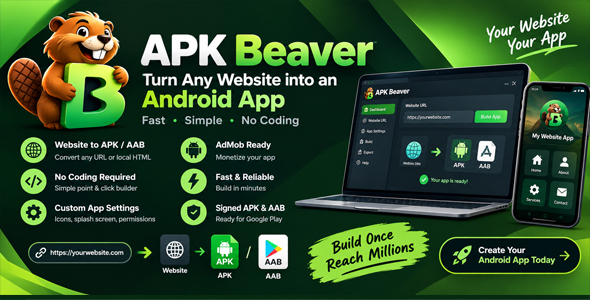
APK Beaver is a Windows desktop application that converts any website URL or local HTML project into a fully signed, production-ready Android APK or AAB in just a few clicks. No Android Studio. No command line. No experience needed.
- Windows 10 and 11 desktop app
- Outputs a Signed APK (for sideloading) and a Signed AAB (ready for Google Play)
- Built-in build tools – everything downloads automatically in one click
- Drag-and-drop Visual Builder to design an app without a website
- AdMob ads integration (banner, interstitial and rewarded) for instant monetization
- Auto-generates and manages your Android keystore
What is APK Beaver?
If you have a website – a portfolio, an online store, a web app, a blog, a booking system – you can now package it as a real Android app and distribute it on the Google Play Store or share it directly as an APK file, all without writing a single line of code.
APK Beaver handles everything behind the scenes: it downloads and manages the Android SDK, JDK and Gradle automatically, generates your signing keystore, compiles your app, and hands you a finished .apk or .aab file ready to ship.
The same tool that takes a professional developer hours to set up – done in under 5 minutes.
Key Features
1. Website URL and Local HTML Folder Support
Point the app at any live website URL (for example https://yoursite.com) or browse to a local folder on your computer that contains an index.html file. Both sources are packaged into a native Android WebView app. Local folders are bundled into the app, so they work fully offline.
2. Visual App Builder
No website yet? Design your app screens visually with drag-and-drop components, edit their properties, add multiple screens, then send the project straight to the build step. Save your work as a project file and open it again at any time.
3. One-Click Build Tools Download
No need to install anything extra before you start. APK Beaver downloads and sets up the JDK, Android SDK, Android platform, build tools and Gradle automatically, once, and keeps them ready for every future build.
4. Signed APK and AAB Output
Every build produces a release-signed output – not a debug build. Choose either or both:
- APK – install directly on any Android device, perfect for testing and sideloading
- AAB (Android App Bundle) – the required format for uploading to the Google Play Store
5. Auto Keystore Generation and Management
A keystore is a security certificate that proves the app belongs to you, and Android requires one for every app. APK Beaver creates it for you automatically on your first build. If you are updating an app you have already published, you can use your existing keystore instead. A built-in Download Keystore button lets you save a backup copy at any time.
6. App Branding – Icon and Splash Screen
Upload your own app icon (512×512 PNG) and splash screen (1080×1920 PNG). The builder generates all required Android icon sizes and applies your splash image to the launch screen.
7. WebView Features
Enable or disable each feature with a single toggle:
- Pull-to-Refresh – users pull down to reload the page
- Offline Mode – shows a friendly message when there is no internet
- File Upload Support – opens the native file picker and camera
- File Downloads and Backups – saves exported files (JSON, CSV, backups, blob and data links) to the phone’s Downloads folder
- Hamburger Navigation Menu – adds a slide-in drawer with your own links, title and colors
8. Granular App Permissions
Choose exactly which Android permissions your app declares. Only enable what your website actually needs:
- Camera
- Microphone
- Photos and Videos (Storage)
- Location (GPS)
- Notifications (Android 13 and newer)
- Phone State
- Contacts
- Calendar
- Bluetooth
- NFC
9. AdMob Monetization
Monetize your app immediately with Google AdMob. Enter your AdMob App ID and ad unit IDs for:
- Banner Ads – a persistent strip at the bottom of the screen
- Interstitial Ads – full-screen ads between page transitions
- Rewarded Ads (optional) – your website can trigger a rewarded ad and receive the result
Do not have an AdMob account yet? Use the built-in Auto-Fill Test IDs button to preview exactly how ads will look before going live.
10. Real-Time Build Console
Watch your app being built in real time through a built-in console with timestamped output and a live progress bar. If anything goes wrong, the console shows exactly which step failed so it is easy to fix.
11. Save and Open Projects
Save every setting of your app – source, branding, features, permissions and visual design – to a single project file, and open it later to rebuild or update. Passwords are never stored in the file.
12. Fast Build Mode
Enable Fast Build Mode to skip saving the full Android project to disk. The app outputs only the final APK or AAB, saving disk space and build time.
13. SDK Version Targeting
Choose your Target SDK (Android 12L to Android 16, API 32 to 36) and Minimum SDK (Android 5.0 to 8.0) to control device compatibility and Play Store target requirements.
Who Is This For?
- Web designers and freelancers who want to deliver an Android app as part of a client project without hiring an Android developer
- Small business owners who already have a website and want a presence on the Play Store
- WordPress, Webflow and Shopify site owners who want to package their site as an app
- Developers who want to quickly prototype or ship a WebView-based Android app without the boilerplate
- Digital product sellers who want to add an Android app to their product offering
- Educators and bloggers who want their content available as a standalone app
How It Works – 5 Simple Steps
- Choose your source. Paste your live site URL, browse to a local HTML folder, or design your app in the Visual Builder. Then fill in your app name, package name and version number.
- Configure features, permissions and branding. Upload your icon and splash screen and switch on the features your app needs.
- Set up monetization (optional). Add your AdMob IDs, or skip this step entirely.
- Set up signing. Let the app auto-generate a keystore or use your existing one. Enter your store password and key password (minimum 6 characters each).
- Click Build and download your files. The build runs in the background. When it finishes, open your APK or AAB straight from the Output section.
Technical Specifications
| Property | Details |
|---|---|
| Platform | Windows 10 / 11 |
| Build tools | Downloaded automatically on first use – nothing to install manually |
| Output formats | Signed APK, Signed AAB |
| Target SDK | API 32 to 36 (Android 12L to Android 16) |
| Minimum SDK | API 21, 24 or 26 (Android 5.0 to 8.0) |
| App sources | Website URL, local HTML folder, Visual Builder project |
| Keystore | Auto-generated, or your own existing keystore file |
| Signing | Release-signed (ready for Play Store) |
| Ads SDK | Google AdMob (Banner, Interstitial, Rewarded) |
| Disk space required | About 1 GB (for build tools) |
| Internet required | First-time tool download, and for URL-based apps |
| Version | 1.0.0 |
What Is Included in the Package
- APK Beaver – Windows desktop application (installer)
- User manual and quick-start guide
- Lifetime free updates
Frequently Asked Questions
Do I need to install Android Studio or any other software manually?
No. APK Beaver downloads and sets up everything it needs the first time you use it. Just install the app and click one button – it handles the rest.
Will the app work with any website?
Yes, as long as the website is publicly accessible through a URL. For websites that require a login, the app wraps the URL and the user logs in inside the app just as they would in a browser. Local HTML folders are also supported.
Can I publish the app to the Google Play Store?
Yes. APK Beaver generates signed Android App Bundles (AAB) ready for submission to the Google Play Store.
To publish your app, you must have a Google Play Developer account. Google requires a one-time registration fee to create this account. This fee is separate from the APK Beaver purchase price.
APK Beaver is a third-party development tool and does not guarantee approval or publication of your app. All submissions must comply with Google Play’s developer policies and requirements.
What happens if I lose my keystore?
Without your original keystore you cannot publish updates to an existing Play Store listing. Always use the built-in Download Keystore button after your first build and store the file somewhere safe. The app cannot recover a lost keystore.
Can I use my own existing keystore?
Yes. In the Signing step, choose Use Existing and browse to your .jks or .keystore file. Enter the same alias and passwords you used when the keystore was created.
Is AdMob required?
No. AdMob is completely optional. If you do not want ads, leave the AdMob toggle off and no ad code is included in the build.
Does this work for offline apps?
Yes. Choose Local HTML Folder as the source and browse to any folder that contains an index.html file. The whole folder is bundled into the app, so it works fully offline.
What is Fast Build Mode?
When enabled, the builder outputs only the final APK or AAB files without saving the full Android project folder to disk. This saves disk space and slightly speeds up builds. It is recommended for most users.
Can I update my app after publishing?
Yes. Increase the Version Code by 1 (for example 1 to 2) and optionally the Version Name (for example 1.0.0 to 1.1.0), then rebuild with the same keystore. Upload the new AAB to the Play Console as a new release.
What Android versions does the output app support?
By default the app targets the newest Android version offered by the builder and supports devices back to Android 7.0 (API 24). The minimum can be lowered to Android 5.0 (API 21) in the build settings.
Get APK Beaver Today
Stop paying developers to build basic Android apps. If you have a website, you already have everything you need. APK Beaver turns it into a real Android app in minutes.
- No coding or Android development knowledge needed
- Windows 10 and 11 desktop app
- Outputs a Google Play-ready signed AAB
- Built-in AdMob monetization
- One-time purchase – no subscription
APK Beaver is an independent product and is not affiliated with, endorsed by, or sponsored by Google, Android or AdMob. All trademarks belong to their respective owners.
| Author | ydulana |
|---|---|
| Price | $79 |
| Sales | 0 |
| Rating | 0 (0) |
| Published | Nov 12, 2026 |
| Last Update | Nov 12, 2026 |
| Application Runtime | Native |
| High Resolution | No |
| Operating System Versions | Windows 11, Windows 10 |
| Video Preview Resolution | 1914x1012 |
Categories
Tags
External listing. code.market does not sell this product and does not process payment for it. Pricing, payment, delivery, licensing, refunds, and support are handled by the third-party merchant on its own website. We may earn an affiliate commission from a referral. Details.
Products of the Week.
Submit🥇

STOP GUESSING WHAT TO POST
AI that learns your brand voice and builds a month of consistent, on-brand social content: carousels, posts and hooks that sound like you, not like everyone else's AI.
SaaS · 7,369 views · 67 clicksSaaS · Week 46 · 7,369 views · 67 clicks
🥈

Conversational Backlinks for Busy Founders
Place Backlink Relevant Conversation for your domain across Forums and Conversations
Website · 46,653 views · 232 clicksWebsite · Week 46 · 46,653 views · 232 clicks
🥉

upvote.club
Free Social Media Engagement that Helps Boost Your Content. Upvote Club supports 19 social networks with 100+ engagement actions in one dashboard. Add links to your posts and get free engagement from real users.
SaaS · 44,593 views · 127 clicksSaaS · Week 46 · 44,593 views · 127 clicks
#4

Substack Posting API
Onboard your Agent to Substack. Write Publish on Substack via API
SaaS · 63,480 views · 206 clicksSaaS · Week 46 · 63,480 views · 206 clicks
#5

Seenshot App
Free, Fast, MacOS Screenshot app. Make Screenshot cmd+shift+2 and send it via link
Desktop App · 32,730 views · 127 clicksDesktop App · Week 46 · 32,730 views · 127 clicks
#6

Hand-Placed Backlinks $9.99 per link. Flat rate.
Buy hand-placed forum, Q-A and directory backlinks. Flat $9.99 per link, no subscriptions — you only pay for approved listings.
Website · 8,349 views · 19 clicksWebsite · Week 46 · 8,349 views · 19 clicks
#7

Free Invoice Generator - PDF Invoices in Your Browser, No Sign-Up
A free invoice maker for freelancers and small businesses: fill in the invoice, check the live preview, and download a PDF that looks exactly like it. Any currency, tax per item, three templates, no sign-up, and nothing leaves your device.
6,977 views · 29 clicksWeek 46 · 6,977 views · 29 clicks
#8

Merge PDF Files Free - Combine PDFs in Your Browser, No Upload
A free PDF merger for office workers, students, and freelancers: combine PDFs and images into one file in the browser, reorder files and pages, pick page ranges, keep bookmarks, and open password-protected PDFs. Nothing is uploaded, no sign-up, no watermark.
6,458 views · 18 clicksWeek 46 · 6,458 views · 18 clicks